Aland Johnson
Founder & Editor-in-Chief
Company / Organization
Workflow Tipster
Experience / Skills
Workflow automation patterns, integration design, webhook/API troubleshooting, data mapping and normalization, document generation and e-sign flows, operational checklists and playbooks for popular software.
About Aland Johnson
Aland Johnson is an Automation & RevOps Consultant and Technical Writer, and he serves as the Founder & Editor-in-Chief of Workflow Tipster (workflowtipster.top)—a resource for bite-sized workflow tips, tool guidance, and troubleshooting solutions for popular software used by modern teams. From 2008 to 2012, Aland developed his foundation in information systems and workplace productivity tools, focusing on how businesses operationalize data across CRM, project management, customer support, and marketing platforms. During this period, he began documenting repeatable processes, building simple integrations, and learning the practical constraints that shape automation outcomes—such as inconsistent field formats, user permissions, and data quality issues. In 2013, Aland moved into hands-on operational support roles where reliability and speed mattered daily. He supported teams working across cloud-based tools, addressing recurring problems like login failures, permission mismatches, missing required fields, and data sync inconsistencies. Between 2014 and 2016, he expanded into cross-application workflow design, connecting systems through APIs and webhooks and establishing a structured troubleshooting method: reproduce the failure, isolate the failing hop, validate credentials and scopes, inspect payload shape, confirm rate-limit behavior, and implement safe retries with logging. From 2017 to 2019, Aland specialized further in RevOps enablement—helping organizations map business requirements into automation-ready schemas and governance. This phase emphasized durable system design: clear ownership of fields and objects, consistent naming conventions, deduplication strategies, and measurable KPIs. In 2019, he earned the Salesforce Certified Administrator credential, reinforcing his expertise in CRM configuration, permissioning, reporting, and operational controls that keep automations stable as teams and pipelines evolve. In 2020, Aland broadened his marketing operations skill set by completing the HubSpot Marketing Software Certification, deepening his work in lifecycle stages, attribution, segmentation, and automated communications—areas where subtle property mapping and timing rules often cause downstream failures. Between 2021 and 2022, he concentrated on integration resilience at scale: reducing duplicates, adding idempotency safeguards, standardizing payload validation, and creating runbooks for incident response when webhooks fail or third-party APIs degrade. In 2023, Aland earned the Zapier Certified Expert credential and continued refining advanced automation patterns across multi-step workflows, conditional routing, and cross-tool data normalization. That same year, he formalized his editorial approach: every guide must be reproducible, version-aware, and supported by verification steps so readers can confirm success rather than “guess and hope.” Since 2024, Aland has been building Workflow Tipster as a practical knowledge base for operators, founders, and teams who need quick, reliable answers. His content emphasizes clarity and measurability—short, actionable tips when speed matters, and deeper troubleshooting playbooks when reliability is the priority. Aland’s guiding standard remains consistent: state the goal, show the exact steps, surface common failure modes, and include a prevention checklist so the workflow stays healthy after the fix.
Related topics
Latest posts by Aland Johnson


Fix Notion Invalid JSON Payload (400 invalid_json ) for Notion API & Automations: Make Requests Valid
If you’re seeing “Notion invalid JSON payload” (or 400 invalid_json / “Error parsing JSON body.” ), the fix is almost always the same: send a truly valid JSON body in the exact shape Notion expects, with the correct headers and serialization .
Aland Johnson February 1, 2026 at 6:03 PM
Fix Notion Field Mapping Failed: Troubleshoot Property Mapping Errors for Zapier/Make/n8n Users
If you’re seeing “Notion field mapping failed” , you can fix it by aligning your automation’s input data with your Notion database property schema, then reloading the schema in your tool so the mapper targets the correct property keys and types and the workflow runs successfully. Most mapping failures come from a small set of root causes— schema drift (the database changed after you built the scenario), data-type mismatches (text sent to a select, arrays sent to a title, invalid date strings), or permission gaps (the integration can’t compute or access related pages).
Aland Johnson February 1, 2026 at 5:53 PM
Stop Notion Duplicate Records Being Created: Prevent & Remove Duplicate Entries for Zapier/Make/n8n Automation Users
When Notion duplicate records are being created, you can stop the problem by designing your workflow to behave like an “upsert”: normalize a unique key, search the database first, update if found, and only create when no match exists—so retries and re-runs don’t multiply entries. Next, once duplicates already exist, you can remove them safely by identifying the dedupe key, selecting a “canonical” record, merging important properties, and archiving the extras—so your database stays trustworthy without losing history.
Aland Johnson February 1, 2026 at 5:41 PM
Fix Notion Data Formatting Errors: Resolve Database Property Validation Issues (Fields) for API & Automation Builders
Notion data formatting errors usually happen when the value you send doesn’t match the database property’s expected shape (object vs array), type (date vs string), or allowed options —and Notion rejects the request with a validation error instead of creating or updating the page. ( developers.
Aland Johnson February 1, 2026 at 5:30 PM
Fix Notion “Attachments Missing / Upload Failed”: Restore File Uploads for Teams (Missing vs Working)
When Notion shows “attachments missing” or “upload failed,” you can usually restore file visibility fast by separating two problems: (1) the file never finished uploading, or (2) the file uploaded but the app can’t reliably fetch or display it—then applying the matching fix path. ( notion.
Aland Johnson February 1, 2026 at 5:18 PM
Fix Notion API “Limit Exceeded” (429 Rate-Limited): Throttle, Backoff & Retry Safely for Developers
STEP 1 — Title & Outline Analysis (quick, practical) - Main keyword (keyword focus): notion api limit exceeded - Predicate (main verb/action): Fix - Relations Lexical used: Synonym — “limit exceeded” ↔ “rate-limited / 429 too many requests” (different phrasing, same intent). ( developers.
Aland Johnson February 1, 2026 at 5:06 PM
Fix Notion Webhook 500 Internal Server Error (Server Error): Troubleshooting Checklist for Developers & Automation Builders
When you hit a Notion webhook 500 internal server error , you can fix it by first proving where the 500 is generated (Notion, your automation platform, or your webhook receiver), then applying the right remedy: retries/backoff for transient failures, or payload/permissions/endpoint fixes for repeatable ones. Next, you’ll learn what a 500 actually means in webhook workflows, what diagnostic signals to collect from a failed run, and how to separate “Notion-side turbulence” from “my endpoint broke,” so you stop guessing and start isolating.
Aland Johnson February 1, 2026 at 4:53 PM
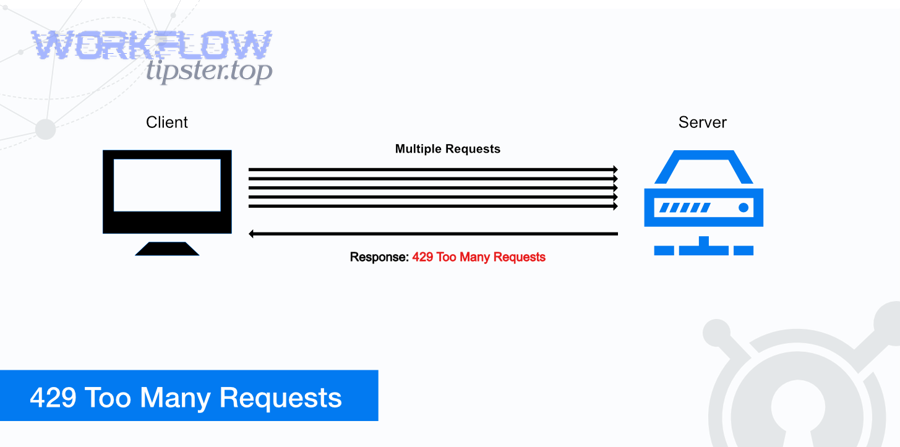
Fix Notion Webhook 429 Rate Limit (429 Too Many Requests): Retry-After Backoff + Throttling for Developers & Automation Builders
If you’re hitting a notion webhook 429 rate limit , you can fix it by doing three things in the right order: respect Retry-After , add exponential backoff with jitter , and throttle/queue Notion API calls so bursts don’t overwhelm your integration. Next, it helps to understand what the 429 response is actually telling you—what “rate_limited” means, why it shows up during webhook spikes, and which signals (status code, error payload, headers, timing) confirm you’re diagnosing the right issue.
Aland Johnson February 1, 2026 at 4:42 PM
Fix Notion Webhook 404 Not Found (object_not_found): Troubleshooting Guide for Developers & Automation Builders
If you’re seeing Notion webhook 404 Not Found (often with the code object_not_found ), you can fix it by validating three things in the right order: the Notion resource is real , your integration can access it , and your webhook/API request is pointing to the correct endpoint and environment . You’ll also learn what “404” means in Notion’s security model, because it’s not always a “wrong URL” problem—it’s frequently a permissions/sharing problem that looks like “not found” on purpose.
Aland Johnson February 1, 2026 at 4:30 PM
Fix Notion Webhook 403 Forbidden (Access Denied): Troubleshooting Checklist for Developers & Automation Builders
A Notion webhook 403 Forbidden usually means one of two things: either your webhook endpoint is refusing Notion’s request , or Notion is refusing your integration’s request —and the fastest fix is to identify which side produced the 403 and correct the exact access rule that blocked it. Most people lose time because “403 Forbidden” sounds the same everywhere, but the underlying cause changes depending on where the 403 appears: in your server logs, in your automation tool’s webhook step, or inside an outbound Notion API call.
Aland Johnson February 1, 2026 at 4:20 PM
Turn Notion Webhook 401 Unauthorized Into Authorized: An 8-Step Fix for Developers & Automation Builders
A Notion webhook 401 unauthorized error happens when your request reaches a server that expects authentication, but the credentials you sent are missing, malformed, expired, or mismatched for that workspace and target resource. In practice, the fastest fix is to stop guessing and verify exactly what token you’re using, where you’re sending it, and what Notion resource the token is actually allowed to access.
Aland Johnson February 1, 2026 at 4:08 PM
Fix Notion Webhook 400 Bad Request: Debug Validation Errors (Not 200 OK) for Developers & Automation Builders
A Notion webhook 400 bad request almost always means your request is not valid enough to be accepted , so the fastest fix is to inspect the raw request (URL, method, headers, and JSON body), identify the exact validation failure, and correct it until you get 200 OK . You’ll also want to understand what Notion is telling you in the error payload—especially when the response mentions validation_error or missing headers—because that message is the shortest path to the specific field or header that is breaking your request.
Aland Johnson February 1, 2026 at 3:57 PM
Fix Notion Trigger Not Firing (Not Triggering): Troubleshoot Database Automations for Automation Builders
If your Notion trigger isn’t firing, you can usually fix it by verifying the event, confirming the trigger can “see” the database item, and removing the three biggest blockers: permissions, filter/condition mismatches, and timing (polling/indexing delays). Next, you’ll diagnose why it happens in the first place—whether the issue is Notion’s own database automation rules, your integration platform’s trigger mechanism (polling vs webhook-style), or a trigger condition that never actually matches your real-world edits.
Aland Johnson February 1, 2026 at 3:46 PM
Fix Notion OAuth Token Expired Errors for Developers: Expired vs Refreshed Tokens (Debug + Prevention Guide)
OAuth token problems in Notion integrations usually look like “token expired,” but the real issue is often refresh-token rotation, redirect URI mismatch, or a token that was revoked/overwritten rather than a simple time-based expiration. Notion’s OAuth flow issues a new access token and a new refresh token when you refresh—so if you keep using the old refresh token, you can trigger invalid_grant .
Aland Johnson February 1, 2026 at 3:35 PM
Fix n8n Timeouts and Slow Runs: A Step-by-Step Troubleshooting Guide to Reduce Workflow Latency for Self-Hosted Teams
If you’re seeing n8n timeouts and slow runs, you can usually fix them by treating the symptom (timeouts) and the cause (latency) separately: raise only the necessary timeout limits, then remove the bottleneck that makes executions slow in the first place. Most of the time, the fastest path is to identify where time is being spent (workflow nodes, database, queue/worker capacity, or reverse proxy), then apply a targeted mitigation—rather than “just increasing timeouts” and hoping it goes away.
Aland Johnson February 1, 2026 at 3:12 PM
Fix Delayed n8n Tasks: Troubleshoot Queue Backlog & “Queued” Executions for Admins + DevOps (Backlog = Queue)
Delayed n8n tasks in queue mode almost always come down to one root reality: your incoming workload is arriving faster than your workers can process it , so executions pile up as Queued until capacity catches up. That’s the quickest way to interpret “n8n tasks delayed queue backlog” without guessing.
Aland Johnson February 1, 2026 at 3:01 PM
Fix n8n Permission Denied Errors (EACCES) in Docker & Linux: Step-by-Step for Self-Hosters
If you’re seeing “permission denied” in n8n, the fastest fix is to make the container user and the mounted folder agree on ownership (UID/GID) and write permissions —most often by correcting the host volume permissions for n8n’s .n8n storage and any folders your workflows write to.
Aland Johnson February 1, 2026 at 2:51 PM
Fix n8n Empty Payload Issues: Troubleshoot Missing Fields in Webhook Workflows for Automation Builders (Empty vs Full Inputs)
When you see “empty payload” or “missing fields” in n8n, the fastest path to a fix is to separate what the sender actually sent from what n8n parsed and displayed. In most cases, the payload isn’t truly empty—it’s being misrouted, transformed, rejected, or parsed into a different place than where you’re looking.
Aland Johnson February 1, 2026 at 2:40 PM
Prevent Duplicate Records in n8n: How to Deduplicate Created Records in Your Workflow (Not Duplicate) — for Automation Builders
Duplicate records in n8n usually come from one of three places: your trigger runs more than you think, your workflow logic multiplies items, or your destination app accepts repeated inserts without a uniqueness rule. The fix is a layered approach: pick a reliable dedupe key, remove duplicates in the incoming items, and prevent duplicates at write time.
Aland Johnson February 1, 2026 at 2:28 PM
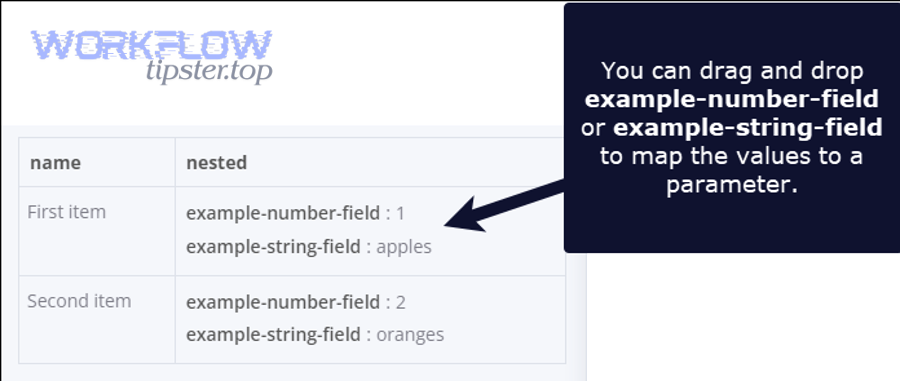
Fix (Resolve) n8n Data Formatting Errors: JSON, Date/Time, and Item-Structure Issues for Workflow Builders
Data formatting errors in n8n are fixable once you treat your workflow like a data pipeline with contracts: each node expects a specific shape (items), a specific type (string/number/date), and a specific encoding (valid JSON). This guide shows you how to diagnose the mismatch, normalize the data, and restore reliable runs.
Aland Johnson February 1, 2026 at 2:18 PM
Fix “Attachments Missing / Upload Failed” in n8n: Troubleshoot Binary Data & File Upload Errors for Workflow Builders (Missing vs Working)
If your n8n workflow says “attachments missing” or an upload step fails , you can fix it by treating the problem as a binary data pipeline issue : confirm the file exists as binary on the current execution item , map the correct binary property into your upload node, and validate filenames/MIME types before sending. Most failures come from a few repeatable causes— wrong binary property name , some items having no binary , branches/merges dropping binary , or multiple attachments not being iterated correctly —so you’ll get the fastest win by diagnosing in that order and testing with one attachment before scaling.
Aland Johnson February 1, 2026 at 2:07 PM
Fix n8n Webhook 500 Internal Server Error: Step-by-Step Troubleshooting for n8n Users (500 vs 400)
A 500 Internal Server Error on an n8n webhook usually means your webhook request reached the server, but something unexpected prevented n8n (or the infrastructure in front of it) from completing the request cleanly—so the response becomes a generic “server-side failure” signal. ( developer.
Aland Johnson February 1, 2026 at 1:57 PM
Fix & Prevent 429 Webhook Rate-Limit Throttling in n8n (Too Many Requests) — for Automation Developers
If you’re seeing HTTP 429 Too Many Requests in an n8n webhook workflow, you can fix it by identifying which component is rate-limiting (the upstream API, your reverse proxy, or your n8n execution throughput) and then applying throttling + backoff so your request rate returns to an acceptable level instead of repeatedly crashing into the limit. Next, you’ll avoid wasting time by learning what 429 actually means in automation pipelines , which headers confirm rate limiting, and why “just retry” often makes the situation worse unless you implement retries with timing control such as Retry-After and exponential backoff.
Aland Johnson February 1, 2026 at 1:45 PM
Fix n8n Webhook 404 Not Found (Not Found → Found): Step-by-Step Troubleshooting for Self-Hosted & Cloud Users
A “n8n webhook 404 not found” error usually means the request reached a web server, but the exact webhook route you’re calling isn’t registered or isn’t reachable at that URL —so the fix is almost always about URL correctness + workflow activation + routing/proxy settings . If you’re self-hosting, the fastest path is to confirm whether the 404 is coming from n8n itself or from your reverse proxy , then align your Production URL , webhook endpoint path, and public base URL variables so incoming requests land on the workflow that’s actually listening.
Aland Johnson February 1, 2026 at 1:35 PM
Fix n8n Webhook 403 Forbidden (Access Denied): Troubleshooting Checklist for n8n Cloud & Self-Hosted Users
A 403 Forbidden (Access Denied) on an n8n webhook means your request reached a server , but that server refused to process it—usually because a security layer, URL mismatch, or permission rule blocks the call. The fastest fix is to confirm you’re hitting the correct webhook URL (test vs production), then trace which layer returns the 403 (n8n, reverse proxy, WAF, or upstream app).
Aland Johnson February 1, 2026 at 1:25 PM
Fix (Unauthorized → Authorized): Resolve n8n Webhook 401 Unauthorized for Developers & Self-Hosted Teams
A 401 Unauthorized on an n8n webhook means the request reached an HTTP endpoint, but the endpoint rejected it because authentication is missing, malformed, or no longer valid—so your first job is to confirm the exact auth requirement and send the right credentials in the right place. Next, you’ll want to match your webhook protection style to your actual risk: a public webhook is convenient, but a protected webhook is safer, and the “best” approach depends on whether you control the caller, the network path, and the data being accepted.
Aland Johnson February 1, 2026 at 1:15 PM
Fix n8n Webhook 400 Bad Request: Troubleshoot Bad vs Valid Requests for Self-Hosted Workflow Builders
A 400 Bad Request on an n8n webhook almost always means the sender’s request is not shaped the way the receiving endpoint expects —wrong URL, wrong method, wrong body format, wrong headers, or a proxy rewriting something along the way. Then, the fastest way to solve it is to identify which layer is actually returning the 400 (n8n vs reverse proxy vs the sender platform), because each layer has different logs, different validation rules, and different “gotchas.
Aland Johnson February 1, 2026 at 1:05 PM
Fix n8n Trigger Not Firing (Not Triggering): Debug Why Workflows Don’t Start for Self-Hosted & Cloud Builders
If your n8n trigger not firing problem is real (not a UI illusion), you can usually fix it by verifying activation/state first, then tracing the event path (source → trigger → execution → downstream nodes) until you find the exact break. Next, you’ll learn what “trigger not firing” actually means in n8n and which screen to check first so you don’t waste time debugging nodes that never even ran.
Aland Johnson February 1, 2026 at 12:55 PM
Fix n8n Timezone Mismatch (Stop Timezone Drift) for Self-Hosted & Docker Workflows
If your workflows run “one hour early,” schedules fire at the wrong local time, or date calculations look shifted, you’re almost always dealing with a timezone mismatch between (1) your container/host clock, (2) your n8n instance timezone, and (3) the per-workflow timezone settings. In self-hosted setups, n8n’s global timezone is controlled by GENERIC_TIMEZONE , and scheduled nodes rely on it to decide when to run.
Aland Johnson February 1, 2026 at 12:45 PM
Fix n8n Pagination Missing Records: Retrieve Every API Item with Offset/Cursor/Next-URL (HTTP Request) — for Automation Builders
If your n8n pagination is missing records, you can fix it by choosing the right pagination model (offset, cursor, or next-URL), enforcing stable ordering, and configuring stop conditions so n8n retrieves every API item instead of silently stopping early or looping on the same page. Many “missing records” problems are not random—they come from a small set of repeatable causes: a next pointer that doesn’t change, an offset that doesn’t increment, unstable sorting that reshuffles results between pages, or a workflow that accidentally drops items during mapping and merging.
Aland Johnson February 1, 2026 at 12:35 PM
Fix n8n OAuth Token Expired Errors: Refresh “Expired vs Valid” Tokens for Self-Hosted Workflow Builders
An “n8n OAuth token expired” error means your workflow can no longer use the provider’s access token to call an API, so requests that worked yesterday can suddenly fail today unless n8n can refresh the token or you re-authorize the credential. To solve it reliably, you need to know what actually expired (access token vs refresh token), where the failure surfaces in n8n, and which provider rules (like “Testing” vs “In production”) can force recurring expirations even when your setup looks correct.
Aland Johnson February 1, 2026 at 12:25 PM
Fix n8n “Invalid JSON Payload”: Troubleshoot HTTP Request & Webhook Bodies and Make Them Valid (Guide for Workflow Builders)
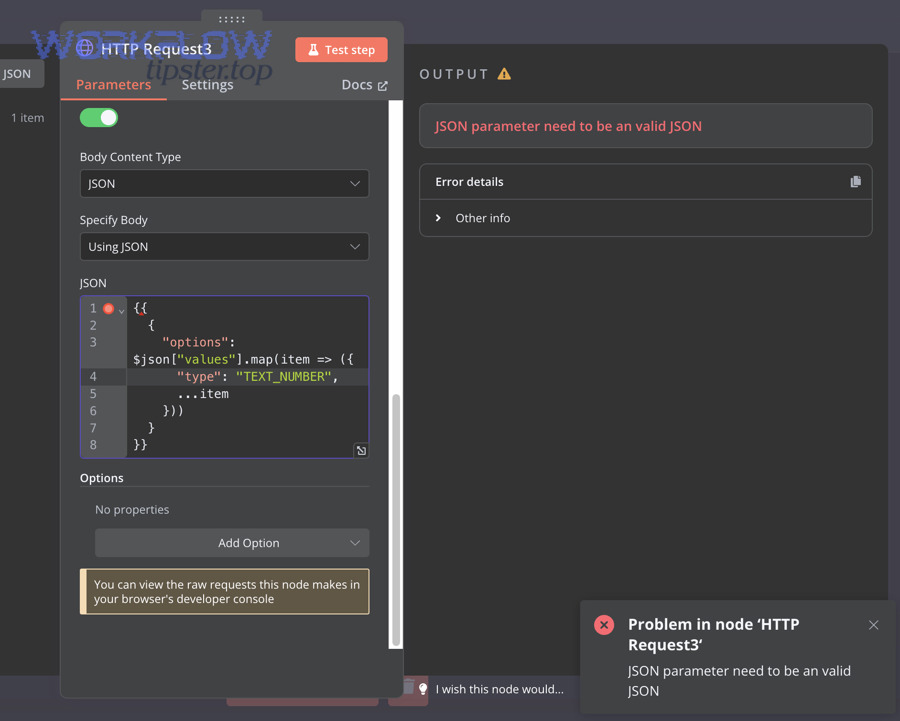
If you’re seeing “Invalid JSON payload” or “JSON parameter needs to be valid JSON” in n8n, you can fix it by identifying whether the payload is syntactically invalid (broken JSON) or valid JSON that fails the API’s schema , then rebuilding the body as a true JSON object with stable types and correct headers. The next step is to understand what the error message is really pointing to: n8n can fail before sending a request (local JSON parsing), or your target API can reject a request after it’s sent (remote validation), and those two paths require different debugging.
Aland Johnson February 1, 2026 at 12:15 PM
Fix “n8n Field Mapping Failed”: Troubleshoot Mapping Errors for Workflow Builders (Stop Undefined Values)
If you see n8n field mapping failed , you can usually fix it by (1) confirming the upstream node still outputs the field you mapped, (2) verifying you’re referencing the correct item (especially after loops/merges), and (3) normalizing your JSON shape before the node that fails. These three checks remove most “undefined” surprises and make your expressions stable.
Aland Johnson February 1, 2026 at 12:05 PM
Fix “n8n API Limit Exceeded”: Troubleshoot Rate Limits (429) & Prevent Throttling for Workflow Builders
If you’re seeing “n8n API limit exceeded” , you can fix it by slowing request bursts, reducing parallel calls, and adding retry/backoff so your workflow stays inside the provider’s rate limits—without breaking your automation logic. Next, you’ll learn how to prove what’s actually limiting you (the external API, your auth token, or a workflow design spike) by reading node outputs, status codes, and rate-limit headers the right way.
Aland Johnson February 1, 2026 at 11:55 AM
Microsoft Teams Troubleshooting
Fix Microsoft Teams Webhook 500 Errors for Developers: Causes vs Workarounds
A microsoft teams webhook 500 server error usually means the webhook request reached an endpoint, but the server-side handler failed to process it—either inside Microsoft Teams’ connector pipeline or inside an intermediary service you own. In practice, the fastest path to resolution is microsoft teams troubleshooting that separates “Teams is failing” from “my payload or network path is failing,” then narrows the issue to reproducible inputs and observable responses.
Aland Johnson January 7, 2026 at 5:40 PM
Microsoft Teams Troubleshooting
Fix Microsoft Teams Webhook 429 Rate Limit for Admins: Throttling vs Quotas
If you are seeing microsoft teams webhook 429 rate limit errors, the shortest accurate interpretation is: Teams (or an upstream service) is protecting itself by slowing you down, and your sender must back off and retry responsibly. In practice, the most reliable way to resolve this is to run microsoft teams troubleshooting in two parallel tracks: confirm which limiter is firing (per webhook, per app, per tenant, or downstream), and then reduce burstiness with retries, batching, and load shaping.
Aland Johnson January 7, 2026 at 5:31 PM
Microsoft Teams Troubleshooting
Fix Microsoft Teams Webhook 404 Not Found for Admins: New vs Old URLs
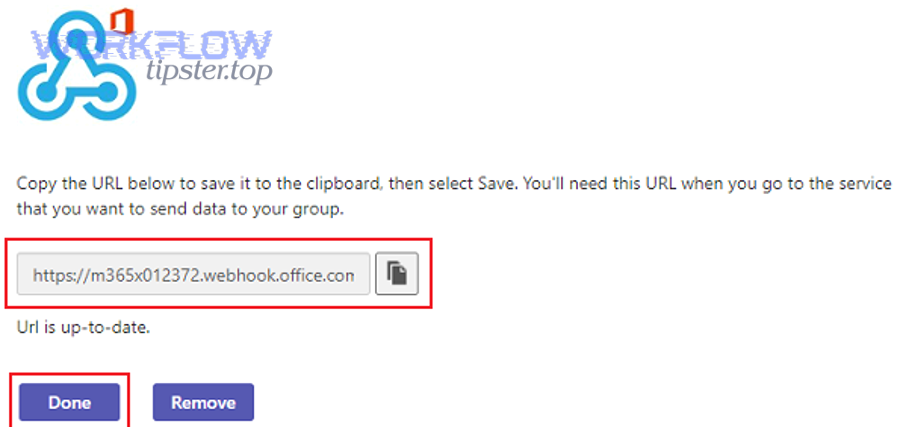
A microsoft teams webhook 404 not found error usually means the webhook URL you’re posting to no longer maps to a valid Teams endpoint—most often because the connector was removed, the URL format changed, or you’re posting to the wrong service (legacy connector vs Workflows webhook). In practical microsoft teams troubleshooting , the fastest win is to verify the webhook URL’s “family” (Incoming Webhook connector vs Workflows), then regenerate or migrate the URL before you over-invest in payload debugging or retry logic.
Aland Johnson January 7, 2026 at 5:22 PM
Microsoft Teams Troubleshooting
Fix and Prevent Microsoft Teams Webhook 403 Forbidden for Admins and Developers
A microsoft teams webhook 403 forbidden error means your request reached Microsoft Teams, but Teams refused to accept or process it because something about identity, policy, or trust did not meet requirements. In most cases, the fastest resolution comes from microsoft teams troubleshooting that separates “URL and channel policy” problems from “request formatting and security controls” problems before you change anything.
Aland Johnson January 7, 2026 at 5:15 PM
Microsoft Teams Troubleshooting
Fix Webhook 401 Errors in Microsoft Teams for Admins: Unauthorized vs Authorized
A microsoft teams webhook 401 unauthorized response means the receiving endpoint refuses your request because it cannot validate who you are (authentication) or what you are allowed to do (authorization). In practice, it is almost always a token, permission, or endpoint-trust problem—not a “Teams is down” problem.
Aland Johnson January 7, 2026 at 5:08 PM
Microsoft Teams Troubleshooting
Fix Microsoft Teams Webhook 400 Bad Request for Integrators, Not 200 OK
A microsoft teams webhook 400 bad request almost always means your request reached the webhook endpoint, but the payload (or how it’s delivered) failed Teams’ validation before it could render a message in the channel. In day-to-day integrations, this shows up when a “working in Postman” payload fails inside code, Make/Zapier, CI tools, or when you switch between MessageCard vs Adaptive Card expectations.
Aland Johnson January 7, 2026 at 5:01 PM
Microsoft Teams Troubleshooting
Fix Microsoft Teams Trigger Not Firing: Causes vs Solutions
If your microsoft teams trigger not firing , the fix is almost always to identify where the chain breaks : the Teams event never happens, the connector never receives it, or the workflow runner never executes it. This guide walks you through that isolation and the exact remediations that typically restore reliability.
Aland Johnson January 7, 2026 at 4:54 PM
Microsoft Teams Troubleshooting
How to Fix Microsoft Teams Timezone Mismatch for Admins: Offset vs Local
A microsoft teams timezone mismatch happens when Teams shows meeting times, message timestamps, or scheduling details in the wrong time zone, so the same event appears shifted by an offset (often 1–12 hours). The fastest path is to confirm the “source of truth” (device, OS, Outlook/Exchange, or tenant policy) and then align every layer to one consistent zone.
Aland Johnson January 7, 2026 at 4:47 PM
Microsoft Teams Troubleshooting
Fix Microsoft Teams Timeouts and Slow Runs for Admins: Causes vs Cures
Microsoft Teams timeouts and slow runs usually come from a small set of bottlenecks—client resources, network path, identity/security controls, or upstream service conditions—so the fastest fix is to isolate the layer before you “tune” anything. In practice, solid microsoft teams troubleshooting starts with symptom classification (chat vs meeting vs files), then moves to repeatable tests that distinguish local cache/CPU issues from proxy/VPN routing or tenant policy overhead.
Aland Johnson January 7, 2026 at 4:40 PM
Microsoft Teams Troubleshooting
Fix Microsoft Teams Tasks Delayed Queue Backlog for IT Admins: Lag vs Flow
If you’re seeing a microsoft teams tasks delayed queue backlog, the practical goal is to identify where work is waiting (client, network, service, or integration) and apply the smallest safe change that restores normal flow without creating data loss or duplicate actions. To do that consistently, microsoft teams troubleshooting should start with a quick “scope and shape” check: which users, which tenant sites, which workloads (chat, channel posts, Tasks app, file uploads), and whether the delay is uniform or spiky.
Aland Johnson January 7, 2026 at 4:33 PM
Microsoft Teams Troubleshooting
Fix Microsoft Teams Permission Denied Errors for Admins: Allow vs Block
If you are seeing microsoft teams permission denied , the short answer is yes: it is a real access-control failure—but it can originate from multiple layers (Teams policy, Entra ID, device compliance, app consent, or even a mis-scoped integration token) that all look “the same” to users. In practical microsoft teams troubleshooting , the fastest wins come from separating who is denied (user vs guest vs app), where the denial happens (client, Teams service, Graph/API gateway, or tenant policy), and what resource is blocked (channel post, file attachment, meeting artifact, webhook callback, bot action).
Aland Johnson January 7, 2026 at 4:27 PM
Microsoft Teams Troubleshooting
Fix How-To: Microsoft Teams Pagination Missing Records for Builders, Complete vs Missing
If you’re seeing microsoft teams pagination missing records , the core issue is rarely “pagination is broken”—it’s usually a mismatch between how Microsoft Teams data is produced (near-real-time, permissioned, sometimes eventually consistent) and how your reader assumes pages behave (static, ordered, fully accessible). This guide is written as microsoft teams troubleshooting for developers, automation builders, and integration owners who need reliable exports of channel messages, chat messages, teams, or members via Microsoft Graph—and who need to prove they did not miss items.
Aland Johnson January 7, 2026 at 4:18 PM
Microsoft Teams Troubleshooting
Resolve Microsoft Teams OAuth Token Expired for Automation Builders: Expired vs Valid
If you see microsoft teams oauth token expired , it means your integration is trying to call Microsoft Teams (or Microsoft Graph on behalf of Teams) with credentials that are no longer accepted, so the request fails until a new valid token is obtained. In practical microsoft teams troubleshooting , this error most often appears as repeated 401 responses, sudden scenario failures after a period of normal operation, or intermittent “works in test, fails in production” behavior when refresh logic or consent scope changes.
Aland Johnson January 7, 2026 at 4:10 PM
Microsoft Teams Troubleshooting
Resolve microsoft teams missing fields empty payload for automators: empty vs full
If your automation run shows microsoft teams missing fields empty payload , it usually means Teams (or the connector sitting in front of Teams) emitted a minimal event where only a few identifiers are present, while the “full” object must be retrieved in a follow-up step. In practice, this is a data-shape problem before it is a “bug” problem: the same trigger can produce a complete payload in one scenario and a sparse payload in another, depending on permissions, channel context, and the delivery mechanism you’re using.
Aland Johnson January 7, 2026 at 4:03 PMMicrosoft Teams Troubleshooting
Fix Invalid vs Valid JSON Payloads in Microsoft Teams for Integrators
If you’re seeing a microsoft teams invalid json payload error, it almost always means the request body is not parseable JSON or the JSON is valid but fails the schema that Teams expects for that specific endpoint (Incoming Webhook, Workflow/Connector, Bot/Graph posting, or Adaptive Card). In practical microsoft teams troubleshooting , the fastest win is to determine where the payload is being posted (Webhook URL, Graph API, bot framework, or an automation platform), then validate the raw body bytes (encoding, escaping) before you touch business logic.
Aland Johnson January 7, 2026 at 3:54 PM