


If you’re seeing “Invalid JSON payload” or “JSON parameter needs to be valid JSON” in n8n, you can fix it by identifying whether the payload is syntactically invalid (broken JSON) or valid JSON that fails the API’s schema, then rebuilding the body as a true JSON object with stable types and correct headers.
The next step is to understand what the error message is really pointing to: n8n can fail before sending a request (local JSON parsing), or your target API can reject a request after it’s sent (remote validation), and those two paths require different debugging.
Then you’ll want a reliable workflow to locate the exact node or expression that breaks the payload, because most “invalid JSON” cases come from expression rendering, accidental quoting, or object-to-string coercion in the last mile.
Introduce a new idea: once you can fix the immediate error, you can harden your workflow so the same class of payload issues doesn’t reappear as other automation failures like retries that create duplicates or backlogs.
What does “Invalid JSON payload” mean in n8n (and where does it usually happen)?
“Invalid JSON payload” in n8n means the data being sent or parsed is not acceptable JSON for the current context—either the text is not valid JSON at all, or it’s valid JSON but not shaped the way the receiving system expects.
To connect the symptom to the source, start by asking where the JSON exists in your workflow: a request body you send, a response body you receive, or an intermediate node output you transform.
In practice, this error usually shows up in three places:
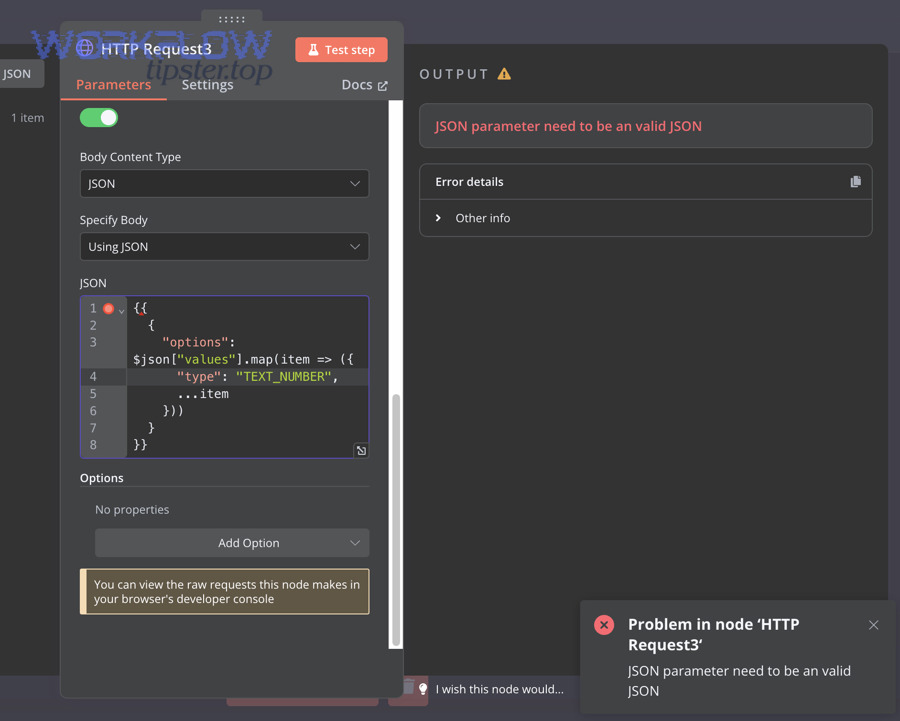
- HTTP Request node (outbound request body): the JSON body editor (or an expression inside it) produces malformed JSON or coerces an object into a string.
- Webhook or API-triggered workflows (inbound parsing): the sender posts something that claims to be JSON, but isn’t—sometimes due to wrong headers, sometimes because it’s a JSON-looking string.
- AI/tool-calling or code transformations: a node returns content that looks like JSON but contains stray quotes, markdown fences, or smart quotes; then later nodes treat it as actual JSON.
What is “valid JSON” vs “invalid JSON” in a workflow payload?
Valid JSON is a strict text format: it must follow specific rules for quotes, commas, braces, and value types, and it must represent one complete JSON value (usually an object).
Invalid JSON breaks those rules, so parsers can’t reliably interpret it. More importantly in n8n, “valid JSON” has two layers: text-level validity (the JSON parser can read it) and data-level validity (the result is the correct type—object vs string vs array—when it reaches the node).
Here’s what “valid JSON” means in workflows, in the most practical terms:
- Keys are double-quoted:
{ "name": "Minh" }, not{ name: "Minh" } - Strings are double-quoted:
{ "message": "hello" }, not{ "message": 'hello' } - No trailing commas:
{ "a": 1, }is invalid - Brackets must match: every
{has a}, every[has a] - Only allowed literal values:
true,false,null, numbers, strings, objects, arrays
Now for the n8n-specific gotcha: you can create a payload that is “valid JSON text” but still wrong for the node, because the node expects a JSON object but receives a string that contains JSON. That difference is invisible if you only look at the characters. It becomes obvious when you inspect the execution data types.
Is the error caused by the request you send, or the response you receive?
Yes—this error can come from either side, and you must determine which side first because the fix is different.
Next, use the simplest branching logic: a request-side error usually happens before the HTTP call completes (n8n fails validation locally), while a response-side error appears after the call, when n8n tries to parse what the server returned.
A fast way to tell:
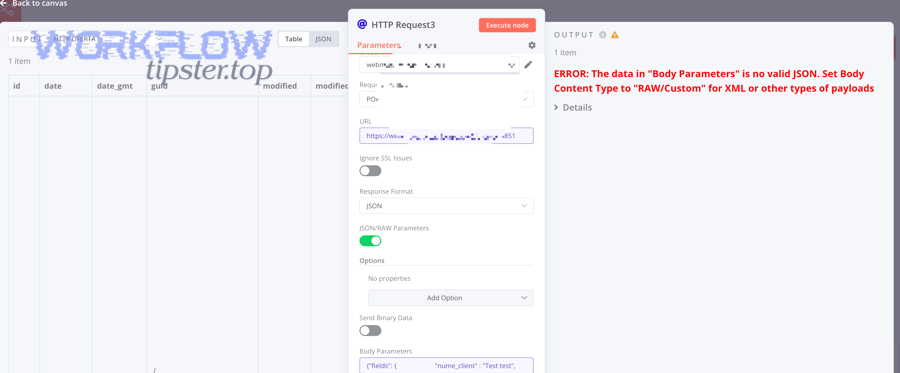
- If you see an n8n node error like “JSON parameter needs to be valid JSON” and the call never meaningfully reaches the server, you’re dealing with request construction.
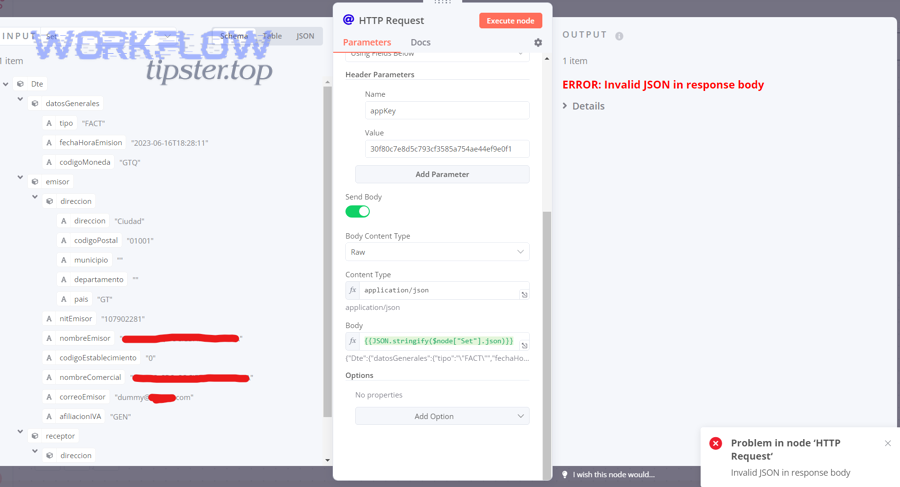
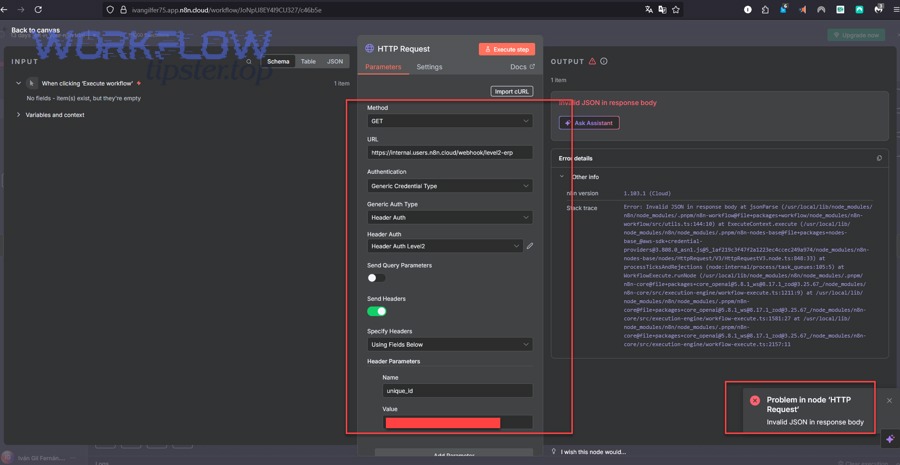
- If the request succeeds but you see “Invalid JSON in response body” or a parsing failure while reading the response, you’re dealing with response parsing (often the API returned HTML/text error pages, not JSON).
Once you label it as “send-side” or “receive-side,” the rest of your troubleshooting becomes far more deterministic.
Is your n8n payload actually invalid JSON, or valid JSON with the wrong schema for the API?
Yes—many “Invalid JSON payload” errors are schema failures disguised as JSON failures, and the difference matters because “fixing JSON syntax” won’t fix “API expects a different structure.”
Then, reframe the problem as two checks you must pass: (1) JSON parses, (2) API accepts the parsed structure.
Think of it like this:
- Syntax validity answers: “Can a JSON parser read this?”
- Schema validity answers: “Does this match what the endpoint expects (field names, types, nesting)?”
In n8n, it’s common to pass syntax but fail schema when:
- You send
"input": "{ \"prompt\": \"hi\" }"(string) instead of"input": { "prompt": "hi" }(object) - You send an array when the endpoint expects an object wrapper
- You send unknown fields (or wrong field names) that strict endpoints reject
This distinction is also why tool-calling and structured-output integrations can fail: the JSON can be perfectly valid, but the receiver rejects unexpected properties.
What are the most common schema mismatches that still trigger “Invalid JSON payload”?
There are five main types of schema mismatches that frequently produce “Invalid JSON payload” style errors: unknown fields, wrong types, wrong nesting, missing required fields, and incorrect root value.
More importantly, these mismatches happen even when your JSON is syntactically perfect.
- Unknown field names
You send{ "type": "TEXT_NUMBER" }but the API expects{ "columnType": "TEXT_NUMBER" }, so it treats the payload as invalid for its schema. - Wrong type for a value
You send{ "count": "10" }as a string, but the API expects a number:{ "count": 10 }. - Wrong nesting level
You send{ "prompt": "…" }but the API expects{ "input": { "prompt": "…" } }. - Missing required fields
You send an object that looks right but omits required keys, so validation fails. - Root value is wrong
You send an array[ ... ]but the endpoint expects an object{ ... }, or vice versa.
A helpful mental model is “shape-first”: before you worry about individual values, confirm the shape (root type + nesting + required wrapper objects).
What’s the difference between a JSON syntax error and an API validation error in n8n logs?
A JSON syntax error fails because the payload is not parseable; an API validation error fails because the payload is parseable but doesn’t satisfy the endpoint’s contract.
Next, use the “where did it fail” clue: syntax errors often appear as n8n parsing failures (or immediate node validation errors), while validation errors appear as HTTP responses like 400, 422, or structured error messages from the API.
Use these quick indicators:
- Syntax error signs
- Error appears even before an HTTP response is recorded
- Messages like “JSON parameter needs to be valid JSON”
- Payload preview shows broken braces/quotes
- Validation error signs
- You get a response status code and a body describing the problem
- Common codes: 400 Bad Request, 422 Unprocessable Entity
- Error body mentions “unknown field,” “expected object,” “required property,” etc.
Once you classify the error correctly, you stop “guess-fixing” and start applying targeted fixes.
What are the top causes of invalid JSON payloads in n8n HTTP Request and Webhook workflows?
There are six main causes of invalid JSON payloads in n8n: double-quoting dynamic text, object-to-string coercion, broken expressions, mismatched Content-Type, hidden characters, and non-JSON responses parsed as JSON.
More importantly, these causes are predictable once you look at the last transformation step where your payload becomes the final request or response.
A lot of n8n troubleshooting becomes easier when you treat JSON payload building as a data formatting pipeline rather than a single field you type into. Many “invalid JSON” bugs are really n8n data formatting errors that happen at boundaries between nodes.
Are expressions turning objects into strings (e.g., “[object Object]”) or breaking quotes?
Yes—expressions can turn an object into a string or break quoting, and that is one of the most common reasons JSON becomes invalid in n8n.
Then, focus on the exact place where the expression is inserted: if you wrap an expression in quotes when it already resolves to a string (or contains quotes), you often create double-quotes that break JSON.
Typical failure patterns:
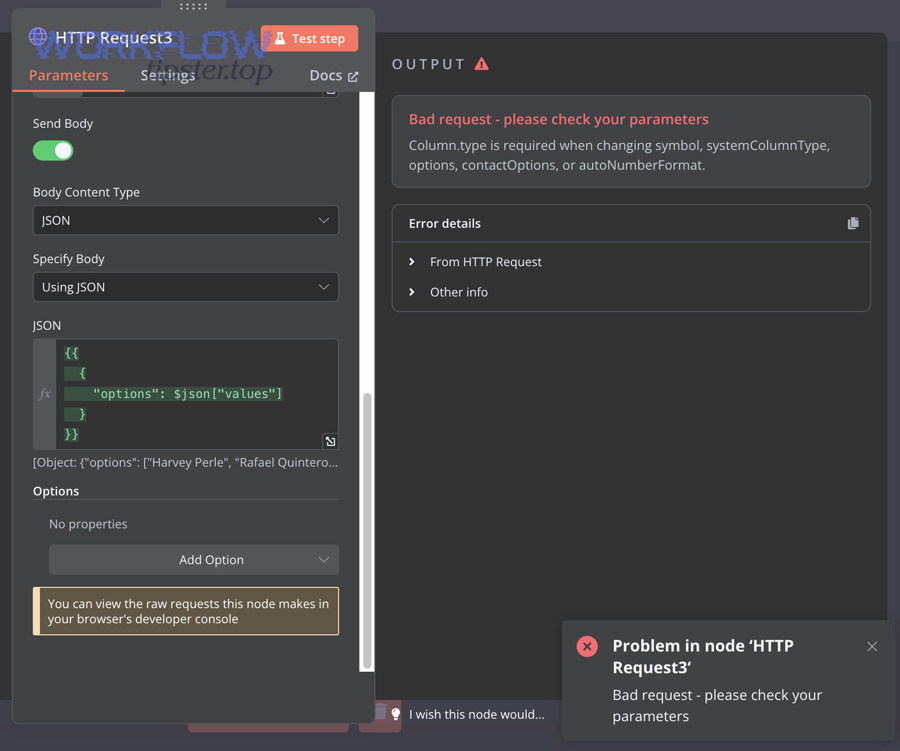
- Object becomes a string
- You expect
{ "input": { ... } } - You accidentally produce
{ "input": "[object Object]" } - The receiving API rejects it, and n8n may also fail if it tries to parse it as JSON
- You expect
- Double quoting
- You write
"prompt": "{{ $json.text }}" - But
$json.textalready contains quotes or JSON-like content - Result:
"prompt": ""Hello""(invalid)
- You write
- Broken expression syntax
- Missing brace, wrong escape, incorrect spread usage
- The expression itself fails and the JSON field becomes malformed
A strong prevention habit is to treat expressions as type-aware inserts:
- Insert objects without quotes
- Insert strings with quotes only if you control the string content (or you escape it)
Is your Content-Type and body mode consistent with the payload you’re sending?
Yes—mismatched Content-Type and body mode can make a valid payload behave like invalid JSON downstream.
Next, align three things so the receiver interprets the payload correctly: Body Content Type, actual body format, and Content-Type header.
Practical alignment rules:
- If you are sending JSON, use:
- Body Content Type: JSON
- Body is a JSON object (not a JSON string)
- Header includes
Content-Type: application/json
- If you are sending raw text or a JSON string for a special case, use:
- Body Content Type: Raw
- You control the exact text
- Header still must match what the API expects
- If you’re sending form fields or files:
- Use form-data or URL-encoded formats
- Don’t force JSON parsing on the receiver
This is especially important with webhooks: senders often post with the wrong Content-Type, so the webhook node treats the body as text, then later nodes assume it’s JSON and fail.
Which “invisible” characters can make JSON invalid (line breaks, smart quotes, encoding)?
Invisible or “non-obvious” characters can invalidate JSON or cause parsers to disagree about what they see—especially smart quotes, non-breaking spaces, or copied formatting.
Next, treat any content copied from rich text editors, PDFs, or AI model output as suspicious until you normalize it.
Common culprits:
- Smart quotes: “ ” instead of ” “
- Non-breaking spaces: look like normal spaces but aren’t
- BOM markers: hidden bytes at the start of a text
- Control characters: embedded in pasted content
If you ever see “everything looks right but it still fails,” test the payload by pasting it into a plain-text editor and a JSON validator, and retyping the quotes and braces manually for a quick sanity check.
How do you debug and pinpoint the exact node that produces the invalid JSON?
You debug invalid JSON in n8n by using a 5-step workflow—isolate the payload, inspect the rendered output, validate the JSON, confirm the data types, and retest with a minimal request—so you can identify the exact node or expression that breaks it.
Then, treat the workflow like a chain of transformations: your goal is to locate the first point where the payload becomes wrong, not the last point where the error appears.
This is where “n8n troubleshooting” becomes systematic instead of frustrating: every step is designed to reduce ambiguity.
Here is the debugging sequence that works across almost every case:
- Duplicate the workflow (so you can experiment safely)
- Disable non-essential nodes (keep only the payload builder + HTTP/Webhook)
- Log the payload right before the failing node
- Validate the exact rendered payload, not the template
- Add complexity back one piece at a time
If you do this, you’ll usually discover the culprit is one of three things: quoting, type coercion, or schema mismatch.
How can you capture the final rendered payload that n8n actually sends?
You can capture the final rendered payload by inspecting execution data and by creating a “payload snapshot” node that outputs the exact body you plan to send.
Next, place the snapshot immediately before the HTTP Request (or webhook response) so nothing else can alter the payload afterward.
Two reliable capture patterns:
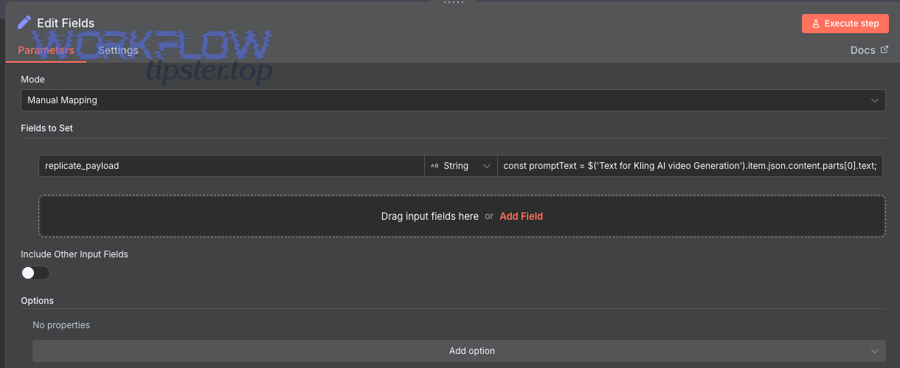
- Snapshot with a Set/Edit Fields node
- Create a field like
debugPayload - Assign it the exact object you’ll send (not a string)
- Inspect
debugPayloadin the execution output
- Create a field like
- Snapshot with a Code node
- Build the payload as an object
- Return it as part of the node output
- Confirm you see an object structure (expandable fields), not a single long string
The reason this works is that it reveals the truth: what n8n will send is not what you typed, but what the expressions resolve to at runtime.
What is the fastest checklist to validate JSON before you send it?
There are 7 quick checks to validate JSON before sending: correct root type, proper double quotes, no trailing commas, balanced brackets, correct escaping, stable data types, and no “stringified JSON” where an object is required.
More importantly, you should validate the final rendered payload, not the template.
Quick validation checklist (use right before the HTTP Request):
- Root is an object
{}unless the API explicitly expects an array - Keys and strings use double quotes
- No trailing commas
- Braces/brackets are balanced
- Newlines/quotes in strings are escaped (or inserted safely)
- Fields have the correct type (number vs string vs object)
- Any nested structure required by the API exists (wrappers like
input,data,attributes)
If you want to make this even faster, keep a “minimal known-good payload” that always works, and compare your current payload against it field by field.
Should you rebuild the body using a Set node (structured) instead of hand-writing JSON strings?
Yes—you should rebuild the body using a structured Set/Edit Fields node in most cases because it reduces quoting mistakes, preserves object types, and makes your payload easier to inspect and validate.
Moreover, structured building gives you a stable foundation for later changes without turning every edit into a fragile string manipulation task.
When structured building is the better choice:
- You have dynamic fields from prior nodes
- You’re nesting objects or arrays
- You’re integrating AI output that might contain quotes/newlines
- You need to guarantee types (object stays object)
When raw JSON strings can still be okay:
- The API requires a very specific raw format
- You’re sending a static payload with minimal dynamic insertion
- You have full control over escaping
This is also how you avoid “fixing JSON” only to trigger other automation problems—like retries producing n8n duplicate records created downstream because your request logic becomes unpredictable.
How do you fix invalid JSON payloads in n8n step-by-step (HTTP Request + Webhook)?
You fix invalid JSON payloads in n8n by applying a step-by-step method: start from a minimal valid payload, rebuild it as a typed object, insert dynamic values safely, validate against the API’s expected structure, and only then enable full workflow complexity—so the final request becomes valid and accepted.
Next, treat each fix as a “pattern,” because most invalid JSON cases repeat across different workflows.
Below are the fix patterns that cover the majority of real-world cases.
How do you convert a mixed payload into a clean JSON object with stable types?
You convert a mixed payload into a clean JSON object by normalizing types at the boundary where data enters the payload: strings stay strings, numbers become numbers, objects remain objects, and arrays remain arrays.
More specifically, the goal is to prevent accidental conversions like object → string or number → string that break schema validation.
A practical approach:
- Build a base object first
- Create the correct root structure and required wrapper fields.
- Map each dynamic value into the base object
- Insert values into the right nesting level.
- Add defaults for missing fields
- Avoid
undefinedleaks by using fallback values.
- Avoid
- Inspect the output as an expandable object
- If you can expand fields in execution data, you’re dealing with real JSON objects, not strings.
If you must accept dynamic content that might be “JSON-looking text” (especially from AI), decide explicitly whether you want:
- A string field that contains that text, or
- A parsed object that becomes part of the payload
That one decision prevents a surprising number of invalid payload failures.
Evidence: According to a study by the University of Luxembourg from the SnT (Interdisciplinary Centre for Security, Reliability and Trust), in 2021, researchers found that JSON subschema checking revealed 43 previously unknown data compatibility bugs, showing how schema mismatches can break clients even when JSON is syntactically valid.
How do you safely include dynamic text (quotes, newlines) without breaking JSON?
You safely include dynamic text by treating it as data, not “JSON code,” and by ensuring it is either properly escaped or inserted into the payload without manual quoting conflicts.
For example, if the text can contain quotes, you should avoid building payloads through string concatenation where those quotes can terminate strings prematurely.
Practical safety rules:
- Never build JSON with string concatenation when the inserted text may contain quotes/newlines.
- Prefer structured object building, then let JSON serialization happen automatically at the node boundary.
- If you must insert into a string field, ensure special characters are preserved as characters, not interpreted as syntax.
A reliable pattern is: store dynamic text in a variable first, then insert it as a value, not as a template that alters the JSON structure.
This is particularly relevant when your workflow includes LLM output: the content may include quotes, markdown, or pseudo-JSON. If you treat it as JSON automatically, you invite failures; if you treat it as text until you intentionally parse it, you regain control.
How do you handle “Invalid JSON in response body” when the API returns non-JSON?
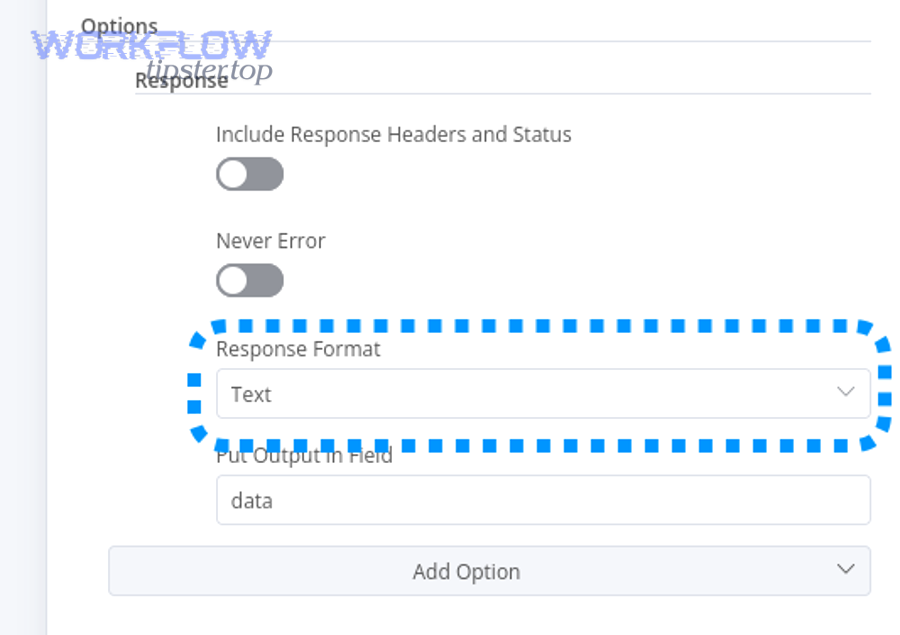
You handle “Invalid JSON in response body” by adjusting response expectations: detect non-JSON responses, treat them as text, and only parse as JSON when the response is truly JSON.
Then, add a guard step: check response headers and content before parsing.
Why this happens:
- Many APIs return HTML error pages (especially behind proxies or gateways)
- Some services return plain text for errors
- Some endpoints return JSON only for success, but text/HTML for failure
Fix strategy:
- Log the raw response body
- Check response Content-Type
- Branch logic:
- If JSON, parse and continue
- If text/HTML, store it for debugging and handle error flow
This prevents your workflow from failing with a parsing error that hides the real root cause.
Which approach is better for reliability: raw JSON strings, structured JSON objects, or form encoding?
Structured JSON objects win for reliability, raw JSON strings work best for edge-case control, and form encoding is optimal for endpoints that explicitly require it—so the best choice depends on whether you prioritize type safety, exact text control, or protocol compatibility.
However, in most n8n workflows, structured objects are the safest default because they reduce formatting mistakes and improve inspectability.
To make the decision tangible, the table below summarizes what each approach is best at and what it risks.
| Approach | Best for | Common risk | Reliability score (practical) |
|---|---|---|---|
| Structured JSON object | Dynamic payloads, nested data, stable types | Schema mismatch if you nest incorrectly | High |
| Raw JSON string | Exact control, special formats, debugging a strict receiver | Quoting/escaping breaks easily | Medium |
| Form encoding | Legacy endpoints, file uploads, specific APIs | Wrong field mapping or content-type | Medium–High (when required) |
The key insight: “valid JSON” is not the same as “successful request.” Reliability is about valid JSON + correct schema + correct headers.
What are the pros/cons of building JSON with expressions vs building it as an object?
Building JSON with expressions is fast for simple inserts, while building it as an object is best for correctness, readability, and long-term maintenance.
Next, use expressions for small value substitutions and object-building for anything nested, dynamic, or reused.
Expressions:
- Pros: quick, compact, easy for simple values
- Cons: easy to break quotes, easy to coerce types accidentally, hard to debug when complex
Objects:
- Pros: preserves types, debuggable, scalable, reusable patterns
- Cons: slightly more setup, requires discipline in mapping fields
If your workflow will evolve (most do), object-building usually pays off quickly—especially when you later add error handling, retries, or batching.
When should you use JSON body vs form-data vs URL-encoded in n8n?
Use JSON body when the API is designed for structured data, form-data when you send files or multipart fields, and URL-encoded when the endpoint expects classic form submissions.
On the other hand, forcing JSON into endpoints that expect form encoding often produces “invalid payload” errors that are not really about JSON.
Decision rules you can trust:
- Use JSON for modern REST APIs with structured fields and nested objects
- Use form-data for file uploads and multipart submissions
- Use URL-encoded for older endpoints or OAuth-style token exchanges that expect it
Getting this right helps you avoid downstream automation damage. For example, when an endpoint keeps rejecting your payload and you retry blindly, you can end up with n8n tasks delayed queue backlog or repeated side effects.
How can you prevent “Invalid JSON payload” errors in n8n workflows long-term?
You can prevent “Invalid JSON payload” errors long-term by adding validation guardrails, standardizing payload construction, and handling strict schema endpoints intentionally—so your workflows stay valid as inputs change.
Moreover, prevention is not just about fewer errors; it’s about fewer “silent” failures that trigger retries, duplicates, and queue buildup.
The prevention mindset is: make invalid states unrepresentable in your workflow.
What validation patterns keep payloads valid (preflight checks, schema validation, default values)?
There are four core validation patterns that keep payloads valid: preflight validation, type assertions, safe defaults, and schema checks at integration boundaries.
Next, treat these patterns like reusable building blocks you can drop into any workflow.
- Preflight check node
- Confirm required fields exist
- Confirm root is object/array as required
- Type assertions
- Confirm numbers are numbers
- Confirm objects are objects (not strings)
- Default values
- Replace missing fields with safe defaults
- Avoid
undefinedvalues leaking into payloads
- Boundary validation
- Validate payload right before the HTTP Request
- Validate inbound webhook data before downstream mapping
These guardrails also prevent collateral damage. For example, a malformed payload can cause partial failures where the same record is posted twice after a retry—one of the easiest ways to get n8n duplicate records created without noticing until later.
How do you standardize payload-building across workflows (templates, reusable sub-workflows)?
You standardize payload-building by creating a reusable “payload builder” pattern—either as a sub-workflow or a consistent Set/Code node template—so every workflow produces payloads with the same structure and type rules.
Specifically, you want standardization at three levels: naming, structure, and validation.
A practical standard:
- A consistent field name like
payloadthat always contains an object - A consistent location for validation (one node before the HTTP Request)
- A consistent error-handling path when validation fails (stop, alert, store debug data)
This reduces future troubleshooting time because you always know where to look and what type to expect.
Why do AI/tool-calling integrations fail with “Invalid JSON payload” even when JSON is valid?
AI/tool-calling integrations can fail even when JSON is valid because the receiver enforces a strict schema and rejects unknown fields, wrong nesting, or incorrect types—so “valid JSON” still becomes “invalid payload” at the contract level.
More specifically, strict endpoints may reject properties like type, unexpected arrays, or schema-style descriptors that don’t belong in the request.
Common AI-related triggers:
- The model output includes JSON wrapped in markdown fences
- The output includes fields that look like schema definitions instead of actual data
- The workflow inserts AI output into JSON without controlling quoting and escaping
The solution is to introduce an explicit “interpretation step”:
- Treat AI output as text first
- Extract only the fields you need
- Build the final request object yourself
This prevents “smart text” from becoming “fragile syntax.”
Does n8n version, hosting (Docker), or proxies affect JSON parsing behavior?
Yes—environment can affect how requests and responses are handled, and it can amplify payload issues through logging differences, proxy transforms, or content-type handling, even though it doesn’t change what valid JSON is.
In addition, self-hosted environments can introduce layers (reverse proxies, security appliances, gateways) that modify headers or bodies in ways that make debugging harder.
Practical environment checks:
- Confirm your proxy is not rewriting Content-Type or compressing/altering payloads unexpectedly
- Confirm the target API receives what you think you sent (compare raw request logs if possible)
- Confirm your workflow is not retrying aggressively when it shouldn’t (to avoid backlog)
This is also where operational symptoms appear: repeated failures and retries can create n8n tasks delayed queue backlog, while partial successes can create duplicates. Prevention is not just correctness—it’s stability.
Evidence: According to a study by the University of Luxembourg from the SnT (Interdisciplinary Centre for Security, Reliability and Trust), in 2021, researchers reported that schema evolution and incompatible expectations can break client applications and that their approach uncovered 43 previously unknown data compatibility bugs, reinforcing why proactive schema checks prevent late-stage failures.