


If your n8n trigger not firing problem is real (not a UI illusion), you can usually fix it by verifying activation/state first, then tracing the event path (source → trigger → execution → downstream nodes) until you find the exact break.
Next, you’ll learn what “trigger not firing” actually means in n8n and which screen to check first so you don’t waste time debugging nodes that never even ran.
Then, you’ll diagnose the cause by trigger type—webhooks, schedules, polling, or app events—because each class fails in a different way (URLs and methods for webhooks, timezone for schedules, credentials/scopes for app triggers, and so on).
Introduce a new idea: the fastest fixes often come from infrastructure checks (routing, proxies, queue mode roles, workers), so the main content below walks you from “is it active?” to “is the event reaching the right process?” in a tight, reproducible order.
Is your n8n workflow actually “Active” (not just tested) when the trigger should fire?
Yes—“n8n trigger not firing” is often caused by a workflow that isn’t truly Active, because test runs don’t behave like production runs, activation is required for real triggers, and environment differences (URLs/timezone/credentials) can change between test and live.
To begin, this matters because you can perfectly configure a trigger node and still get zero executions if the workflow never entered production mode.
Are you confusing “Execute workflow” with production trigger behavior?
Many people are, because “Execute workflow” is a manual run that proves downstream nodes can work, but it doesn’t prove the trigger receives real events.
Here’s the practical difference that affects debugging:
- Manual execution answers: “If I already have input data, will my nodes run correctly?”
- Trigger execution answers: “Will an external event (or time schedule) start the workflow without me clicking anything?”
A clean way to confirm you’re not mixing them up:
- Activate the workflow (toggle to Active).
- Trigger the event again (send the webhook, wait for schedule, perform the app action).
- Check Executions for a new production execution (not only a test record).
n8n’s docs emphasize that scheduling/automatic runs require publishing/activation rather than only executing manually. (docs.n8n.io)
Is the workflow “Active,” but the trigger still only works in test mode?
If test mode works and Active mode doesn’t, treat that as a strong signal that your live endpoint/settings differ from test.
Common examples:
- You’re sending requests to the test webhook URL but expecting the active workflow to respond.
- Your trigger depends on credentials that are valid in test but fail in production (token refresh, scopes, permission differences).
- Your schedule trigger uses a timezone you didn’t expect (workflow timezone vs instance timezone). (docs.n8n.io)
When you hit this specific pattern, immediately jump to these checks (in this order):
- Confirm you are calling the production trigger endpoint (especially for webhooks). (docs.n8n.io)
- Confirm the workflow’s timezone (especially for schedule triggers). (docs.n8n.io)
- Confirm credentials are still valid (watch for the classic n8n oauth token expired symptom in nodes that rely on OAuth).
What does “trigger not firing” mean in n8n, and where should you look first?
“Trigger not firing” in n8n means the workflow never creates a new execution from the trigger node, so you should first look at Executions (production), then the trigger’s event receipt (URL/logs), before you inspect any downstream node logic.
Next, this definition matters because it stops you from debugging the wrong layer (nodes vs event delivery).
In practice, “trigger not firing” usually belongs to one of these buckets:
- No event received (the trigger never gets called/polled).
- Event received, but no execution created (blocked by activation mode, routing/queue mode, auth, or internal errors).
- Execution created, but it ends immediately (filters/IF nodes, missing fields, empty payload, or node errors).
Your first 2-minute triage:
- Open Executions and filter to “today / last hour” to see if anything started.
- If you see nothing, you’re in bucket #1 or #2.
- If you see executions but they stop instantly, you’re in bucket #3.
A crucial time-saver: if you are self-hosting and your instance clock/timezone is wrong, scheduled triggers can appear “dead” even though they’re simply waiting for a different local time. n8n explicitly notes schedule timing depends on workflow or instance timezone configuration. (docs.n8n.io)
Evidence: According to a study by University of Delaware from the Electrical Engineering Department, in 1991, a survey of 94,260 Internet hosts found that about half had local clock errors greater than two minutes, and ten percent had errors greater than four hours. (ntp.org)
Which trigger type are you using, and what are the most common causes for each?
There are 4 main trigger types behind “n8n trigger not firing”: (1) Webhook/event-receive, (2) Schedule/time-based, (3) Polling/interval fetch, and (4) App-event (OAuth/API) triggers—each fails for different reasons like wrong URL, timezone mismatch, rate limits, or expired credentials.
Then, once you classify your trigger, you can apply the right fix instead of random trial-and-error.
To make the diagnosis fast, the table below maps trigger types to the highest-probability causes and the first check you should do.
| Trigger type (group) | Most common cause of “not firing” | First check to confirm | Fast fix |
|---|---|---|---|
| Webhook / incoming HTTP | Calling test URL while expecting live, wrong method/path, proxy not routing | Send request and watch proxy/access logs + Executions | Use production URL, correct method, fix routing/SSL |
| Schedule / cron-like | Wrong timezone, workflow not active/published | Confirm workflow timezone vs instance timezone | Set correct timezone and activate workflow (docs.n8n.io) |
| Polling / interval | Node credentials fail, rate limits, data returns empty | Check node error logs + last successful run | Refresh credentials, reduce frequency, add backoff |
| App-event via OAuth/API | Permissions/scopes, token refresh issues (n8n oauth token expired) | Look at trigger node error + credential status | Reconnect credential, confirm scopes, rotate tokens |
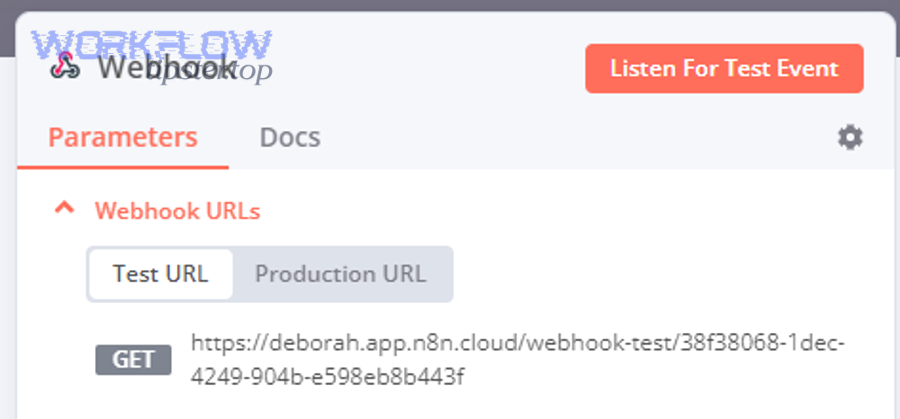
Is your trigger a Webhook, and are you using the correct URL (test vs production)?
For webhooks, one mistake dominates: sending requests to the test URL while your workflow is Active (production).
n8n documents that the Webhook node exposes different endpoints for test and production, and you must use the right one for the mode you’re in. (docs.n8n.io)
Use this checklist:
- If you’re debugging in the editor with “Listen for test event,” use the test URL.
- If your workflow is Active, call the production URL.
- If you use a reverse proxy, confirm it forwards:
- the path exactly (no stripping unless intended),
- the correct host,
- and the correct protocol headers (HTTPS termination issues can break callbacks).
A surprisingly common “looks fine but fails” case: your webhook is hit, but the payload arrives without expected keys, causing your logic to stop or branch away. If you’ve seen something like n8n missing fields empty payload, treat it as a data-contract problem:
- confirm
Content-Typeis correct, - confirm the sender is actually including the fields,
- add a guard node that logs/validates schema before filters.
Is your trigger a Schedule Trigger, and is timezone configured correctly?
For schedule triggers, timezone is the silent killer.
n8n’s course material states the Schedule Trigger uses the workflow timezone if set, otherwise it falls back to the instance timezone. (docs.n8n.io)
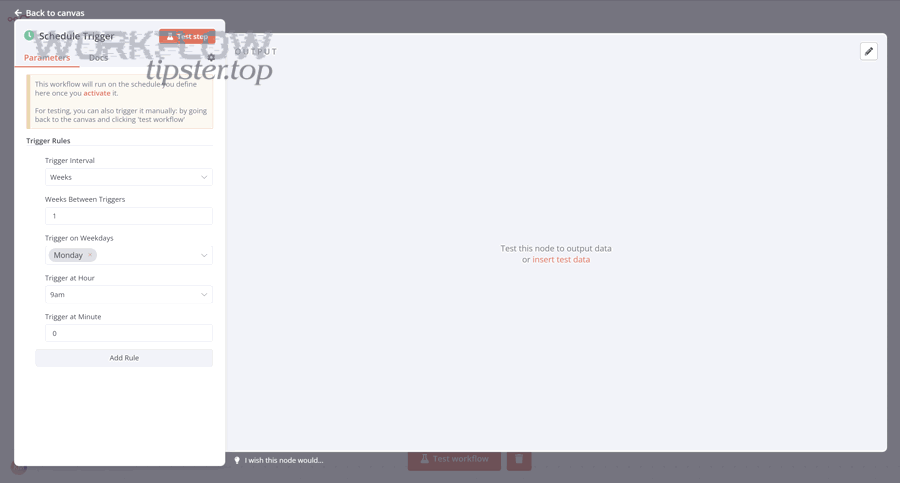
Your fastest fix sequence:
- Open Workflow settings → find timezone.
- If it’s unset, check the instance timezone.
- Align to your intended timezone and re-activate workflow.
- Temporarily set the trigger to run every minute to confirm it fires, then restore the real schedule.
Is your trigger a Polling trigger, and are you being rate-limited or receiving empty results?
Polling triggers can “not fire” even when they’re working, because the trigger runs but returns no new items (so nothing appears downstream).
How to distinguish:
- If executions exist but contain 0 items, you likely have:
- no new data at the source,
- too strict “since last run” logic,
- API returning empty due to filters or permissions.
Fix pattern:
- Log raw response data for a few runs.
- Reduce filters temporarily.
- Add a “Store last seen ID/timestamp” mechanism so you can verify incremental fetch works.
This is also where “n8n troubleshooting” becomes a methodology: don’t guess—instrument the trigger output until you can explain why it returns 0 items.
Is your trigger an OAuth/app-event trigger, and is the credential still valid?
If your trigger depends on OAuth, “not firing” sometimes really means “firing but failing to authenticate.”
You’ll notice:
- the trigger node shows auth errors,
- executions fail immediately, or
- you see refresh behavior that stops working after a while (classic n8n oauth token expired situation).
The reliable repair path:
- Open the credential and confirm it’s still connected.
- Reconnect OAuth if you changed scopes, domains, or redirect URLs.
- If you’re self-hosted behind a proxy, confirm your public base URL is correct so redirects match.
Evidence: According to a study by University of British Columbia from the Department of Electrical and Computer Engineering, in 2012, researchers examined 96 popular websites using OAuth-based login and reported critical vulnerabilities caused by implementation choices. (css.csail.mit.edu)
Are your workflow filters or logic silently preventing a run from continuing?
Yes—“n8n trigger not firing” often looks like a trigger issue when the workflow actually starts, but filters, IF conditions, dedupe logic, or missing fields stop the execution early for at least three reasons: the data doesn’t match conditions, the branch routes to “no,” or downstream nodes error out immediately.
Moreover, once you confirm an execution exists, you should shift focus from event delivery to logic gates.
Here’s the core idea: a trigger can fire correctly, but your workflow can still appear “dead” if it does nothing useful.
Are IF/Switch conditions too strict for real-world payloads?
Test payloads are often “clean.” Real payloads are messy.
To prevent silent failure:
- Add a logging step right after the trigger:
- capture the raw payload,
- log key fields you depend on,
- record a small “reason code” if you route to a no-op branch.
- Normalize input:
- coerce types,
- set defaults for missing keys,
- handle optional fields explicitly.
If your team has ever said “it triggered but nothing happened,” it’s usually because the IF condition was built against a sample payload—then production sent a slightly different shape (hello, n8n missing fields empty payload).
Are you deduplicating events in a way that blocks valid runs?
Deduplication is essential for webhooks and polling triggers, but it’s easy to overdo it.
Common dedupe patterns that cause accidental suppression:
- Using a timestamp field that doesn’t change (so everything looks like a duplicate).
- Hashing the entire payload and rejecting events where one irrelevant field stays constant.
- Storing “last processed ID” but never updating it due to a branch or error.
Better approach:
- Define a stable event identity (e.g.,
order_id,ticket_id,message_id). - Store it in a lightweight data store.
- Only dedupe on that identity + a reasonable time window.
Are errors being swallowed or routed away from visibility?
If the workflow “fires” but you never notice because it fails and gets handled quietly:
- Ensure error workflows/notifications are configured.
- Temporarily set nodes to “continue on fail” only when you’re trying to collect diagnostics (not as a permanent fix).
- Check the execution for the exact node where it stops.
In production debugging, visibility beats elegance. Instrument first, optimize later.
Is your self-hosted setup routing events to the right place (URLs, proxy, workers)?
If you’re self-hosted, “n8n trigger not firing” is often an infrastructure routing problem: requests hit the wrong container/service, reverse proxy rules don’t forward webhook paths, or queue mode splits responsibilities so the “main” instance receives triggers while workers execute jobs.
Especially, this becomes critical when you scale out or introduce queue mode.
Are you behind a reverse proxy, and is it forwarding webhook paths correctly?
Typical failure pattern:
- Your domain loads the n8n UI fine…
- But webhooks return 404/502, or never create executions.
That usually means your proxy routes / to the UI, but doesn’t route the webhook paths (or strips them).
Fix checklist:
- Confirm the exact webhook path your workflow expects.
- Confirm your proxy forwards:
- method (POST vs GET),
- path (no accidental rewrite),
- headers (
X-Forwarded-Proto, host), - and body size limits (large payloads can be dropped).
If you run a proxy like Nginx or Traefik, inspect access logs while you send a test request. If the request never appears, your event never reached n8n—so no amount of node tweaking will help.
Are you using queue mode, and do you understand which instance receives triggers?
In queue mode, n8n separates concerns: one instance receives workflow information (including triggers) and worker instances perform executions. (docs.n8n.io)
This is exactly where teams get stuck:
- A webhook hits a “worker” container that isn’t supposed to receive it.
- The main instance receives the webhook, but workers aren’t processing jobs (so executions queue and never complete).
- Redis connection settings are wrong, so jobs never flow.
n8n’s queue mode docs describe how the main instance and workers interact. (docs.n8n.io)
If you’re troubleshooting workers, treat Redis as a first-class dependency:
- Is Redis reachable from both main and workers?
- Are you using the correct queue mode environment variables? (docs.n8n.io)
- Do you see jobs being created but not consumed?
If you suspect queue mode webhook issues, community reports show real cases where webhooks can behave differently when roles/routing are misconfigured, which can mimic “trigger not firing.” (community.n8n.io)
Is your public base URL correct for callbacks and OAuth?
Self-hosting behind a proxy adds a hidden constraint: your “public” URL must match what external services think your n8n URL is.
Symptoms when it’s wrong:
- OAuth connections succeed once, then fail later.
- Webhooks validate but deliveries fail or redirect incorrectly.
- External tools post to HTTP while your instance expects HTTPS.
Fix it by aligning:
- external service callback URLs,
- your proxy TLS termination,
- and your n8n public/base URL settings.
This is one of the most common root causes behind OAuth-trigger failures that show up as n8n oauth token expired or repeated re-auth prompts.
How do you validate the fix and prevent the trigger from failing again?
Validate your “n8n trigger not firing” fix with a 3-step method—(1) reproduce the event, (2) confirm a production execution is created, and (3) confirm downstream data and alerts—then prevent recurrence by adding observability, retries, and change-safe configuration.
In short, a fix isn’t real until you can prove it survives the next 24–72 hours of normal traffic.
What is the fastest “proof test” after you change something?
Use a proof test that matches your trigger type:
- Webhook: send a real request to the production URL and confirm a new execution appears. (docs.n8n.io)
- Schedule: set it to a short interval briefly (e.g., every minute), confirm it fires, then restore. (docs.n8n.io)
- OAuth/app event: perform the exact action in the source app and watch the trigger node + execution for auth errors.
If you changed infrastructure (proxy/queue mode), do the proof test twice:
- immediately after change,
- again after a restart/redeploy (because many “fixes” only worked due to warm state).
How do you add monitoring so you notice failures before users do?
Prevention is mostly visibility:
- Add a lightweight “heartbeat” workflow that runs on a schedule and pings a log/notification channel.
- Add alerts for:
- zero executions over an expected window,
- repeated trigger errors,
- queue backlog (if using queue mode),
- credential failures.
If you are doing serious n8n troubleshooting in production, your goal is simple: reduce mean time to detect and reduce mean time to recover.
Which hardening practices prevent “not firing” from coming back?
Use these safeguards:
- Lock in correct routing: keep a tested proxy config for webhook paths and don’t “clean it up” casually.
- Control payload variability: validate schemas early, handle missing keys, and set defaults.
- Credential hygiene: rotate tokens, document scopes, and schedule periodic credential checks.
- Queue mode discipline: keep role boundaries clear (main vs workers) and monitor Redis connectivity. (docs.n8n.io)
Finally, if you want one quick “walkthrough” visual for webhook debugging patterns, this video is a solid reference point: