


A “n8n webhook 404 not found” error usually means the request reached a web server, but the exact webhook route you’re calling isn’t registered or isn’t reachable at that URL—so the fix is almost always about URL correctness + workflow activation + routing/proxy settings.
If you’re self-hosting, the fastest path is to confirm whether the 404 is coming from n8n itself or from your reverse proxy, then align your Production URL, webhook endpoint path, and public base URL variables so incoming requests land on the workflow that’s actually listening.
If you’re on managed hosting (including cloud deployments), you’ll usually solve 404s by ensuring you’re using the Production URL for published workflows and avoiding expired test listeners, while also validating the external service’s callback URL and HTTP method.
Introduce a new idea: once your webhook is “Found,” you can harden reliability with a lightweight n8n troubleshooting playbook that also covers adjacent failures like n8n webhook 400 bad request, n8n webhook 500 server error, and n8n timeouts and slow runs.
What does “404 Not Found” mean for an n8n webhook?
A 404 Not Found for an n8n webhook means the server handling your request can’t find the webhook resource at that URL, which typically happens when the workflow isn’t registered at that endpoint or your proxy is routing elsewhere.
Next, to fix it quickly, you need to identify where the 404 is generated (n8n vs proxy) and why the requested path doesn’t map to an active webhook.

Is the 404 coming from n8n or from your reverse proxy/app server?
If the response body looks like “Cannot POST /webhook/…”, that often indicates the request is being handled by an upstream app server (or misrouted) rather than the webhook you expect—common when a proxy path or base URL is wrong.
To isolate the source, check these signals:
- Response headers: does the
Serverheader match your proxy (e.g., nginx) or your app stack? - Access logs: does n8n log the incoming request at all?
- Path shape: are you calling
/webhook/...vs/webhook-test/...correctly for the workflow state?
Once you know which layer returns 404, you can fix the correct layer instead of guessing.
How is 404 different from n8n webhook 400 bad request and n8n webhook 500 server error?
404 is about missing route/resource; 400 is about a request that reached the handler but is invalid; 500 is about a server-side failure after handling began.
Here’s a simple context table (so you can map symptoms to actions):
| Status | What it usually means in webhook flows | What to check first |
|---|---|---|
| 404 | Endpoint not registered / wrong URL / wrong routing | URL, test vs prod endpoint, workflow active, proxy path |
| 400 | Payload or headers don’t match what your workflow expects | Content-Type, JSON validity, required fields, auth headers |
| 500 | Workflow or node execution failed unexpectedly | Execution logs, node errors, credentials, downstream API failures |
If you’re seeing 400/500 alongside 404 across different attempts, it’s a strong clue your requests are hitting different layers (proxy vs app vs workflow) depending on URL/method.
Evidence: According to a study by University of Houston from the Rockwell Career Center, in 2022, a 404 Not Found indicates “the resource was not found by the server.”
Is your n8n webhook workflow active and listening?
Yes—your webhook can return 404 even when your setup is “fine” if (1) the workflow isn’t published/active, (2) you’re calling the wrong URL type, or (3) the listener window for test mode has ended.
Then, once you confirm activation state, you can align the URL you’re calling with the workflow mode that’s actually listening.
Do you need to click “Listen for Test Event” or use the Production URL?
If you’re still building the workflow, use Test URL and click Listen for Test Event; if you’re integrating a real external service, use the Production URL and publish the workflow so it stays registered.
Key behavior differences you should rely on:
- Test URL: registers temporarily while listening (useful for local trials).
- Production URL: registers when the workflow is published and remains available until unpublished.
If you mix these up, you’ll often see “works in test, 404 in prod” (or the reverse).

Can a workflow become inactive or lose its webhook registration?
Yes, it can—especially in containerized or scaled setups—if the workflow becomes unpublished, the instance restarts without the expected persistence/config, or you’re hitting a different instance than the one that registered the webhook.
Practical checks that catch the most real-world cases:
- Confirm the workflow is Published/Active in the editor (not just saved).
- Verify you’re calling the exact Production URL shown for the Webhook node.
- If you run multiple replicas, ensure webhook requests are consistently routed to a node that has the workflow loaded (sticky sessions or shared state design can matter).
This is why “it worked yesterday” is very often a routing or lifecycle issue, not a webhook-node issue.
Which n8n webhook URL should you use: Test or Production?
Test URL wins for rapid iteration, Production URL is best for stable external integrations, and “local URLs” are the worst choice for public callbacks—so pick based on where the request originates and how long the endpoint must exist.
Next, you should validate the endpoint type (/webhook-test/ vs /webhook/) and ensure the generated base URL matches what outside systems can reach.
When should you use /webhook-test/ vs /webhook/ endpoints?
Use /webhook-test/ when you’re manually triggering and watching input in the editor; use /webhook/ when an external system needs a stable URL that works continuously after you publish.
Common failure pattern:
- External service is configured with a test URL.
- You stop listening (or the listener expires).
- The service keeps sending events → you get 404.
If the goal is production automation, don’t let test URLs escape into real integrations.
How do n8n environment variables change the generated webhook URL?
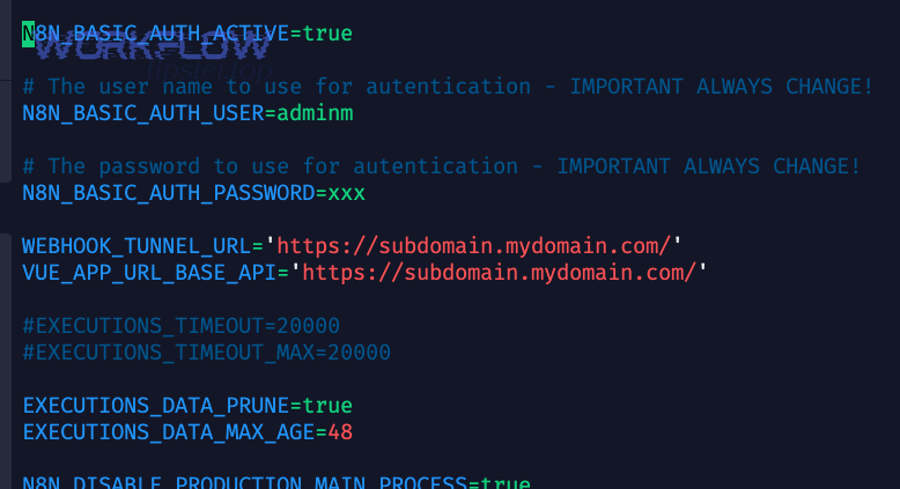
In self-hosted deployments—especially behind a reverse proxy—n8n generates webhook URLs from N8N_PROTOCOL, N8N_HOST, and N8N_PORT, and you often must override the public-facing base with WEBHOOK_URL so the editor shows and registers the externally reachable address.
This matters because your webhook can be “working internally” while every outside request hits the wrong host/path and returns 404.
What are the most common causes of n8n webhook 404 not found?
There are 4 main causes of “n8n webhook 404 not found”: (1) wrong URL/path/method, (2) test-vs-prod mismatch, (3) reverse proxy routing/base path issues, and (4) public URL mismatch from environment variables.
Below, we’ll walk through each cause in the order that typically resolves the issue fastest.
Wrong path, method, or missing trailing slash
The Webhook node can be configured for different HTTP methods (GET/POST/etc.), and the path is exact—so a mismatch can look like “not found” from the caller’s perspective.
Quick checks:
- Confirm the caller uses the same method as the Webhook node.
- Copy/paste the URL from the node panel (don’t retype).
- If you manually set a path, ensure it matches exactly (including any route parameters).
If you see “Cannot POST …” when you expected GET (or vice versa), fix the method first.
Reverse proxy routing, base path, and headers (X-Forwarded-*)
A reverse proxy can return 404 if it’s not routing the webhook path to n8n, or if the upstream headers don’t reflect the original request scheme/host—especially when you terminate TLS at the proxy.
Most common proxy mistakes:
- Proxy only forwards
/to n8n, but webhook traffic arrives under a different subpath. - Missing
X-Forwarded-Host/X-Forwarded-Proto, causing mismatch in generated URLs. - Incorrect proxy hop configuration, so n8n doesn’t trust the forwarded headers.

DNS/SSL and public URL mismatches (WEBHOOK_URL, N8N_HOST, N8N_PROTOCOL)
If your DNS points to one host but your n8n instance is generating webhook URLs for another (or for localhost), external services will call a URL that never reaches the correct route and you’ll get 404.
This is exactly why WEBHOOK_URL exists: to tell n8n the canonical public base URL when the internal runtime details don’t match external reality.
Auth/CORS/firewall blocks that look like 404
Some gateways and security layers intentionally respond with 404 to hide protected endpoints (instead of 403). In practice, this means you may be “blocked” but only see “not found.”
Signs this is happening:
- 404 occurs only from certain IPs/regions.
- 404 appears only when auth headers are missing.
- Proxy/WAF logs show the request was denied upstream.
If you suspect this, verify logs at each layer (WAF → proxy → n8n).
How do you fix n8n webhook 404 on self-hosted setups (Docker, VPS, reverse proxy)?
Fixing self-hosted n8n webhook 404 is a 6-step checklist: verify published workflow → confirm correct prod URL → test with curl → inspect n8n logs → fix proxy routing/headers → set WEBHOOK_URL (and related variables) to the public base URL.

Then, once you’ve run the checklist end-to-end, you’ll usually convert “Not Found” into consistent, repeatable “Found” in minutes.
Step-by-step checklist (curl, logs, active workflow, exact URL)
Use this sequence to avoid loops and false positives:
- Publish the workflow (for production usage).
- Copy the Production URL directly from the Webhook node.
- Send a minimal request using curl (match method + headers).
- Check n8n logs: do you see the incoming request or an execution?
- If logs are empty, the request never reached n8n → fix routing.
- If logs show hits but still 404, you’re calling the wrong URL/path or the workflow isn’t registered.
While doing this, keep notes of which layer returns the 404. That one detail prevents 80% of wasted time.
Also, don’t ignore performance-related symptoms: if your webhook sometimes works but later fails, you may be dealing with restarts, scaling, or n8n timeouts and slow runs that mask the real issue with cascading retries.
Example configs for Nginx/Traefik and required env vars
Behind a reverse proxy, n8n recommends setting WEBHOOK_URL and configuring proxy hops and forwarding headers so n8n can generate and register correct public URLs.
Practical guidance that prevents recurring 404s:
- Ensure your proxy forwards the webhook paths to the n8n upstream.
- Make sure the last proxy sets
X-Forwarded-For,X-Forwarded-Host, andX-Forwarded-Proto. - Set
WEBHOOK_URL=https://your-public-domain/(exactly what external services call).
Once this is correct, your editor UI and external callback URLs stop drifting apart—one of the biggest root causes of self-hosted webhook issues.
Evidence: According to a study by De La Salle University from the Department of Industrial and Systems Engineering, in 2023, a case-study analysis of incident response found that 75% of interview answers pointed to competency/knowledge as a major MTTR factor and 90% highlighted escalation/availability as critical—supporting the idea that clear escalation + observability reduces time-to-fix for production failures.
How do you fix n8n webhook 404 on n8n Cloud or behind managed platforms?
Fixing a webhook 404 on managed hosting usually means (1) using the Production URL for a published workflow, (2) avoiding expired test listeners, and (3) verifying the external service is calling the exact URL/method you configured.

Next, focus on the “last-mile” details—because managed platforms remove many server variables, but not configuration errors.
Cloud-specific gotchas (test URL expiry, published workflows, IP allowlists)
On cloud setups, the most common 404 causes are operational rather than infrastructural:
- A workflow wasn’t actually published (saved ≠ active).
- A service is still calling a test URL after you stopped listening.
- Requests are blocked/filtered upstream (sometimes surfaced as 404).
If you’re mixing environments (dev vs prod), label URLs clearly and update the external service config when you promote a workflow.
Third-party service callbacks and retries (Stripe/GitHub etc.)
When services like Stripe or GitHub call your webhook, they may retry aggressively after failures. If your URL is wrong, you’ll see repeated 404s; if your workflow fails mid-run, you may also see n8n webhook 500 server error during bursts.
To prevent noisy failures:
- Confirm the service sends the method you expect (POST is common, but not universal).
- Ensure your workflow responds quickly (or uses async patterns) to avoid timeouts.
- If payloads are large, keep an eye on size and processing time; otherwise, you may “fix 404” only to hit 500/timeouts next.
How can you prevent future n8n webhook errors and slow runs?
You can prevent recurring webhook failures by standardizing URL management, adding lightweight monitoring/alerting, controlling payload/time limits, and applying consistent security controls—so you catch issues before users report them.

Below are the most practical micro-level safeguards that keep “404 not found” from coming back.
How do you monitor, alert, and reduce MTTR for webhook automations?
Start by treating every webhook like an API endpoint:
- Track request counts, error rates, and latency.
- Alert when 404 spikes (often indicates config drift or workflow deactivation).
- Log correlation IDs so you can trace proxy → n8n → downstream nodes.
This is where Workflow Tipster-style operational discipline helps: a tiny runbook plus consistent metrics will beat ad-hoc debugging every time.
How do you handle payload limits, n8n timeouts and slow runs, and retries safely?
If your webhook executes long workflows, aim for predictable behavior:
- Respond fast (or offload heavy work) so the caller doesn’t time out.
- Use retries thoughtfully to avoid request storms.
- Keep payloads reasonable; n8n documents a default webhook max payload size of 16MB (self-hosted configurable).
If you’re seeing “it’s slow and then it fails,” solve the performance bottleneck first—because slow runs often trigger duplicate deliveries and make logs look chaotic.
How do you secure webhook endpoints (auth, signatures, rate limiting) without breaking them?
Security should reduce risk without creating “mystery 404s”:
- Use supported auth methods (Basic/Header/JWT) in the Webhook node when appropriate.
- If using a gateway/WAF, log blocked requests clearly (don’t silently 404).
- Consider IP allowlists or signatures for high-risk endpoints.
Security is strongest when it’s observable: if a request is denied, you should be able to prove why in logs.
What’s the fastest n8n troubleshooting playbook for 404, 400, 500 errors?
Use a “three-layer” flow:
- Routing layer: DNS → TLS → reverse proxy paths/headers.
- Webhook layer: correct URL type, workflow active, method/path match.
- Execution layer: node errors, downstream API failures, performance bottlenecks.
If you follow that order, you’ll stop bouncing between fixes and you’ll resolve most incidents—whether they show up as n8n webhook 400 bad request, n8n webhook 500 server error, or classic n8n webhook 404 not found—with far fewer iterations.