


If you’re seeing make invalid json payload, the short version is: Make received or generated a request body that is not valid JSON at the point where a module expects strict JSON parsing (webhook intake, HTTP request body, JSON parser, or an app module that validates JSON).
In practical Make Troubleshooting, this error is rarely “random.” It usually traces back to one of four roots: broken JSON syntax, wrong content-type/encoding, data mapping that injects unexpected characters, or nested JSON that is still a string instead of a JSON object.
Beyond fixing the immediate run, you also want a repeatable way to isolate the failing bundle and prevent regressions: validating payloads before sending, normalizing types, and returning helpful responses so the sender can correct quickly.
To introduce a new idea, think of JSON payload quality as an integration contract: once you treat payload construction as a contract step (not just “some text body”), these failures become predictable and preventable.
What does “invalid JSON payload” mean in Make scenarios?
It means a Make module expected strict JSON, but the payload could not be parsed into a valid JSON value (object/array/value) under standard JSON rules, so the run fails at ingestion or transformation.
To begin, anchor on the “where” in the scenario: the error is emitted by the first module that attempts to parse/validate the body as JSON, not necessarily the module that originally produced the broken content.

In Make, this most commonly appears in three places: (1) a Custom Webhook receiving a request body that claims to be JSON, (2) an HTTP request module sending JSON where the mapped body is malformed, or (3) a JSON parse/transform step that tries to parse a string as JSON.
Concretely, the payload might look “JSON-like” to humans but violate strict rules: single quotes instead of double quotes, trailing commas, unescaped quotes inside strings, or additional text before/after the JSON document.
According to research by the Internet Engineering Task Force from the JSONbis Working Group, in December 2017, RFC 8259 formalized JSON syntax expectations used by interoperable parsers across platforms.
That standardization matters because Make integrations typically rely on strict parsers; “lenient JSON” accepted by some tools will still fail once it hits a strict validator.
Why does Make reject a payload as invalid JSON?
Make rejects it because the payload violates JSON syntax, arrives with mismatched headers/encoding, or is constructed via mapping in a way that turns structured data into an invalid string.
Next, treat causes as a small set of failure modes you can systematically test, rather than guessing.

Syntax violations that break parsing
Invalid JSON is usually literal syntax: missing braces, missing commas, trailing commas, or wrong quotation marks. To transition from theory to reality, check the exact character position where parsing fails (often provided by the module error details).
Common culprits include:
- Single quotes around keys/strings: {‘a’:’b’} (invalid) vs {“a”:”b”} (valid)
- Trailing commas: {“a”:1,} (invalid)
- Unescaped quotes inside strings: {“note”:”He said “hi””} (invalid)
- Unquoted keys: {a:1} (invalid)
Header and content-type mismatches
Even when the body looks correct, Make can fail if the sender uses a wrong Content-Type or mixes form-data with JSON. To move forward, confirm the sender is actually sending raw JSON with application/json, not a JSON string inside form fields.
Mapping issues that inject unexpected characters
Make mapping can unintentionally introduce raw line breaks, smart quotes, or partial fragments when variables are empty. As a bridge to the fix steps, assume at least one mapped value is either blank, contains unescaped characters, or is not the type you think it is.
Nested JSON still trapped as a string
If you receive JSON inside a JSON field (for example, a field named payload containing “{…}” as text), you must parse it as JSON before using it as an object. Otherwise, concatenation and quoting often produce invalid output.
According to research by Postman from its State of the API Report team, in 2024, 39% of respondents cited inconsistent documentation as a major roadblock—an environment where payload formats drift and invalid bodies become more likely.
How does make troubleshooting isolate an invalid JSON payload in seconds?
Use a deterministic workflow: identify the first failing module, inspect the exact input bundle, capture the raw body, and replay with controlled payload variants until the failure reproduces consistently.
After that, you can switch from “debugging” to “fixing,” because you’ll know which character or mapping decision breaks JSON validity.
Step 1: Pinpoint the first parser/validator
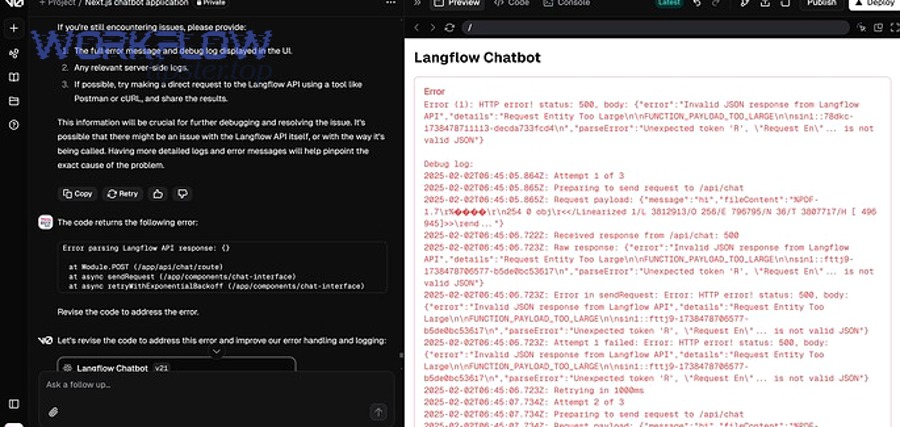
Start at the run log and locate the earliest module that complains about JSON. To illustrate, a downstream module can fail because an upstream HTTP module built an invalid body—so you always debug at the point where JSON is first interpreted as JSON.
Step 2: Inspect the raw body before parsing
In webhook scenarios, capture what the sender posted. In HTTP scenarios, inspect the exact request body Make sent. Then, move one link further: copy the raw body text and validate it with a strict JSON validator (any strict validator will do, as long as it is not “lenient”).
Step 3: Replay with minimal payloads
Reduce the payload to the smallest JSON that should succeed (for example, {“ok”:true}). Then add fields back until the error returns. This narrows the problem to a specific field/value and prevents you from chasing symptoms.
Step 4: Verify the sender’s headers and transport
Confirm Content-Type, character encoding, and whether the sender is compressing the body. This is the bridge to prevention: once you standardize these transport details, “random” invalid payloads often disappear.
According to research by Postman from its State of the API 2024 program, 74% of organizations identify as API-first—meaning payload contracts are central, and debugging workflows that isolate failures quickly are a productivity multiplier.
How do you fix common JSON syntax problems without rewriting the whole scenario?
Fix the payload at the boundary: normalize strings, escape unsafe characters, and generate JSON using structured construction rather than manual concatenation.
Next, you’ll want to pick the fastest fix that also reduces future risk.

Stop hand-building JSON strings
If you are manually concatenating strings like {“name”:”{{name}}”,”note”:”{{note}}”}, you are one quote away from breaking JSON. Instead, build an object using mapping fields where possible (key/value inputs), then serialize it to JSON.
Escape dynamic text fields proactively
Text fields often contain quotes, backslashes, or line breaks. To move from “it works for me” to reliability, ensure these characters are escaped before they reach a JSON string context. If Make offers a JSON encoding function in your toolkit, prefer that over custom replace rules.
Eliminate trailing commas and non-JSON tokens
Trailing commas, comments, and “undefined/NaN” values are not JSON. The practical fix is to ensure empty values become null or omitted fields, not placeholder tokens.
Validate the final JSON at runtime (guardrail)
Add a lightweight validation/parse step before critical sends. If the parse fails, route to an error handler that logs the raw body and returns a readable response to the sender.
According to research by the Library of Congress from its Digital Formats documentation program, in 2017, JSON’s standardization (including RFC 8259) reinforced strict syntax requirements that parsers rely on for interoperability.
How do mapping and data-type issues create invalid JSON in Make?
They create invalid JSON when mapped values are empty, wrongly typed, or contain characters that are safe as data but unsafe inside a quoted JSON string.
Next, treat data-type control as part of your scenario design, not as an afterthought.

Blank fields that collapse structure
If a required field maps to an empty value, some payload builders end up producing broken fragments (for example, leaving dangling commas or inserting nothing where a string is expected). The fix is to use defaults and conditional mapping: if empty, map null, omit the key, or set a safe fallback.
Numbers, booleans, and nulls treated as strings
When numeric/boolean values are wrapped in quotes, consumers might still accept them—but your own intermediate steps can break when you later embed them in another JSON string. Prefer true booleans and numbers as types, then serialize once.
Double-encoding JSON (JSON inside a JSON string)
A frequent pattern is: upstream module outputs a JSON string; downstream module expects an object. If you embed that string directly, you often end up with extra quotes and escaping that makes the overall payload invalid. The fix is to parse the inner JSON string into an object before re-serializing.
Community pattern: invalid mapping produces 400-class failures
In real-world Make scenarios, mapping issues can produce requests that the receiver rejects. For example, Make Community discussions highlight cases where a mapped value is blank, causing a 400 error due to an invalid or incomplete request body.
According to research by the Make Community from its support forum discussions, in August 2024, users reported 400 failures traced to blank or improperly mapped request fields—an issue that often co-occurs with invalid JSON payload construction.
How do you prevent invalid JSON when sending webhooks or HTTP requests from Make?
Prevent it by standardizing Content-Type, generating JSON from structured objects, validating before sending, and enforcing a single serialization step at the last responsible moment.
After that, you can treat outbound payload reliability as an engineering control, not a manual habit.

Set the correct Content-Type and body mode
If you send JSON, ensure the request is configured as raw JSON and declares application/json. If you send form-data, don’t pretend it is JSON—because the receiver (or a later parser) will fail.
Make Community guidance for HTTP 400 cases commonly points to malformed request bodies and recommends aligning content-type with the actual body format.
Build payloads as objects, then serialize once
Design rule: construct the data as structured fields first, then convert to JSON once. If you serialize twice, you almost always create escaping artifacts and higher risk of invalid JSON.
Guardrail: validate payloads before critical calls
Add a “parse/validate JSON” step before sending to third-party systems. If it fails, short-circuit the flow and log the raw body. This is where operationally mature integrations differ from fragile ones.
Security and integrity: validate schemas and reject unknown fields
Invalid payloads are not only operational issues; they can be security signals. Implement schema checks (even lightweight ones) to reduce ambiguity and avoid passing unexpected structures into downstream systems.
According to research by the OWASP Foundation from the OWASP API Security Project team, in July 2023, the updated API Security Top 10 emphasized that API ecosystems face evolving risks—making strict input validation and consistent payload contracts foundational controls.
How should you respond when the sender posts invalid JSON to a Make webhook?
You should return a clear 4xx response with a machine-readable error body, so the sender can correct their request quickly and stop retry storms.
Next, connect this response design to faster resolution: the better your error message, the fewer back-and-forth cycles you need.

Return a structured error message
Send back an error object that includes: error type, a short message, and (if safe) where parsing failed. Avoid echoing sensitive content. Instead, include a request ID so you can correlate logs.
Use consistent 4xx semantics
For invalid JSON, 400 is typically appropriate. For unauthorized senders, use 401/403 depending on your auth model. For missing endpoints, 404 indicates the route is wrong, not the payload.
Design for retries and idempotency
Some senders retry on any non-2xx response. If you return 400 with clear instructions, you reduce repeated invalid traffic. If the sender cannot fix immediately, rate-limit or temporarily block to protect your scenario capacity.
Operational reality in Make webhooks
Make Community discussions include practical patterns for crafting 400-class webhook responses using Make modules, including returning error details in a controlled way.
In longer troubleshooting write-ups, you may see labels like Make Troubleshooting and references such as make webhook 400 bad request, make webhook 403 forbidden, and make webhook 404 not found; treat these as symptoms to classify, while still validating the raw JSON first to confirm the true root cause.
According to research by the Make Community from its scenario and webhooks support forum, in October 2023, practitioners discussed building correct 400-class webhook responses that include structured error details for faster sender-side fixes.
How do you make invalid JSON payload failures rare, observable, and recoverable?
Make them rare by enforcing contracts, observable by logging and correlation IDs, and recoverable by routing failures to controlled handlers with clear retries and alerts.
After that, your scenario becomes resilient: failures still happen, but they no longer become prolonged outages.
Contract-first payload design (schema mindset)
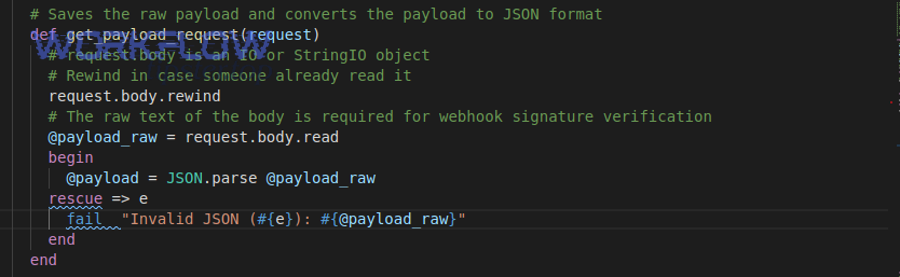
Define the payload schema explicitly: required fields, allowed types, and constraints (string length, enums, date formats). Then enforce it at the boundary—webhook intake or before outbound send.
Structured logging with correlation
Store: request ID, module name, scenario run ID, and sanitized payload preview. When invalid JSON appears, you can search and cluster by sender or field patterns.
Fallback routes and dead-letter handling
Instead of letting a scenario fail hard, route invalid payloads to a “dead-letter” path: save the raw input, notify an operator, and optionally respond to the sender with remediation instructions.
Monitor drift and documentation changes
Payload formats drift when upstream apps change fields, rename keys, or ship new versions. Add monitoring that flags new/unknown keys and unexpected type changes before they break parsing.
According to research by Postman from its State of the API 2024 reporting, teams increasingly ship and iterate APIs quickly—an environment where continuous monitoring and contract checks help prevent integration breakage from format drift.
Edge cases that look like JSON but fail: encoding, BOM, and “almost JSON” formats
These failures happen when the bytes or the format are not what the parser expects, even if the text looks correct at a glance—so you must verify encoding and confirm the content is truly JSON, not a close cousin.
Below, you’ll move from typical causes to the rare ones that consume the most time when you don’t know to check them.

UTF-8 BOM and hidden control characters
A leading BOM or invisible control characters can cause strict parsers to reject the payload. If validation fails “at the first character,” strip BOM, normalize whitespace, and ensure you are using UTF-8 consistently end-to-end.
JSON Lines (NDJSON) vs standard JSON
Some systems send newline-delimited JSON objects (one object per line). That is not the same as a single JSON document. If Make expects one JSON value, you must split lines and parse each line separately.
Arrays vs objects at the top level
Some receivers expect an object, but you send an array—or vice versa. While JSON permits both, applications often enforce one. Align the top-level type with the receiving module’s expectations.
FAQ-style checks for fast resolution
- “It validates in my editor—why does Make fail?” Your editor may be lenient; re-validate with a strict RFC-aligned validator and confirm bytes/encoding.
- “Why does it only fail for some records?” One field likely contains quotes/newlines/emoji or unexpected nulls; isolate by replaying minimal payload variants.
- “Can I embed JSON inside JSON?” Yes, but parse inner JSON into an object before re-serializing, or you risk double-encoding and invalid output.
- “How do I share findings with my team?” Publish a short runbook and keep a checklist; some teams centralize this under internal guidance titles like Workflow Tipster to standardize incident response.
According to research by the Internet Engineering Task Force from the JSONbis Working Group, in December 2017, strict interoperability considerations (including parsing and text encoding expectations) were documented alongside JSON syntax in RFC 8259—reinforcing why “almost JSON” can still fail in strict automation pipelines.