


A make webhook 400 bad request error means the HTTP request reaching your Make webhook endpoint is being rejected as a client-side problem, so resending the same request usually fails again unless you change the payload, headers, or routing.
In practice, the fastest path is Make Troubleshooting that separates “bad request content” (malformed JSON, wrong Content-Type, unexpected encoding) from “bad request capacity” (a webhook queue that’s full and getting rejected with 400).
Next, you’ll learn how to inspect exactly what Make received (method, headers, query, raw body) and how to reproduce the call with a controlled request so you can fix the root cause instead of guessing.
To start, “Giới thiệu ý mới”: you will build a simple decision tree that tells you whether the 400 is coming from your sender, your network path, or Make’s webhook handling—then apply the right fix with confidence.
What does “make webhook 400 bad request” mean in Make?
A make webhook 400 bad request response means the server (Make’s webhook endpoint) cannot or will not process what it perceives as a client error—often malformed syntax, invalid framing, or deceptive routing—so the request must be corrected before it will succeed.
Next, good make troubleshooting begins by mapping the generic HTTP meaning of 400 to the Make-specific behaviors that can also emit 400.

At the HTTP level, a 400 is a client-error status indicating the request won’t be processed because something about the request is “bad” (e.g., invalid JSON, broken headers, wrong message framing). MDN summarizes this as “the server would not process the request due to something it considered to be a client error.” Source: https://developer.mozilla.org/en-US/docs/Web/HTTP/Reference/Status/400
At the protocol-definition level, the IETF’s HTTP Working Group defines 400 similarly: the server “cannot or will not process the request due to something that is perceived to be a client error.” Source: https://datatracker.ietf.org/doc/html/rfc9110
Make adds an important twist: if you do not place a “Webhook response” module, Make uses default responses. In its Webhooks documentation, Make states that one default case returns 400 when the webhook queue is full (i.e., “queue is full”), which is capacity-driven rather than a JSON syntax issue. Source: https://help.make.com/webhooks
Why 400 is “not retryable” until you change something
A 400 is effectively a “fail-fast” signal: repeated identical requests usually keep failing because the request itself (or the circumstances of acceptance) hasn’t changed.
Next, you should treat 400 as a structured debugging problem, not a transient incident: capture the request, validate it, then re-send a corrected version.
- Content problems: invalid JSON, wrong encoding, missing required fields, wrong field types.
- Transport framing problems: mismatched Content-Length, invalid headers, proxy rewriting.
- Make-side acceptance problems: webhook queue full returning 400 by default behavior (unless customized).
Quick decision: content vs capacity
If Make logs show your request never becomes a parsed bundle, it’s usually a request construction problem; if Make responds quickly with 400 under load and queue metrics spike, it’s often capacity/queue.
Next, you’ll classify the failure modes that generate 400 before your scenario logic even runs.
Which request mistakes trigger a 400 before your scenario even runs?
Most make webhook 400 bad request incidents come from a small set of request-construction mistakes—invalid JSON, incorrect Content-Type, unsupported payload shape, or an upstream client sending data that does not match what your webhook expects.
Next, use this grouping to avoid random tweaks and instead test the most likely failure mode first.

1) Invalid JSON or unexpected JSON shape
Invalid JSON (unescaped characters, trailing commas, broken quotes) is a classic trigger, but “valid JSON with the wrong shape” is just as common: your Make mapping expects an object, but the sender posts an array; or your scenario expects a field but receives it nested differently.
Next, treat your webhook like an API endpoint: define and enforce a stable payload contract.
2) Wrong Content-Type (or sending JSON as text)
Even when the body visually looks like JSON, a sender can mark it as text/plain or omit Content-Type. Some platforms will also double-encode JSON (JSON string inside JSON) which breaks downstream parsing unless you decode explicitly.
Next, validate both the body and the headers, not just the body.
3) Encoding and newline issues
Newline handling, Unicode normalization, and accidental control characters can cause parsers to reject a body that “looks normal” in a UI log. This is especially frequent when payloads are built from CSV/Excel exports or copied from rich-text sources.
Next, you will normalize and sanitize payloads before they reach Make.
4) Oversized payloads and multipart confusion
If the sender posts large payloads, binary blobs, or multipart/form-data without a compatible boundary, your webhook may reject or fail to parse the body, leading to 400-like behavior depending on the gateway or webhook handler.
Next, split large bodies, send URLs to files instead of raw binaries, or use supported upload patterns.
This table contains the most common 400 symptoms and the fastest fixes, so you can troubleshoot by evidence rather than guesswork.
| Symptom in Make/Webhook caller | Likely cause | Fastest fix |
|---|---|---|
| 400 immediately; no usable parsed fields | Invalid JSON or broken encoding | Validate JSON (strict), remove control characters, ensure UTF-8 |
| 400 with “bad request”; body looks fine in logs | Wrong Content-Type / double-encoded JSON | Send Content-Type: application/json; decode stringified JSON |
| Works in tests, fails in production spikes | Queue full or acceptance limits | Increase processing rate, adjust scheduling, add response module, reduce bursts |
| Fails only when certain fields are present | Type mismatch (number vs string), unexpected nulls | Schema validation + coercion; set defaults; filter nulls |
According to the Internet Engineering Task Force from the HTTP Working Group, in June 2022, RFC 9110 defines 400 as a client error caused by malformed syntax, invalid framing, or deceptive routing—so you should change the request, not “retry harder.” Source: https://datatracker.ietf.org/doc/html/rfc9110
How do you debug the incoming webhook request in Make step by step?
The most reliable way to fix make webhook 400 bad request is to capture the exact incoming request, replay it with a controlled sender, and then change one variable at a time until Make accepts and parses it.
Next, this make troubleshooting workflow turns a vague “400” into a concrete diff between a failing and a working request.
Step 1: Confirm which webhook URL is being hit
Verify you are calling the correct webhook (correct scenario/environment, correct custom webhook instance, correct method). A surprising number of 400s are “wrong endpoint” issues that look like malformed payload problems.
Next, you’ll confirm the request method and headers.
Step 2: Capture method, headers, query, and raw body
Use Make’s webhook logs (or the webhook’s request detail view) to record the request method, headers, query parameters, and raw body exactly as received. This is your ground truth.
Next, you’ll compare that ground truth against a known-good request.
Step 3: Reproduce the request with a controlled tool
Replay the failing call using a stable client (e.g., curl/Postman) so you can isolate whether the sender platform is mutating the payload. Keep the same URL, method, headers, and body as the captured request.
Next, you’ll begin a “one-change” iteration loop to converge on the fix.
Step 4: Validate JSON strictly and normalize types
Run the raw body through a strict JSON validator (no lenient parsing) and confirm the top-level structure matches what your scenario expects (object vs array), then normalize field types (string vs number vs boolean) before it hits Make.
Next, you’ll make parsing deterministic by enforcing a payload contract.
Step 5: Move parsing upstream (when needed)
If the sender is unreliable (e.g., inconsistent formatting), consider adding a lightweight middleware endpoint (Cloudflare Worker, small Node/Express endpoint) to validate, coerce types, and forward a clean payload to Make.
Next, you’ll decide whether the 400 is caused by content or by webhook capacity.
According to Mozilla’s MDN documentation, a 400 typically reflects malformed request syntax, invalid framing, or deceptive routing—so debugging must start from the exact request as received, not assumptions about what you think you sent. Source: https://developer.mozilla.org/en-US/docs/Web/HTTP/Reference/Status/400
Is your 400 actually a webhook queue problem or a rate/throughput issue?
Yes—your make webhook 400 bad request can be a capacity rejection when Make’s webhook queue is full, which looks like “bad request” even though your JSON is correct.
Next, your make troubleshooting should check queue behavior and request rates before you refactor payload mapping.
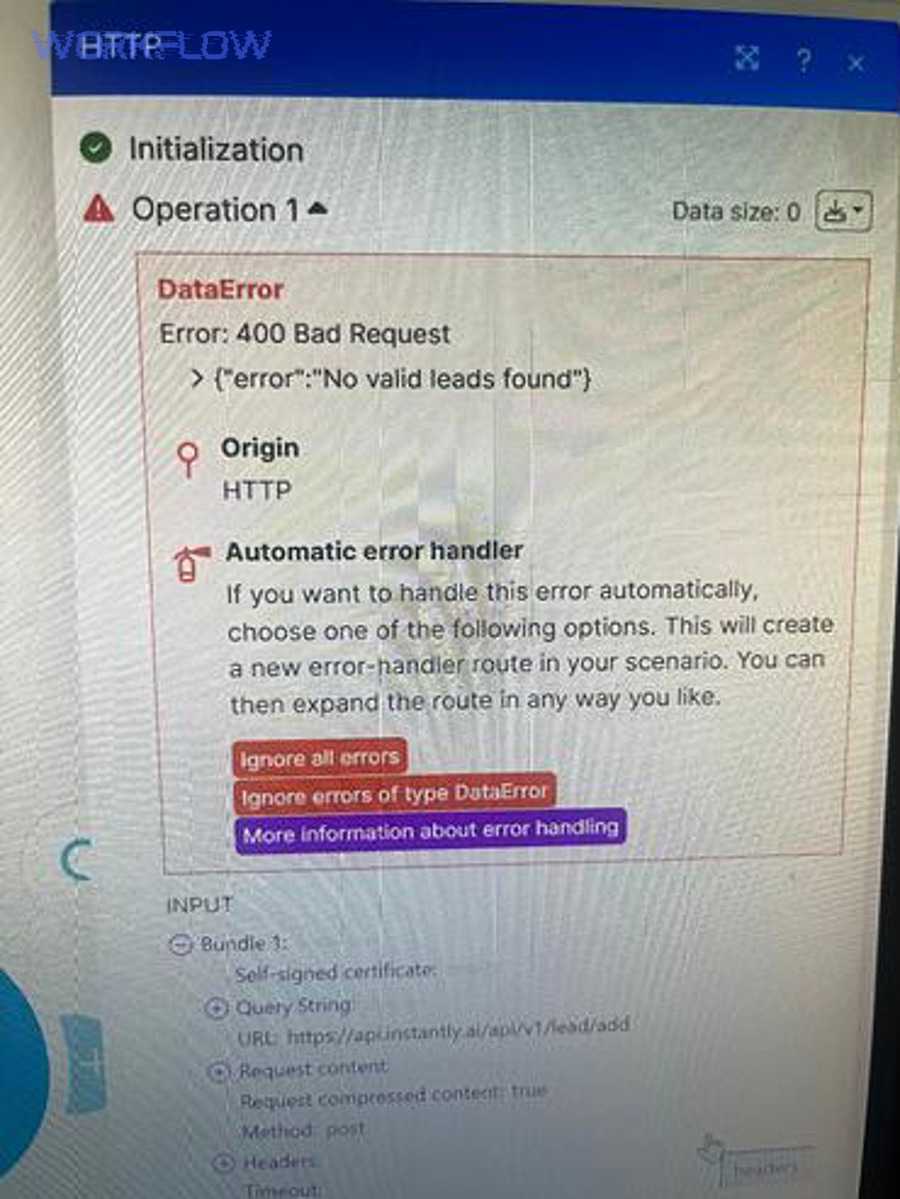
How Make’s default webhook responses can produce 400
Make’s Webhooks documentation describes default responses when you don’t place a “Webhook response” module. It explicitly lists a default 400 response for “webhook queue full” (“queue is full”), and a 429 for rate limit checks failing. Source: https://help.make.com/webhooks
Next, you must determine whether you’re filling the queue because processing is slower than incoming events.
Queue sizing and burst behavior you should account for
Make also notes that scheduled webhooks store requests in a queue and process them based on your configured maximum results, and it provides queue limits tied to subscription/credits (including a per-credits allowance and a hard maximum). Source: https://help.make.com/webhooks
Next, tune scheduling, max results/cycles, and sequential vs parallel processing to match your inbound volume.
Rate and throughput: when you should expect 429 vs 400
Make’s documentation states it can process up to 30 incoming webhook requests per second and will return 429 if you exceed that. If you are below that but still get 400, queue saturation or request structure issues become the prime suspects. Source: https://help.make.com/webhooks
Next, you’ll apply patterns that prevent bursts from collapsing your webhook acceptance.
This table contains a practical “queue vs payload” discriminator, so you can pinpoint whether to fix throughput or content first.
| Signal | Queue/capacity issue | Payload/content issue |
|---|---|---|
| Fails mostly during traffic spikes | Likely | Less likely |
| Fails consistently for a specific record | Less likely | Likely |
| Queue length grows; runs lag behind | Likely | Unrelated |
| “Replay” with curl also fails | Sometimes | Often |
How to build a “400-proof” payload contract for stable integrations?
You can prevent recurring make webhook 400 bad request failures by defining a payload contract (schema + types + required fields), validating it before sending, and versioning changes so producers and consumers never drift.
Next, you’ll translate this contract into practical validation steps that upstream systems can implement quickly.

Define the canonical schema (and freeze it)
Write down the exact fields your Make scenario expects, their types, and whether they are required. Then treat that as an API contract. If you must change it, version it: add fields as optional first, deprecate later.
Next, you’ll make upstream systems self-correcting by validating early.
Validate at the edge, not inside the scenario
If you validate only after Make receives the webhook, you will still pay the operational cost of rejected requests and ambiguity. Instead, validate in the sender (preferred) or in a small middleware endpoint that returns a clear 4xx with a human-readable error message.
Next, you’ll add type coercion rules so “numbers-as-strings” don’t break parsing.
Normalize data types and reserved characters
Enforce stable formats for dates, currency, and identifiers. For example, always send ISO-8601 timestamps as strings, and ensure decimal separators are consistent. Also sanitize line breaks and remove control characters in user-generated text.
Next, you’ll add defensive defaults for missing optional values.
Use idempotency keys to avoid repeated “bad” events
When upstream retries aggressively, you can get repeated failures that look like “an endless 400 loop.” Add an idempotency key (event ID) and dedupe upstream or at the middleware edge so one bad record doesn’t flood your webhook.
Next, you’ll secure webhook calls without accidentally causing request rejection.
How to secure and authenticate webhook calls without breaking requests?
Secure webhooks by authenticating the caller (shared secret, signature, allowlist) while keeping the HTTP request clean—because security controls that mutate headers or body can accidentally trigger make webhook 400 bad request.
Next, you’ll implement authentication in a way that is observable, reversible, and easy to debug.

Prefer request signing (HMAC) over “secret in body”
Use an HMAC signature over the raw body plus a timestamp, pass it in a header, and verify it before forwarding to Make. This avoids leaking secrets in logs and makes tampering detectable.
Next, you’ll ensure your signature is computed on the exact bytes you send, not a re-serialized JSON object.
Be careful with proxies and body reformatting
Some proxies reformat JSON (whitespace, key order) or decompress/transform bodies, which breaks signatures and can also create parsing discrepancies. If you must proxy, sign and forward the raw body unchanged.
Next, you’ll create a clean failure mode that distinguishes authentication from payload issues.
Separate authentication failures from request-format failures
When authentication fails, you want a clear auth error; when formatting fails, you want a clear parsing error. In day-to-day ops, teams often confuse these and waste hours debugging the wrong layer. In your internal runbook, explicitly differentiate auth cases such as make webhook 401 unauthorized from malformed-request cases.
Next, you’ll operationalize guardrails so upstream systems stop sending bad requests repeatedly.
According to the IETF from the HTTP Working Group, in June 2022, request framing and routing issues are valid reasons for 400; therefore, security layers must avoid rewriting the request in ways that look like invalid framing. Source: https://datatracker.ietf.org/doc/html/rfc9110
What to do when upstream systems keep sending bad requests?
If upstream systems repeatedly trigger make webhook 400 bad request, you should add “protective plumbing”: validate before sending, quarantine invalid events, and create feedback loops so producers fix their data at the source.
Next, you’ll reduce fire-fighting by making bad data visible, measurable, and stoppable.

Add a quarantine path (dead-letter queue concept)
Instead of dropping bad events silently, route them to a quarantine store (database row, S3/GCS bucket, or a “Rejected events” table) with the original raw body, timestamp, and reason. This creates a deterministic way to fix and replay.
Next, you’ll prevent one broken record from flooding your webhook.
Implement backoff and circuit breakers upstream
When producers see 400, they should stop and alert rather than retry immediately. Aggressive retries turn a single data bug into a volume incident that can fill queues and trigger more rejections.
Next, you’ll decide how to respond to upstream callers so they behave correctly.
Return actionable error messages (when you control the edge)
If you can insert middleware, return a structured JSON error response describing what failed (missing field, invalid type, invalid JSON) so producers can fix quickly. This is the difference between “random 400” and “field X must be number.”
Next, you’ll align formatting rules across your stack to eliminate recurring inconsistencies.
Standardize formatting and mapping rules across systems
Many producers generate inconsistent payloads because each team “formats” data differently (dates, decimals, locale). Consolidate rules and document them, especially around CSV-to-JSON conversion and spreadsheet exports. In internal playbooks, you can group these recurring issues under make data formatting errors to drive consistent remediation.
Next, you’ll switch from ad-hoc fixes to a compact FAQ that covers edge cases you’ll see repeatedly.
Contextual Border: Up to this point, you’ve addressed the main root causes and debugging workflow. Below, we’ll expand into edge cases, diagnostics shortcuts, and operational patterns that reduce recurrence.
FAQ and edge cases for Make webhook 400 bad request
This FAQ addresses the “last 10%” scenarios that still produce make webhook 400 bad request even after you’ve validated JSON and confirmed the correct webhook URL.
Next, these answers help you close the loop with a repeatable runbook so incidents become rare.
Why does it work in “Run once” but fail in live traffic?
Live traffic introduces concurrency, bursts, and producer retries. If your scenario is slower than incoming events, you can fill the queue and trigger rejections. Re-check your scheduling, max results/cycles, and whether sequential processing is required for ordered workloads (and if so, whether you need higher throughput elsewhere). Source: https://help.make.com/webhooks
Next, instrument queue length and execution time so you can predict saturation.
Can a proxy or WAF cause 400 even when my JSON is valid?
Yes. Proxies/WAFs can reject requests for policy reasons, rewrite headers, enforce size limits, or alter request framing. If you have any intermediary, compare raw requests at the sender, at the proxy, and at Make’s received logs to find the exact divergence.
Next, bypass intermediaries temporarily to confirm whether the 400 originates upstream or at Make.
What is the simplest “known-good” webhook request template?
Use a minimal POST with Content-Type set to application/json, a small JSON object body, and no exotic encodings. Start small, get acceptance, then add fields incrementally. This is a core technique in Make Troubleshooting when you need to isolate one breaking field quickly.
Next, once the minimal request works, lock the schema and add validation in the producer.
Should I customize the Webhook response module?
Often yes. The default behaviors can be too generic for producers. A customized response can confirm receipt, explain validation errors, or instruct backoff behavior. Just be careful to place it appropriately: if you respond too early, you might hide downstream failures; if you respond too late, producers might time out. Source: https://help.make.com/webhooks
Next, choose the response strategy that matches your producer’s retry logic and timeout settings.
- Key takeaway: Treat 400 as “change the request,” not “retry the request.” Sources: https://developer.mozilla.org/en-US/docs/Web/HTTP/Reference/Status/400 and https://datatracker.ietf.org/doc/html/rfc9110
- Make-specific takeaway: 400 can also reflect “queue is full” under default webhook responses, so check capacity signals early. Source: https://help.make.com/webhooks