


Make API limit exceeded usually means your scenario has sent too many requests in a short window (or consumed an API quota) and the platform or a connected app is throttling you, often returning an HTTP 429 response.
For day-to-day Make Troubleshooting, the fastest path is to identify whether the limit is coming from Make’s own API, a third-party app API (Google Sheets, Airtable, etc.), or from your scenario design (bursting webhooks, high parallelism, chatty pagination).
Next, you want to choose a mitigation that matches your trigger type (instant vs scheduled), because Make handles throttling and retries differently depending on scheduling and incomplete execution settings.
Giới thiệu ý mới: below is a practical, engineering-first playbook that explains the error, isolates the bottleneck, and then hardens your scenarios so “limit exceeded” becomes a rare, predictable event rather than a daily fire drill.
What does “Make API limit exceeded” mean in practice?
It means a rate limit or quota has been exceeded, so further requests are temporarily rejected until the window resets or capacity is restored. Next, you should confirm whether the rejection is from the Make API (organization rate limit) or from the connected service’s API (module/app rate limit).

In Make, people often say “API limit exceeded” for three different phenomena:
- Make API organization rate limiting: requests to the Make API are limited per minute by plan.
- Third-party API throttling: a connector (or HTTP calls) hits limits enforced by the external provider.
- Scenario burst behavior: instant triggers and parallel bundles create spikes that exceed a limit even when total daily volume looks modest.
According to research by Make from Developer Documentation, in December 2025, Make API rate limits are plan-based (e.g., Core 60/min, Pro 120/min), and exceeding them returns HTTP 429 with an organization-limit message.
The key operational nuance is that 429 is a symptom, not a diagnosis: you must trace which layer is enforcing the limit so you can apply the right control (delay, batching, concurrency cap, scheduling, or plan changes) instead of randomly adding Sleep modules everywhere.
Which limits are you actually hitting: Make API, app API, or scenario design?
There are three main limit categories, and you can distinguish them by the error message, module context, and timing pattern. Next, map the error to its category before implementing fixes, because each category has different “best” mitigations.

1) Make API organization rate limit (platform-level)
- Typical when you call the Make API endpoints (org-level automation, admin-like operations) and exceed plan allowance per minute.
- Message commonly indicates an organization request limit exceeded and returns HTTP 429.
2) Third-party app rate limit (connector-level)
- Occurs inside a specific app module (e.g., Google Sheets, Airtable, Shopify, OpenAI, etc.) or your HTTP module calling that provider.
- Message may be “rate limit error,” “too many requests,” “user rate limit exceeded,” or provider-specific codes.
3) Scenario burst/concurrency limit (design-level)
- Often shows up with instant triggers, high parallelism, or large batch runs that execute many operations in a tight timeframe.
- May look “random” because it depends on load spikes and queue behavior.
According to research by Make from Help Center content, the “rate limit error” in Make corresponds to HTTP 429 Too Many Requests, and prevention strategies differ for instant vs scheduled scenarios (e.g., maximum runs per minute, sequential processing, Sleep, and incomplete executions).
To keep your investigation disciplined, treat each failing module as an “API client,” then ask: who is enforcing the quota, what is the time window, and what is the burst driver (webhook flood, pagination loop, or parallel bundle fan-out).
How can you confirm Make organization rate limiting during make troubleshooting?
You confirm it by locating the failing module/endpoint, reading the exact 429 message, and matching it to Make’s documented organization rate limits by plan. Next, rule out third-party throttling by checking whether the error text references the external provider instead of your organization.

Use this workflow:
- Open the execution details and identify the precise module that first returns 429.
- Copy the raw error message and look for “organization exceeded” vs provider-specific language.
- Check your plan’s Make API rate limit and compare it with your peak request burst per minute.
- Correlate timing: Make org rate limiting often appears as short-lived 429 bursts during heavy admin/API activity; third-party limits correlate strongly with one app connector or one HTTP host.
According to research by Make from Developer Documentation, in December 2025, the Make API enforces organization-level per-minute limits (Core 60/min; Pro 120/min; Teams 240/min; Enterprise 1000/min), returning HTTP 429 when exceeded.
If your scenario is not calling the Make API directly, then the phrase “Make API limit exceeded” is likely being used loosely to describe a third-party rate limit. In that case, shift your focus to connector behavior: number of operations per bundle, pagination loops, and whether multiple scenarios share the same connection and collectively exceed the provider’s quotas.
How do you fix “Make API limit exceeded” in make troubleshooting workflows?
You fix it by reducing burst rate (concurrency and scheduling), reducing request count (batching and aggregation), and adding controlled retries (backoff + error handling) where appropriate. Next, choose the smallest change that stabilizes throughput without over-delaying business-critical runs.
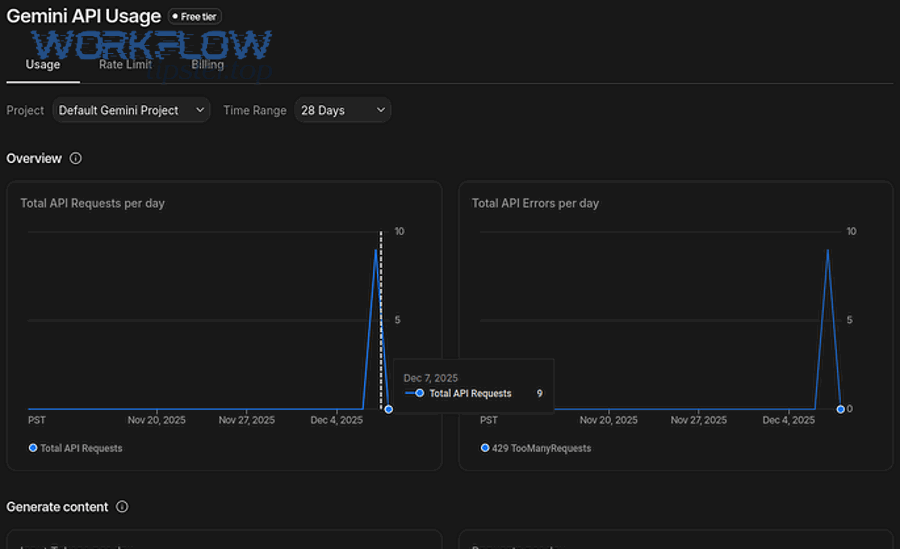
Start with the mitigation ladder below, in order. Each step is “low cost, high signal,” and you can stop once the error disappears in peak conditions.
Step 1: Cap instant trigger burst rate
- If the scenario is instant-triggered, set Maximum runs to start per minute to prevent webhook floods from starting too many executions at once.
- Enable sequential processing when ordering matters and parallelism is creating spikes.
Step 2: Add targeted delays only where they change the burst profile
- Place a Sleep module before the specific module that hits the limit, not at the top of the scenario.
- Calibrate delay to the provider’s limit (e.g., 10 requests/min implies about 6 seconds per request).
Step 3: Add an error handler route that retries safely
- For HTTP 429, use an error handling route that waits then retries, ideally with increasing delays (backoff).
- Community patterns commonly use an error route + Sleep + retry module chain to resume execution after waiting.
Step 4: Reduce the number of requests per run
- Prefer bulk endpoints (e.g., bulk add/update) and aggregator modules to replace N calls with 1 call.
- Lower “records per run” when running every minute to prevent per-run spikes.
According to research by Make from Help Center guidance, in a rate-limit event without an error handler, Make may pause scheduled runs (e.g., 20 minutes) or rerun with exponential backoff depending on scenario type and incomplete execution settings.
As a practical rule: first stabilize start rate (so the system stops spiking), then optimize request density (so each run does more work per call), and only then add retries (so residual 429s self-heal).
How do you cut request volume with batching, aggregation, and smarter pagination?
You cut request volume by doing more work per call: batch writes, aggregate bundles, and paginate with strict limits and checkpoints. Next, redesign “chatty” loops that read/write one record at a time, because they are the most common hidden cause of limit exceeded errors.

High-leverage tactics:
- Bulk operations: if an app offers “bulk add rows” or “bulk update,” use it to collapse many small requests into fewer large ones.
- Aggregator modules: aggregate multiple bundles into a single bundle before sending to the destination API, particularly for write-heavy scenarios.
- Pagination discipline: cap page size, cap maximum pages per run, and store checkpoints (cursor/offset) so you never re-scan the same range.
- De-duplication gates: before writing, check whether the record already exists (or use upsert-style endpoints) to avoid repeated writes that waste your quota.
Below is a table that helps you quickly identify “request inflation patterns” and the design refactor that typically eliminates them.
| Pattern you see in executions | Why it hits limits | Refactor that usually fixes it |
|---|---|---|
| Loop writes 1 row per bundle to Sheets/DB | High request count in a short window | Aggregate bundles + bulk insert/update |
| Pagination pulls entire dataset every run | Repeated reads consume quota continuously | Checkpoint cursor + incremental fetch only |
| Multiple scenarios share one connection | Combined throughput exceeds provider rate | Stagger schedules + per-scenario throttles |
| Instant trigger spawns parallel executions | Burst concurrency spikes request rate | Max runs/min + sequential processing |
According to research by Make from Help Center recommendations, when scheduled scenarios must run frequently, limiting records processed per run (e.g., about 20) can reduce the likelihood of exceeding rate limits compared to processing large batches every minute.
In short, “limit exceeded” is often solved not by slowing down everything, but by compressing work: fewer calls, larger payloads, and a design that never re-reads or re-writes the same data unnecessarily.
How should you implement retries (exponential backoff) without duplicating data?
You should retry only transient 429s using exponential backoff and idempotent design so a repeated call cannot create duplicates. Next, introduce an error-handling route that waits and retries, while also adding a de-duplication key (or upsert) at the destination.

Retrying 429 is correct when the provider is throttling temporarily, but it becomes dangerous when a “retry” can create a second invoice, a duplicate row, or a second customer record. Use these guardrails:
- Classify errors: retry 429 and some 5xx; do not blindly retry 4xx validation failures.
- Backoff schedule: start small (e.g., 5–10 seconds), then increase (e.g., 20s, 40s, 80s) until the provider’s window resets.
- Idempotency key: include a stable unique key in your request (or write to a DB with a unique constraint) so replays are safe.
- Resume logic: in Make, implement an error route that waits then replays the failing module or continues after recovery.
To make the backoff concept more concrete, here is a short video that explains why exponential backoff reduces synchronized retries (“thundering herd”) and stabilizes APIs under load:
According to research by Make from Help Center documentation, when incomplete executions are enabled, Make can rerun incomplete executions using exponential backoff in many rate-limit scenarios, which often resolves transient throttling without manual intervention.
If you need one operational principle to remember: backoff protects the API, but idempotency protects your data. Implement both, and retries become a reliability tool rather than a data-integrity risk.
How do you prevent rate-limit spikes in instant triggers, webhooks, and high parallelism?
You prevent spikes by controlling scenario start rate, enforcing sequential processing where needed, and smoothing bursts with queue-like behavior (small batches, staggered schedules). Next, treat instant triggers as “burst amplifiers” and engineer explicit dampers into your scenario.

Instant triggers can create runaway concurrency because every inbound event can start a run, and a backlog can build faster than downstream APIs can accept requests. Use these patterns:
- Maximum runs to start per minute: the simplest, most effective “rate limiter” for webhooks in Make.
- Sequential processing: forces one-at-a-time handling to avoid parallel spikes, especially when multiple modules hit the same provider.
- Buffer-and-drain: write inbound events to a storage layer (Sheets/DB/queue-like table), then process them on a scheduled scenario that drains at a controlled rate.
- Fan-out discipline: if one trigger leads to many API calls (e.g., enrich, sync, notify), aggregate and batch those calls instead of issuing them per event.
According to research by Make from Help Center guidance, sequential processing and run-rate controls are recommended mitigation strategies for rate limit errors in instant scenarios, because they spread sudden spikes of requests over longer periods.
The deeper point is architectural: instant triggers are excellent for low-latency workflows, but scheduled “drain” processors are often superior for high-throughput syncing because they allow you to explicitly shape traffic.
When should you change plans, split workloads, or redesign capacity?
You should change plans or redesign capacity when throttling persists after you have reduced burst rate and request count, especially if your business requirements demand higher sustained throughput. Next, compare your peak requests per minute to your plan’s Make API limit and your providers’ limits to see which upgrade (or redesign) actually removes the bottleneck.

Capacity decisions in Make are rarely “upgrade or suffer”; you typically have three levers:
- Plan-based throughput: if you are truly limited by the Make API organization limit, upgrading increases the allowed requests per minute.
- Workload shaping: stagger schedules, drain queues, and reduce parallelism so your traffic pattern fits within existing quotas.
- Topology: split scenarios by function (ingest vs process vs publish) and cap each segment’s rate, so one noisy workflow cannot starve the rest.
In practice, many “API limit exceeded” incidents are not solved by upgrading Make because the real constraint is the third-party provider’s API quota (especially on free tiers). For example, some providers enforce strict monthly call limits, and Make can only slow down or retry; it cannot bypass those quotas.
According to research by Make from Pricing/Plan information, in December 2025 the Make API rate call limit per minute scales by plan (e.g., Core 60, Pro 120, Teams 240, Enterprise 1000), which can matter for high-scale admin/API usage.
Choose upgrades only after you quantify the constraint. If the provider is the bottleneck, your ROI is usually higher from batching + queue draining than from higher platform limits.
How do you operationalize limits: monitoring, runbooks, and client expectations?
You operationalize limits by documenting per-connector quotas, setting scenario-level traffic budgets, and building a runbook that prescribes the correct mitigation for each limit source. Next, treat limits as a normal SRE concern—observable, testable, and automatable—rather than as a mysterious connector failure.

Build a simple operational system around your scenarios:
- Traffic budget per scenario: define an expected ceiling (requests/min) for each connector-heavy scenario, and enforce it with scheduling and run caps.
- Connector limit registry: maintain a table of each provider’s documented quota, reset window, and recommended backoff strategy.
- Standard error handling: implement a consistent 429 handler pattern (wait + retry + resume) for connectors where retries are safe.
- Client messaging: if you build scenarios for clients, explain that API throttling is an external constraint and that mitigation is a balance between speed and quota safety.
Below is a table that helps teams align incident response: it ties the observed symptom to the first-line action and the longer-term fix.
| Symptom | First-line action | Long-term fix |
|---|---|---|
| 429 with Make organization limit message | Reduce Make API calls/min; stagger admin/API workflows | Optimize endpoints; upgrade plan if required by sustained demand |
| 429 from one app module (provider message) | Add backoff + Sleep; reduce per-run records | Batch/aggregate; redesign to queue-and-drain; adjust provider plan |
| Throttling only during webhook bursts | Set max runs/min; enable sequential processing | Buffer inbound events; scheduled drain; reduce fan-out calls |
According to research by Make from Help Center guidance, rate limit errors are common with instant triggers and high-volume processing, and mitigation includes scheduling controls, sequential processing, Sleep, and bulk/aggregator approaches.
The payoff is reliability: once you standardize how you detect and handle throttling, your team stops “guess fixing” and starts applying deterministic controls based on the limit source.
Contextual border: The sections above cover the core intent—diagnosing and fixing “Make API limit exceeded.” Next are advanced guardrails and closely related errors that are frequently confused with rate limiting, useful when you run high-scale automations or support multiple clients.
Advanced guardrails that keep “limit exceeded” rare at scale
At scale, you prevent limit exceeded incidents by enforcing explicit rate policies (token bucket), improving observability, and training your team to distinguish throttling from authentication or trigger failures. Next, use the four guardrails below to harden complex scenario portfolios where multiple workflows compete for the same quotas.

How do token-bucket policies translate into Make scenario controls?
You can approximate token-bucket rate limiting by combining max runs/min, record limits per module, and controlled delays so your scenario never exceeds a known request budget. Next, define your “tokens” as requests or operations, then enforce the budget at the most bursty boundary (usually the trigger).
Practically, that means:
- Limit scenario starts per minute for instant triggers.
- Limit records processed per run for scheduled drains.
- Aggregate before writing, so each “token” does more work.
What observability signals should you track for rate limits?
You should track burst indicators (runs started/min, bundles processed/run), connector hot spots (which module throws 429), and recovery behavior (rerun counts and delays). Next, turn these into a lightweight dashboard or weekly review so you detect quota pressure before it becomes an incident.
High-value signals include:
- Top 5 scenarios by peak runs/min and peak operations/run
- Top 5 connectors by 429 frequency
- Mean time to recovery after a 429 (with and without error handling)
Which common errors look like rate limits but require different fixes?
Some frequent support tickets are not rate limiting at all, so the “Sleep and retry” instinct wastes time and can hide the real issue. Next, separate throttling from authentication and trigger problems by checking whether the error is 401/403 auth-related, or whether the trigger never emitted events.
In practical make troubleshooting, teams often mix up rate limits with issues like Make Troubleshooting playbooks for auth and triggers, including cases labeled make oauth token expired and make trigger not firing in internal tickets. Those are resolved by re-authorizing connections, refreshing tokens, verifying webhook subscriptions, and confirming trigger schedules—not by throttling controls.
FAQ quick answers for “Make API limit exceeded”
These answers are designed to be copied into internal runbooks or client replies. Next, use them to reduce repeated diagnosis cycles and keep responses consistent across your team.
- Is 429 always my fault? No; it often indicates a provider’s quota policy, but you control burst rate, batching, and retries to operate within that policy.
- Should I add Sleep everywhere? No; add it only where it changes the burst profile for the failing module, and prefer batching/aggregation first.
- Why did it start happening “suddenly”? Most often due to a volume spike, an added scenario sharing the same connection, or a provider enforcing limits more strictly on certain plans.
- What’s the fastest stable fix? Cap runs/min for instant triggers, reduce records/run for scheduled scenarios, then add a 429 error handler with backoff.