


If you want reliable DevOps visibility without living in five dashboards, the most practical approach is to route GitHub signals (PRs, issues, CI/CD runs) into ClickUp (work tracking) and Microsoft Teams (team-wide alerts) using a simple, repeatable automation workflow.
Next, you also need to choose how to build it—native integrations, GitHub Actions, or an automation platform—because each option changes how much control you have over routing, formatting, and long-term maintenance.
Then, the workflow only stays useful if it avoids alert overload: you’ll need severity rules, deduplication, and “update-not-create” patterns so Teams notifications remain actionable instead of becoming background noise.
Introduce a new idea: once the setup works and the noise is controlled, you can harden the system with governance, least-privilege access, and scalability patterns across multiple repos and environments.
What are “GitHub → ClickUp → Microsoft Teams DevOps alerts,” and what problem do they solve?
GitHub → ClickUp → Microsoft Teams DevOps alerts are an automation workflow that captures GitHub engineering events and turns them into ClickUp task updates plus Teams notifications, so DevOps teams can triage, assign, and resolve delivery issues faster with a shared operational view.
To better understand why this matters, think about what typically breaks DevOps flow: signals are scattered across PR pages, CI logs, and chat threads, so the team loses time translating “what happened” into “who owns it” and “what to do next.” This workflow fixes that gap by connecting three layers:
- Signal layer (GitHub): the source of truth for code, PRs, issues, and CI/CD results
- Work layer (ClickUp): the source of truth for ownership, priorities, and resolution steps
- Communication layer (Microsoft Teams): the place where coordination happens in real time
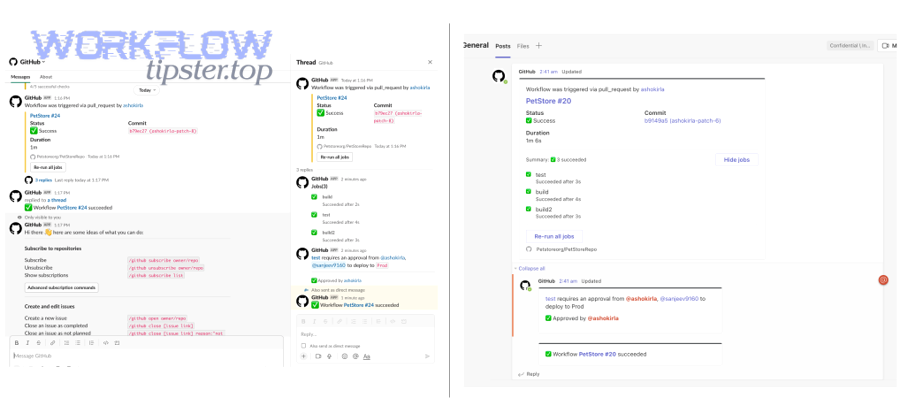
How the workflow creates a “single operational story”
A good alert is not “Build failed.” A good alert is a mini-story:
- What changed (repo, branch, commit/PR)
- What happened (test failed, deploy failed, security check failed)
- Impact (blocking release, production incident risk, degraded reliability)
- Owner (team/person, service owner, CODEOWNERS hint)
- Next action (create/update ClickUp task; notify channel; link to logs)
When this story is consistent, it becomes a predictable triage loop and reduces coordination friction inside Teams. Microsoft has also highlighted how fragmented work is increasingly shaped by constant interruptions (meetings, email, notifications), reinforcing the need to make each notification more meaningful rather than simply more frequent. (microsoft.com)
Which GitHub events should trigger CI/CD notifications and task updates?
There are 4 main types of GitHub events you should use for DevOps alerting—PR lifecycle, issue lifecycle, workflow runs, and releases/deployments—based on the criterion “does this event change delivery risk or require human action?”
Specifically, grouping events this way prevents the common mistake of alerting on everything. You only want alerts that either (1) block a delivery path, (2) indicate a regression, or (3) require coordinated decision-making.
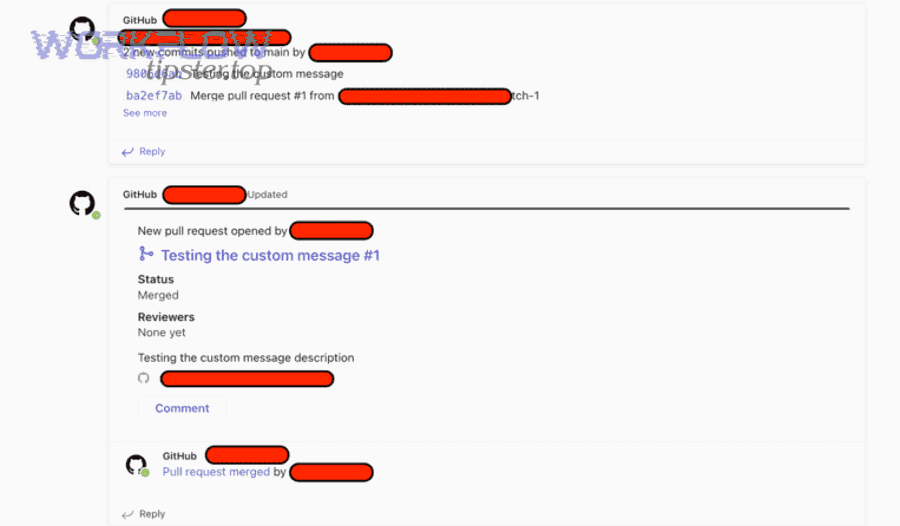
Which pull request events are most useful for DevOps alerting?
The most useful PR events are the ones that represent handoffs and risk transitions, because they directly affect release readiness. Focus on:
- PR opened / reopened: create or link a ClickUp task (if you track features via tasks)
- Review requested / changes requested: notify the owning team channel (only if it blocks the merge)
- PR merged: update ClickUp status (e.g., “Merged → Ready for Deploy”) and optionally post a Teams note
- Merge conflicts detected: route to the PR owner (avoid blasting a whole channel)
A simple pattern that works well:
- PR opened → create or link ClickUp task
- PR merged → update ClickUp task status + notify release channel if merge is to main
Which CI/CD workflow run signals matter most (success, failure, canceled)?
Workflow notifications should be failure-biased, because success is expected and quickly becomes noise.
Use these signals:
- workflow_run: failure (or job failure) → create/update a “CI failure” task, notify a triage channel
- workflow_run: success → optional (only for production deploy workflows or compliance-critical checks)
- workflow_run: canceled → usually no alert unless it indicates a broken pipeline or blocked deployment
- check_suite / check_run events → good for per-PR gating (tests, lint, security scans)
Tie each alert to the minimum useful context:
- run name + failing job name
- branch/environment
- commit SHA + PR number (if relevant)
- link to logs
- “who owns it” hint
If you want a stable mental model, DORA’s software delivery metrics emphasize outcomes like recovery time and failure rates, which aligns with making failure signals more visible than routine successes. (dora.dev)
Which release and deployment events should notify Teams vs only update ClickUp?
Deployment signals should be routed based on audience:
- Teams notifications for events that require coordination:
- production deploy failed
- rollback executed
- release blocked (gating failed)
- security policy failure affecting release
- ClickUp-only updates for events that primarily affect tracking:
- staging deploy success
- release created/published (if no action needed)
- build artifact produced (if it’s not a handoff)
A practical rule:
- If a human must coordinate within 15 minutes, post to Teams.
- Otherwise, update ClickUp and keep the alert silent.
How do you set up the automation workflow step-by-step from GitHub to ClickUp to Microsoft Teams?
The most reliable method is to build the workflow in 7 steps—define event scope, connect GitHub, connect ClickUp, connect Teams, map fields, add dedupe/noise controls, and run a test plan—so alerts become actionable task updates and channel notifications instead of random pings.
Then, once you treat setup as a pipeline (not a one-off integration), you’ll avoid the classic problem where “it worked once” but fails during real incident pressure.
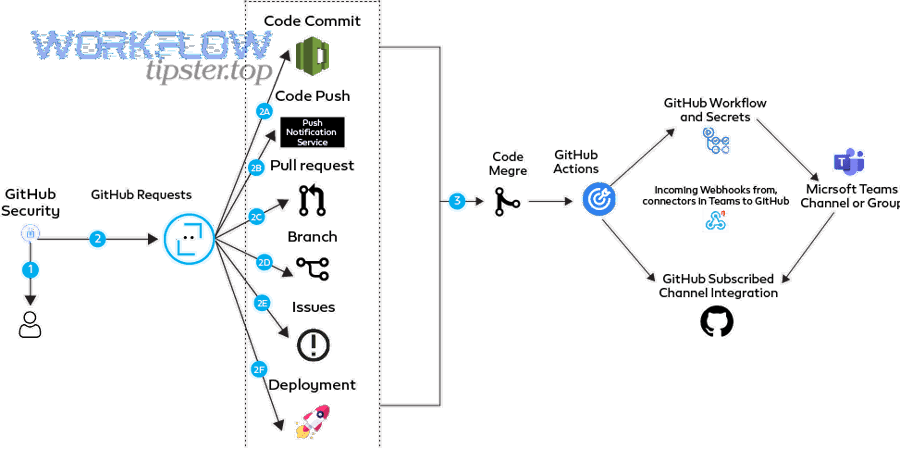
What prerequisites (permissions, channels, ClickUp structure) do you need before connecting tools?
You need three prerequisites—stable destinations, stable ownership, and stable permissions—because automation workflows fail most often when the destination model is vague.
1) Stable destinations
- Choose the Teams channels (e.g.,
#devops-alerts,#release-status,#service-payments) - Decide whether alerts are posted as new messages or threads (threading helps reduce noise)
2) Stable ownership
- In ClickUp, define where DevOps triage lives:
- Space → Folder → List (e.g.,
DevOps→Incidents & CI→CI Failures)
- Space → Folder → List (e.g.,
- Agree on task status taxonomy:
New→Triaging→Assigned→Fix in Progress→Resolved→Verified
3) Stable permissions
- GitHub: confirm repo access and whether you can install apps, create webhooks, or run Actions
- ClickUp: confirm API access (workspace permissions + list access)
- Teams: confirm connector/app posting permission to the target channels
How do you map GitHub issues/PRs to ClickUp tasks without losing context?
You map GitHub items to ClickUp tasks by using a consistent ID strategy + field mapping so each GitHub object updates the same task over time.
A proven mapping strategy
- Use a unique key stored in ClickUp (custom field), such as:
github_pr_urlorgithub_issue_url- or
repo + PR number
- On every event:
- Search ClickUp for an existing task with that key
- Update if found; create if not found
Minimum ClickUp fields to populate
- Title:
Repo • PR #123 • Short summary - Description: include PR/issue URL + commit SHA + failing job + log link
- Assignee: PR author or service owner (if known)
- Tags:
ci,deploy,hotfix,security - Status: map from event (e.g., failure →
Triaging, success after fix →Verified)
This is where you can naturally extend to other operational patterns you may already use, like freshdesk ticket to asana task to microsoft teams support triage—the same mapping principles apply: unique ticket IDs, update-not-create, and clear ownership.
How do you format Microsoft Teams alerts so they’re actionable (not noisy)?
You format Teams alerts by ensuring each message contains context + owner + next step, because “FYI” alerts are what create alert fatigue.
A high-signal Teams alert includes:
- Headline: “CI failed on main: payments-service”
- Impact: “Blocks deploy to production”
- Owner: “Assigned to @oncall-payments”
- Action: “ClickUp task created/updated: [link]”
- Evidence: “Failing job: integration-tests; run: [link]”
If you use Adaptive Cards, keep them minimal:
- one “Open logs” button
- one “Open ClickUp task” button
- one “Open PR” button
Here’s one practical video overview of Teams message cards and workflow-style notifications you can adapt to CI/CD alerts:
Evidence: Microsoft reported that employees using Microsoft 365 are interrupted, on average, every 2 minutes by a meeting, email, or notification—making “high-signal” notification design essential. (microsoft.com)
Should you use native integrations, GitHub Actions, or an automation platform for this workflow?
Native integrations win in speed and simplicity, GitHub Actions is best for version-controlled customization, and automation platforms are optimal for multi-step routing and non-engineer maintenance—so the “best” choice depends on control, scale, and how often your workflow changes.
Meanwhile, if you decide based only on “what’s easiest today,” you often pay for it later with brittle mappings or untraceable failures.
Before comparing, here is a quick table summarizing what each approach is best at (this table helps you pick the right build path based on ownership and complexity).
| Approach | Best for | Limits | Typical fit |
|---|---|---|---|
| Native integrations | Fast setup, standard event-to-task linking | Limited routing logic, limited dedupe controls | Small-to-mid teams, standard PR/task linking |
| GitHub Actions | Full control, code-reviewed configs, reusable workflows | Requires engineering ownership | DevOps-heavy orgs, CI/CD-driven alerting |
| Automation platforms | Conditional routing, multi-app chains, non-dev maintainers | Cost, rate limits, complexity sprawl | Cross-team workflows, many destinations |
Is a native integration enough for most DevOps alert workflows?
Yes—native integration is enough if your workflow is primarily “link PRs/issues to tasks + post basic notifications,” for three reasons: it’s fast to deploy, easy to maintain, and reduces integration surface area.
However, if you need environment-based routing (“prod failures go to on-call”), dedupe keys, or message templates, you’ll outgrow it quickly.
Use native when:
- one repo or a few repos
- one or two Teams channels
- simple mappings (PR ↔ task)
- minimal conditional logic
How does GitHub Actions compare to no-code automation for Teams notifications?
GitHub Actions wins in traceability and control, no-code wins in speed and flexibility across apps, and neither is universally superior.
- GitHub Actions advantages
- config lives in repo (reviewable, versioned)
- secrets managed in GitHub
- easy to standardize across repos
- can compute idempotency keys and do “update-not-create” robustly
- No-code advantages
- faster iteration on routing rules
- easier for ops/project leads to adjust mappings
- more convenient for multi-app chains beyond GitHub
If your team already builds operational chains like airtable to microsoft excel to onedrive to docusign document signing, you’ll recognize the same tradeoff: code gives you deep control; no-code gives you speed and cross-tool reach.
When should you choose an automation platform over custom scripts?
Choose an automation platform when you need routing complexity and multi-destination orchestration, for three reasons: it supports branching logic, reduces custom maintenance overhead, and makes cross-team visibility easier.
Strong signals you need a platform:
- multiple channels per repo/service
- severity-based routing (critical vs info)
- enrichment steps (lookup owner, service tier, environment)
- “create in ClickUp + notify Teams + comment in GitHub” in one flow
How do you prevent duplicate alerts and reduce notification noise?
You prevent duplicate alerts and reduce noise by combining filters, deduplication keys, and update-not-create task behavior, because DevOps alerts become harmful when they fragment attention without improving response quality.
More importantly, noise control is not “mute everything”; it is “promote the signals that drive action.”
What filtering rules reduce noise without hiding critical failures?
Filtering works best when it is policy-based rather than emotional (“too many alerts!”). Use rules like:
Branch and environment rules
- Notify on
main/release/*branches - Notify only for
productiondeploy workflows (orstagingif you’re in a release window)
Severity rules
- Page/urgent Teams channel only for:
- deploy failed
- rollback
- security gate fail on release branch
- Post non-urgent info to a lower-signal channel (or ClickUp-only)
Flaky test rules
- Require repeat failure threshold (e.g., 2 failures in 15 minutes) before notifying
- Route flaky suites to a “quality backlog” ClickUp list instead of the on-call channel
Time-window rules
- Batch informational alerts during working hours
- Escalate critical only after-hours
How do you deduplicate webhook retries and repeated CI failures?
Deduplication requires a stable idempotency key and a decision to update rather than create.
Use an idempotency key
- For workflow runs:
repo + workflow_name + run_id - For PR checks:
repo + PR_number + check_name + sha - For issues:
repo + issue_number + action
Update-not-create mechanics
- If a ClickUp task exists with that key → update the same task:
- append latest failure details
- increment failure count
- keep one canonical task link in Teams (edit message if possible, or post in thread)
Prevent “event storms”
- Add a cooldown: “don’t notify again for the same key for 10 minutes unless severity increases”
This matters because alert fatigue is a real operational risk; PagerDuty frames it as a condition where excessive alerts can degrade response quality and increase the chance of missing critical signals. (pagerduty.com)
What are common setup failures, and how do you troubleshoot them quickly?
There are 5 common failure categories—authentication, permissions, event delivery, mapping errors, and rate/format limits—based on the criterion “where the signal breaks between GitHub, ClickUp, and Teams.”
In addition, you troubleshoot faster when you diagnose by symptom (what you see) and map it to a single failure class rather than randomly changing settings.
Are permissions and OAuth scopes the #1 cause of broken DevOps alerts?
Yes—permissions and OAuth scopes are the #1 cause for three reasons: integrations often “connect” without full rights, scopes can change over time, and repo/channel-level permissions differ from org-level assumptions.
Besides, scope failures often look like “silent failures” where nothing posts, which makes teams waste time searching the wrong place.
Fast checks:
- GitHub app installed on the right repo(s)?
- Webhook event types enabled?
- ClickUp token has access to the workspace + list?
- Teams connector/app allowed to post in that channel?
What do you do when Teams messages don’t post or cards don’t render?
You fix Teams posting issues by checking destination permission, payload format, and message size, because Teams rejects messages that don’t match the connector/app’s expectations.
Checklist:
- Confirm the exact channel is valid and the app has access
- If using cards:
- validate the schema
- remove complex elements until it renders
- Reduce payload size:
- keep only essential fields
- link out to logs rather than embedding too much
Practical workaround:
- Post plain text + links first
- Upgrade to cards after reliability is proven
How do you monitor and validate that alerts are actually being delivered?
You validate delivery by running a test plan + ongoing health checks, because “we assume alerts work” is how teams discover failures during incidents.
A simple validation plan:
- Trigger a known CI failure (safe test workflow)
- Confirm Teams message arrives with correct links
- Confirm ClickUp task is created/updated (not duplicated)
- Trigger a recovery (success after failure) and verify state transition
- Review logs: ensure retries don’t create new tasks
Ongoing monitoring:
- daily “heartbeat” workflow run that posts to a low-noise channel
- weekly audit: count GitHub failures vs ClickUp tasks created/updated
- alert on missing deliveries (dead-letter pattern)
Evidence: DORA’s delivery metrics emphasize measuring delivery stability (including failure-related outcomes), reinforcing that “failure visibility and recovery loops” are core to operational performance. (dora.dev)
How can you optimize governance, security, and scalability for GitHub → ClickUp → Teams DevOps alerts?
You optimize governance, security, and scalability by applying least-privilege access, severity governance, multi-repo routing standards, and reliability controls (retries + idempotency + fallback) so the workflow remains trustworthy as teams and repos grow.
Next, this is where micro-level improvements pay off: the goal shifts from “make it work” to “make it safe, scalable, and boring.”
What is the least-privilege permission model for GitHub webhooks, ClickUp access, and Teams posting?
Least privilege means each connector can do only what it must, for three reasons: it limits blast radius, reduces accidental data exposure, and makes audits simpler.
Practical controls:
- GitHub
- prefer GitHub Apps with repo-scoped permissions over broad personal tokens
- enable only necessary webhook events
- rotate secrets and validate webhook signatures
- ClickUp
- use a dedicated integration user with constrained workspace/list access
- store only required identifiers (PR URL, run URL) in tasks
- Teams
- restrict posting to specific channels
- document which workflow posts where (an “alerts registry”)
How do you design alert severity tiers (critical vs informational) to avoid “alert fatigue”?
Critical wins for time-sensitive risk, informational is best for visibility without urgency, and silence is optimal for non-actionable events—so severity tiers should explicitly define what you do not notify about.
To illustrate the antonym relation that matters here—alert vs silence—use a severity matrix:
| Tier | Meaning | Where it goes | Example events |
|---|---|---|---|
| Critical | Human action needed now | On-call / priority Teams channel + ClickUp | prod deploy failed, rollback, security gate fail on release |
| Important | Needs action soon | DevOps alerts channel + ClickUp | CI failed on main, flaky suite repeats, release blocked |
| Informational | FYI visibility | Low-noise channel or ClickUp-only | staging deploy success, release published |
| Silent | Not actionable | No Teams message | routine success checks, minor status updates |
PagerDuty’s guidance on alert fatigue emphasizes that too many alerts can lead to missed critical issues and degraded team performance, which is why severity design is not optional once you scale. (pagerduty.com)
How do you scale this workflow across multiple repos, environments, and teams?
You scale by standardizing routing rules and templates, because manual per-repo customization creates drift and breaks during re-orgs.
Scaling patterns:
- Route by repo naming convention (e.g.,
payments-*→#payments-alerts) - Route by environment (prod vs staging)
- Route by ownership (CODEOWNERS/service catalog)
- Use a shared alert template so every message tells the same story
If you already manage multi-destination support flows like freshdesk ticket to trello task to discord support triage, you can reuse the same pattern: one canonical ticket/task object, consistent routing, and clear ownership per destination.
How do you enforce reliability with retries, idempotency keys, and a “dead-letter” fallback?
Reliability comes from building a failure-aware pipeline, because external APIs fail, webhooks retry, and network issues happen at the worst time.
Core controls:
- Retries with backoff for transient failures
- Idempotency keys so retries don’t create duplicates
- Dead-letter fallback:
- if posting to Teams fails, write a “delivery failed” note into ClickUp
- or send a fallback message to a dedicated “integration-health” channel
- Missing alert detection:
- compare expected failures (GitHub) vs recorded work items (ClickUp)
This is how you keep the workflow trustworthy even when the underlying tools are briefly unreliable—so DevOps alerts remain a system, not a hope.