


A 429 “API Limit Exceeded” error in Zapier usually means one of your steps is sending too many requests in a short window, so Zapier or the connected app temporarily throttles your Zap until the request rate drops. The fastest path to recovery is to confirm where the limit is enforced (Zapier vs. the app), then smooth the burst with delays, batching, and retries.
If you’re seeing “API Limit Exceeded” specifically as HTTP 429, it maps to the web standard for “Too Many Requests,” and it often includes guidance like a Retry-After wait time that tells you when to try again. (developer.mozilla.org)
Many “429” incidents are actually caused by bursty Zap behavior: a large batch of triggers, loops that fan out actions, or multiple Zaps hitting the same app connection at once. In other cases, the connected app’s API quota is the true bottleneck, and Zapier is simply surfacing the app’s response.
Introduce a new idea: the most reliable fix is not “slow everything down,” but “control the burst” so your automations keep running without repeatedly tripping rate limits.
What does “API Limit Exceeded” (429 rate limit) mean in Zapier?
A 429 “Too Many Requests” error means your Zap (or a webhook route) exceeded an allowed request rate, so the system rejects or throttles requests until you back off and retry more slowly. (developer.mozilla.org)
Next, to anchor this in Zapier reality, remember that Zapier and each connected app can impose rate limits—so “API Limit Exceeded” is the symptom, and the root cause is “too many requests too quickly,” not necessarily “Zapier is broken.” Zapier explicitly notes that when a large number of triggers or actions happen in a short time, they can be throttled to reduce frequency. (help.zapier.com)
Here’s what “429” typically looks like inside Zapier:
- In Task History, you’ll see an error on a step (often an action step calling an external API).
- In Webhooks by Zapier, you’ll see a 429 status code when webhook calls exceed the documented limits. Zapier documents examples like 20,000 requests per 5 minutes per user, and for certain legacy webhook routes 1,000 requests per 5 minutes per Zap. (help.zapier.com)
- In instant triggers, Zapier documents that Zaps with instant triggers can encounter 429 errors if they exceed 20,000 requests every 5 minutes per user. (help.zapier.com)
The practical takeaway: “429” is a speed problem, not a data problem. Your Zap is trying to do valid work at an invalid pace for the limit in effect.
What are the most common causes of 429 rate limit errors in Zapier automations?
There are 6 main causes of Zapier 429 “API limit exceeded” errors: (1) bursty triggers, (2) fan-out loops, (3) multiple Zaps sharing one app connection, (4) webhook spikes, (5) retries without backoff, and (6) account-level or step-level limits being reached based on plan or route type. (help.zapier.com)
Then, to troubleshoot efficiently, you want to map your symptoms to one of these patterns—because each pattern has a different “fast fix.”

Here’s a breakdown of each cause and the specific behavior that creates the limit spike:
- Bursty triggers (sudden spikes of events): A surge of new rows, form submissions, payments, or webhook deliveries can trigger hundreds or thousands of Zap runs in minutes. If each run calls the same app API, you get a dense request burst and trip a rate limit.
- Fan-out behavior (one trigger → many API calls): Looping through lists and calling an API per item, “find-or-create” patterns that do multiple API calls per record, and repeated searches across paths all multiply requests per trigger.
- Shared app connection across many Zaps: Zapier notes that an app’s rate limit can be shared across all Zaps in your account, so combined usage can exceed the app’s threshold even if each Zap looks light. (help.zapier.com)
- Webhooks spikes and legacy route limits: If you use Webhooks by Zapier, Zapier documents specific rate limits and states you will see 429 when exceeding them. (help.zapier.com)
- Retries without real backoff: If the sender retries aggressively, you can create a loop: rate limit → retry → rate limit. Zapier recommends using “industry-standard exponential backoff” for retries in webhook delivery scenarios. (help.zapier.com)
- Plan- or mechanism-specific throttling: Zapier’s own throttling can occur during high activity, and Zapier documents certain limits depending on plan and trigger mechanics. (help.zapier.com)
Important: This section is core zapier troubleshooting—you’re not just fixing an error message, you’re identifying the traffic pattern that causes the error.
Is the 429 rate limit coming from Zapier or the connected app?
Yes—you can usually tell whether a 429 is enforced by Zapier or the connected app, and the fastest way is to inspect (1) the step type, (2) the error message wording, and (3) whether the limit matches Zapier-documented thresholds. (help.zapier.com)
Next, treat this like a source-identification exercise: you’re not solving “429” yet—you’re answering “whose 429?”
Use this practical decision checklist to identify the source:
- Likely Zapier-side when: The failing step is Webhooks by Zapier and the response aligns with Zapier’s webhook limits; you see guidance consistent with Zapier throttling; or the scenario matches Zapier’s documented 20,000/5-min per user threshold for instant triggers. (help.zapier.com) (help.zapier.com)
- Likely app-side when: The message names the app, mentions quota/billing tiers, or only a specific app step fails while other steps remain healthy.
- Mixed-source when: Zap bursts amplify the connected app’s API limit, especially when multiple Zaps share the same app connection and the same step fails across many runs at once.
Zapier also provides a simple heuristic: to differentiate between an app error and a Zapier error, look for “Zapier” in the error message. (help.zapier.com)
What’s the difference between “Zapier-side limits” and “app-side limits” when troubleshooting?
Zapier-side limits are throttles and request caps enforced by Zapier’s infrastructure (often relevant for Webhooks routes and certain trigger mechanics), while app-side limits are quotas and rate thresholds enforced by the connected service’s API across your account, keys, or plan. (help.zapier.com)
In addition, this distinction matters because the “right fix” changes: Zapier-side issues often require Zap traffic-shaping (queueing and pacing), while app-side issues often require call reduction, batching/caching, or increasing quota.
The table below summarizes the key differences and the best next action depending on which side is enforcing the limit:
| Dimension | Zapier-side limits | App-side limits |
|---|---|---|
| Where you see it | Often on Webhooks by Zapier steps, or Zapier-trigger mechanics | On the app action/search step that calls the app API |
| Error clues | Mentions Zapier, Zapier thresholds, replay/delayed processing guidance | Mentions quota, API key, plan limits, app-specific “Too Many Requests” |
| How it scales | Scales with Zap burst behavior and webhook throughput | Scales with total API usage across your app account/keys |
| Best “first fix” | Queue and spread runs; replay; backoff retries | Reduce calls; batch; cache; limit concurrency; request higher quota |
| Long-term fix | Shape traffic and prevent spikes from becoming bursts | Architect for fewer requests per record; upgrade plan/quota if needed |
This is where semantic clarity saves you time: you’re not “fixing a 429,” you’re deciding whether the bottleneck is the automation platform or the destination API.
What are the fastest fixes to stop 429 errors and get runs flowing again?
The fastest way to stop Zapier 429 errors is a 5-step recovery sequence: (1) confirm the source, (2) pause the burst, (3) spread requests with a queue/delay, (4) reduce calls per run, and (5) replay or retry with backoff so you recover without re-triggering the limit. (help.zapier.com)
Then, once the Zap is stable, you can optimize for speed again without returning to the same failure mode.
Step 1: Identify the exact step and source in Task History
- Open the failed run and locate the first step that returns 429.
- If it’s Webhooks by Zapier, compare with Zapier’s documented webhook rate limits and behavior. (help.zapier.com)
- If it’s an app step, assume app-side until proven otherwise.
Step 2: Stop the burst at the entry point (temporary containment)
- If the trigger is a webhook source you control, throttle at the sender (slow event delivery, batch events, or pause retries).
- If the trigger is polling or scheduled, reduce frequency temporarily.
This containment step prevents a cascading pileup—because rate limits hit at peak intensity, not at average load.
Step 3: Add a queue to smooth actions
Zapier recommends “Delay After Queue” to spread the rate at which a Zap runs actions after exceeding webhook limits. (help.zapier.com)
- Use it when one trigger causes many actions quickly.
- Use it when repeated 429s cluster tightly in time.
- Use it when you need predictable throughput (e.g., 1 item every N seconds).
Step 4: Reduce API calls per item (fast wins)
- Replace repeated Search steps with one search + conditional logic.
- Use deduplication keys to avoid “find” calls when you already have the ID.
- Consolidate multiple create/update actions into fewer calls where possible.
- Cache IDs in a datastore so you don’t “search every time.”
Step 5: Retry correctly (don’t hammer)
For HTTP 429, the standard approach is to wait and retry, often respecting Retry-After when it exists. (developer.mozilla.org) Zapier also points to industry-standard exponential backoff for webhook retry delivery. (help.zapier.com)
Replay the held/failed runs
Zapier documents a Replay option for affected Zap runs in the context of exceeding webhook rate limits. Use replay only after you’ve added throttling/queueing; otherwise you replay into the same ceiling. (help.zapier.com)
Where this connects to other Zap reliability issues: if you’re also fighting zapier timeouts and slow runs troubleshooting, fixing 429 bursts often improves timeouts too because fewer concurrent requests reduce downstream latency and step retries. Similarly, if you see timestamps that make you think you’re missing triggers, verify schedules and filters as part of zapier timezone mismatch troubleshooting because time windows can unintentionally compress events into bursts.
Can you prevent “API Limit Exceeded” errors long-term without slowing your automations too much?
Yes—you can prevent Zapier “API Limit Exceeded” 429 errors long-term without making everything slow by combining 3 strategies: (1) control burstiness with queueing, (2) lower requests-per-item with caching and batching, and (3) add adaptive backoff so retries don’t amplify spikes. (help.zapier.com)
More importantly, this is where you stop thinking in “Zap speed” and start thinking in “throughput design”: the goal is sustained throughput at the maximum safe rate.
- Design for steady throughput, not instant spikes: Capture events quickly, then process actions steadily with a controlled release rate.
- Reduce the number of calls per run: Store and reuse IDs, avoid repeated searches, and consolidate actions so each trigger consumes fewer API requests.
- Build graceful retry behavior: Respect Retry-After for 429 responses when present and use exponential backoff to avoid synchronized retry storms. (developer.mozilla.org) (help.zapier.com)
- Separate fast path and bulk path: Route urgent tasks to low-volume flows and bulk backfills to queued, paced flows.
- Watch shared-limit hotspots: App limits can be shared across Zaps in your account, so stagger schedules and consolidate requests where possible. (help.zapier.com)
This is how you keep things fast and stable—by making speed a controlled property instead of an accident.
How do advanced builders diagnose and optimize 429 rate-limit issues beyond the basic fixes?
To go beyond basic fixes, advanced builders use instrumentation and traffic modeling to find where bursts originate, quantify requests-per-run, and choose the best shaping method (queueing, batching, or backoff) for the specific latency and limit behavior. (help.zapier.com)
Then, they validate the change by measuring whether retries drop, throughput rises, and failure rate stays near zero—because “no more 429s” is not the same as “healthy automation.”
Compute your real request rate (not your event rate)
Two metrics matter: events per minute (incoming triggers) and API calls per event . Your effective request rate is: requests/minute = events/minute × calls/event. Advanced builders compute this per Zap and per app connection to find hidden multipliers.
Identify burst sources with time clustering
- “Everything fails at 9:00” suggests schedule-induced bursts.
- “Everything fails after a campaign email” suggests event-driven bursts.
- “Everything fails after a replay” suggests retry-induced bursts.
Use shaping models intentionally (token bucket vs. queue)
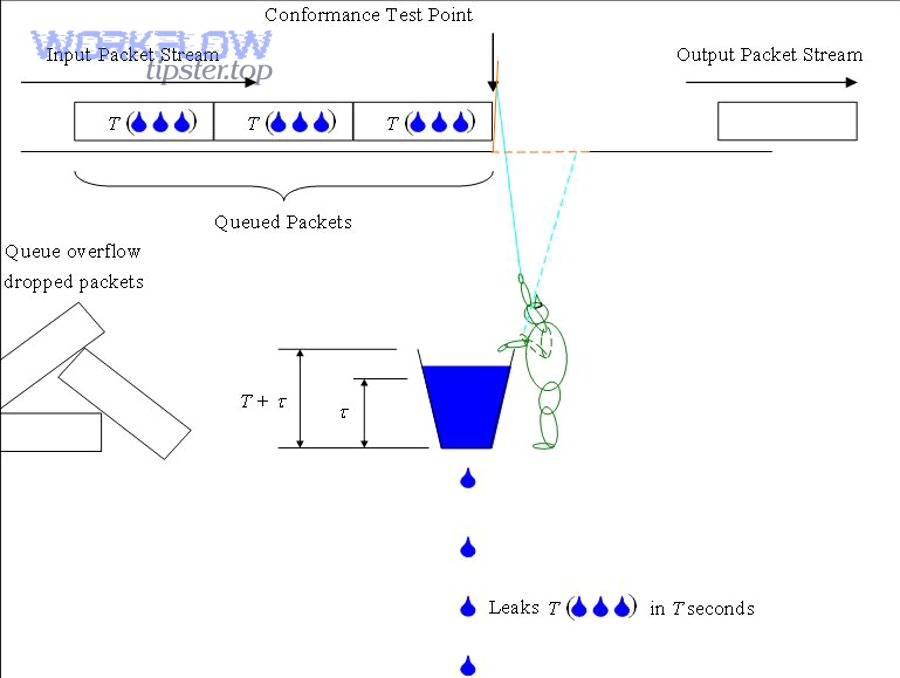
Token-bucket-like systems tolerate short bursts up to a point, then throttle. Queueing transforms bursts into steady flow. If failures happen at burst peaks, queueing usually matches the problem better.
Treat retries as a control-system problem
Zapier points to exponential backoff as the correct retry pattern for webhook delivery. (help.zapier.com) Backoff stabilizes behavior under stress by spacing retries instead of concentrating them.
According to a study by Massachusetts Institute of Technology from the Department of Mathematics, in 2024, an exponential backoff strategy produced 0% timeouts in one “dips” scenario in their microservice-latency testbed, while other scenarios showed different trade-offs depending on latency patterns. (math.mit.edu)
Build a rate-limit budget per app
Advanced operators document an app’s known limits, safe sustained throughput, burst tolerance, backoff parameters, and queue release cadence. Then they keep each Zap inside the budget by design, not by accident.