


A 500 Internal Server Error on an n8n webhook usually means your webhook request reached the server, but something unexpected prevented n8n (or the infrastructure in front of it) from completing the request cleanly—so the response becomes a generic “server-side failure” signal. (developer.mozilla.org)
If you want to resolve it fast, treat the webhook like a mini API: reproduce the request, read the n8n execution + container logs, isolate the failing node or edge component (proxy, auth, timeout), and then decide whether to return a controlled 4xx response instead of letting the workflow crash into 500.
You’ll also get better stability by designing webhook workflows for predictable responses: validate inputs early, fail gracefully with explicit status codes, and wire error handling so you can capture stack traces and context without breaking production automation.
Introduce a new idea: once you understand when 500 vs 400 is appropriate, you can turn “mysterious 500s” into either (1) actionable internal fixes or (2) clean client-facing errors that reduce retries, noise, and support tickets.
What is an n8n webhook 500 internal server error?
An n8n webhook 500 internal server error is a server-side failure response indicating the webhook request could not be fulfilled due to an unexpected condition during execution. (developer.mozilla.org)
Next, the key is to translate that generic signal into a specific failure point inside your webhook flow (trigger → workflow → response) so you can fix the real cause.
In n8n, a webhook request can be answered in different ways depending on your Webhook node settings (test vs production URL, response mode, or using a dedicated response node). (docs.n8n.io) When the workflow is configured to respond at the end (or via a response node), any unhandled exception, invalid response configuration, or upstream infrastructure issue can surface as a 500.
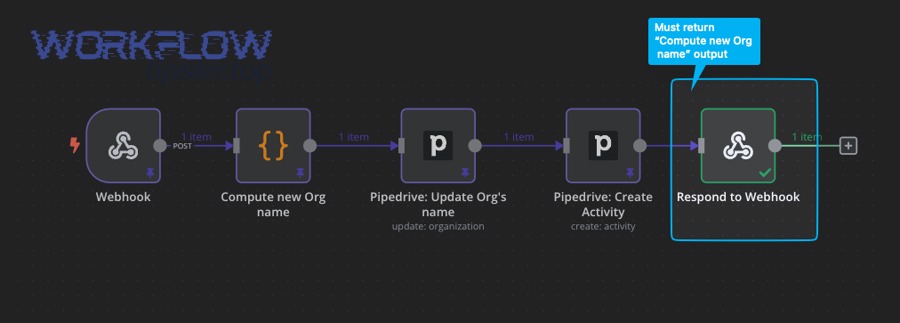
A practical n8n-specific detail: if your workflow errors before the first Respond to Webhook node executes, n8n returns an error message with a 500 status by default. (docs.n8n.io) That means “500” often really means “your workflow crashed before it could respond safely,” not necessarily that the incoming webhook request itself was malformed.
Is a 500 error always an n8n issue?
No—an n8n webhook 500 error is not always caused by n8n, because proxies, load balancers, network layers, and even the client runtime can trigger or mask server-side failures.
Then, to narrow it down quickly, separate (1) workflow execution failures from (2) edge/infrastructure failures and (3) client-side misunderstandings.
Here are three common reasons it’s not “purely n8n”:
- Reverse proxy or gateway behavior: If you run n8n behind Nginx/Traefik/Cloudflare, misrouted paths, header rewriting, body size limits, or upstream timeouts can yield 5xx responses even when n8n is fine. A reverse proxy literally sits between client and server; if it can’t connect upstream or times out, you’ll see errors that look like “n8n 500” from the outside.
- Timeout mismatch: The client may expect a response in seconds, while your workflow takes longer (waiting on APIs, large transforms). Some gateways return 500/502/504 depending on configuration—so the symptom can vary even if the root cause is “workflow too slow.”
- Browser + CORS confusion: If you call a webhook directly from a browser app, CORS can block requests or preflight handling can fail unless headers are configured correctly. CORS relies on response headers and sometimes a preflight request; if those don’t succeed, the request may not behave as expected. (developer.mozilla.org)
In real n8n usage, people sometimes see “500” in the browser network panel while the workflow never triggers, especially when CORS or frontend tooling is involved. (community.n8n.io)
What are the most common causes of 500 errors in n8n webhooks?
There are 6 main types of n8n webhook 500 causes—(A) workflow runtime exceptions, (B) response configuration mistakes, (C) invalid headers/redirects, (D) upstream API failures that aren’t handled, (E) timeouts/large payload limits, and (F) auth/credential problems—based on where the failure occurs in the request→workflow→response chain.
Next, treat each type as a “checkpoint” so you can eliminate possibilities systematically instead of guessing.
Workflow runtime error inside a node
A 500 commonly happens when a node throws an exception and nothing catches it, so the workflow aborts before returning a proper response.
To illustrate, webhook workflows often include HTTP requests, database queries, code/function nodes, and data mapping—any of which can break on unexpected inputs, null values, or schema mismatches.
What to look for:
- The execution shows a red error on a specific node.
- The error message references JSON parsing, undefined properties, invalid expressions, or external API errors.
- The workflow never reaches the response node (if you use Respond to Webhook).
How to fix:
- Add early validation (required fields, types, allowed values).
- Add branch logic for missing/invalid data.
- Convert “hard failures” into controlled responses (see the 400 vs 500 section below).
Respond-to-webhook flow never completes cleanly
A webhook configured to respond “when last node finishes” or via a Respond to Webhook node can return 500 if execution fails before responding. (docs.n8n.io)
Then, the practical fix is to guarantee a response path even when downstream work fails.
Common patterns:
- You placed Respond to Webhook after a risky node (API call) without a fallback branch.
- You changed workflow logic and the Respond to Webhook node is no longer reached.
- You rely on expressions in the response that fail when data is missing.
Invalid header values or redirect configuration
A surprisingly real 500 cause is sending an invalid header value (for example, a redirect “Location” header that becomes undefined). In an n8n community case, container logs showed: Invalid value “undefined” for header “location” while a Respond to Webhook node returned 500. (community.n8n.io)
Next, always treat response headers as “strict”—they must be valid strings, and your expressions must resolve reliably.
Fix checklist:
- If you build redirect URLs dynamically, default them (never allow null/undefined).
- Log the computed header values before responding.
- If a field is optional, omit the header entirely instead of sending junk.
Upstream API errors that you don’t handle (auth, rate limits, 5xx)
Many webhook workflows call other services (CRM, email, DB, AI, etc.). If those calls fail and you don’t catch/branch, your webhook returns 500 even though the incoming request was fine.
Besides, this is where “n8n oauth token expired” becomes a real production trigger: the upstream call fails, your node errors, and the webhook collapses into 500 unless you handle renewal/fallback.
Practical mitigation:
- Detect known upstream statuses (401/403/429/5xx).
- Retry with backoff where appropriate (carefully).
- Return a controlled error payload if upstream is unavailable.
Timeouts and payload/size limits
Long-running workflows and large request bodies can cause gateway timeouts, memory pressure, or proxy rejections that surface as 5xx errors.
More importantly, webhook endpoints are often expected to respond quickly; if you need long work, consider responding immediately with “accepted” semantics and process asynchronously (queue pattern).
Credential / environment / deployment misconfiguration
Self-hosted setups fail in ways that look like webhook 500:
- Wrong base URL, mixed HTTP/HTTPS, broken TLS termination.
- Incorrect path rewriting in the proxy.
- Missing env vars required by nodes (API keys, DB connection strings).
- Container resource limits causing crashes or restarts during webhook bursts.
If you’re doing n8n troubleshooting on self-hosted infrastructure, always verify the edge first (proxy logs) and then the app (n8n container logs), because either layer can create the same outward symptom.
How do you troubleshoot an n8n webhook 500 error step by step?
The fastest way to fix an n8n webhook 500 error is a 9-step troubleshooting loop: reproduce → capture request → inspect execution → inspect logs → isolate workflow → verify response mode → validate inputs → test the edge → add monitoring, which typically turns a vague 500 into a specific failing node or misconfiguration.
Then, once you find the failing checkpoint, apply a targeted fix and retest using the exact same request.
Step 1–2: Reproduce and capture the exact request
Start by reproducing with a deterministic client (curl/Postman) so you control:
- HTTP method (GET/POST)
- Headers (Content-Type, Authorization, custom headers)
- Body (raw JSON, form data, multipart)
- URL (test vs production webhook URL)
In n8n’s Webhook node, confirm you’re using the intended URL type (test vs production) and response mode. (docs.n8n.io) A frequent “it worked yesterday” issue is that someone used the test URL in production or changed the response mode.
Step 3: Check the n8n execution for the failing node
Open the latest execution and identify:
- Which node is red (failed)
- The error message + stack trace
- The last successful node (to locate boundary conditions)
If the workflow errors before your Respond to Webhook node runs, n8n can return 500 automatically. (docs.n8n.io) So the “execution timeline” is your map: you’re trying to prove whether you ever reached “response generation.”
Step 4: Check container / server logs for edge-case errors
Some failures don’t surface clearly in the UI (especially header-related issues, proxy exceptions, or runtime crashes).
For example, the community case that produced Invalid value “undefined” for header “location” only became obvious when checking logs. (community.n8n.io)
What to look for:
- “Invalid header value”
- “Payload too large”
- “Request aborted”
- “Upstream timed out”
- Node runtime errors (memory, segmentation faults, OOM kill signals)
Step 5–6: Isolate the workflow and verify response design
Create a minimal version:
- Webhook trigger
- Set node returning a static JSON payload
- Respond to Webhook (or last-node response)
If this minimal workflow returns 200 reliably, the issue is downstream logic, not the webhook plumbing. If it still returns 500, suspect proxy/path/TLS or core instance health.
Also confirm your response approach:
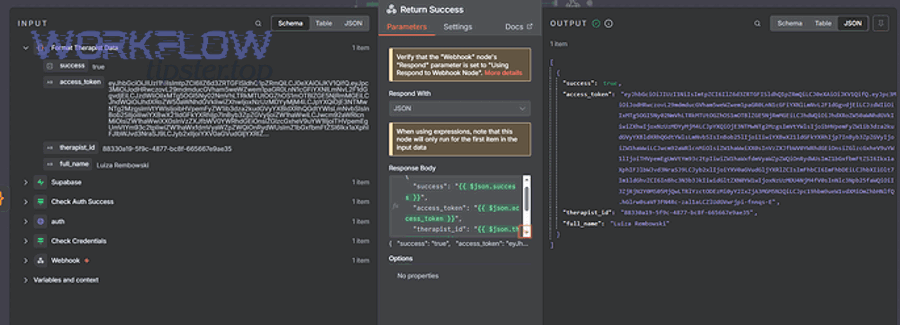
- If you must return custom status codes and payloads, use Respond to Webhook and make sure it executes. (docs.n8n.io)
- If you don’t need custom behavior, a simpler response mode may reduce failure points. (docs.n8n.io)
Step 7: Validate inputs and return 400 for bad client payloads
A huge portion of “500” incidents are actually “bad inputs that break mapping.” If the incoming payload is missing fields or has wrong types, your expressions can fail.
So add an early “validate” gate:
- Required fields present?
- Types correct (string vs number vs object)?
- Sizes within limits?
- Allowed values?
When the client payload is malformed, it’s usually more correct to return 400 Bad Request rather than 500. (developer.mozilla.org) (We’ll compare 400 vs 500 formally in a later section.)
Step 8: Inspect the edge: proxy rules, timeouts, and body limits
If you run behind a reverse proxy, verify:
- Path forwarding (no missing
/webhook/...segments) - Host headers and HTTPS termination
- Timeout values (proxy_read_timeout, upstream timeout)
- Max body size limits
If the proxy times out but n8n continues running, you can get user-visible errors while work continues in the background—creating duplicate retries and inconsistent state.
Step 9: Add error workflows and monitoring so 500s become actionable
When an automated workflow errors, you want context captured automatically:
- Request ID / correlation ID
- Input payload summary
- Node that failed
- Error message + stack trace
- Runtime info (instance, memory, queue depth)
n8n’s Error Trigger node exists specifically to react when an automatic workflow errors. (docs.n8n.io) This is the bridge between “a 500 happened” and “we know exactly why and have the data to fix it.”
Evidence: According to a study by Kırklareli University (Distance Learning Implementation and Research Center) and Istanbul University researchers published in 2020, the study selected 14 participants and included a “connection timeout – 500” faulty interaction, showing that server-style failures are detectable in user behavior research and can be measured with repeatable tasks. (researchgate.net)
What is the difference between an n8n webhook 500 server error and a 400 bad request?
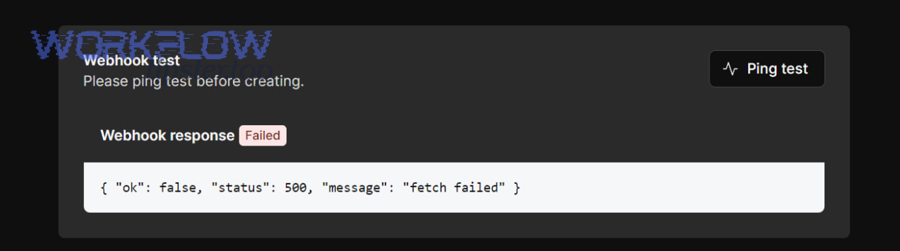
A webhook 500 typically signals an unexpected server-side failure, while a 400 Bad Request indicates the server won’t process the request because it’s malformed or invalid from the client side. (developer.mozilla.org)
However, the most useful operational difference is ownership: 400 means “client must change,” 500 means “server/workflow must change.”
Before you decide, it helps to see how n8n behaves: if your workflow errors before responding, n8n may return 500 automatically. (docs.n8n.io) If instead you validate early and respond intentionally, you can convert many noisy 500s into clean 400s when the request is the real issue.
Here’s a quick table (context: it maps symptoms you see in webhook calls to the most appropriate status code and what to fix first):
| Symptom in the webhook call | Better status code | What it usually means | First thing to check |
|---|---|---|---|
Missing required field (e.g., email absent) breaks an expression |
400 | Client payload invalid | Validate payload before mapping |
| JSON can’t parse / wrong Content-Type | 400 | Malformed request framing | Headers + body format |
| Upstream API returns 401 because token expired | 500 (or 502/503), sometimes 401 | Server-side dependency/auth failure | Credential refresh logic (n8n oauth token expired) |
| Workflow throws unhandled exception | 500 | Your workflow logic failed | Execution error on a node |
| Proxy times out while workflow runs long | 502/504 (often), may appear as 500 | Edge timeout | Proxy timeout + workflow duration |
| Respond-to-webhook sets redirect header to undefined | 500 | Invalid response construction | Container logs + header expressions (community.n8n.io) |
A practical n8n pattern: if your webhook is acting like an API endpoint, explicitly validate and respond with 400 when the payload is bad—so you don’t mislead clients into retrying forever. That’s how you stop “n8n webhook 400 bad request” scenarios from masquerading as server failures in dashboards.
How can you prevent n8n webhook 500 errors in production workflows?
You can prevent most n8n webhook 500 errors by designing your webhook workflow with 6 prevention layers—input validation, safe branching, controlled responses, dependency hardening, runtime protection, and observability—which reduces unhandled exceptions and turns failures into intentional outcomes.
More importantly, prevention is cheaper than firefighting because 500s tend to trigger retries, duplicates, and cascading errors.
Layer 1: Validate inputs at the boundary
Treat the Webhook node as a public API boundary:
- Required fields, types, sizes
- Authentication present and correct
- Reject unknown/unsafe payloads early
If the request is bad, return 400 with a clear message so clients don’t keep retrying. (developer.mozilla.org)
Layer 2: Make responses deterministic
Pick a response strategy and make it predictable:
- If you use Respond to Webhook, ensure it always executes in success and failure branches. (docs.n8n.io)
- Don’t compute headers from optional data without defaults (avoid “undefined” header values). (community.n8n.io)
Layer 3: Add error workflows and capture context
Use an error workflow so failures don’t disappear into 500 noise. n8n’s Error Trigger runs when an automatic workflow errors, enabling logging/alerts with the failing execution data. (docs.n8n.io)
Layer 4: Harden upstream dependencies
If your workflow depends on external APIs:
- Handle known error statuses (401, 403, 429, 5xx)
- Add retries only where safe (idempotent operations)
- Cache tokens, refresh on expiry, and fail gracefully when auth breaks
This is where you prevent a single upstream failure from turning into repeated webhook 500 responses.
Layer 5: Protect runtime with timeouts, queues, and rate limits
If the workflow does heavy work:
- Respond quickly and offload long processing (queue pattern)
- Limit concurrency where possible
- Watch memory/cpu on self-hosted deployments
The goal is to avoid long-running webhook requests that are vulnerable to gateway timeouts or resource exhaustion.
Layer 6: Monitor the right signals
Track:
- 5xx rate by endpoint
- Latency percentiles
- Node-level failure counts
- Proxy error logs (upstream connect/timeouts)
- Execution error summaries
This turns 500 from “random” into “trendable,” which is how teams build reliable automation.
Should you switch from n8n self-hosted to n8n cloud when you see frequent 500 errors?
It depends—switching to n8n Cloud can reduce infrastructure-related 5xx issues, but it won’t automatically fix workflow logic bugs, invalid responses, or unhandled exceptions that also cause 500 errors.
Then, the decision becomes a comparison: are your 500s mostly ops problems (proxy, TLS, scaling) or workflow problems (node errors, bad mappings, invalid headers)?
Here’s a simple decision lens:
- Self-hosted is still a good fit if:
- You can read and act on server + proxy logs quickly
- You control the network and security posture
- Your failures usually point to workflow configuration and you can fix them fast
- Cloud is usually a better fit if:
- Your 500s often correlate with scaling, restarts, proxy misconfig, or infrastructure uncertainty
- You want managed upgrades and less operational overhead
- You prefer focusing on workflow correctness rather than deployment correctness
Regardless of hosting, you still need good “workflow engineering”: validate inputs, branch on upstream failures, and build deterministic responses so clients don’t interpret server failures incorrectly. That’s the same core discipline whether you run it yourself or outsource the ops.
What advanced diagnostics help when 500 errors are intermittent?
There are 4 advanced diagnostic techniques—correlation IDs, edge-layer tracing, browser/CORS verification, and replay-based load tests—that help you catch intermittent webhook 500s by turning “rare failures” into reproducible, inspectable events.

Next, use these tools when basic execution logs aren’t enough, especially in production where errors are sporadic.
How do correlation IDs and structured logs pinpoint the failing hop?
Add a request ID at the very start (from a header or generated) and log it through the workflow and the proxy. When a 500 happens, you can trace the same ID across:
- Proxy access/error logs
- n8n execution logs
- External API logs (if you pass it downstream)
This is the fastest way to prove whether the failure occurred before n8n, inside n8n, or after n8n (response path).
How can proxy/gateway logs reveal timeouts and upstream failures?
Intermittent 500s often turn out to be intermittent upstream connectivity:
- DNS hiccups
- Upstream connect timeouts
- TLS renegotiation issues
- Body size rejections on only some payloads
Edge logs usually show timing and upstream status codes that the client never sees.
Can CORS and browser behavior make a webhook “look like” a 500?
Yes—browser tooling can confuse debugging because CORS adds preflight behavior and blocks responses unless headers are correct. CORS is an HTTP-header based mechanism and can require a preflight request before the actual request proceeds. (developer.mozilla.org)
In practice, users sometimes report “500” or failed requests in the browser network panel while the workflow never triggers, especially during frontend integration attempts. (community.n8n.io)
If your webhook is intended for browser use:
- Ensure correct
Access-Control-Allow-Originstrategy - Handle OPTIONS requests if needed
- Avoid sending sensitive webhooks directly from the client when a backend proxy is safer
How do replay tests and synthetic monitoring catch rare 500 spikes?
Record a few real webhook payloads (sanitized), then replay them on a schedule:
- Same headers
- Same sizes
- Same concurrency patterns
This helps you catch:
- Memory leaks
- Slow upstream dependencies
- Race conditions in workflow logic
- Header/redirect edge cases that only appear with certain data
Evidence: According to a study by Kırklareli University and Istanbul University researchers published in 2020, the study’s “connection timeout – 500” task used a defined timeout duration and measured user recovery behavior, reinforcing that timeout-style failures can be treated as measurable events rather than “random errors.” (researchgate.net)
Finally, if you want a consistent place to document repeatable fixes, you can build a small internal playbook page (for example, a “WorkflowTipster” troubleshooting entry) that lists your top failure patterns, the exact logs to check, and the “return 400 vs return 500” decision rules—so every incident gets faster to solve.