


A Zapier webhook 429 (Too Many Requests) rate limit error usually means your workflow is sending bursts that exceed Webhooks by Zapier limits or an app’s shared throttle, so Zapier temporarily rejects or holds requests until the traffic calms down. (help.zapier.com)
To resolve it quickly, you need to (1) confirm which limit you’re hitting (per-user vs legacy per-Zap vs downstream app), then (2) reduce burstiness using queueing/batching and (3) retry with exponential backoff instead of constant retries. (help.zapier.com)
You’ll also want to distinguish “429 rejection” from “delayed processing” (where Zapier may return 200 but run the Zap later), because the fix is different: one is traffic shaping, the other is expectations + monitoring. (help.zapier.com)
Introduce a new idea: once you’ve stabilized today’s failures, you can prevent 429s long-term by designing your webhook sender like a rate-limited client (token bucket mindset), so your throughput stays high without triggering throttles.
Is a Zapier webhook 429 error always a rate-limit problem?
No—while most 429s are genuine rate limiting, a “Zapier webhook 429 rate limit error” can also appear because your sender is retrying too aggressively, multiple systems are sharing the same quota, or a downstream API is returning 429 and your Zap is surfacing it as a failed step. The practical reason is that 429 is a traffic signal, not a root cause label.
Next, the fastest way to avoid misdiagnosis is to treat 429 as a symptom of burst + shared limits and validate the evidence in your logs.
Here’s how to decide whether it’s truly a Zapier-side webhook limit:
- Look at where 429 occurs.
- If the 429 is the response to your POST into Webhooks by Zapier, you’re hitting Zapier’s webhook intake limit (or a legacy route limit). (help.zapier.com)
- If the 429 happens on an action step calling another app, you’re likely hitting that app’s API throttle (shared across Zaps in your account). (help.zapier.com)
- Look at the pattern.
- Burst traffic (hundreds/thousands in a short window) points to intake throttling or downstream throttling.
- “Every request fails immediately” can be a misconfigured endpoint, but that’s uncommon with 429 specifically—more often it’s persistent overload caused by constant retries.
Most importantly, don’t “fight” a 429 by retrying instantly. Constant retries increase pressure and can keep you rate-limited longer.
What does “429 Too Many Requests” mean in Webhooks by Zapier?
A 429 in Webhooks by Zapier means Zapier received more webhook requests than it allows within a defined time window, so it rejects additional requests (or forces you to retry later) to protect the platform and keep processing fair. Zapier explicitly states you’ll see 429 when you exceed Webhooks by Zapier rate limits, and it recommends retrying with exponential backoff. (help.zapier.com)
Then, it helps to visualize what’s happening: rate limiting is basically a “bucket” or “token” control that prevents unlimited spikes.
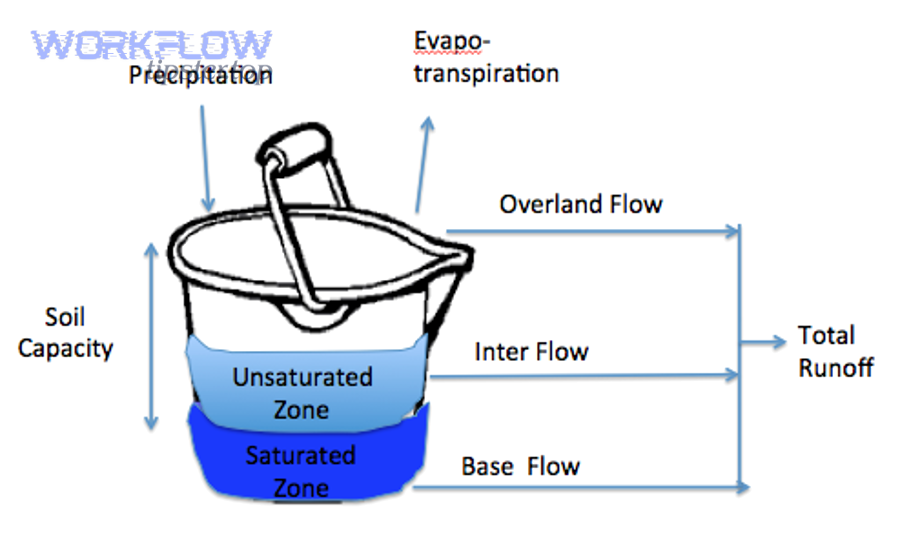
Specifically, Webhooks by Zapier outlines two key webhook intake limits that commonly trigger 429:
- 20,000 requests every 5 minutes per user (across webhooks). (help.zapier.com)
- 1,000 requests every 5 minutes per Zap for legacy webhook routes (when the webhook URL doesn’t include a Zapier user ID). (help.zapier.com)
Zapier also warns about delayed processing during high webhook activity—your sender might see a 200 response, but Zapier may process the run minutes later. (help.zapier.com)
Evidence: According to a study by Stony Brook University (Department of Computer Science), in 2016, analysis of randomized exponential backoff shows it can maintain stable throughput while reducing collision risk in contention scenarios—exactly why “back off” retries beat instant retries under congestion. (www3.cs.stonybrook.edu)
What are the most common causes of Zapier webhook 429 rate limit errors?
The most common causes are bursty webhook traffic, shared quotas across multiple Zaps/users/apps, and retry loops that amplify load. More importantly, these causes often overlap—so you want to fix the shape of traffic, not just today’s failures.

To better understand the real trigger, group causes into three buckets:
- Burst traffic from your sender (the #1 cause)
- Batch jobs firing at the top of the hour.
- Backfills that replay thousands of events quickly.
- Multiple workers/servers sending to the same webhook endpoint with no global throttle.
- Shared limits you didn’t realize you were sharing
- The same Zapier account receives webhooks for many Zaps at once (hitting per-user windows). (help.zapier.com)
- A single app’s API limit is shared across all your Zaps in your account (so one busy Zap can throttle another). (help.zapier.com)
- Retry storms and feedback loops (the silent killer)
- Your system retries immediately on any non-200 and sends a second burst on top of the first.
- Zap steps that fail with 429 get retried by you, while Zapier is also working through queued/delayed processing.
A quick rule that prevents hours of guesswork: if the failures are “clustered in time,” it’s traffic shaping; if they’re “spread out evenly,” it may be a sustained shared quota issue.
How do you troubleshoot and fix Zapier webhook 429 rate limit errors step by step?
The best fix is a three-part method: confirm the limit you hit → smooth traffic → retry correctly, so you reduce burst pressure while still delivering every event.
Then, apply these steps in order—because doing them out of order (like adding retries first) can make the situation worse.
How to confirm the limit type (per-user vs legacy per-Zap)
Start by identifying which Webhooks by Zapier limit is relevant:
- If your webhook URL includes a Zapier user ID, you’re generally under the per-user 20,000/5-min window. (help.zapier.com)
- If it’s a legacy webhook route (no user ID in the URL), you may hit the per-Zap 1,000/5-min limit sooner. (help.zapier.com)
Practical checks that work even without deep platform access:
- Check your sender logs: count how many requests you sent in the last 5 minutes when 429 started.
- Check whether multiple sources share the webhook: if several systems send to the same endpoint, your “true” rate is the sum.
- Check Zap history timestamps: if many runs start at the same second/minute, you’re in burst territory.
Outcome you want: a sentence like “We’re hitting per-user 20,000/5-min because we push 8,000 events/minute during a nightly sync.”
How to smooth traffic with Delay After Queue and batching
Once you know you’re in burst territory, fix the shape:
- Queue incoming events before sending them to Zapier (or before triggering heavy actions inside the Zap).
- Batch events (send 1 payload containing 50–500 items) if your downstream logic supports it.
- Add spacing between actions so Zapier isn’t forced to run thousands of tasks instantly.
Zapier itself recommends using Delay After Queue to spread out the rate at which a Zap runs its actions. (help.zapier.com)
Concrete examples that usually work:
- If you currently send 10,000 webhooks in 30 seconds, re-shape to 10,000 over 10–20 minutes.
- If your system can batch, send 200 webhooks each containing 50 records instead of 10,000 single-record webhooks.
Key idea: rate limits are often about bursts, not your daily totals.
How to implement exponential backoff retries (instead of constant retries)
After you smooth traffic, add retries—but do it the “polite” way.
Zapier explicitly recommends industry-standard exponential backoff for retries when you don’t get a 200 response. (help.zapier.com)
Use this retry pattern:
- Retry only on 429 (and possibly transient 5xx), not on permanent failures.
- Wait 1s → 2s → 4s → 8s → 16s (cap it), plus jitter (random +/- 20–40%) so your clients don’t all retry at the same millisecond.
Why this works: exponential backoff reduces collision probability under congestion, while constant retries keep the channel overloaded.
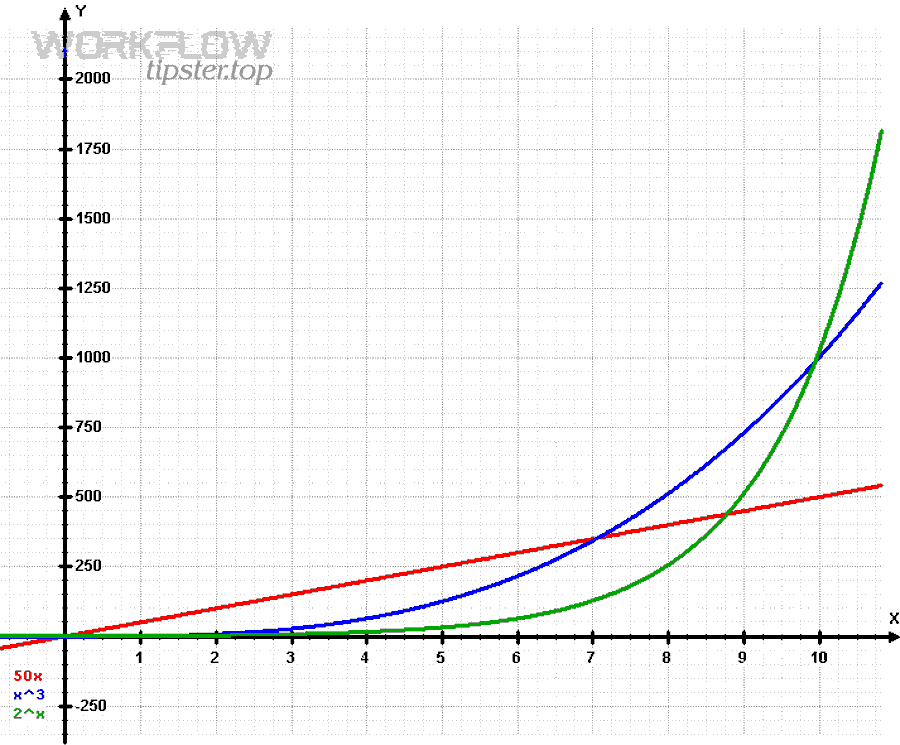
Here’s one useful mental model:
- Instant retry is the antonym of backoff retry: one amplifies load, the other releases pressure while preserving delivery.
Optional explainer video (one embed only):
How to replay failed Zap runs safely
After stabilizing incoming traffic and retries, you need to recover:
- Replay the Zap run for affected failures (Zapier lists replaying as a supported option after exceeding limits). (help.zapier.com)
- Prevent duplicates by ensuring your workflow is idempotent:
- Use a unique event ID (from your source system) and dedupe in a storage step or Zapier Tables/your DB.
- If your action creates records, check “find-or-create” patterns before “create.”
This matters because rate-limit recovery often triggers “catch-up bursts.” You want recovery to be controlled, not a second outage.
Evidence: According to Zapier’s Help Center, exceeding Webhooks by Zapier rate limits returns 429, and recommended mitigations include retrying non-200 deliveries with exponential backoff and using Delay After Queue to spread execution. (help.zapier.com)
What is the difference between Zapier throttling, delayed processing, and a hard 429 rejection?
Zapier throttling is the broader concept of limiting frequency; delayed processing is “accepted but later,” while a 429 is “not accepted right now.” The distinction matters because the same symptom (“my Zap is slow”) can have different fixes.

Next, use these definitions to triage correctly:
- Hard 429 rejection (Too Many Requests):
Your request exceeded a limit window, so you must slow down and retry later. (help.zapier.com) - Delayed processing (200 but slow runs):
Zapier may return 200 yet delay processing for minutes during high webhook activity. In this case, hammering retries is unnecessary; you need monitoring and expectation-setting. (help.zapier.com) - Zap throttling / rate limiting (general):
Zapier throttles triggers/actions when many occur in a short span, and app rate limits can throttle actions across all Zaps in your account. (help.zapier.com)
A simple troubleshooting decision tree:
- If you see 429 → reduce burst + backoff retries.
- If you see 200 but late runs → reduce burst anyway, but focus on queueing + observing run lag.
- If only one app step fails with 429 → it’s probably the app’s API, so throttle that step or reduce concurrency.
Which approach is better for avoiding 429: lowering webhook send rate vs increasing Zapier limits?
Lowering burst rate is usually better first, while increasing limits is the right move when your business volume is legitimately high and stable.

Then, choose based on your constraints:
Option A — Lower/smooth webhook send rate (best first move)
- Pros: works immediately, reduces failures everywhere, doesn’t depend on plan changes.
- Cons: adds latency (seconds to minutes), requires queueing/batching changes.
Option B — Adjust platform limits / plan-based settings (best when volume is real and constant)
Zapier notes you can adjust flood protection limits for a Zap if you have a paid plan. (help.zapier.com)
Zapier also lists different rate limits for private apps by plan tier (e.g., Team/Enterprise higher). (help.zapier.com)
To make this decision quickly, here’s a small table that compares what each approach optimizes (this table summarizes the tradeoffs you’ll feel in production: latency, engineering effort, and reliability).
| Approach | Best when… | What it improves | What it costs |
|---|---|---|---|
| Smooth traffic (queue/batch/delay) | You have bursts or backfills | Reliability + fewer 429s | Added latency, some build work |
| Backoff retries | Your delivery must be “eventually consistent” | Recovery from transient throttles | Slower success under load |
| Increase limits / adjust flood protection | Your baseline volume is high & steady | Higher ceiling | Plan changes + still needs shaping |
A strong rule: Even if you increase limits, you still need smoothing—because spikes can exceed almost any ceiling.
How is 429 rate limit troubleshooting different from 401 unauthorized and attachment upload failures?
429 troubleshooting is about traffic shaping and retry behavior, while 401 troubleshooting is about authentication/authorization, and attachment failures are about payload size, file handling, and app-specific constraints—so the fixes are fundamentally different even if they all appear as “Zap failed.”

Below is how to separate them cleanly in real workflows, including the phrases you might be tracking in your content taxonomy (e.g., “zapier troubleshooting”).
When should you treat an error as “zapier webhook 401 unauthorized troubleshooting” instead of 429?
Treat it as a 401 problem when the response indicates your request lacks valid credentials or permission—meaning slowing down won’t help.
What changes in your approach:
- For 401: validate auth headers, tokens, signing secrets, and endpoint permissions; rotate credentials; confirm environment (prod vs staging).
- For 429: keep auth the same and change rate + retry shape.
If you see intermittent 401s, it can be a token refresh issue or a rotated secret—still not a rate-limit issue.
How does “zapier attachments missing upload failed troubleshooting” differ from rate limiting?
Attachment failures usually happen when:
- The file URL is not publicly accessible to Zapier,
- The file is too large for an app step,
- The payload isn’t formatted the way the destination app expects,
- Or the attachment expires before the Zap tries to fetch it.
By contrast, 429 is about how many requests arrive in a window, not whether the file is valid.
Practical difference in what you log:
- For attachments: log file URL, content type, size, auth requirements, and whether the file can be downloaded from outside your network.
- For 429: log request counts per second and per 5 minutes, plus retry intervals.
Can 429 “fixes” accidentally create attachment failures?
Yes—because adding queueing/delays can cause a file URL to expire before Zapier fetches it.
So when you add Delay After Queue or batching, also:
- Increase link expiry time (signed URLs),
- Or upload the file to durable storage first, then pass a stable link to Zapier.
That’s a classic example of macro → micro semantics: you solved rate limiting, but the new timing exposed a file lifecycle constraint.
What’s the safest way to prevent cross-problem confusion in zapier troubleshooting?
Use a “first-principles” classification:
- 429: “too many requests” → traffic shaping + backoff retries. (help.zapier.com)
- 401: “unauthorized” → credentials, signing, permissions.
- Upload/attachment failed: file access + file constraints + URL lifetime.
If you standardize that classification in your logs (error type, endpoint, step, quota window, retry count), your future incidents become pattern-matching instead of guesswork.