


If Slack says your request has an invalid JSON payload, the fastest fix is to stop guessing and make Slack’s expectations explicit: send well-formed JSON, send the right JSON shape, and send it with the right headers to the right endpoint. This article shows you how to get from “payload rejected” to “message delivered” with a repeatable, minimal-first workflow.
Then, you’ll learn what the error really means in Slack terms—why it can happen even when your JSON “looks fine”—and how to interpret the most common failure patterns (bad escaping, wrong top-level object, blocks structure mistakes, and mismatched endpoints). (docs.slack.dev)
Next, you’ll follow a step-by-step diagnostic method you can reuse across any toolchain—custom code, CI pipelines, and low-code automations—so you can isolate the one field or variable that breaks the request instead of rewriting your integration from scratch.
Introduce a new idea: once the core fix is stable, you can prevent these errors permanently by building payloads safely, validating them automatically, and understanding edge cases that create “valid JSON” that still isn’t “Slack-compatible.”
What does “invalid JSON payload” mean in Slack (and why does Slack reject it)?
“Invalid JSON payload” in Slack means Slack cannot parse the JSON you sent, or it can parse it but it isn’t a JSON object in the structure Slack expects, so the request is rejected before your message is processed. (docs.slack.dev)
To better understand the failure, treat this error as two buckets:
- Parse failure: the body isn’t valid JSON (syntax/encoding/header issues).
- Shape failure: the body is “JSON-like” but not the right top-level object (for example, you sent a string or array where Slack expects an object). (docs.slack.dev)
Slack rejects the payload because message delivery is downstream of parsing. If the payload cannot be interpreted reliably, Slack cannot safely apply permissions, transform Block Kit structures, or validate message fields. That’s why you typically see the error immediately, even if your app has correct authentication.
A practical way to keep terminology consistent (the “hook chain”) is to use one mental model throughout the article:
- Valid JSON = syntactically correct JSON text (parsable).
- Slack-compatible payload = valid JSON and the correct structure for the Slack endpoint (webhook vs Web API vs tool action).
Is “invalid JSON payload” always caused by malformed JSON?
No—“invalid JSON payload” is not always caused by malformed JSON, because (1) Slack may parse your JSON but find it is not a top-level object, (2) your tool may send JSON as a quoted string (double-encoded), or (3) you may be posting the right JSON to the wrong Slack endpoint. (docs.slack.dev)
Next, this matters because “JSON validity” and “Slack compatibility” are different checks, and you need to know which one you’re failing to fix the issue quickly.
Here are three high-signal reasons it’s not always malformed JSON:
- Wrong top-level type: Slack expects an object, but you sent an array, string, or number (Slack calls this “json_not_object”). (docs.slack.dev)
- Double encoding: you send
"{\"text\":\"hi\"}"instead of{ "text": "hi" }(Slack sees a string, not an object). - Endpoint mismatch: you send a webhook-style payload to a Web API method (or vice versa), so required parameters differ and validation fails earlier.
To isolate which case you’re in, look at the raw outbound body exactly as Slack receives it (not the object you think you’re sending). In many environments, what you log before the HTTP request is not what the network actually transmits.
What is the minimum valid Slack payload for webhooks vs Web API?
Incoming Webhooks win for minimal payload simplicity, while the Slack Web API is best for precise control and method-specific features, because webhooks accept a message-style JSON body, while Web API methods validate parameters per method. (docs.slack.dev)
Then, once you anchor on a minimal payload, you can expand safely without triggering invalid JSON payload errors.
Here’s the practical difference:
- Incoming Webhook: you send a JSON payload directly to the webhook URL; minimal payload is usually a
textfield. (docs.slack.dev) - Web API (e.g., chat.postMessage): you call a method endpoint (authenticated) and must provide method parameters correctly; JSON body shape matters, and wrong shapes can trigger parsing/shape errors like
invalid_jsonorjson_not_object. (docs.slack.dev)
To keep your first test deterministic, start with plain text before adding blocks. Slack also documents that when you use blocks, the top-level text becomes a fallback used for notifications—so the “minimal” mindset still applies even in rich messages. (docs.slack.dev)
What are the most common causes of Slack invalid JSON payload errors?
There are 3 main types of causes of Slack invalid JSON payload errors—syntax errors, transport/header issues, and payload-structure (schema) mismatches—based on whether Slack fails at parsing, interpreting the body, or validating the expected message shape. (docs.slack.dev)
Specifically, each category produces a distinct debugging path, so grouping causes upfront prevents “random fix” cycles.
A helpful way to troubleshoot (especially if you’re doing Slack Troubleshooting across multiple workflows) is to map symptoms to categories:
- Parse failures (Slack can’t parse your body at all): usually invalid syntax, wrong encoding, or wrong content type. (docs.slack.dev)
- Not-an-object failures (Slack parses JSON but it’s not an object): arrays/strings/numbers, double encoding. (docs.slack.dev)
- Block Kit / field structure failures (Slack parses object but message fields are wrong type or wrong nesting):
blocksnot an array, invalid block objects, mismatched top-level keys. (docs.slack.dev)
Which JSON syntax issues break Slack payloads most often (quotes, commas, trailing commas, newlines)?
There are 4 common JSON syntax failure patterns that break Slack payloads most often—unescaped quotes, trailing commas, invalid control characters/newlines in strings, and comments/non-JSON constructs—based on how strict JSON parsers interpret the payload. (docs.slack.dev)
More specifically, these failures often come from templating or string concatenation, not from “hand-written JSON.”
Focus on these high-frequency mistakes:
- Unescaped double quotes inside strings
- Example failure:
"text": "Build "passed"" - Fix: escape internal quotes or build with a serializer:
"text": "Build \"passed\""
- Example failure:
- Trailing commas (allowed in some languages’ object literals, invalid in JSON)
- Example failure:
{ "text": "hi", } - Fix: remove trailing commas; use a JSON linter before sending.
- Example failure:
- Raw newlines or control characters in a JSON string
- Example failure:
"text": "Line1 Line2" - Fix: use
\ninside strings or let a serializer encode safely.
- Example failure:
- Comments (JSON does not support
//or/* */)- Fix: remove comments or switch to a safe template format.
If you’re generating messages from user content (PR titles, form inputs, ticket summaries), treat every variable as untrusted and escape it before injecting it into a payload. This single practice eliminates the majority of “random” invalid payload failures in CI notifications.
Do headers like Content-Type: application/json affect Slack’s JSON parsing?
Yes—headers like Content-Type: application/json can directly affect whether Slack parses your body as JSON, because Slack’s Web API documentation explicitly warns that parsing failures can occur when the content type is incorrect. (docs.slack.dev)
Then, once you fix the header, you often discover the real problem is payload shape or escaping, which becomes visible only after parsing succeeds.
In practice, header-related failures happen in three ways:
- Your HTTP client defaults to form encoding (
application/x-www-form-urlencoded) while you believe you’re sending JSON. - A low-code tool wraps JSON in a string field and sends the wrapper, not the object.
- A proxy or middleware rewrites the body and changes encoding.
A simple sanity check: capture the raw outgoing request with a network inspector or logging middleware and confirm:
- Body starts with
{(object) rather than"(string) or[(array). Content-Typeisapplication/jsonwhen sending JSON to endpoints that expect it. (docs.slack.dev)
Can “blocks” cause invalid JSON payload even when the JSON is valid?
Yes—Block Kit “blocks” can trigger payload errors even when the JSON is valid, because Slack validates that blocks is a correctly structured array of valid block objects, not just “some JSON.” (docs.slack.dev)
Moreover, Block Kit increases complexity, so block structure mistakes become the dominant cause after you’ve already fixed syntax and headers.
Common Block Kit shape mistakes include:
blocksis an object, not an array:"blocks": { ... }instead of"blocks": [ ... ]- A block object is missing required fields like
type. - You exceed constraints (like blocks count) or use invalid block types for the surface.
Slack’s Block Kit docs describe blocks as composable UI components and specify constraints like up to 50 blocks in each message. (docs.slack.dev)
When your payload violates these constraints, Slack may reject it as an invalid payload, depending on endpoint and toolchain error mapping.
How do you diagnose and fix Slack invalid JSON payload step-by-step?
The most reliable method is a 6-step “minimal payload → validate → transmit → expand → isolate → harden” workflow that turns an invalid JSON payload error into a predictable debugging process with a clear stopping point: a Slack-compatible payload that posts successfully. (docs.slack.dev)
Let’s explore how this workflow prevents endless trial-and-error and fits both code and automation tools.
Use this sequence:
- Confirm the endpoint type (Incoming Webhook URL vs Web API method endpoint). (docs.slack.dev)
- Send the smallest possible payload (start with
text). - Validate JSON (syntax, encoding, top-level object).
- Verify headers & transport (
Content-Type, request body not double-encoded). (docs.slack.dev) - Add one feature at a time (blocks, attachments, dynamic fields).
- When it breaks, isolate the breaking delta (field, variable, or block).
This is also the fastest way to distinguish payload problems from other Slack delivery issues. For example, if you’re diagnosing “slack trigger not firing” in an automation, an invalid JSON payload can prevent the workflow from ever reaching the Slack action step, making it look like the trigger is the problem when the payload is actually failing earlier in the pipeline.
How can you validate your payload as “valid JSON” before sending it to Slack?
Validating your payload means proving it is parsable JSON text and a top-level JSON object, using a linter/validator and a “show me the parsed object” check before it ever leaves your system. (docs.slack.dev)
To better understand why this matters, remember Slack can reject payloads that parse but aren’t objects (json_not_object) as well as payloads that don’t parse (invalid_json). (docs.slack.dev)
A practical validation checklist:
- Syntax check: run JSON through a validator (or parse it in your language runtime).
- Type check: ensure the parsed root is an object/map/dictionary (not an array/string).
- Encoding check: ensure UTF-8 without hidden control characters.
- No comments: remove non-JSON artifacts.
- Deterministic output: serialize with a JSON encoder, not string concatenation.
If you can, log both:
- The serialized JSON string you send, and
- The parsed object you believe it represents (before serialization).
When these differ, you have a serialization or templating issue—not a Slack issue.
How do you isolate the field or variable that breaks the Slack payload?
To isolate the breaking field, remove or disable payload sections until the request succeeds, then re-add them one by one—a binary-search approach that finds the exact delta that produces the invalid JSON payload error.
Then, the moment you identify the delta, you can fix it with targeted escaping or schema correction instead of rewriting the integration.
Use this isolation strategy:
- Start from a known-good minimal payload:
{ "text": "hello" }(webhook style). (docs.slack.dev) - Add one of the following per iteration:
- A dynamic variable (e.g., PR title, username, ticket subject)
- A
blocksarray with one simple section block - A formatting feature (mentions, links)
- When the request fails, inspect only the last added change.
Where variables go wrong most often:
- Variables include raw quotes (
") or backslashes (\) that weren’t escaped. - Variables contain newline characters that weren’t encoded.
- Variables are already JSON strings and you encode them again (double encoding).
In CI and notifications, the classic case is a PR title like: Fix "edge case" in parser which breaks naïvely interpolated JSON.
Should you start with a “minimal payload” and then add fields until it fails?
Yes—you should start with a minimal payload because it (1) confirms endpoint + auth + transport work, (2) narrows failures to the newest change, and (3) prevents Block Kit complexity from masking basic JSON/header issues, which shortens debugging time dramatically. (docs.slack.dev)
Moreover, this is the same approach you use to debug other Slack workflow symptoms like “slack tasks delayed queue backlog,” where the system appears slow or stuck but the real failure may be a rejected payload that causes retries and queue buildup.
A stable incremental path looks like this:
textonlytext+ one dynamic variable- Add
blockswith one section block - Add formatting (links, mentions)
- Add more blocks, images, or interactive elements
If the error returns at step 3–5, you know the failure is structural—not transport.
How do fixes differ across Slack Webhooks, Slack Web API, and automation tools?
Incoming Webhooks win in simplicity, Slack Web API wins in precision, and automation tools are best for speed of integration, because each path enforces payload rules differently and fails in different places when the JSON payload becomes invalid. (docs.slack.dev)
However, once you understand what each path expects, you can apply the same “valid then compatible” payload logic across all of them.
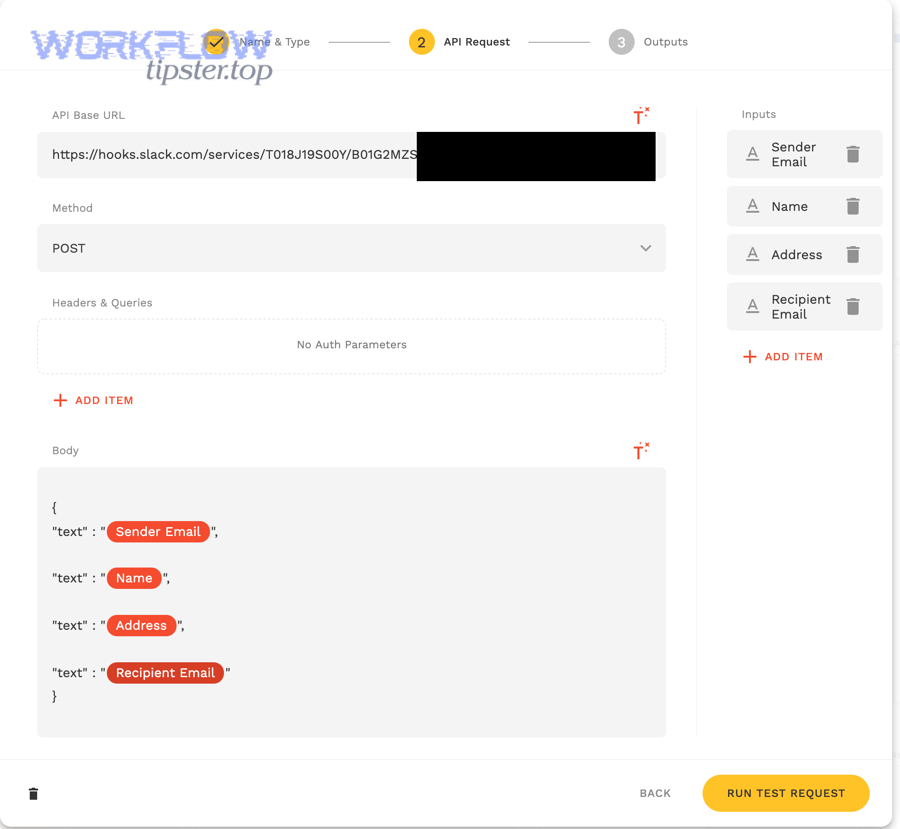
To make the differences concrete, the table below summarizes what changes in practice when you troubleshoot an invalid JSON payload across contexts.
| Context | What Slack expects | Where invalid payload usually originates | Best first fix |
|---|---|---|---|
| Incoming Webhooks | JSON message payload posted to webhook URL | Bad JSON syntax, wrong blocks shape, bad escaping in interpolated strings | Start with { "text": "hello" }, then add blocks |
| Web API (e.g., message methods) | Method-specific parameters; JSON must parse and match expected types | Wrong Content-Type, non-object root, wrong field types |
Confirm headers; ensure root object; confirm method params |
| Automation tools | Tool-specific mapping to Slack fields; often templates | Double encoding, templating escaping, field mapping errors | Inspect raw outbound HTTP body and remove one template variable |
This framing prevents a common pitfall: treating Slack as the only thing that can be wrong. In low-code platforms, the platform’s “payload builder” is frequently the real source of invalid JSON.
Slack Incoming Webhook vs Web API: what payload structure differences matter most?
Incoming Webhooks win for direct message-style payloads, while the Web API is best for method-driven parameter validation, because webhooks accept a JSON body representing the message, but Web API methods validate specific parameter sets and may reject the same JSON shape. (docs.slack.dev)
Meanwhile, the fastest way to avoid confusion is to match your payload template to the endpoint before you add blocks or dynamic variables.
Key differences that matter:
- Where you send:
- Webhook: a unique webhook URL you post to. (docs.slack.dev)
- Web API: a method endpoint (authenticated); payload and headers must match that method. (docs.slack.dev)
- What “minimal” means:
- Webhook: message payload (often just
text). (docs.slack.dev) - Web API: method params; wrong types or missing required params can cause errors that look like payload issues.
- Webhook: message payload (often just
Also, when you use blocks, Slack expects blocks to be an array of valid blocks, and Slack documents constraints around block usage and maximum counts. (docs.slack.dev)
In GitHub Actions or CI pipelines, what causes “Need to provide valid JSON payload”?
In CI pipelines, “Need to provide valid JSON payload” is usually caused by templating and escaping issues, because YAML, shell quoting, and environment variable interpolation can silently transform a JSON object into invalid syntax or a JSON string.
Then, fixing the escaping typically resolves the Slack rejection without changing the Slack side at all.
Typical CI-specific causes:
- A variable contains a quote/newline and is injected raw.
- Multiline strings are injected without converting newlines to
\n. - The JSON file you reference contains trailing commas or comments.
- Your tool expects an object, but you pass a stringified JSON blob.
A CI-friendly defensive pattern is:
- Build the payload as a structured object (where possible).
- Serialize with a JSON tool (
jqor a language JSON library) to guarantee valid output. - Print the final serialized JSON to logs (redacting secrets) so you can see what Slack receives.
In low-code tools (Pipedream/n8n), is the payload often double-encoded (stringified JSON inside JSON)?
Yes—payloads are often double-encoded in low-code tools because the tool stores your “JSON” as a string template and then serializes again, which turns an object into a quoted string and triggers “json_not_object” or similar parsing/shape errors. (docs.slack.dev)
Besides, this is one reason “slack trigger not firing” reports can be misleading: the trigger may fire, but the Slack action fails immediately due to a malformed or mis-typed body.
How to spot double encoding:
- Your raw request body starts with
"instead of{. - The payload contains lots of escaped quotes like
\"text\". - Slack error implies it parsed something but not an object. (docs.slack.dev)
How to fix it:
- Use the tool’s “raw JSON object” mode (not “text template” mode).
- If the tool forces string templates, build the object first, then serialize exactly once.
- Avoid passing JSON strings between steps unless the next step explicitly expects a string.
How can you prevent Slack invalid JSON payload errors permanently?
Preventing Slack invalid JSON payload errors is a 5-guardrail system—(1) generate payloads with serializers, (2) validate JSON and object shape, (3) validate Block Kit structure, (4) test against a sandbox channel, and (5) log/replay payloads—so failures are caught before production. (docs.slack.dev)
More importantly, prevention is what stops recurring incidents that look like “slack tasks delayed queue backlog” when retries stack up behind a repeatedly rejected payload.

Think of prevention as “make it impossible to send invalid payloads,” not “be careful.”
Should you generate Slack payloads with a JSON builder instead of string concatenation?
Yes—you should generate Slack payloads with a JSON builder because (1) builders escape quotes and newlines safely, (2) builders preserve the correct top-level object type, and (3) builders reduce human error when adding blocks and nested fields, which is exactly what causes most invalid JSON payload failures.
Especially, this single change eliminates the most common syntax mistakes (trailing commas, broken quoting) and makes your payload repeatably valid.
A safe pattern in any language is:
- Construct a native object/dictionary/map for the payload.
- Serialize with the language’s JSON encoder.
- Send the serialized string with correct
Content-Type. (docs.slack.dev)
This also makes your payload easier to unit test, because you can validate the object structure before serialization and compare it to expected JSON snapshots.
What pre-flight checks catch invalid payloads before deployment?
There are 6 pre-flight checks that catch invalid payloads before deployment: JSON parse check, root object check, header check, Block Kit schema check, constraints check (like max blocks), and sandbox post check, based on whether the failure is syntactic, structural, or constraint-driven. (docs.slack.dev)
Thus, a payload that passes all six checks is almost always Slack-compatible.
Use this checklist:
- Parse the serialized body (in the same runtime that sends it).
- Assert root is an object (not array/string). (docs.slack.dev)
- Assert
Content-Type: application/jsonwhen sending JSON. (docs.slack.dev) - Validate blocks structure (
blocksis an array; each block has correct fields). (docs.slack.dev) - Check constraints (for example, Slack documents message block limits such as up to 50 blocks in a message). (docs.slack.dev)
- Post to a sandbox channel and record the response.
According to a study by University of Luxembourg from SnT, in 2021, researchers analyzed 25 GitHub projects containing 3,806 JSON schema files, and found 737 schemas had changed at least once, highlighting how schema changes are common and can introduce data compatibility bugs if not validated. (software-lab.org)
That study supports a practical point for Slack integrations: once your message payload becomes a “schema” your team relies on (especially in automations), validating and versioning it is not optional—it is how you prevent invisible breakage from small changes.
What are the tricky edge cases that still trigger Slack invalid JSON payload (even when everything looks correct)?
There are 4 tricky edge-case categories that can still trigger Slack invalid JSON payload errors—encoding/special characters, “valid vs compatible” mismatches, Block Kit constraint violations, and complexity trade-offs between text and blocks—based on failures that occur after basic JSON parsing seems correct. (docs.slack.dev)
Next, these edge cases matter most when your payload is generated dynamically or passed through multiple systems (webhook → queue → automation → Slack).

Can special characters, emojis, or non-UTF-8 encoding make a Slack payload “valid JSON” but still fail?
Yes—special characters and encoding issues can make a payload appear valid but still fail in transit or parsing, because hidden control characters, incorrect encoding, or middleware transformations can corrupt the exact bytes Slack receives.
Then, the fix is usually to normalize strings to UTF-8, remove control characters, and ensure your serializer handles emojis and Unicode correctly end-to-end.
High-risk scenarios include:
- Copy/pasting from rich text sources (smart quotes, non-breaking spaces).
- Data passing through systems that assume a different encoding.
- Logs or templating layers that escape characters inconsistently.
A pragmatic mitigation is to sanitize input strings:
- Normalize Unicode (NFC) where available.
- Replace control characters except
\nand\t. - Always serialize with a trusted JSON encoder.
What’s the difference between “valid JSON” and a “Slack-compatible JSON payload”?
Valid JSON wins in syntax correctness, while Slack-compatible JSON wins in endpoint-specific structure and constraints, because Slack can parse a payload that is valid JSON yet still reject it if it does not match the expected object shape, field types, or message schema for the endpoint. (docs.slack.dev)
However, once you recognize this distinction, debugging becomes faster because you test syntax first and compatibility second.
Use this rule of thumb:
- If Slack complains about parsing (
invalid_json), you likely have syntax/header/encoding trouble. (docs.slack.dev) - If Slack indicates it’s not an object (
json_not_object), your top-level type or encoding is wrong. (docs.slack.dev) - If Slack rejects blocks/fields, your payload is valid JSON but not Slack-compatible. (docs.slack.dev)
This is also why “it works in my JSON linter” is not proof it will work in Slack. Slack compatibility includes domain rules like blocks count and valid block structures.
When do Block Kit constraints (length limits, missing fallback text, invalid block types) surface as payload errors?
Block Kit constraints surface as payload errors when your message includes blocks that violate Slack’s structural rules or constraints, such as incorrect block objects, invalid types, or exceeding documented limits like block counts per message. (docs.slack.dev)
More specifically, these issues appear right when you add blocks or dynamic content, because constraints are enforced after parsing but before posting.
Three constraint-driven pitfalls to watch:
- Too many blocks in a message (Slack documents up to 50 blocks per message). (docs.slack.dev)
- Invalid block structure (missing required fields like
type, wrong nesting). (docs.slack.dev) - Missing or weak fallback
textfor notifications when using blocks . (docs.slack.dev)
A safe habit is to include both:
- A short, descriptive top-level
textsummary, and - Blocks for the rich UI.
This makes messages more robust across surfaces and prevents confusion when notifications show nothing meaningful.
Is it better to send plain text messages instead of blocks to avoid payload errors?
Plain text wins for reliability and speed, while blocks are best for rich, structured communication, because text has fewer structural rules, but blocks require strict arrays of valid block objects and can fail when templates or constraints drift. (docs.slack.dev)
In addition, the best compromise is staged adoption: start with text, stabilize delivery, then add blocks with incremental validation.
A practical decision guide:
- Choose text-first when:
- You’re building a new integration and need high delivery confidence.
- You’re debugging recurring invalid payload errors.
- You’re sending simple alerts.
- Choose blocks when:
- You need consistent formatting for operations workflows (status, owners, buttons).
- You want interactive actions or structured summaries.
- You can validate blocks automatically before sending. (docs.slack.dev)
If you adopt blocks, keep your message pipeline “safe by design”:
- Builder/serializer only (no string concatenation).
- Unit tests for payload shape.
- A sandbox channel for fast validation.
- Logged payload samples for replay.
That’s how you move from “invalid JSON payload” firefighting to predictable Slack message delivery—so Slack remains an accelerator, not a recurring source of integration downtime.