


If you want DevOps alerts to actually change outcomes, you need a workflow that turns GitHub signals into two things at the same time: structured coordination in Basecamp and fast visibility in Discord. This guide shows how to set up GitHub → Basecamp → Discord alerts so engineers see what matters, act quickly, and keep the work documented.
You’ll also learn which GitHub events belong in an alerting stream (and which ones create noise), because “more notifications” is not the same as “better incident response.” The goal is an alert map that routes the right event to the right place with the right severity.
Next, we’ll compare Notifications vs Webhooks vs GitHub Actions vs no-code automation so you can choose a setup that fits your team’s maturity, security requirements, and maintenance budget—without overengineering on day one.
Introduce a new idea: once the pipeline is working, we’ll tighten reliability and security so the workflow stays useful at scale (across repos, teams, and on-call rotations) and doesn’t degrade into alert fatigue.
What does “GitHub → Basecamp → Discord DevOps alerts” mean in a practical workflow?
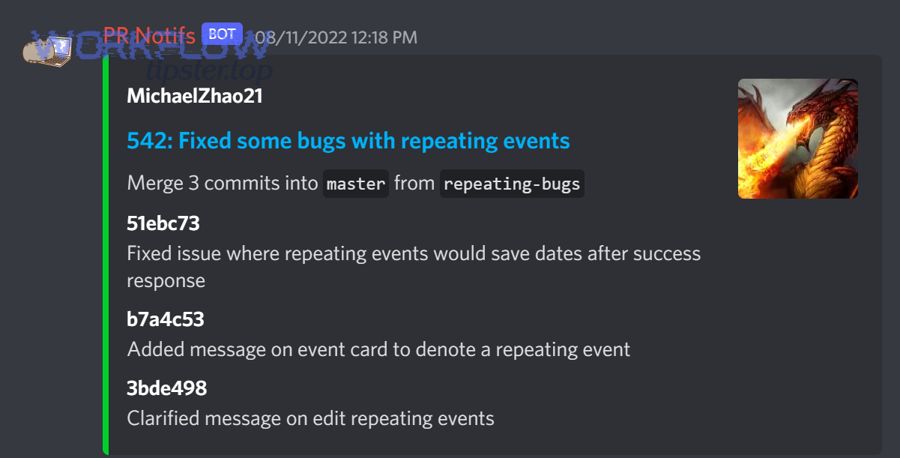
It means you build one alert pipeline that sends GitHub events to Discord for fast team awareness and to Basecamp for durable coordination, so engineers can respond quickly while keeping a clean project record.
Then, to better understand why this pattern works, separate “where people notice” from “where people decide”:
- Discord = real-time awareness layer. Engineers see alerts as they happen, ask quick questions, and coordinate immediate action in the right channel.
- Basecamp = coordination and accountability layer. The same event (or a summarized version) lands in a Basecamp thread/message so the team can assign owners, track decisions, and keep an audit-friendly timeline.
What are the core “must-have” GitHub triggers for DevOps alerting?
A “must-have” trigger is one that changes operational risk or changes the likelihood of production breakage, and it should be included because it produces a clear next action for an engineer.
Next, focus on triggers that represent change (deployments/releases), risk (security/permissions), and breakage (failed automation):
- Deployments and releases: A deployment is a production-risk event; it’s not just “information,” it’s a moment that can create incidents.
- CI/CD failures that block delivery: Failed builds/tests matter when they stop shipping or indicate a broken main branch.
- Pull request lifecycle events (limited): PR opened/merged can matter when it implies a new change is entering main, but only if you filter aggressively (more on that later).
In practice, your must-have set should be small enough that the team can read every alert in the main DevOps channel without scrolling past dozens of low-signal messages.
What optional GitHub events should you include to improve engineering visibility without noise?
Optional events improve visibility when they’re routed to the right destination or converted into summaries (digest-style), rather than blasted into your primary alert channel.
Then, route optional events based on who needs to act:
- Issue created/label changes can help triage if your process treats labels as action signals.
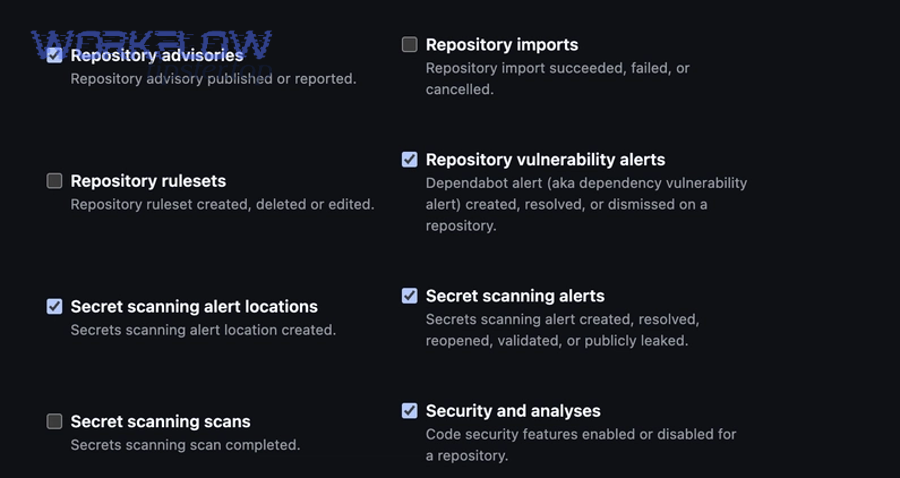
- Dependabot/security-related events matter, but they’re often better in a dedicated security channel unless you’re in active incident mode.
- Discussion/comment activity is almost always noise in DevOps channels; if you include it, send it to a low-priority channel or Basecamp-only.
According to a study published by the Association for Computing Machinery (ACM) in 2025 reviewing alert fatigue mitigation research, high alert volume and low-quality alerts are a consistent driver of fatigue, and solutions focus heavily on prioritization and automation to reduce overload. (dl.acm.org)
Which GitHub events should you send as DevOps alerts?
There are 4 main types of GitHub events you should send as DevOps alerts—change, quality gates, operational risk, and security signals—based on whether the event creates a time-sensitive engineering action.
Next, treat “DevOps alerts” as a taxonomy, not a random list:
- Change events (what is shipping / what changed)
- Quality gate events (what blocks shipping)
- Operational risk events (what can break production)
- Security events (what creates exposure or urgent remediation)
This grouping helps you route alerts correctly: Discord for real-time awareness, Basecamp for coordination, and (optionally) digests for low urgency.
When you implement this, start by mapping each group to an owner:
- Change: release manager / on-call lead
- Quality gates: build sheriff / CI owner
- Operational risk: SRE/on-call
- Security: security engineering or a designated champion
A workflow that routes by ownership becomes calmer and more reliable than a workflow that routes everything everywhere.
According to GitHub’s official documentation on webhooks and workflow triggers, repositories can emit many event types (e.g., push, pull_request, delete), and selecting only the events that matter to your process is essential to avoid unnecessary notifications. (docs.github.com)
Should you use Notifications, Webhooks, GitHub Actions, or no-code automation for this pipeline?
Yes—you should choose your approach deliberately because each option has different tradeoffs in control, reliability, and maintenance, and the wrong choice usually creates either alert spam or brittle integrations.
Then, compare them using three criteria engineering teams actually feel day-to-day:
- Control: Can you filter, route, enrich, and format alerts?
- Reliability: Can you retry safely, avoid duplicates, and handle rate limits?
- Effort: How quickly can you ship a working pipeline and keep it running?
Is a no-code automation approach the fastest way to connect GitHub to Basecamp and Discord?
Yes—no-code automation is usually the fastest path to a working pipeline because it gives you prebuilt triggers/actions, simple filtering, and quick iteration without building infrastructure.
Next, use no-code when your requirements look like this:
- You need a working alert flow today
- You can accept limited customization
- Your team prefers configuration over code
- You’re not handling sensitive payloads beyond what’s necessary
However, no-code tools can struggle with advanced needs like idempotency, signature verification, and complex routing logic across many repos. In those cases, you graduate to webhooks or Actions.
To keep the semantics consistent, think of no-code as the prototype layer of your automation workflows: fast to start, easy to adjust, and good for proving what your team actually needs.
(And if your team already runs other automation workflows—like “calendly to outlook calendar to zoom to trello scheduling” or “calendly to outlook calendar to google meet to jira scheduling”—you already understand the operational value of wiring events to the tools where work happens.)
Are webhooks better than “notifications” when you need structured DevOps alerts?
Yes—webhooks are usually better than basic notifications because they deliver structured event payloads to your endpoint, which allows you to filter, enrich, and route alerts with precision.
Then, the key difference is this:
- Notifications are often “push text to a place.”
- Webhooks are “send structured data so you can decide what to do.”
With webhooks, you can:
- Drop low-signal events before they ever hit Discord
- Route incidents to an on-call channel automatically
- Create a Basecamp thread only when a condition is met (e.g., failed deployment + production environment)
Basecamp’s own help documentation describes webhooks as a mechanism where Basecamp notifies your application when something changes, emphasizing the payload URL and trigger types. (3.basecamp-help.com)
When is GitHub Actions the best choice for sending alerts to Discord and coordinating in Basecamp?
GitHub Actions is the best choice when you want alerts to be generated by CI/CD context (jobs, environments, artifacts) and you need conditional logic that lives next to the code.
Next, Actions shines when your alert depends on workflow results, such as:
- “Send a Discord alert only if tests fail on main”
- “Post a Basecamp update only when deployment to production completes”
- “Include links to logs, artifacts, and run summaries”
GitHub’s official Actions documentation details many workflow triggers and filtering capabilities (like path filters), which makes Actions effective for precise, low-noise alerts. (docs.github.com)
How do you set up a GitHub → Basecamp → Discord alert flow step by step?
Use a routing-first method with 6 steps—define signals, map destinations, choose delivery, secure secrets, format messages, and test end-to-end—so you can ship a reliable alert workflow that engineers actually use.
Then, follow this sequence to avoid the most common failure pattern (building “the pipeline” before you know what should flow through it).
- Define the signal set
Pick a small set of events (from the taxonomy earlier). If you start with everything, you will end with nothing—because the channel becomes ignorable. - Create a routing map
Decide where each event goes: Discord channel, Basecamp thread/message, or digest. - Choose your delivery mechanism
Quick start: no-code; Best structure: webhooks; CI-context aware: GitHub Actions - Set up secure credentials
Use secrets (not hardcoded tokens). Keep scope minimal. - Format messages as “action cards”
A good alert answers: what happened, where, impact, link, next step. - Test with real scenarios
Run a controlled set of events (test PR, failing build, mock deployment) and confirm routing.
How do you design the routing map from GitHub events to Basecamp and Discord destinations?
Design the routing map as a table where each GitHub event has one owner, one severity, and one primary destination—then optionally a secondary log destination—so the alert always creates a clear next action.
Next, build a routing table like this (and keep it short at first):
- Deployment succeeded (prod) → Discord: #deployments (info) + Basecamp: “Deploy Log” thread
- Deployment failed (prod) → Discord: #on-call (high) + Basecamp: create “Incident: Deployment Failure” thread
- CI failed on main → Discord: #build-breakages (medium) + Basecamp: “Build Sheriff” message
- Security alert (critical) → Discord: #security-alerts (high) + Basecamp: security task thread
When you apply this, you create “one event → one decision path,” which is what prevents confusion during incidents.
How do you format DevOps alert messages so they’re actionable for engineering teams?
Format alerts into a consistent template—Event + System + Severity + Impact + Link + Next step—so an engineer can decide what to do within 10 seconds of reading.
Then, use these components:
- Event: “Deployment failed”
- System: repo/service name + environment
- Severity: high/medium/low (based on customer impact and urgency)
- Impact: what could be broken
- Link: direct URL to the PR/run/logs
- Next step: “Rollback” / “Investigate logs” / “Page on-call”
A great alert is not longer; it’s more decisive.
How do you validate the workflow end-to-end before rolling it out to the whole team?
Validate the workflow by running three test scenarios (low, medium, high severity) and verifying delivery, formatting, routing, and permissions in both Discord and Basecamp.
Next, test like this:
- Low severity: PR opened → goes to a low-noise channel or digest (confirm it does not hit on-call)
- Medium severity: CI failure on main → goes to build channel and Basecamp log
- High severity: simulated deployment failure → goes to on-call channel and creates a Basecamp incident thread
Also verify:
- Links are clickable and point to the exact run/PR
- Message formatting survives Discord markdown and Basecamp formatting
- Rate limits don’t collapse bursts of events
- Duplicate prevention works under retries
According to GitHub Marketplace listings for Discord webhook notification Actions, these actions are designed specifically to send messages to Discord via webhooks inside workflows—making them a practical option for end-to-end testing with real CI runs. (github.com)
How do you reduce alert fatigue while keeping DevOps alerts reliable?
You reduce alert fatigue by filtering aggressively, grouping intelligently, and routing by ownership—and you keep reliability by adding retries, deduplication, and rate-limit awareness—so your DevOps alerts stay actionable instead of becoming background noise.
Then, treat alerting like product design: if the experience is bad, users churn (they mute the channel), and your pipeline becomes performative instead of operational.
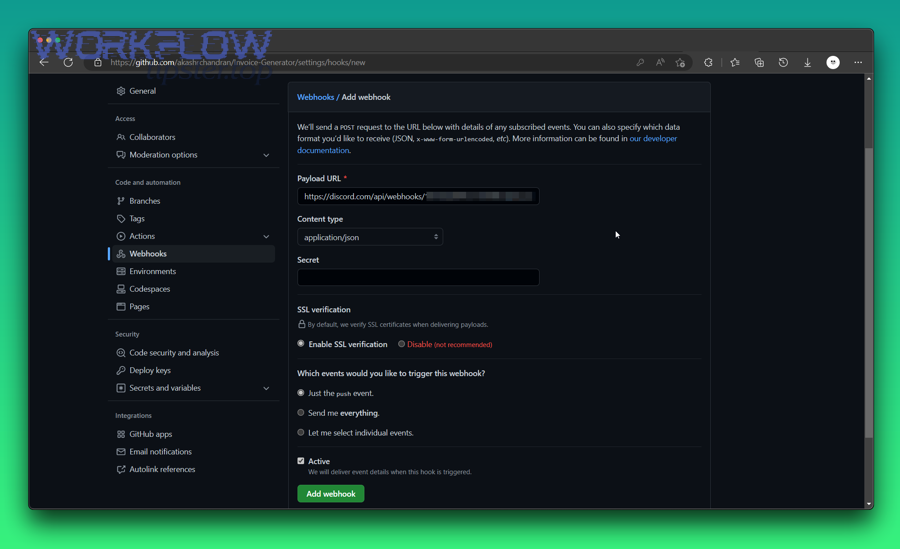
How do you filter and group alerts so Discord stays useful and Basecamp stays organized?
Filter and group alerts by severity, environment, and frequency so Discord receives only time-sensitive signals, while Basecamp receives structured summaries and decision threads.
Next, use practical rules that engineers accept:
- Severity routing
- High: on-call Discord channel + Basecamp incident thread
- Medium: team channel + Basecamp log message
- Low: digest-only or a quiet channel
- Environment routing
- Production events go to high visibility
- Staging/dev events go to low visibility unless they block delivery
- Frequency controls
- Batch repetitive events (e.g., multiple CI failures in 10 minutes → one summarized alert)
- Debounce “spammy” triggers (commit storms, comment storms)
Basecamp organization tip: keep a dedicated “Deployments / Incidents” space so coordination doesn’t fragment across random project messages.
What are the most common failure points, and how do you fix them?
The most common failure points are permissions, misrouted webhooks, poor filtering, and duplicate floods, and you fix them by tightening scopes, validating endpoints, adding event guards, and implementing idempotency.
Then, diagnose failures in this order:
- Permissions/scopes: Token can’t post to Basecamp or can’t read GitHub event context.
- Webhook endpoint mistakes: Wrong URL, missing HTTPS requirements, firewall blocks.
- Event selection mistakes: Too many events enabled, or wrong “types” configured.
- Formatting/payload issues: Messages too large, missing required fields, broken markdown.
- Dupes and bursts: Retries cause repeated alerts; a busy repo triggers floods.
Fix patterns:
- Add filters (paths-ignore, branch filters, environment checks)
- Add a dedupe key (event ID + repo + timestamp window)
- Add backoff on retries
- Separate channels by purpose (on-call vs general engineering updates)
According to a 2024 paper on alert fatigue mitigation (published in a peer-reviewed venue on ScienceDirect), alert overload can cause high-risk alerts to be missed or delayed, and effective systems emphasize prioritization and triage to keep the workload manageable. (sciencedirect.com)
Is this workflow secure enough for production engineering teams?
Yes, this workflow can be secure enough for production engineering teams if you apply least-privilege permissions, store secrets properly, minimize sensitive data in alerts, and verify webhook integrity—because security failures in alerting often become access failures in production.
Next, treat the alert pipeline as part of your production system: it touches credentials, internal links, and operational context.
What permissions and secrets do you actually need across GitHub, Basecamp, and Discord?
You need only the minimum tokens/scopes required to read the triggering event and post messages—nothing more—so compromise impact stays small.
Then, apply these principles:
- GitHub
- Prefer GitHub Actions secrets for webhook URLs and tokens
- Restrict token scopes to what’s necessary (read metadata, post statuses if needed)
- Be cautious with triggers like
pull_request_targetbecause it can introduce security risk if misused (especially in public repos)
- Discord
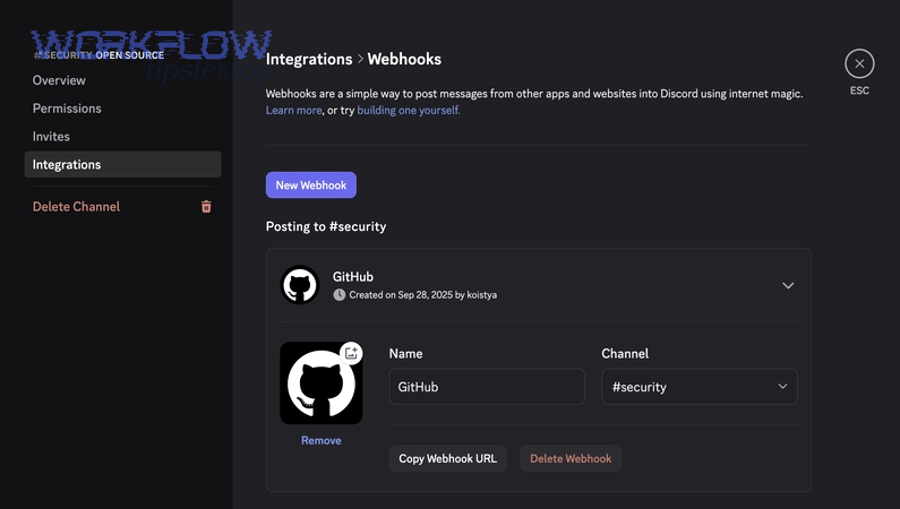
- Use a webhook URL per channel (or per purpose) so revocation is easy
- Store webhook URLs only in secrets, never in repo files
- Basecamp
- Use OAuth/token scopes appropriate to posting messages in a specific project
- Keep integrations project-scoped when possible to reduce blast radius
GitHub’s workflow and webhook documentation highlights that different events and triggers have different security implications, and careful event selection and secret handling is part of safe automation. (docs.github.com)
What information should you avoid putting into alerts to reduce risk?
Avoid putting secrets, personal data, and sensitive internal incident details into alerts because Discord and notification logs often have broader visibility than your incident response system.
Then, redact or omit:
- Access tokens, API keys, webhook URLs
- Customer identifiers, PII, or private support ticket content
- Internal hostnames and private endpoints unless necessary
- Full stack traces if they include secrets or internal paths
- Any content that would be risky if copied outside the company
A safe alert is still actionable because it points to the source of truth (the run log, deployment dashboard, Basecamp incident thread) rather than embedding everything inside the message.
How can you optimize and extend GitHub → Basecamp → Discord DevOps alerts beyond the basic setup?
You can extend the pipeline by adding severity-based escalation, webhook integrity checks, incident-ready threads, and governance rules—so alerts move from “notifications” to “operations control” as your engineering org scales.
Next, this is where micro-semantics matters: you shift from the basic synonym (“alerts” = “notifications”) to the operational antonym (“signal” vs “noise”) and design for the difference.
How do you build severity-based escalation so “alerts” don’t become “noise”?
Build escalation by labeling alerts with severity and routing only high-severity events to on-call, while routing informational events to quieter channels or Basecamp logs.
Then, define severity with three questions:
- Does this affect production customers?
- Does it require action within minutes?
- Is there a clear owner who must respond?
If “yes” to the first two, it’s high and belongs in on-call Discord plus an incident thread in Basecamp. If not, it’s medium/low and should be grouped, digested, or logged.
This is how you keep Discord readable and Basecamp meaningful at the same time—without muting the very channel you need during incidents.
How do you implement webhook integrity and replay safety (signature verification and idempotency)?
Implement integrity by verifying shared secrets (signatures) and implement replay safety by deduplicating events using an idempotency key—so retries don’t create duplicate incident spam.
Then, apply two safeguards:
- Integrity (trust): confirm the request came from the system you expect.
- Idempotency (safety): confirm you haven’t already processed the same event.
Even if you’re using a managed tool, you can often simulate idempotency by checking event IDs or run IDs and ignoring repeats within a time window.
How do you create an incident-ready alert pathway (deploy failure → Basecamp incident thread → Discord war-room)?
Create an incident-ready pathway by automatically generating a Basecamp incident thread for high-severity events and simultaneously posting a “war-room” message to a dedicated Discord channel with the same incident identifier.
Then, use a consistent incident template:
- Incident name: “Incident: <service> <env> <symptom>”
- Links: run logs, deployment, dashboards
- Owner: on-call lead
- Status cadence: update frequency and next checkpoint
This pattern turns alerts into coordination, which is the difference between “we saw it” and “we fixed it.”
How do you govern and audit alert pipelines across multiple repos and teams?
Govern the pipeline by standardizing routing maps, documenting ownership, reviewing permissions quarterly, and maintaining a single change process for alert rules—so your alerting system stays predictable as repos multiply.
Then, define governance artifacts:
- An “Alert Routing Map” page (source of truth)
- A list of webhook endpoints and owners
- A review checklist (scopes, channels, noise levels)
- A change log (what changed, why, and impact)
According to Basecamp’s documentation on webhooks, webhooks are configured per project with defined trigger types and a payload URL, which makes ownership and governance at the project level an important operational control. (3.basecamp-help.com)