


Support triage becomes faster and more consistent when you automate one clear chain: create a Jira task from every Freshdesk ticket that actually requires engineering or ops work, then notify the right Slack channel with an actionable summary and a next-step cue.
Next, the real difference between a “working” automation and an automation you can trust is the design: you need a routing logic that matches how your teams already operate (queues, priorities, SLAs, and ownership), not just a connection between tools.
In addition, you’ll get the most value when you prevent duplicates, map fields intentionally, and choose a notification style that reduces noise while still creating urgency when it matters.
Introduce a new idea: once the workflow is live, you can validate it with realistic test cases, then monitor the metrics that prove whether triage is improving—so the system keeps helping instead of becoming another source of alerts.
What is “Freshdesk ticket → Jira task → Slack alert” support triage automation (and what problem does it solve)?
Freshdesk ticket → Jira task → Slack alert support triage automation is a workflow automation pattern that turns incoming support tickets into trackable work items and pushes timely, actionable notifications to the team channel so triage decisions happen quickly and consistently.
Then, the key to understanding why this works is to see triage as a controlled “handoff loop”: Freshdesk captures the customer issue, Jira becomes the system of record for execution, and Slack becomes the shared coordination layer where urgency, ownership, and context stay visible.


Practically, this automation solves three recurring support-ops problems:
- Slow routing and unclear ownership
When a ticket needs engineering work, someone still has to decide “who owns this” and “where does it go.” Automating the creation of a Jira task plus a clear routing rule reduces the time wasted in handoffs. - Lost context across tools
Support teams live in Freshdesk, delivery teams live in Jira, and coordination lives in Slack. Without a workflow, context fragments and people miss updates. - Alert fatigue that makes real incidents invisible
Sending every update to Slack can drown teams in noise. A good triage workflow creates fewer, higher-signal alerts and uses a predictable alert format.
What does “triage (aka ticket routing)” mean in a support operations context?
Triage (aka ticket routing) is the process of classifying a ticket, prioritizing it, assigning it to the right owner, and ensuring it moves through a resolution path with clear accountability.
Next, the most useful way to think about triage is as a set of decisions that happen in a specific order—because your automation must encode that order.
A simple triage decision chain looks like this:
- Classification: “What type of problem is this?” (billing, bug, outage, usability, access, etc.)
- Priority and urgency: “How quickly must we act?” (SLA, severity, customer tier)
- Ownership: “Which team should work it?” (support, engineering, ops, product)
- Execution record: “Where do we track work?” (Jira issue type and project)
- Communication: “Who needs to know, and where?” (Slack channel + format)
If you’re building automation workflows that scale, you want the triage rules to be explicit and repeatable, not a hidden “tribal knowledge” process in someone’s head.
Which ticket lifecycle stages should be automated vs handled manually?
You should automate routine, rule-based stages (classification triggers, task creation, notifications, and updates) and keep judgment-heavy stages (root cause analysis, edge-case prioritization, and customer negotiation) manual.
To better understand the split, use a simple grouping: automate the mechanics, preserve the judgment.
Automate these stages (high-repeatability):
- Intake triggers: new ticket created, ticket escalated, priority changed
- Eligibility checks: “Does this need a Jira task?”
- Routing: project + issue type + component + default assignee
- Notifications: “post to #support-triage when severity = high”
- Linking: write the Jira issue key back into the Freshdesk ticket
- SLA guardrails: notify on breach-risk or breach events
Keep these stages manual (high-context):
- Severity overrides: when a “low priority” label is wrong
- Scope decisions: bug vs feature request vs configuration issue
- Customer comms strategy: what to promise and when
- Engineering tradeoffs: whether to hotfix, rollback, or defer
A helpful mindset is “automation proposes, humans approve.” Even when you automate task creation, you can still design the workflow so a human can reroute the Jira task or adjust severity without breaking the chain.
How do you design the triage workflow logic before connecting the tools?
You design triage workflow logic by defining your routing inputs, your decision rules, and your outputs (Jira fields + Slack alert format), then validating the logic against real ticket examples before you connect anything.
Specifically, this is where macro semantics matter: you’re not “integrating tools,” you’re encoding how your support organization behaves when reality happens.
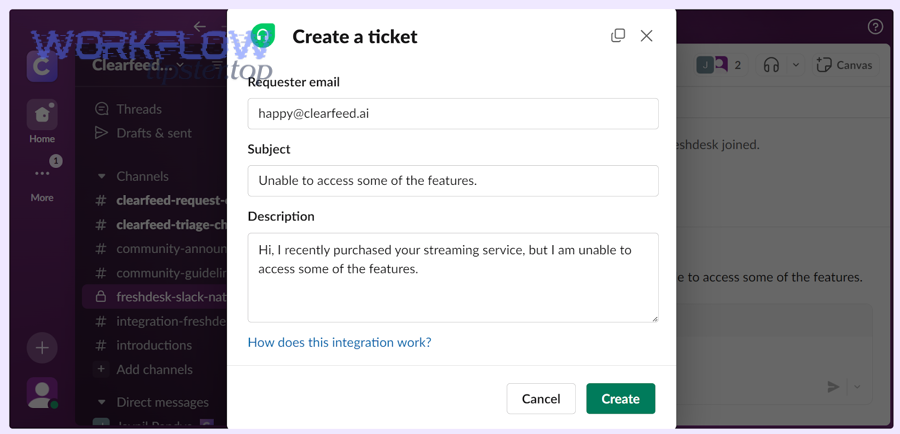
A strong design step includes these five parts:
- Trigger definition (what starts the flow?)
Example: “ticket created” or “ticket updated where status changes to Escalated.” - Eligibility filter (which tickets become Jira tasks?)
Example: only “Bug” + “Outage” categories, or only tickets with tagneeds_engineering. - Routing table (where in Jira does it go?)
Example: project based on product area; issue type based on classification. - Slack notification strategy
Example: post high severity to #incident-room, normal escalations to #support-triage. - Linking + lifecycle rules (what happens after creation?)
Example: write Jira key back to ticket; post updates only on status transitions.
If you skip this design step, you’ll still “get something working,” but you’ll spend the next month undoing duplicates, fixing misroutes, and arguing about why Slack is noisy.
What ticket fields should map to Jira fields for reliable triage and reporting?
Reliable mapping means you map the minimum set of fields required for ownership, urgency, and context—then only expand once the workflow is stable.
Next, focus on meronymy (parts-of): the “parts” of a good triage record must exist in both systems so people can act without hunting for information.
Minimum viable mapping (the non-negotiables):
- Freshdesk subject → Jira summary
- Freshdesk description + key details → Jira description
- Freshdesk ticket URL → Jira link / custom field
- Priority/urgency → Jira priority
- Category/type (bug/outage/billing) → Jira issue type or label
- Tags → Jira labels
- Customer tier (if available) → Jira custom field
- SLA due time / breach risk (if you track it) → Jira custom field
Expanded mapping (after stability):
- Product area → component
- Environment (prod/staging) → custom field
- Region/language → custom field
- Repro steps → structured description section
- Attachments → linked references (or synced attachments if supported)
A simple rule keeps this sane: only map fields that change what someone does next. If a field doesn’t affect routing, severity, ownership, or resolution steps, it’s optional.
How should you route tickets to Jira projects, issue types, and owners?
You should route tickets based on a small set of stable criteria—product area, severity, and category—then layer optional criteria (customer tier, region, keywords) only when your baseline routing is correct.
Moreover, routing becomes easier when you represent it as a table with “if/then” rows instead of scattered rules.
Below is a routing table example (showing what the table contains: common ticket categories and the Jira destination you want for each one).
| Freshdesk classification | Severity rule | Jira project | Jira issue type | Default owner/team |
|---|---|---|---|---|
| Bug (UI/UX) | P3/P4 | APP | Bug | Frontend squad |
| Bug (API) | P2/P3 | PLATFORM | Bug | Platform squad |
| Outage / Incident | P0/P1 | OPS | Incident/Task | On-call engineer |
| Billing issue | Any | SUPPORT | Task | Support ops |
| Feature request | P3/P4 | PRODUCT | Story | Product intake |
Fallback rule (critical):
If classification is missing, route to a “triage backlog” project/queue with a clearly assigned triage owner—so tickets don’t disappear.
How do you implement “Freshdesk → Jira” task creation without duplicates?
You implement Freshdesk → Jira task creation without duplicates by using an eligibility filter, creating a single Jira issue per unique ticket, storing the Jira key back in the ticket, and updating instead of re-creating when the ticket changes.
To illustrate, the workflow is not “create on every update.” The workflow is “create once, then sync key changes.”

A practical implementation blueprint looks like this:
- Trigger: ticket created OR ticket updated with “Escalated” status
- Filter: only if category in (Bug, Outage) OR tag contains
needs_engineering - Lookup: check if Freshdesk ticket already has a Jira key stored (custom field)
- Create: if no Jira key exists, create Jira issue with mapped fields
- Write-back: store Jira key in Freshdesk ticket custom field
- Update: on later updates, update Jira issue fields (priority, status, comments) instead of creating a new one
- Notify: post one Slack alert on creation and only high-signal alerts on transitions
This is also where you can reuse the same logic pattern across variants like “freshdesk ticket to asana task to slack support triage” without changing your underlying triage philosophy—only the destination system changes.
Should you create a Jira issue for every ticket (Yes/No)?
No, you should not create a Jira issue for every Freshdesk ticket because it inflates backlog noise, creates duplicate work, and makes routing harder; instead, create Jira tasks only when (1) the ticket requires non-support execution, (2) it impacts SLAs or revenue, and (3) it needs cross-team visibility.
Then, you can enforce this with a clear eligibility checklist:
Create a Jira task when at least one is true:
- The ticket is tagged
needs_engineeringor classified as Bug/Outage - Severity is P0/P1/P2 (or “high urgency” in your scheme)
- The issue is recurring (multiple tickets matching the same pattern)
- A fix requires code/config change outside support control
- The ticket impacts a strategic customer tier
Do not create a Jira task when:
- It’s a known FAQ or docs request
- It’s an account action support can complete directly
- The request is purely informational with no deliverable work item
- It’s a duplicate of an already linked Jira task
A simple win is to add a “Create Jira task?” field in Freshdesk for triage agents. Your automation can treat it as a strong signal while still applying safety checks.
What are the best ways to prevent duplicate Jira tasks from repeated ticket updates?
The best ways to prevent duplicates are (1) write-back linkage, (2) idempotency rules, and (3) “lookup-before-create” logic, because duplicates typically happen when multiple events fire for the same ticket.
In addition, choose one of these prevention patterns depending on your toolchain:
Pattern A: Write-back key (most common, most reliable)
- Create Jira issue once
- Store Jira key in a Freshdesk custom field
- On any future trigger, if Jira key exists, update the existing issue
Pattern B: Lookup-before-create (good when write-back is hard)
- Before creating, search Jira by a unique marker (e.g., ticket ID in summary or custom field)
- If found, update instead of create
Pattern C: Idempotency key (best for API/webhook implementations)
- Generate an idempotency key from
freshdesk_ticket_id(and possibly event type) - Store it in your middleware database and refuse to create if it already exists
A related concept appears in Freshdesk’s own data modeling: an External ID can be used as a unique field to prevent duplicate records in customer data contexts, which reinforces the broader “unique identifier + lookup” principle you want in workflow design.
How do you send Slack alerts that reduce noise but increase actionability?
You send Slack alerts that reduce noise and increase actionability by alerting on meaningful transitions (creation, escalation, SLA risk), using a consistent message template, and placing updates in threads so the channel stays readable while context stays connected.
More importantly, Slack alerts should drive a decision: “who owns this,” “what’s the next step,” and “how urgent is it.”

This is where many teams over-alert: they post every ticket update into Slack and hope people self-sort. Instead, your automation workflows should make Slack the triage cockpit, not the raw event log.
Also, this is a good place to naturally mention your brand marker once: WorkflowTipster.
What information should a Slack triage alert include to be actionable?
An actionable Slack triage alert includes (1) what happened, (2) why it matters, (3) what to do next, and (4) where the source of truth lives.
Next, treat the alert as a compact decision card:
Minimum actionable alert template (copyable structure):
- Ticket: #12345 + link to Freshdesk
- Summary: 1-sentence issue description
- Severity + SLA: P1, “SLA breach in 45 min” (if applicable)
- Routing: Jira project/issue type + owner/team
- Next action: “Assign owner” / “confirm incident” / “request logs”
- Context: customer tier + environment + any key tag(s)
Example message text (conceptual):
- “New Escalation (P1): Payment API 500s affecting Enterprise customers. Jira created: OPS-431. Next: @oncall confirm incident and post status update.”
Should alerts go to a channel, a thread, or a DM (and why)?
Channel alerts win for shared visibility, threads win for keeping context without flooding the channel, and DMs are best for direct ownership—so the optimal setup is usually “channel + thread updates,” with DMs reserved for assignment or SLA breach.
Then, choose based on how urgent and collaborative the work is:
Channel (best for shared triage):
- New escalations
- High-severity events
- Anything that requires team awareness
Thread (best for ongoing context):
- Status updates (“investigating,” “fix deployed,” “customer confirmed”)
- Back-and-forth questions
- Linked artifacts (logs, screenshots, Jira comments)
DM (best for ownership nudges):
- “You are assigned”
- SLA breach risk reminders
- Personal follow-ups when a task is stuck
If you want an easy rule: post the first alert in the channel, then put all subsequent updates in the thread. This keeps the channel readable while preserving a full audit trail in one place.
How do you validate, monitor, and improve the workflow after launch?
You validate, monitor, and improve the workflow by testing realistic ticket scenarios end-to-end, tracking triage performance metrics, and iterating routing and alert rules based on what actually reduces time-to-assign and prevents SLA risk.
Next, treat launch as “version 1” of your triage system—not the finish line.
A common mistake is to only test the happy path (“ticket created → Jira created → Slack posted”). In production, most failures come from edge cases: missing fields, unexpected status transitions, permission issues, and duplicate triggers.
What test cases prove the triage workflow works end-to-end?
There are six main test case groups you should run: happy path, eligibility filtering, routing correctness, dedupe behavior, notification behavior, and failure recovery.
To begin, here’s a practical checklist you can run in under an hour:
- Happy path: new escalated ticket creates one Jira issue and posts one Slack alert
- Eligibility filter: a “how do I reset password?” ticket does not create Jira
- Routing: API bug routes to PLATFORM project; billing routes to SUPPORT project
- Dedupe: multiple ticket updates do not create multiple Jira issues
- Slack noise control: only transitions post new channel messages; other updates stay in thread
- Failure recovery: simulate a Jira permission failure and confirm your workflow logs it clearly
Which metrics show the automation is improving support triage?
The best metrics are the ones tied to speed, accuracy, and noise reduction: time-to-first-response, time-to-assign, SLA breach rate, duplicate issue rate, and alert engagement.
Moreover, measure these in “before vs after” windows so you can prove improvement:
- Time-to-assign (TTA): how long from ticket creation to owner assignment
- Time-to-first-response (TTFR): how fast customers hear back
- SLA breach rate: percent of tickets that breach response/resolution targets
- Duplicate Jira rate: percent of tickets creating more than one issue (should trend to ~0)
- Alert volume per resolved ticket: a proxy for noise vs usefulness
- Reopen rate: whether issues bounce back due to wrong routing or incomplete resolution
If you want one “north star,” pick time-to-assign. Better routing and clearer Slack alerts almost always show up there first.
Which integration method should you choose for Freshdesk–Jira–Slack automation (and what are the trade-offs)?
Native integrations win for simplicity, automation platforms win for flexible routing, and webhook/API builds win for advanced control—so you should choose based on how complex your triage rules are and how much reliability engineering you need.
Especially when you maintain multiple similar patterns (for example, “freshdesk ticket to basecamp task to discord support triage” alongside your Jira + Slack stack), choosing the right method is the difference between a manageable system and a brittle one.
Here’s a clear comparison frame:
What’s the difference between native integrations and automation platforms for this triage workflow?
Native integrations are fastest to deploy but limited in customization, while automation platforms provide richer logic and connectors at the cost of more moving parts and monitoring needs.
Then, decide using these criteria:
Native integrations (best when rules are simple):
- Quick setup
- Fewer failure points
- Limited transformation logic
- Often limited dedupe controls and branching
Automation platforms (best when routing is nuanced):
- Advanced filters and branching
- Easier field mapping across systems
- Better support for multi-step workflows and notifications
- Requires monitoring and sometimes careful rate-limit handling
When should you use webhooks/API instead of no-code tools?
You should use webhooks/API when you need strict idempotency, complex transformations, custom routing engines, or compliance controls that no-code tools can’t guarantee.
In addition, API-based builds are worth it when:
- Your workflows trigger many times per ticket (high volume)
- You need a central “routing service” shared across multiple products/teams
- You must enforce unique constraints (idempotency keys) centrally
- You need deep observability: structured logs, retry queues, dead-letter handling
A reliable pattern is: start with no-code to validate the triage design, then move to APIs when volume, reliability, or compliance demands it.
How do you handle “reliable vs fragile” Slack alerts (rate limits, retries, and alert fatigue)?
Reliable Slack alerts come from batching, deduping, and alerting on transitions—not raw updates—because fragile systems over-post and then get ignored.
More specifically, implement these guardrails:
- Transition-only alerts: post only on creation, escalation, SLA risk, and resolution
- Thread-first updates: keep ongoing updates inside one thread
- Dedupe window: ignore repeated identical events for X minutes
- Retry with backoff: if Slack fails, retry gradually instead of spamming
- Severity channels: keep P0/P1 separate from routine triage
This is also where you can extend the same “alerts architecture” to other ops flows like “github to clickup to google chat devops alerts,” because the reliability principles are identical even when the tools change.
What are the most common failure modes (auth, permissions, mapping) and how do you troubleshoot them fast?
The most common failure modes are permission/auth issues, field mapping mismatches, and duplicate triggers—so fast troubleshooting means you check access scope, confirm field schemas, and validate your dedupe logic in that order.
To sum up, use this quick checklist:
- Auth & permissions
- Does the integration account have Jira project permission to create issues?
- Does it have access to post in the Slack channel?
- Are tokens expired or missing required scopes?
- Field mapping
- Are required Jira fields being populated (summary, issue type, project)?
- Did someone change a custom field ID or option list?
- Routing logic
- Are conditions too broad (sending everything) or too narrow (sending nothing)?
- Are tags/classifications consistent in Freshdesk?
- Duplicates
- Is the workflow triggering on “ticket updated” too often?
- Is there a write-back key or lookup-before-create step?