


Turning a Freshdesk ticket into a Jira task and alerting the right people in Google Chat is the fastest way to move from “new request” to “owned work” without losing context. The core intent of this guide is to show you how to design the workflow so every ticket becomes a correctly scoped Jira issue and every alert lands where action happens.
Because automation only works when permissions, field mapping, and routing rules are reliable, this article also explains what access you need, what data must exist on the ticket, and how to structure rules so your triage logic stays consistent as volume grows. That way, your support team and engineering team collaborate with less manual copying and fewer missed escalations.
Once the workflow is running, the next challenge is operational: avoiding duplicates, preventing notification noise, and catching failures before they become outages in your process. This is where de-duplication patterns, message design, and safe retries make triage automation feel “invisible” in a good way.
Introduce a new idea: the most effective triage automation is not “more alerts,” but “more clarity,” so the main content starts by defining the workflow end-to-end and then builds each component in a practical order.
What does “Freshdesk Tickets → Jira Tasks → Google Chat Alerts” mean for support triage routing?
This workflow is an automated support-triage pipeline where a Freshdesk ticket triggers rules that create a Jira task/issue and post a Google Chat alert to the team that must act. Next, to make that flow actually useful, you need shared definitions (triage vs routing) and a minimum data contract between Freshdesk and Jira.

In real operations, “Freshdesk ticket → Jira task” is not just a copy action—it is a translation. Freshdesk stores a customer-facing support record. Jira stores an execution-facing work item (investigation, bug fix, change request, incident response). The automation’s job is to translate the ticket into a work item that is:
- Understandable (the description is complete and structured),
- Routable (the project/issue type/assignee make sense),
- Trackable (links and IDs connect ticket ↔ issue),
- Actionable (the alert includes what someone should do next).
When it is done well, triage becomes predictable: every ticket is either resolved inside Freshdesk, escalated into Jira, or escalated and actively surfaced in Chat so it can’t be ignored.
What is the difference between triage and routing in ticket operations?
Triage and routing are related, but they solve different problems: triage decides what the ticket is and how urgent it is, while routing decides who should own it and where it should go. Then, because automation rules need a single “decision tree,” many teams treat triage as routing—triage outcomes become routing rules.
Practically, triage answers questions like:
- Is this an incident, service request, or bug report?
- What is the severity and customer impact?
- Is this a known issue or new pattern?
- Does it require engineering, IT ops, or support-only handling?
Routing answers questions like:
- Which Jira project should track this work?
- Which issue type best matches the work (Bug, Task, Incident, Change)?
- Who is the owning team or on-call person?
- Which communication channel should be alerted?
When your Title says “Triage = Routing,” it intentionally uses a synonym relation to match how practitioners search: some people search “triage automation,” others search “routing rules,” but they want the same operational outcome—tickets reach the right owners fast.
Which data must a Freshdesk ticket include before it can become a useful Jira task?
There are 7 minimum data elements a Freshdesk ticket should include to become a high-quality Jira task, based on the criterion “does this reduce back-and-forth once the issue is created?” Then, you can add optional fields as your workflow matures.
Minimum ticket-to-task data contract (recommended):
- Clear subject/title (short summary of the problem)
- Full description (steps, symptoms, expected vs actual)
- Requester identity (who reported it + account/org)
- Priority or severity (what urgency it carries)
- Category/type (what kind of issue it is)
- Source link (Freshdesk ticket URL so Jira can link back)
- Artifacts (logs/screenshots/attachments or at least references)
To make mapping reliable, define simple normalization rules in Freshdesk:
- If the description is empty or vague, require an internal note template before escalation.
- If priority is missing, apply a default based on category (e.g., “outage” defaults higher).
- If category is missing, use tags or form fields to enforce a valid value list.
A useful mental model is: Freshdesk captures the “customer narrative,” Jira captures the “engineering narrative.” Your automation should convert one into the other with minimal loss of meaning.
Do you need specific accounts, permissions, and access to automate Freshdesk, Jira, and Google Chat?
Yes—you need the correct permissions because this workflow touches ticket data, creates Jira issues, and posts into a Chat space, and each platform blocks actions when scopes or roles are insufficient. Then, once you treat permissions as part of the design (not an afterthought), you avoid the most common “it worked in testing but fails in production” scenario.

Atlassian’s documentation highlights that the Freshdesk integration can convert tickets into Jira Service Management alerts and sync data, which implies your Jira side must have permissions for the target project/service and the integration must be authorized correctly. (support.atlassian.com)
What permissions and credentials are required in Freshdesk, Jira, and Google Chat?
There are three permission layers—one per system—and your automation is only as strong as the weakest one. Then, you should document these in a “setup checklist” so onboarding a new admin doesn’t break production flows.
Freshdesk
- Permission to read ticket fields used by the workflow (including custom fields).
- Permission to write back (to store Jira key, add internal notes, change status, etc.) if you do two-way linkage.
- API authentication method (API key or OAuth token) governed by your org’s security policy.
Jira / Jira Service Management
- Permission to create issues in the target project(s).
- Permission to set required fields (issue type, priority, components, labels, custom fields).
- Permission to add comments/attachments if you sync updates or add context later.
Google Chat
- Access to the specific Chat space where notifications will be posted.
- Ability for admins to enable incoming webhooks or Chat apps for users/spaces (org policy dependent).
- A webhook URL (for one-way notifications) or a Chat app (for interactive actions).
Google’s own webhook quickstart describes incoming webhooks as a way to send asynchronous messages to a Chat space using external triggers, and it notes constraints like rate limits—both are directly relevant to triage notifications. (developers.google.com)
Is OAuth better than API tokens for this workflow?
OAuth is usually better for long-term operational safety, while API tokens can be faster to implement for small teams; your best choice depends on how strictly you need rotation, traceability, and revocation. Then, you can align the method to your risk model instead of “whatever is easiest today.”
OAuth tends to win when:
- You need predictable credential rotation without downtime.
- You need better auditability and centralized revocation.
- You have multiple environments (dev/staging/prod) and want clean separation.
API tokens tend to win when:
- You’re building a lightweight proof-of-concept quickly.
- The automation runs in a controlled internal environment.
- You can store secrets safely and rotate them with a defined process.
A practical compromise is: prototype with tokens, then migrate to OAuth once the workflow proves business value and becomes “mission-critical” for triage.
How do you build the workflow rules to convert Freshdesk tickets into Jira tasks?
Build the workflow in 6 steps—trigger, filter, enrich, map, create, and link back—so the expected outcome is one Jira task per eligible Freshdesk ticket with a Chat alert that includes context and a direct link. Next, you’ll make each step explicit so it can be tested independently.

The 6-step workflow blueprint
- Trigger: “New ticket created” or “Ticket updated (status/priority/tag change)”
- Filter: Only escalate tickets that meet criteria (e.g., severity, category, SLA risk)
- Enrich: Add derived fields (impact score, routing tag, owner group)
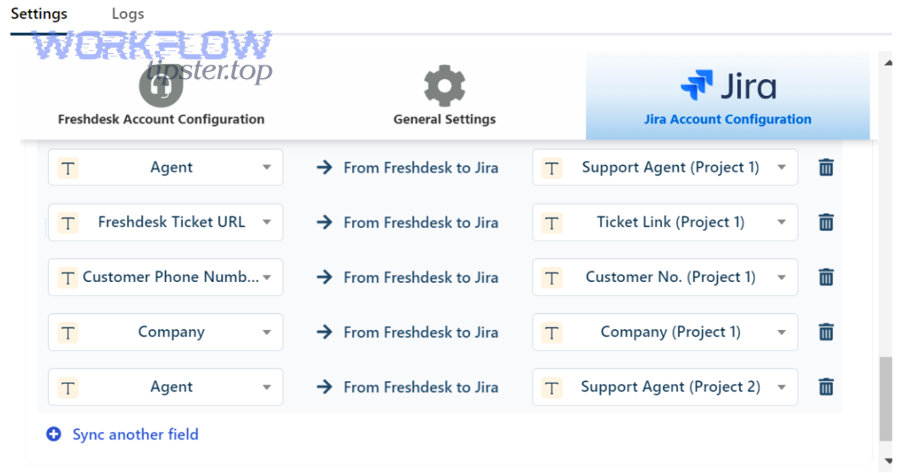
- Map: Convert Freshdesk fields into Jira fields using a mapping table
- Create: Create the Jira issue with the correct project/issue type
- Link back: Write the Jira key/URL into Freshdesk to prevent duplicates and preserve traceability
A no-code automation platform like Zapier frames this pattern as “trigger starts the workflow, action performs the next step,” which matches how most teams implement the first version quickly. (zapier.com)
Which Freshdesk triggers are best for triage: new ticket, status change, or priority change?
New ticket wins for speed, status change is best for escalation, and priority change is best for “severity corrections,” so the optimal trigger depends on whether you want immediate routing, controlled escalation, or refined triage. Then, you can choose a trigger strategy that minimizes noise.
- New ticket trigger is best when every ticket must be acknowledged and routed quickly (high-volume support desks).
- Status change trigger is best when you want a human triage step first (“needs engineering” status → create Jira).
- Priority change trigger is best when you want escalation to be explicit and reversible (priority raised → create Jira + alert).
A common mature pattern is hybrid:
- New tickets notify a triage room (lightweight).
- A specific triage decision (status/tag/form field) creates Jira and notifies the owning team (high signal).
How should you map ticket fields to Jira issue fields for accurate triage?
Map fields using a “meaning-preserving” approach: you don’t just match names—you match intent—so the Jira issue preserves urgency, ownership, and evidence from the ticket. Next, use a small mapping table to avoid confusion and reduce configuration drift.
Below is a mapping table example. It shows what data moves where so the created Jira task is complete, consistent, and routable.
| Freshdesk ticket field | Jira issue field | Why it matters for triage |
|---|---|---|
| Subject | Summary | Quick scanning and searchability |
| Description + internal triage notes | Description | Reduces back-and-forth with engineering |
| Priority | Priority | Drives SLA behavior and escalation |
| Category / Type | Component / Labels / Issue type | Enables routing by domain |
| Tags | Labels | Enables automation rules and dashboards |
| Requester / Company | Reporter / Custom field | Preserves customer context |
| Ticket URL | Custom field + link | Ensures traceability |
| Attachments | Attachments or linked storage | Preserves evidence |
Description template tip: Put the most actionable content at the top:
- “Impact / user count”
- “Reproduction steps”
- “Logs / screenshots”
- “Freshdesk ticket link”
- “What support already tried”
If you do this consistently, the Jira issue becomes the single place engineering works, while Freshdesk remains the customer-facing system of record.
How do you route tickets to the correct Jira project, issue type, and assignee automatically?
Route by 3 criteria—domain, urgency, and ownership—so tickets land in the correct Jira project and the correct team sees them immediately in Chat. Next, you’ll turn those criteria into rule sets that stay stable as your organization changes.
Routing is where automation workflows either deliver value or create chaos. The best routing designs are:
- Predictable: same inputs → same outputs
- Transparent: anyone can explain why a ticket went to that team
- Editable: you can change rules without rebuilding the entire system

What routing rule sets work best for IT support teams?
There are 4 rule sets that work well for IT support teams, based on the criterion “does it map cleanly to real ownership boundaries?” Then, you can combine them for more precision.
- Service domain routing
- Example: “Email / SSO / Network / Endpoint / SaaS App”
- Output: Jira project = domain project, component = specific service
- Work type routing
- Example: “Incident vs Request vs Change vs Bug”
- Output: Jira issue type changes, workflows and SLAs differ
- Customer tier routing
- Example: “VIP / Standard / Internal”
- Output: priority baseline and escalation path changes
- SLA risk routing
- Example: “Breaching in 2 hours”
- Output: notify on-call or lead + increase visibility
If you want to embed semantic connectivity for readers, you can cross-reference similar patterns like freshdesk ticket to clickup task to google chat support triage as a parallel workflow design: same triage logic, different task destination.
Should routing be based on priority first or category first?
Category-first wins for correct ownership, priority-first is best for speed in emergencies, and the optimal approach is a hybrid where category assigns the team and priority controls escalation. Then, you get both correctness and urgency without misrouting.
- Priority-first risks: high priority might route to “whoever is awake,” causing ownership confusion.
- Category-first risks: critical incidents might go to the right team but too quietly.
Hybrid recommendation
- Category determines the Jira project/team.
- Priority determines:
- issue type (Incident vs Task),
- alert intensity (mention vs post),
- escalation path (triage room → on-call room).
To demonstrate the flexibility of rule sets, you can even borrow logic from unrelated scheduling automations—like calendly to calendly to zoom to monday scheduling—where category is “meeting type” and priority is “urgency,” and the same decision-tree discipline applies.
How do you format Google Chat alerts so they reduce time-to-triage instead of creating noise?
A high-signal Google Chat alert includes the ticket summary, urgency, ownership cue, and direct action link—so the reader can decide what to do within 10 seconds. Next, you’ll structure messages to support triage decisions rather than just “FYI” notifications.

Google’s developer documentation emphasizes that webhooks are for one-way asynchronous notifications and highlights practical constraints like rate limits; that’s why message quality matters more than message quantity. (developers.google.com)
What should a “high-signal” Google Chat triage message include?
A high-signal triage message includes 9 elements, based on the criterion “does this reduce the need to open other tools just to understand the situation?” Then, you can standardize this as a template.
9 elements
- Ticket title (human-readable)
- Severity/priority (visually obvious)
- Category/service (routing hint)
- Requester/org (context without oversharing)
- SLA state (breaching soon vs normal)
- Jira key (newly created issue ID)
- Freshdesk link + Jira link
- Suggested next action (“acknowledge / assign / investigate”)
- Owner cue (“@Infra On-Call” or “Team: SSO”)
Example (plain text style)
[P1] SSO outage: users cannot log inTeam: Identity | SLA: 30m to breachJira: ITOPS-123 | Freshdesk: #45678Action: Acknowledge + assign investigator
If you want even more clarity, use card-style messages (structured fields, buttons). That’s an optimization you’ll revisit in Supplementary Content.
Is it better to post alerts to one triage room or multiple team rooms?
Centralized posting wins for shared awareness, multi-room posting wins for faster ownership, and the best practice is a staged approach where the message starts centralized and escalates into the owning team’s room only when criteria are met. Then, you reduce noise while still accelerating response.
Staged approach
- Stage 1: Post all eligible escalations into a central triage space (no mentions).
- Stage 2: If severity is high or SLA risk increases, post into the owning team’s space (with a mention).
- Stage 3: If still unacknowledged, escalate to on-call leadership space.
This design mirrors how humans naturally handle triage: observe → assign → escalate.
How do you prevent duplicate Jira tasks and ensure each Freshdesk ticket maps to exactly one Jira issue?
Yes—you can prevent duplicates by using a stable idempotency key, writing back the Jira key to the Freshdesk ticket, and checking for an existing Jira issue before creating a new one. Next, you’ll implement these controls in the simplest possible way so they survive real-world edge cases.
Duplicate prevention matters because duplicates create:
- parallel work,
- conflicting updates,
- extra notifications,
- and mistrust in the automation.
The safest mindset is: issue creation must be idempotent (re-running the same event does not create another issue).
What are the most reliable de-duplication methods for ticket-to-issue automation?
There are 4 reliable de-duplication methods, based on the criterion “does it still work when the trigger fires multiple times?” Then, you can combine methods for higher confidence.
- Write-back field (recommended baseline)
- Add a Freshdesk custom field:
Jira Issue Key - If it exists, do not create a new issue
- Add a Freshdesk custom field:
- Search-before-create
- Search Jira for an issue where
FreshdeskTicketID = X(custom field) - If found, reuse it and only post an “update” alert if needed
- Search Jira for an issue where
- External idempotency store
- Store
ticket_id → jira_keyin a lightweight database - Useful if you can’t write to Freshdesk or want cross-tool consistency
- Store
- Deterministic fingerprint
- Hash critical fields (ticket_id + created_at)
- Use it as a unique key in Jira labels or custom fields
Practical recommendation: start with method 1. Add method 2 once you have enough volume that “rare edge cases” become weekly incidents.
What should you do when a ticket legitimately needs multiple Jira tasks?
One ticket should map to multiple Jira tasks only when the work truly decomposes into independent deliverables; otherwise, it’s better to create one parent issue and track subtasks. Then, you keep traceability clean while still enabling parallel work.
When “one ticket → many issues” makes sense
- Multiple teams must deliver separate changes (e.g., infra + app + security).
- The work spans different Jira projects with different workflows.
When “one parent + subtasks” is better
- One team owns the work but needs parallel execution.
- You want a single source of truth for updates back to the customer.
A stable operational pattern is: create one “umbrella” issue and link additional issues as blockers or related items—then the ticket remains associated with a single primary Jira key.
What are the most common failure points in this automation, and how do you troubleshoot them?
The most common failure points are authentication, missing required fields, permission mismatches, and notification delivery limits, and you troubleshoot them by isolating the failing step (trigger, mapping, create, post) with logs and test events. Next, you’ll use a structured checklist so fixes are repeatable.

Freshdesk’s Jira Plus guidance positions the integration as a two-way connection for collaboration, which is exactly why troubleshooting needs to cover both creation and synchronization behaviors. (support.freshdesk.com)
Which field-mapping and validation errors break Jira issue creation most often?
The most frequent Jira creation failures come from required fields and invalid values, and you solve them by validating payloads before creation and aligning Jira field configurations with your mapping. Then, “bad tickets” get corrected in triage instead of failing silently.
Common mapping failures
- Missing required fields (component, issue type, priority, custom fields)
- Invalid option values (labels too long, invalid enum values)
- User fields not resolvable (reporter/assignee not found)
- Permission restrictions (cannot set priority, cannot create issue type)
- Attachment limits or blocked file types
Prevention checklist
- Keep a “required fields” reference per Jira project and issue type.
- Maintain a mapping dictionary (category → component, priority → priority).
- Validate in a staging environment before rolling out new fields.
How do you monitor, log, and retry failed automations safely?
You monitor and retry safely by capturing structured logs per step, limiting retries with backoff, and routing unrecoverable failures to a human review queue. Next, you’ll treat failure handling as a feature, not a patch, so triage doesn’t break under load.
Safe failure handling design
- Log every run with: ticket ID, Jira key (if created), Chat message ID (if posted), status.
- Classify failures:
- Recoverable: network timeouts, rate limits → retry with backoff
- Non-recoverable: invalid fields, permission denied → send to review
- Use a “dead-letter” concept:
- a list/queue of failed tickets for a human to fix and reprocess.
Operational best practice: alert the system owners (not the whole team) when automation fails. The goal is to keep front-line Chat rooms clean.
Evidence: According to a study by Çukurova University from the Surgical Nursing Department (Faculty of Health Sciences), in 2025, researchers found that higher alarm fatigue was linked with an increased likelihood of errors, and alarm fatigue accounted for 14.5% of variance in error tendency—an important reminder that excessive alerts can degrade performance. (pmc.ncbi.nlm.nih.gov)
How can you optimize and harden Freshdesk → Jira → Google Chat triage automation for scale and security?
You optimize and harden this workflow by adding two-way sync where it truly helps, implementing SLA-driven escalation rules, protecting sensitive data in alerts, and choosing a scaling strategy that controls noise while preserving speed. Next, these micro-optimizations turn a “working integration” into a durable system.
How do you implement two-way sync so Jira status updates reflect back in Freshdesk?
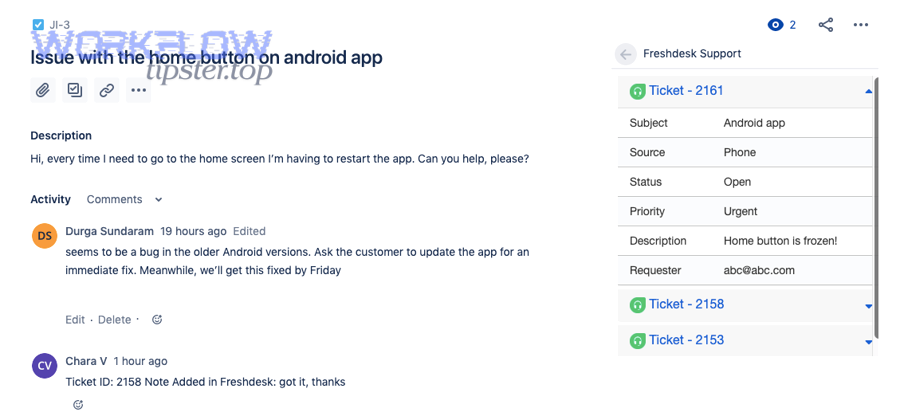
Two-way sync works by treating Freshdesk and Jira as linked records and defining which fields are authoritative in each direction, so status changes and key comments flow back to the ticket without overwriting support ownership. Then, you reduce “status drift,” where the customer-facing ticket says one thing and Jira says another.
Practical sync scope (recommended)
- Jira → Freshdesk
- Jira status → Freshdesk internal status note (or a mapped status field)
- Key comments → internal notes (not customer-visible unless curated)
- Freshdesk → Jira
- Customer replies → Jira comment (or summarized note)
- Priority escalation → Jira priority update (if allowed)
Conflict prevention rule
- Choose one system as the source of truth per field:
- Jira owns engineering status
- Freshdesk owns customer communication status
What SLA-based escalation patterns improve routing without spamming Google Chat?
SLA-based escalation improves routing by notifying only when time risk changes, so the team sees fewer messages but each message signals urgency. Then, triage becomes proactive instead of reactive.
High-value escalation patterns
- Near-breach alert: triggers once when “time remaining < threshold”
- Breach alert: triggers if still unacknowledged and time hits zero
- Owner-change alert: triggers only when the owner changes (reduces noise)
- Batch low-severity updates: posts a summary every hour rather than per event
This is also where message threading helps: post updates into the same thread so Chat stays readable.
How do you protect sensitive customer data in Chat alerts (PII masking and access controls)?
Yes—you can protect sensitive data by limiting what fields are sent, masking PII patterns, and restricting alerts to spaces with appropriate access controls. Then, your automation supports security and compliance instead of undermining them.
PII-safe alert design
- Do not include full emails, phone numbers, addresses, or payment identifiers.
- Use a “customer ID” or account name instead of personal details.
- Replace raw logs with links to secure storage where access is controlled.
- Use separate Chat spaces for sensitive categories (security incidents, VIP accounts).
Access controls
- Restrict who can add webhooks/apps to spaces.
- Use dedicated “automation” identities (not personal accounts).
- Rotate secrets and document ownership.
Which scaling strategy is better: throttle and batch alerts or route to more spaces?
Throttling and batching wins when volume is high and attention is the bottleneck, while routing to more spaces wins when ownership boundaries are clear and speed matters most; the optimal choice depends on whether “too many alerts” or “too slow handoffs” is your dominant pain. Then, you can scale without rebuilding the workflow.
When to throttle/batch
- Many low-severity tickets
- Teams complain about noise
- You need digest-style awareness
When to route to more spaces
- Distinct teams own distinct categories
- High urgency is common
- You want faster acknowledgements
A mature strategy often blends both:
- Route high-severity issues immediately to the owning team and on-call space.
- Batch low-severity updates into scheduled summaries.
Note on implementation flexibility: This article focuses on the operational design and patterns that work regardless of tooling. Whether you implement with native integrations, a no-code platform, or custom scripts, the core logic stays the same: consistent mapping, reliable routing, safe notifications, and strong de-duplication.