


Yes—you can connect Freshdesk to Trello so every ticket can automatically become (and stay linked to) a Trello card, which gives your support team a single, trackable workflow from intake to resolution without manual copy-paste.
Next, you’ll learn what “Freshdesk to Trello automation” actually means in day-to-day support operations, including which ticket events should create cards, what details must be carried over, and how teams avoid losing context when work moves between tools.
Then, you’ll see the practical integration options—native connectors (if available), no-code automation platforms, and light custom solutions—plus which option fits different support-team realities like volume, compliance, and multi-board routing.
Introduce a new idea: once the foundation is clear, you can build reliable ticket-to-card workflows that update over time, route work to the right board/list, and remain resilient as your processes scale.
What does “Freshdesk to Trello automation” mean for a support team workflow?
“Freshdesk to Trello automation” is a workflow integration that turns ticket events in Freshdesk (create, update, status change) into structured actions in Trello (create, move, label, comment) so support work can be planned, tracked, and collaborated on in a Kanban-style system.
To better understand why this matters, start by picturing the full lifecycle: Freshdesk captures customer issues, while Trello coordinates internal work—automation bridges the gap so the same “case” stays consistent across both tools.
How does a ticket-to-card workflow reduce manual coordination?
It reduces manual coordination by automatically creating a Trello card with the right title, description, and links the moment a ticket meets a rule, then keeping that card updated so teammates don’t have to ask, “What changed?” or re-copy details.
Specifically, automation removes three common “support friction” moments:
- Intake handoff: Tickets that require internal work become cards automatically, so nothing waits in a queue because someone forgot to create tasks.
- Status visibility: When ticket priority or status changes, cards can move lists or gain labels so Trello reflects real service urgency.
- Context sharing: Key customer details and diagnostics can be attached to the card, reducing back-and-forth and repeated questions.
More importantly, this creates a shared operational language: Freshdesk remains the source of truth for customer communication, while Trello becomes the execution canvas for internal collaboration.
What are the core components you must define before integrating?
You must define (1) the trigger events, (2) the Trello destination structure, (3) the field mapping, and (4) the update rules—because automation fails when it’s unclear what should happen, where it should land, and how it should evolve.
For example, define these basics before you connect anything:
- Triggers: New ticket, ticket updated, ticket assigned, status changed, tag added, priority escalated.
- Destinations: Which Trello board, which list, which labels, and who should be assigned.
- Mapping rules: What ticket details become the card title/description/custom fields.
- Update rules: When to move the card, add comments, or archive/close.
In short, you’re not just “connecting two apps”—you’re defining an operational contract between customer service and internal delivery.
Can you connect Freshdesk to Trello without code?
Yes, Freshdesk to Trello can be connected without code because most teams can use no-code automation platforms or marketplace connectors that authenticate both tools and let you configure trigger → action workflows with rules, filters, and mappings.
However, “no code” still requires design decisions—so below is how to confirm feasibility and avoid the most common setup traps.

What no-code requirements determine feasibility?
No-code feasibility depends on API access, trigger coverage, permissions, and required data fields—because if your plan can’t read the event you need, write the field you need, or authenticate securely, the workflow will break.
- Trigger coverage: Can your tool trigger on “ticket updated” (not only “ticket created”)?
- Write access: Can it create cards, add comments, update descriptions, move lists, and manage labels?
- Identity and permissions: Does it support service accounts, shared inbox workflows, or per-agent connections?
- Data structure: Can it pass ticket URL, requester email, priority, tags, and conversation snippets?
To illustrate, teams often succeed with simple create-card automations, but struggle when they need bi-directional updates or strict list/label routing across many boards.
What are the 3 biggest risks of “quick” no-code setups?
The 3 biggest risks are duplicate cards, missing context, and uncontrolled automation sprawl—because fast setups often skip idempotency (duplicate prevention), field mapping standards, and governance.
- Duplicate cards: Multiple triggers fire for the same ticket (e.g., create + update), producing multiple Trello cards with no clear owner.
- Missing context: Cards get only a subject line, while critical details (customer impact, steps to reproduce, attachments) remain trapped in the ticket.
- Sprawl: Dozens of one-off Zaps/automations appear, each with different naming rules and routing logic, making failures hard to debug.
Thus, “no-code” works best when your team treats it like a mini product: consistent conventions, versioning, testing, and ownership.
What integration options can connect Freshdesk tickets to Trello cards?
There are 4 main types of Freshdesk-to-Trello integrations—native marketplace connectors, automation platforms, iPaaS workflow tools, and custom API builds—based on the criterion of who hosts the logic and how deeply the workflow can be customized.
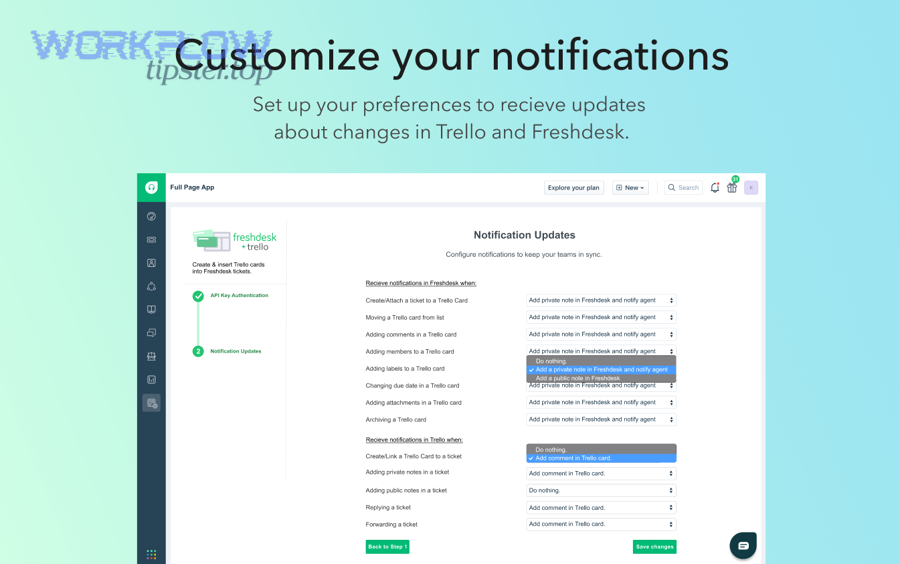
Below, you’ll see what each option is best at, what it typically cannot do, and when a support team should choose it.
Native apps and marketplace connectors
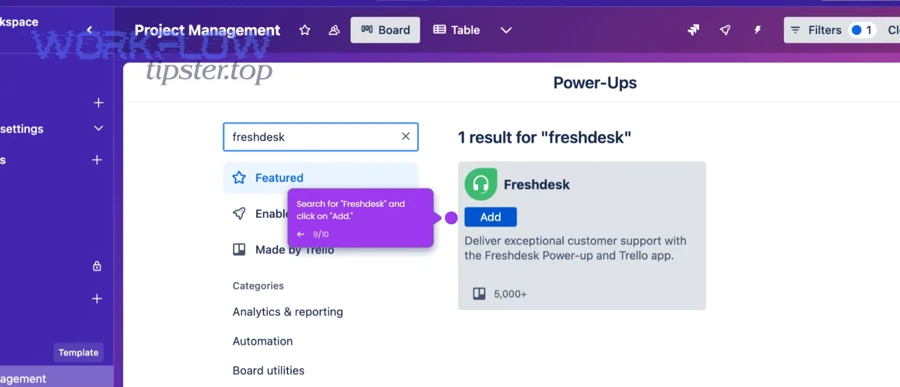
Native apps and marketplace connectors work best when you want a straightforward “ticket context inside Trello (or vice versa)” experience with minimal configuration, because the vendor has already standardized authentication, UI patterns, and basic actions.
- Best for: Simple linking, consistent UI, lower maintenance.
- Typical limits: Fewer routing rules, fewer conditional branches, limited transformation of fields.
- Operational fit: Small to mid teams with stable workflows and low need for complex automations.
More specifically, native connectors shine when your workflow is “create a card for certain tickets” and “view the ticket link from the card” rather than “orchestrate a complex multi-board process.”
Automation platforms (Zapier-style workflows)
Automation platforms work best when you want fast, configurable trigger → action recipes without writing code, because they offer flexible steps, filters, and multi-app extensions commonly used in Automation Integrations.
- Best for: Fast setup, lots of triggers/actions, easy conditional logic, multi-step flows.
- Typical limits: Rate limits, complex error handling, advanced mapping may require paid tiers.
- Operational fit: Teams that want quick wins with governance (naming standards, owner, testing).
For example, the same platform that connects Freshdesk → Trello often also supports patterns like basecamp to google calendar scheduling syncs or google docs to clickup task creation—so your team can reuse a consistent automation approach across departments.
iPaaS tools and advanced workflow engines
iPaaS tools are best when you need multi-branch logic, data transformation, and robust monitoring, because they support more advanced orchestration patterns than lightweight automations.
- Best for: Complex routing, data transformation, retries, logging, and enterprise governance.
- Typical limits: Higher cost, heavier setup, requires more operational discipline.
- Operational fit: High-volume support, regulated environments, or multi-team triage systems.
In addition, iPaaS solutions can standardize payloads so the same ticket taxonomy drives routing across multiple boards, products, or regions.
Custom API integration (build your own)
Custom API integration is best when you need the highest control over security, logic, and data fidelity, because you can implement strict deduplication, precise mapping, and enterprise-grade audit trails.
- Best for: Deep customization, strict compliance, fine-grained ownership, complex bi-directional sync.
- Typical limits: Engineering time, maintenance, version changes, monitoring burden.
- Operational fit: Teams with developer resources and a stable need that justifies building.
To sum up, choose custom only when the “cost of workflow failure” is higher than the “cost of ownership.”
How do you set up the Freshdesk → Trello integration step by step?
The most reliable setup method is a 7-step workflow: define scope, prepare Trello structure, choose an integration tool, connect accounts, create a trigger-action recipe, map fields, then test with controlled tickets to ensure correct routing and updates.
To begin, treat setup as a small implementation project—because a clean first version prevents months of manual cleanup later.
Prerequisites: access, permissions, and workspace structure
You need admin or equivalent permissions in Freshdesk and Trello, a destination board strategy, and a shared ownership model for the automation—because integrations fail when no one can edit settings, boards are inconsistent, or credentials belong to a single person.
- Freshdesk: Confirm you can read ticket events and access the fields you will map (status, priority, tags, requester, group/agent).
- Trello: Create or confirm boards/lists, decide labels, and verify who can create/move cards.
- Ownership: Assign an “automation owner” (role, not person) and document where settings live.
Next, align on the single question that drives setup quality: “Which tickets deserve a Trello card, and why?”
Step-by-step setup: trigger, filter, action, and mapping
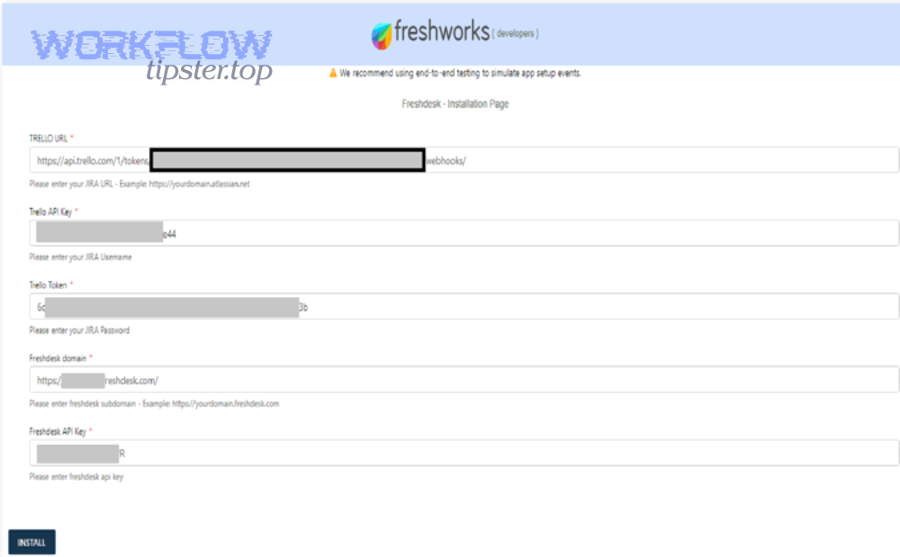
Set up by choosing a Freshdesk trigger, adding filters (so only the right tickets flow), selecting Trello actions (create/move/update), then mapping fields into a consistent card template that preserves context.
- Step 1: Pick a trigger (e.g., New Ticket or Ticket Updated).
- Step 2: Add filters (e.g., only specific groups, tags, priorities, or ticket types).
- Step 3: Choose action (e.g., Create Card in Trello on a specific board/list).
- Step 4: Map fields into title, description, labels, members, due date, and custom fields.
- Step 5: Add a “link-back” field (ticket URL) so the card and ticket stay connected.
- Step 6: Add optional follow-up actions (comment, checklist, label, move list).
- Step 7: Test with controlled tickets and confirm no duplicates and correct routing.
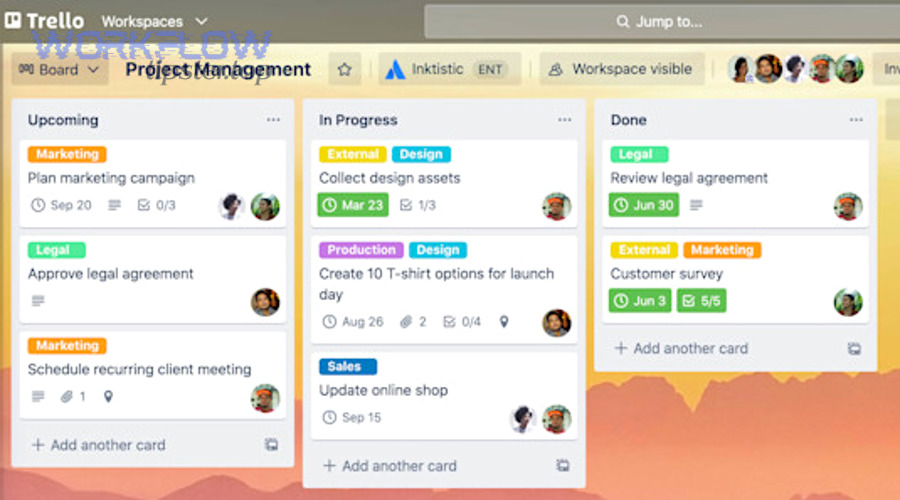
Below is a practical visual reference for how Trello boards/lists/cards typically look once your ticket-to-card flow is active.
How do you validate the integration with real-world test cases?
Validate the integration by running at least 6 test cases—new ticket, high priority ticket, reassigned ticket, status change, internal note/comment update, and closed ticket—because each case stresses a different part of your trigger logic and update behavior.
Specifically, use a short test plan like this:
- Create: Does one ticket create exactly one card in the right board/list?
- Routing: Do tags/groups correctly route to different lists or boards?
- Context: Does the card contain ticket URL, requester, summary, and key fields?
- Updates: Does a status/priority change move the card or update labels?
- Comments: Do internal notes or public replies create the expected Trello comments (if enabled)?
- Closure: Does closing the ticket archive/move the card (if you want that behavior)?
In short, testing isn’t “does it run once”—it’s “does it behave correctly across the lifecycle.”
What should you map from Freshdesk tickets to Trello cards to keep context intact?
There are 8 core mapping categories you should carry from Freshdesk to Trello—identity, urgency, ownership, customer impact, diagnostics, attachments, conversation signals, and traceability—based on the criterion of “what a teammate needs to act without reopening the ticket.”
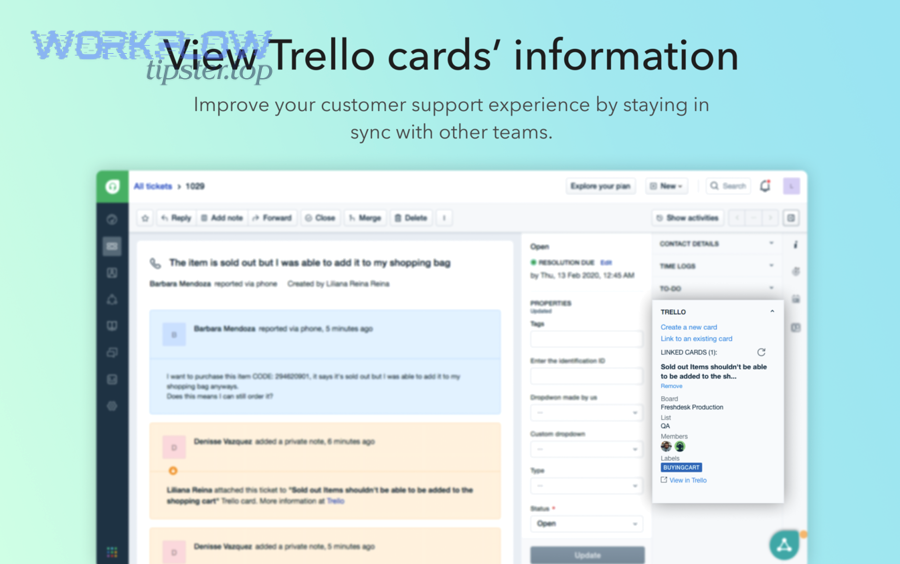
Especially in high-volume support, good mapping turns Trello from “yet another place to check” into a true execution layer.
Ticket identity and traceability fields
Map identity and traceability fields so every card proves which ticket it represents and how to get back to the source of truth, because support workflows collapse when people can’t verify context quickly.
This table contains the minimum identity fields and where they typically land on a Trello card; it helps standardize your mapping so every card looks familiar.
| Freshdesk Field | Trello Destination | Why It Matters |
|---|---|---|
| Ticket ID + Subject | Card Title | Instant recognition and de-duplication |
| Ticket URL | Description (top line) | One-click return to full conversation |
| Requester name/email | Description or Custom Field | Customer context and follow-up clarity |
| Product/Category | Labels or Custom Field | Routing, reporting, and prioritization |
Next, add a simple consistency rule: every Trello card created from Freshdesk must include the ticket URL in the first 2 lines of the description.
Priority, SLA signals, and urgency mapping
Map urgency by turning priority/SLA signals into labels, due dates, or list placement, because Trello is most useful when the board visually reflects what needs attention first.
- Priority → Labels: P1/P2/P3 labels or “Urgent / High / Normal.”
- SLA breach risk → Due date: Use due date as “latest safe action time,” not a vague reminder.
- Escalations → List move: Move cards into an “Escalated” list when a ticket is escalated.
However, keep the mapping stable—changing label meaning every month destroys the board’s signal value.
Description template: what to include and in what order
Use a fixed description template that starts with link-back and summary, then customer impact and reproduction details, because teammates scan the top 10 lines before they decide what to do next.
- Line 1–2: Ticket link + Ticket ID
- Line 3–5: One-paragraph summary (“What happened, who is affected, desired outcome”)
- Line 6–10: Steps to reproduce / environment / device / error message
- Below: Key tags, internal notes (if appropriate), and a short “definition of done”
To illustrate, when engineers or operations receive the card, they should be able to start work without asking support to restate the problem.
Attachments, screenshots, and sensitive data handling
Include attachments selectively and protect sensitive data by linking rather than copying when needed, because support tickets can contain personal data that should not be replicated across systems without policy review.
- Safe default: Link to the ticket and attach only non-sensitive screenshots needed for execution.
- Redaction rule: Remove or redact customer identifiers in screenshots before attaching to Trello.
- Access control: Use board permissions so only relevant teams can view customer context.
In short, “keep context intact” does not mean “copy everything everywhere”—it means “copy what teams need to act safely.”
Can the integration update Trello cards when the Freshdesk ticket changes?
Yes, the integration can update Trello cards when a Freshdesk ticket changes because many automation tools can trigger on ticket updates and then edit card fields, move lists, add comments, or adjust labels—if you design a stable linking key and update strategy.
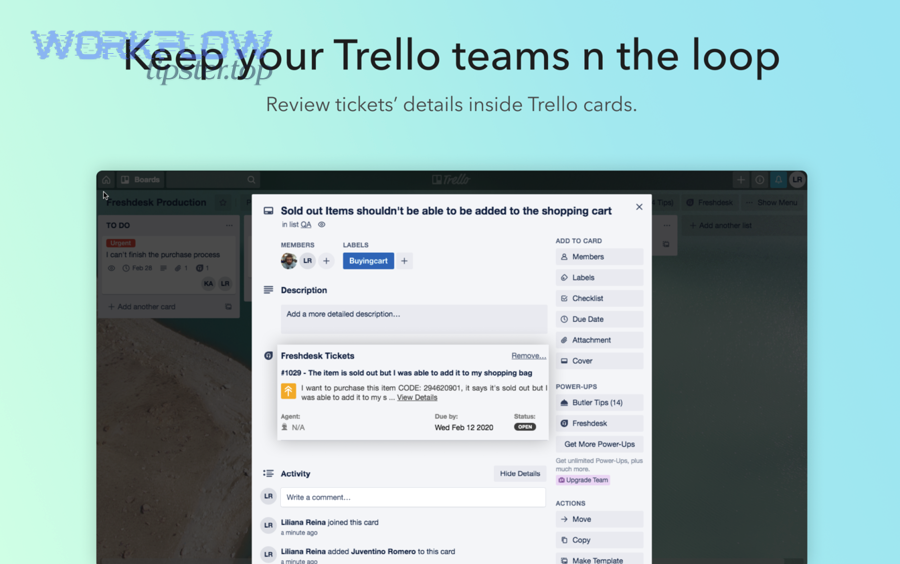
Meanwhile, the real question is not whether updates are possible, but how to prevent update loops, duplicates, and noisy comment spam.
One-way updates vs two-way sync: what’s realistic?
One-way updates (Freshdesk → Trello) are realistic for most teams, while true two-way sync is best reserved for limited fields, because bi-directional syncing increases complexity, conflicts, and the risk of infinite loops.
- Recommended default: Freshdesk drives truth; Trello reflects execution state.
- Two-way candidates: Simple fields like “assigned engineer” or “work status” if you have strict rules.
- Avoid syncing: Full conversation text, large attachments, or fields with frequent changes.
More specifically, support teams gain the most value when Trello shows “what’s being worked on” and Freshdesk remains the customer communication log.
What triggers and updates should you enable (and which to avoid)?
Enable updates that improve execution visibility—status, priority, assignment, and key tags—and avoid updates that create noise, like posting every ticket reply as a Trello comment, unless your team explicitly needs that behavior.
- Enable: Status change → move card; priority change → update label; assignment/group change → update member; escalation tag → add label + move list.
- Optional: Add comment only for internal notes that contain actionable instructions.
- Avoid: Mirroring every public reply into Trello comments (creates unreadable threads).
Thus, the best update strategy is “signal over exhaustiveness.”
Which automation recipes work best for support teams using Freshdesk and Trello?
There are 6 high-performing Freshdesk-to-Trello automation recipes—triage creation, escalation routing, engineering handoff, status-based movement, SLA protection, and closure hygiene—based on the criterion of “what reduces cycle time without losing accountability.”
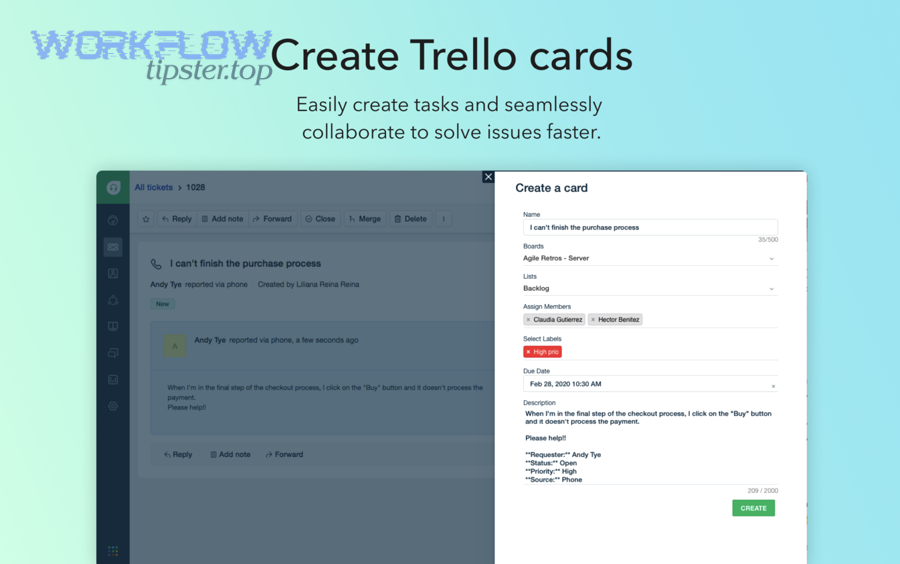
Below are practical recipes you can adopt, along with the logic behind why they work.
Recipe 1: Create a Trello card only for tickets that need internal work
Create cards only when a ticket matches tags, groups, or categories that represent “work to be done,” because sending every ticket to Trello dilutes focus and turns the board into a duplicate inbox.
- Trigger: Ticket created or tagged
- Filter: Category = Bug / Feature / Ops; or tag includes “internal-work”
- Action: Create card in “To Do” list with standardized mapping
More importantly, this recipe protects your Trello board from becoming an unmanageable mirror of your ticket queue.
Recipe 2: Route escalations to a dedicated Trello list (or board)
Route escalations into a dedicated list/board because escalations need visibility, tighter ownership, and faster response, and Trello’s visual structure makes that urgency obvious.
- Trigger: Priority changes to P1/P2 or tag “escalated” added
- Action: Move card to “Escalations,” add “Escalated” label, assign on-call member
- Optional: Add a checklist for required escalation steps
In addition, a dedicated escalation lane helps leadership review risk without opening every ticket.
Recipe 3: Engineering handoff with a “definition of done” checklist
Use an engineering handoff checklist because it standardizes what engineering needs to begin work, reducing back-and-forth and preventing stalled cards waiting for missing details.
- Trigger: Ticket assigned to “Engineering Liaison” or moved to “Needs Engineering”
- Action: Add checklist: reproduce steps, logs, environment, expected vs actual, acceptance criteria
To sum up, checklists convert “messy tickets” into “actionable tasks.”
Recipe 4: Keep Trello aligned with Freshdesk status milestones
Align card movement with a small set of Freshdesk status milestones because a consistent mapping makes your Trello board a reliable operational view of progress.
- Example mapping: Open → To Do; Pending → Blocked/Waiting; Resolved → Review/QA; Closed → Done/Archive
- Rule: Move lists only on milestone statuses, not every micro-update
However, avoid over-granularity—too many lists makes the workflow harder to maintain than the work itself.
Recipe 5: SLA protection reminders without spamming the board
Use SLA protection reminders that fire only when risk is high, because the goal is to prevent breaches—not to create constant noise that people ignore.
- Trigger: Time-based check (e.g., SLA due within X hours) or priority + age rule
- Action: Add a warning label or a single comment that tags the owner
- Guardrail: One reminder per ticket per milestone window
In short, a reminder that everyone sees but nobody trusts is worse than no reminder at all.
Recipe 6: Closure hygiene (archive or consolidate completed cards)
Apply closure hygiene by archiving or moving done cards regularly, because boards that never clear create the illusion that work never finishes and degrade signal for active priorities.
- Trigger: Ticket closed
- Action: Move card to “Done” and optionally archive after N days
Thus, your board stays readable, and weekly reviews become faster and more accurate.
Native integration vs automation platforms vs custom build: which should you choose?
Native integration wins in simplicity, automation platforms are best for flexible no-code workflows, and custom builds are optimal for high-control, high-compliance environments—because each option is designed for a different balance of speed, customization, and ownership.
This table contains a practical comparison across the criteria most support teams care about; it helps you choose based on workflow reality rather than hype.
| Option | Best For | Strengths | Tradeoffs |
|---|---|---|---|
| Native / Marketplace Connector | Simple, stable workflows | Fast setup, consistent UX, low maintenance | Limited branching and customization |
| No-Code Automation Platform | Multi-step workflows, quick iteration | Flexible triggers/actions, filters, easy scaling across apps | Needs governance; may hit limits at high volume |
| iPaaS / Workflow Engine | Enterprise orchestration | Advanced routing, monitoring, transformation, retries | Higher cost and implementation effort |
| Custom API Build | Strict control and deep customization | Exact mapping, strong security/audit controls, tailored UX | Engineering + maintenance burden |
Which option fits small teams vs scaling support orgs?
Small teams usually fit native or simple no-code automation, while scaling support orgs often move toward iPaaS or targeted custom components, because growth increases routing complexity, volume, and the cost of integration failures.
- Small team: Start with no-code + strict conventions (naming, mapping template, owner).
- Mid team: Add multi-board routing and monitoring; consolidate automations into fewer, stronger workflows.
- Large org: Standardize taxonomy, implement governance, and consider iPaaS/custom for reliability and compliance.
More importantly, choose the smallest tool that can reliably enforce your process—then upgrade only when constraints become real.
How do cost, security, and maintenance change the decision?
Cost, security, and maintenance change the decision because the cheapest integration is not the cheapest outcome if it causes missed escalations, duplicate work, or unclear ownership during incidents.
- Cost: Compare subscription + time to maintain + time lost in failures.
- Security: Prefer least-privilege access, shared ownership, and auditable credentials.
- Maintenance: Choose solutions with clear logging, retry behavior, and documented mappings.
To sum up, “choose” is a governance decision as much as a tooling decision.
How do you test, troubleshoot, and keep the Freshdesk → Trello automation reliable?
You keep Freshdesk → Trello automation reliable by using a 5-part reliability system: controlled testing, deduplication safeguards, monitoring/logging, change management, and periodic audits—so failures are detected quickly and fixes don’t create new problems.
Below, you’ll see exactly what to test, what breaks most often, and the operational habits that keep the workflow stable as the team scales.
Testing checklist: functional, edge-case, and volume tests
Use functional, edge-case, and volume tests because integrations can “work” in a happy path while failing in real operations where fields are empty, priorities change rapidly, or tickets are merged.
- Functional: New ticket creates one card; mapping is correct; routing is correct.
- Edge-case: Empty subject, special characters, missing requester name, attachment-only tickets, merged/linked tickets.
- Volume: Burst of tickets (peak hour) to confirm rate limits and timing behavior.
Next, document the expected result for each test so teammates can verify changes without guessing.
Common failure modes: duplicates, missing updates, permission errors
The most common failure modes are duplicates, missing updates, and permission errors because triggers can fire multiple times, filters can be too strict, and credential scopes can change as teams evolve.
- Duplicates: Prevent by storing the Trello card ID back into the Freshdesk ticket (or using a unique “ticket ID” marker in the card) and checking before creating.
- Missing updates: Confirm you’re triggering on the right event (created vs updated) and that filters don’t exclude legitimate cases.
- Permission errors: Use stable service accounts and ensure boards/lists allow the automation identity to write.
However, the fastest fix is not always the best fix—so avoid “adding more triggers” as a default response, because that often creates sprawl and duplication.
Monitoring and alerts: what to watch weekly
Watch failure rate, latency, and workflow drift weekly because these three signals reveal whether the integration is silently degrading or misrouting work as conditions change.
- Failure rate: Number of failed runs / total runs (trend matters more than one spike).
- Latency: Time from ticket event to Trello action (spikes indicate rate limiting or platform issues).
- Drift: Cards landing in the wrong list/board due to taxonomy changes or new ticket categories.
In addition, keep a single “runbook” that states: where logs are, how to re-run failed items, and who owns fixes.
What advanced pitfalls and scale considerations should you plan for when automating Freshdesk tickets to Trello cards?
Advanced pitfalls include taxonomy drift, multi-board routing complexity, audit/compliance needs, and cross-team ownership conflicts—because scaling introduces more ticket types, more stakeholders, and more risk when automation behaves unexpectedly.
Especially as support grows, you need a strategy that prevents a good automation from becoming a fragile dependency.
How do you prevent taxonomy drift from breaking routing?
Prevent taxonomy drift by standardizing categories/tags, documenting routing rules, and versioning changes, because routing logic is only as stable as the labels and fields it depends on.
- Standardize: A controlled list of ticket categories and tags that power routing.
- Document: “If category = X, then board/list = Y” in a living routing map.
- Version: Change routing rules through a documented update process with tests.
Thus, your automation remains predictable even as products and teams change.
What happens when you need multiple boards, regions, or products?
When you need multiple boards/regions/products, you must move from “one workflow” to a routing architecture, because a single board cannot represent every team’s reality without becoming cluttered and ambiguous.
- Routing keys: Product, region, ticket type, severity, customer tier.
- Board strategy: One board per product line or function, with consistent list naming across boards.
- Escalation strategy: A shared escalation board or a standardized escalation list in each board.
More importantly, keep the mapping consistent across boards so cross-team reporting remains possible.
How do you keep ownership clear across Support, Ops, and Engineering?
Keep ownership clear by defining who owns the ticket, who owns the Trello card, and what “done” means for each team, because ambiguity creates stalled work and conflicting updates.
- Support owns: Customer communication, ticket fields, SLA commitments.
- Delivery team owns: Trello execution steps, internal checklists, and work estimates.
- Shared responsibility: The automation itself, including routing rules and monitoring.
In short, the best Freshdesk-to-Trello automation is not the most complex—it’s the one your teams can trust every day.