


When you automate real-time DevOps alerts (notifications) from GitHub into monday.com and Discord, you turn “something happened in code” into “the team sees it immediately and a task exists to act on it.” This guide shows the end-to-end workflow—what it is, how it works, and how to keep it reliable in real production use.
Next, you’ll choose the right implementation path for your team: the fastest no-code approach, a hybrid setup, or a custom webhook/GitHub Actions method when you need deeper control. The goal is the same in every case: fewer manual updates, clearer ownership, and faster response.
Then, you’ll learn how to define what should alert your team (and what should not). DevOps alerting only works when it’s high-signal—so we’ll cover filters, routing, formatting, and “update vs create” rules that prevent noise from becoming the default.
Introduce a new idea: once the workflow runs, the real work becomes governance—deduplication, rate limiting, troubleshooting, and scaling patterns—so you can grow from a single repo to many teams without turning Discord into a firehose.
What does a “GitHub → monday.com → Discord DevOps alerts workflow” actually do?
A GitHub → monday.com → Discord DevOps alerts workflow is an automation workflow that captures key GitHub events, converts them into trackable work in monday.com, and posts real-time notifications to Discord so engineering teams can respond quickly and consistently.
To better understand why this matters, let’s connect the workflow to the daily reality of DevOps: visibility, ownership, and fast feedback loops.

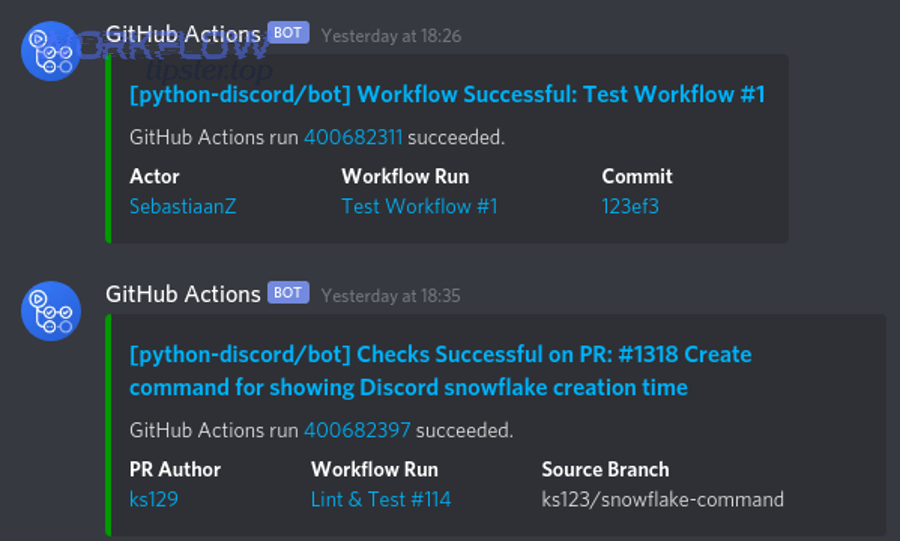
At the macro level, this workflow solves one problem: GitHub is where events happen, monday.com is where work lives, and Discord is where humans notice things. If you skip one of those layers, you either lose visibility (no real-time notification), lose accountability (no work item), or lose the source of truth (no GitHub context).
A practical “DevOps alert” here can mean:
- A pull request opened that needs review.
- A CI workflow run failed.
- A deployment completed (or failed).
- A release tag was created.
- A critical issue was opened and labeled.
The best workflows don’t just “notify.” They route the event to the right place, attach enough context to make it actionable, and preserve the link back to GitHub so engineers can verify quickly.
What GitHub events should count as DevOps alerts for engineering teams?
There are 4 main types of GitHub events that should count as DevOps alerts, based on actionability and time sensitivity: (1) collaboration events, (2) CI/CD status events, (3) release/deploy events, and (4) operational issue events.
Next, let’s explore how each category maps cleanly into monday.com tasks and Discord messages without creating noise.
- Collaboration events (PRs & reviews)
- PR opened / reopened / ready for review
- Review requested / changes requested
- PR merged into main
Best use: Create or update a monday.com item that represents the PR lifecycle. Post a Discord alert only at key transitions (review requested, CI failed, merged).
- CI/CD status events (workflow_run / check_suite)
- Build failed
- Tests failed
- Security scan failed
- Pipeline canceled repeatedly
Best use: Post to a dedicated Discord channel like
#build-failuresand update a single monday.com item per workflow run (not per job step). - Release/deploy events
- Tag created / release published
- Deployment started / deployment failed / deployment succeeded
Best use: Post to
#deploymentswith environment (staging/prod), and update a “Deployment Tracker” board in monday.com. - Operational issue events (issues & labels)
- Issue opened with
bug,incident,sev-1 - Incident label applied
- Regression label applied
Best use: Create a monday.com incident item with owner + SLA, and post a Discord alert that tags the responsible group.
- Issue opened with
Evidence (why “noise control” matters): According to a study by the University of California, Irvine (Informatics), in 2008, interrupted work increased reported stress, frustration, time pressure, and effort—meaning excessive alerts can speed reactions but raise workload costs. (ics.uci.edu)
Does this workflow replace incident management tools, or complement them?
This workflow complements incident management tools: GitHub → monday.com → Discord is best for team-level operational awareness and task accountability, while dedicated incident platforms are optimal for escalation, paging, SLAs, and postmortems.
However, the important question is where you draw the line—so you don’t overfit Discord alerts into a full incident response system.
Use GitHub → monday.com → Discord when you want:
- A fast signal to the team
- A trackable task to ensure follow-through
- A lightweight triage flow
Use incident tooling (Pager/on-call systems, status communications, runbooks) when you need:
- 24/7 escalation and paging
- Guaranteed acknowledgment workflows
- Audit-ready incident timelines and postmortems
A simple rule that prevents confusion: Discord alerts should help a team notice and act; incident tools should guarantee escalation and accountability when stakes are high.
Can you automate GitHub → monday.com → Discord alerts without writing code?
Yes—you can automate GitHub → monday.com → Discord alerts without writing code because monday.com provides GitHub integration options and you can use webhook-based notification steps, but you’ll still need careful mapping, filtering, and governance to avoid noise, duplicates, and permission failures.
Then, the real decision becomes which no-code path gives you enough control for your team’s needs.

Many teams start with a “no-code first” model because it’s fast:
- Connect GitHub to monday.com using built-in integration templates.
- Use Discord webhooks to post messages to channels without running a bot.
- Add guardrails: filters, routing rules, and a dedup strategy.
Where no-code can struggle is in advanced cases:
- Multi-repo routing with complex team ownership
- Strict idempotency rules (“update the same item every time”)
- Rate-limiting bursts during CI storms
- Deep message formatting with dynamic embeds + fallback behavior
Which setup path should you choose: native monday.com integration, no-code automation, or custom webhooks/actions?
Native monday.com integration wins in speed, no-code automation platforms are best for flexible chaining, and custom webhooks/GitHub Actions are optimal for deep control and reliability at scale.
However, choosing correctly requires matching the approach to your constraints—volume, complexity, and governance.
Here’s the decision logic engineering teams actually use:
- Native monday.com GitHub integration (fastest path)
- Best when: you want quick visibility into PRs/issues and straightforward board updates.
- Tradeoff: limited custom routing and message formatting compared to bespoke pipelines.
- No-code automation platform (middle path)
- Best when: you need to chain “GitHub → monday.com item update → Discord webhook” with filters and mapping.
- Tradeoff: you inherit platform limits and may need workarounds for idempotency/dedup.
- Custom webhooks / GitHub Actions (control path)
- Best when: you need strict dedup, custom embed formatting, multi-team routing, or compliance logging.
- Tradeoff: you own the code, maintenance, and monitoring.
A practical comparison table helps teams decide. This table compares setup options by speed, flexibility, and governance (the three criteria that most directly affect operational success):
| Approach | Setup speed | Customization | Reliability controls | Best for |
|---|---|---|---|---|
| Native monday.com integration | Fast | Medium | Medium | Simple visibility + tracking |
| No-code automation | Medium | High | Medium | Flexible workflows across tools |
| Custom webhooks / Actions | Medium | Very high | High | Scale + dedup + governance |
What minimum permissions and credentials are required to connect GitHub, monday.com, and Discord?
Minimum permissions require (1) GitHub access to the repo events you want to capture, (2) monday.com access to the target board and columns you will update, and (3) a Discord webhook URL for the target channel—plus secure storage of all secrets.
Next, let’s make this concrete so setup doesn’t fail on day one.
GitHub
- You need permission to install/configure integrations or webhooks on the repo/org.
- If using webhooks: you should verify deliveries using GitHub’s recommended signature header and shared secret.
monday.com
- You need board access to create/update items and write to relevant columns.
- Confirm the integration is installed/authorized at the right level (account/board), not only for one user.
Discord
- For webhook posting, you need a webhook created in a specific channel.
- Discord webhooks are designed as a low-effort way to post messages without a bot user.
Secret handling
- Store webhook URLs and tokens in secure secrets storage (e.g., CI secrets, vault).
- Rotate credentials when team ownership changes.
- Use least privilege: only the repos, boards, and channels needed.
How do you set up the workflow step-by-step from GitHub to monday.com and Discord?
The best way to set up GitHub → monday.com → Discord DevOps alerts is a 7-step method: define alert scope, pick integration path, connect accounts, map fields, build Discord templates, test end-to-end, and monitor delivery—so you get reliable real-time notifications and actionable tasks.
To begin, we’ll walk the steps in the same order engineers naturally execute them during rollout.

- Define alert scope (signal first)
- Choose events (PR open, workflow fail, deploy fail).
- Define severity tags (info/warn/critical).
- Define routing rules (repo → team → channel/board).
- Choose your implementation path
- Native monday.com integration if your mapping is simple.
- GitHub Actions if you want CI-native notifications with high control.
- Webhooks if you want event-level routing across many event types.
- Connect GitHub → monday.com
- Install/enable integration and select templates/boards.
- Confirm item creation/update behavior (create on PR open, update on merge, etc.).
- Create Discord webhooks
- Make dedicated channels for different alert classes (build failures, deployments, releases).
- Create a webhook per channel; treat the URL as a secret.
- Build mapping + templates
- Map GitHub fields into monday.com columns.
- Format Discord messages to be readable and consistent.
- Test end-to-end
- Use a sandbox repo, sandbox board, sandbox Discord channels.
- Trigger controlled events (PR open, failed workflow, release tag).
- Monitor + improve
- Track delivery errors, duplicates, missed events.
- Adjust filters and batching rules as the team scales.
How do you map GitHub data to monday.com items so alerts become actionable tasks?
Mapping GitHub data to monday.com becomes actionable when you map (1) identity, (2) ownership, and (3) next action—so every alert creates or updates a task with a clear owner, status, and direct link back to the GitHub object.
Specifically, mapping fails when teams treat monday.com as a log instead of a workflow board.
A simple, high-signal mapping model:
Identity fields
- Repo name → Board or Group
- PR/Issue number → Item key (store in a column)
- URL → Link column (so the task always points back to GitHub)
Ownership fields
- Assignee / code owner → People column
- Reviewer requested → Secondary owner or subitem
State fields
- PR status → Status column (Open / Review / Changes requested / Merged)
- CI status → Status column (Passing / Failing / Flaky)
- Severity label → Priority column (P3/P2/P1)
Next action fields
- “What should happen next?” column: Review, fix build, rollback, investigate
- Due date / SLA if you treat failures as time-sensitive
If you want a reliable “update vs create” behavior, define one key rule:
- Create one monday.com item per PR/Issue/WorkflowRun and update that item as the event changes.
This prevents the most common failure mode: dozens of items created for the same underlying event.
How do you format Discord alerts so they’re readable and low-noise?
There are 5 main types of Discord alert formats that keep DevOps notifications readable, based on clarity and scanning speed: (1) headline + status, (2) link-first, (3) embed-style sections, (4) threaded follow-ups, and (5) digest summaries.
Next, we’ll match the format to the alert type so Discord stays useful instead of overwhelming.
- Headline + status (best default)
✅ Deploy succeeded: service-api → prod- Includes: repo/service, environment, status, timestamp
- Link-first (best for PR review alerts)
PR ready for review: #1842 (feature/login-rate-limit)- Direct PR link + short title
- Embed-style sections (best for failures)
- Section 1: What failed (workflow/job)
- Section 2: Where (branch/env)
- Section 3: Who/Owner
- Section 4: What to do (runbook link)
- Threaded follow-ups (best for noisy pipelines)
- One parent message per workflow run
- Replies for job-level detail
- Digest summaries (best during CI storms)
- Every 10 minutes: top failures, repeated failures, new failures
To naturally embed operational knowledge into alerts, add:
- “Runbook” link (docs)
- “Owner” tag (team role)
- “Severity” indicator (emoji + label)
- “Next action” sentence
This is also where a practical voice helps. If you write like Workflow Tipster, you’ll keep the message short, directive, and actionable: “What happened, what to do, where to click.”
How do you test end-to-end delivery before rolling out to the whole org?
End-to-end testing works best as a 6-checklist validation—trigger correctness, routing correctness, mapping correctness, update behavior, rate-limit tolerance, and rollback plan—so rollout doesn’t surprise your engineering teams with spam or missing alerts.
Then, you treat the workflow like production software: controlled tests first, broad release second.
Checklist
- Trigger correctness: Does the right GitHub event trigger the workflow?
- Routing correctness: Does repo/team map to the right monday.com board and Discord channel?
- Mapping correctness: Do fields land in the right columns (owner, status, link)?
- Update behavior: Does the same PR update one item, rather than creating many?
- Rate-limit tolerance: Can you handle 20 failures in 2 minutes without dropping messages?
- Rollback plan: Can you disable notifications quickly if noise spikes?
A safe rollout pattern:
- Week 1: One repo, one team, one channel.
- Week 2: Add CI failures + deployments.
- Week 3: Add more repos and multi-board routing.
- Week 4: Add digests and escalation rules.
How do you prevent spam, duplicates, and missed alerts in a DevOps notification workflow?
You prevent spam, duplicates, and missed alerts by applying (1) strict filters, (2) deduplication/idempotency rules, and (3) delivery resilience—because DevOps alerts only work when each message is meaningful, unique, and reliably delivered.
Moreover, this is where the workflow either becomes a trusted system or gets muted by the team.
At the macro level, “noise” usually comes from three sources:
- Too many event types (everything alerts)
- Too many granular steps (every job step alerts)
- Too many duplicates (create instead of update)
“Missed alerts” usually come from:
- Permission failures (token revoked)
- Webhook verification failures
- Rate limiting without retries/backoff
- Payload mismatches after tool changes
What filters should you apply to keep only high-signal GitHub alerts?
There are 6 main filter types that keep GitHub alerts high-signal, based on what actually predicts actionability: branch filters, status filters, label filters, workflow filters, environment filters, and repetition filters.
Next, apply them in this order so you remove the biggest noise sources first.
- Branch filter
- Alert only on
main,release/*, or protected branches.
- Alert only on
- Status filter
- For CI: alert only on failure, or failure + recovery (fail → pass).
- Label filter
- For issues: alert only when
incident,sev-1,customer-impactappears.
- For issues: alert only when
- Workflow filter
- Alert only from key workflows (build/test/deploy), not from every lint job.
- Environment filter
- Alert deploy events only for staging/prod, not ephemeral preview environments.
- Repetition filter
- Suppress repeat failures within a window (e.g., “same failure signature within 10 minutes”).
When teams do this well, Discord remains a “signal channel,” and monday.com becomes a clean operational dashboard rather than a graveyard of tasks.
How do you handle duplicates and idempotency across monday.com items and Discord messages?
Idempotency works when you use a stable event key and enforce a single “source object → one record” rule—so the same PR, issue, or workflow run updates an existing monday.com item and posts only one Discord thread root message.
However, implementing idempotency requires choosing the right identifier and storage strategy.
Recommended dedup keys
- PR:
repo + PR number - Issue:
repo + issue number - Workflow run:
repo + workflow_run_id - Deployment:
repo + environment + deployment_id
monday.com side
- Store the key in a dedicated column (e.g., “External ID”).
- Update by key match instead of creating a new item every time.
Discord side
- Use one webhook message as the “parent” per event key and reply/update when status changes.
- If you can’t edit messages, post a short “state change” line instead of repeating full context.
What are the most common errors—and how do you fix them—when GitHub alerts don’t reach monday.com or Discord?
The most common GitHub → monday.com → Discord delivery failures come from (1) authentication/permissions, (2) webhook validation mistakes, and (3) rate limits/timeouts—and you fix them by isolating the failure point, validating credentials, and applying retries/backoff with observability.
Especially in DevOps, the fastest fix comes from knowing which layer failed before you change anything.
Think of the pipeline as three hops:
- GitHub event created
- Event processed/mapped into monday.com
- Notification delivered to Discord
If hop #1 is failing, you won’t see events. If hop #2 is failing, tasks won’t update. If hop #3 is failing, the team won’t notice.
Is the failure caused by authentication/permissions (OAuth scopes, token expiry, repo access)?
Yes—authentication/permissions are the most frequent cause of failures because tokens expire, org policies change, repos become private, or integrations lose access; three fast checks are credential validity, scope correctness, and repo/org authorization status.
Next, run these checks in order to fix the issue quickly.
Check 1: Credential validity
- Confirm the token/webhook URL is still active and not rotated.
- Confirm the integration account still exists and has access.
Check 2: Scope correctness
- Ensure the integration has the minimum scopes required for the repo events and board actions.
- Confirm the integration is installed/authorized at the right level (account/board), not only for one user.
Check 3: Repo/org restrictions
- GitHub orgs can restrict third-party apps or require approvals.
- Repos may require admin rights to manage hooks/integrations.
Fix playbook
- Re-authorize the integration.
- Rotate secrets securely and update the workflow.
- Reduce privileges after it works (least privilege hardening).
Is the issue caused by webhook delivery, rate limits, or payload mismatches?
Yes—webhook delivery problems, rate limits, and payload mismatches commonly break alerts because spikes create bursts, endpoints fail to respond quickly, and signature verification can reject valid payloads when implemented incorrectly; the three key fixes are verification alignment, retries/backoff, and schema validation.
Meanwhile, once you treat “delivery” as a system, reliability improves dramatically.
Rate limits
- You need retries with backoff, batching/digests during storms, and suppression of repetitive messages.
Payload mismatches
- When you upgrade integrations or change event types, payload shapes can change.
- Fix by validating required fields, adding defaults, and logging unknown fields rather than failing the whole delivery.
Evidence (why resilience matters): According to a study by the University of California, Irvine (Informatics), in 2008, interruptions increased stress and effort measures during work—so resilient alerting that reduces unnecessary interruptions protects productivity while maintaining rapid response. (ics.uci.edu)
How can you optimize and govern GitHub → monday.com → Discord alerts at scale?
You optimize and govern GitHub → monday.com → Discord alerts at scale by implementing “signal vs noise” controls, multi-team routing rules, security hardening, and a clear threshold for moving from no-code to custom automation—so alerts stay actionable even as repos, teams, and volume grow.
In addition, scaling is less about adding more alerts and more about improving decision quality per alert.
When the workflow expands, the risks shift:
- More repos → more routing complexity
- More teams → more ownership ambiguity
- More CI volume → more rate-limit pressure
- More stakeholders → more governance needs
This is where you treat alerts as a product: define who it serves, what success means, and what happens when it misbehaves.
How do you implement “signal vs noise” controls (alert suppression, batching, and escalation)?
Signal wins when you suppress repetitive alerts, batch non-urgent updates, and escalate only critical conditions—noise is the antonym you actively design against—so Discord stays readable and monday.com stays actionable.
Next, use these controls in layers rather than trying to “perfect” alerting in one pass.
Suppression
- Suppress repeated failures with the same signature within a time window.
- Suppress low-severity alerts outside business hours (unless on-call).
Batching
- Send a 10-minute digest for non-critical alerts.
- Keep immediate alerts for severity 1 conditions only.
Escalation
- If a failure persists across N runs or exceeds a threshold, escalate:
- Tag a role/team
- Add an “Incident” label
- Create a higher-priority monday.com item
A strong rule that teams trust:
- Immediate Discord alert: first occurrence of a critical failure + any production impact
- Digest: repeated non-critical failures
- monday.com task: everything that requires a human action or follow-up
How do you route alerts by repo, team, or environment to the right monday.com board and Discord channel?
There are 4 main routing strategies—single board, per-team boards, per-service boards, and environment-based routing—based on how ownership is structured in your org.
To illustrate, the correct routing approach depends on whether teams own services, platforms, or environments.
- Single board + groups per team
- Best for smaller orgs, fewer repos.
- Risk: board becomes crowded.
- Per-team boards
- Best when teams have strong boundaries.
- Routing key: repo → team.
- Per-service boards
- Best for microservice-heavy orgs.
- Routing key: service name extracted from repo naming conventions.
- Environment-based routing
- Best for deployment-heavy orgs.
- Routing key: env →
#deployments-prodvs#deployments-staging.
A practical technique:
- Maintain a routing table (repo prefix → team → board → Discord channel).
- Keep it versioned so changes are reviewed (like code).
What security hardening should you apply (least privilege, secret rotation, webhook signature verification)?
There are 5 main hardening practices—least privilege, secret rotation, signature verification, HTTPS enforcement, and event minimization—based on reducing blast radius while keeping delivery reliable.
More importantly, security hardening is part of reliability: leaked webhooks and overly broad tokens create operational risk.
- Least privilege
- Limit GitHub access to required repos/events.
- Limit monday.com access to required boards/columns.
- Limit Discord webhooks to required channels only.
- Secret rotation
- Rotate webhook URLs and tokens on schedule or ownership changes.
- Track rotations in runbooks.
- Signature verification
- Validate webhook payloads using a shared secret and signature header.
- HTTPS + verification
- Use TLS endpoints; verify SSL correctly.
- Event minimization
- Subscribe to the minimum number of events needed (reduces risk and noise).
When should you switch from no-code to custom automation for this workflow?
You should switch from no-code to custom automation when complexity or volume makes reliability and governance more valuable than setup speed—specifically when you need strict deduplication, advanced routing, compliance logging, or rate-limit-aware batching across many repos.
In short, the switch happens when “manual fixes” become a recurring operational tax.
- You can’t reliably prevent duplicates with existing tools.
- You need one canonical state machine (PR/CI/deploy) across multiple channels and boards.
- You require audit-ready logs or compliance controls.
- You regularly hit platform limits or rate limits during CI storms.
- You need custom message formatting with consistent templates across many alert types.
This is also where your broader automation ecosystem matters. Teams that already run cross-tool automation workflows (for example, “calendly to outlook calendar to microsoft teams to monday scheduling” or “calendly to outlook calendar to microsoft teams to asana scheduling”) often have the governance muscle to maintain custom pipelines—because they already think in routed systems, not one-off zaps.
And if your org runs multiple business workflows alongside DevOps workflows—like “airtable to microsoft excel to google drive to dropbox sign document signing”—a unified governance approach (naming conventions, routing tables, error handling, and secret rotation) reduces cognitive load across all automations, not just GitHub alerts.