


Freshdesk to monday.com integration works best when you treat it as a ticket-to-item pipeline: a Freshdesk ticket becomes a trackable monday.com item, with ownership, status, and context preserved so work doesn’t disappear between teams.
A practical setup starts with choosing the right connection method—native marketplace apps, no-code automations, or a custom API/webhook build—because the “best” option depends on volume, security needs, and how much two-way sync you require.
Then you need a clean mapping between Freshdesk fields (requester, priority, status, tags, links) and monday.com columns (people, status, priority, link, text), so your board stays readable and your team can act without re-checking the ticket every time.
Introduce a new idea: once the mapping is clear, you can design automation rules that reduce context switching and handoff stress—because interruptions and constant tool-hopping often push people to “work faster,” but at the cost of higher stress and time pressure.
What is a Freshdesk to monday.com integration, and what does it automate?
A Freshdesk to monday.com integration is a ticket-to-work tracking connection that turns Freshdesk ticket events (like “new ticket”) into monday.com actions (like “create an item”), so support requests become visible, assignable work on a board.
To better understand why this matters, it helps to define what should move across systems and how it should be represented once it arrives.
Which Freshdesk data should be sent to monday boards?
The best Freshdesk data to send is the data that reduces back-and-forth while keeping the monday item lightweight: ticket ID/link, subject, requester, priority, status, tags, group/agent, and the latest public message (or a short summary).
Next, decide what the monday item must enable at a glance:
- Traceability: a link back to the Freshdesk ticket is non-negotiable (you want one click to source-of-truth).
- Ownership: a People column that reflects who must move the work forward (support owner, triage owner, or dev owner).
- Signal over noise: subject + a short “problem statement” beats copying an entire email thread into the board.
- Decision hints: priority, category, product area, and SLA risk flags help teams triage fast.
Then, keep heavy context where it belongs: Freshdesk remains the system of record for the full conversation, while monday.com stays the execution board where prioritization and delivery happen.
Which monday elements map best to tickets?
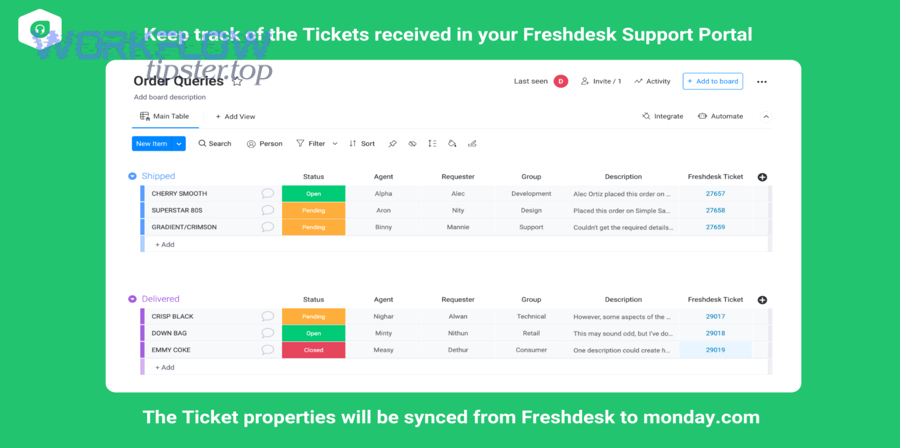
Tickets map best to Items on a Board, with columns that mirror the decisions you expect a team to make: status, priority, owner, due date, and a link-to-ticket column.
In practice, the cleanest mapping looks like this:
- Freshdesk ticket ID → monday Link column (points back to the ticket)
- Ticket subject → monday Item name
- Ticket status → monday Status column (Open / In progress / Waiting / Resolved)
- Priority/Urgency → monday Priority (Status/Dropdown)
- Agent/Group → monday People (or Teams)
- Tags/Category → monday Text/Dropdown for routing and reporting
Next, decide whether you want two-way updates. Two-way sync is powerful, but it can also create loops if you don’t define “who owns status” (Freshdesk vs monday). The safest approach is often: Freshdesk owns customer-facing status; monday owns delivery status—and you only sync the “bridge signals” each side truly needs.
Should you integrate Freshdesk with monday.com?
Yes—Freshdesk to monday.com integration is worth doing for most support + product environments because it (1) reduces handoff friction, (2) improves visibility of work-in-progress, and (3) prevents ticket-driven tasks from getting lost in chat, email, or spreadsheets.
More importantly, integration helps you control the human cost of tool switching: people often compensate for interruptions by working faster, but research shows that speed can come with higher stress, frustration, and time pressure.
Will it reduce context switching and miscommunication?
Yes, if you design it so monday becomes the shared workspace for execution and Freshdesk remains the shared workspace for customer communication—which eliminates “Where is this at?” messages and reduces duplicate triage.
Then, make the handoff explicit:
- Support creates/receives ticket → item is created (or linked) on the correct board.
- Product/engineering triage happens on the board (priority, owner, sprint, due date).
- Critical state changes are visible without opening Freshdesk every time.
According to a study by University of California, Irvine from the Department of Informatics, in 2008, people completed interrupted tasks faster but reported more stress, frustration, and time pressure, showing why reducing avoidable tool-hopping can improve the work experience.
Is it worth it for small teams?
Yes—small teams often benefit more because they have fewer roles and less time to manage handoffs manually; the key is keeping the integration simple (one board, minimal fields, clear ownership).
Next, avoid overbuilding. For a small team, the “good” version is:
- Create an item on new ticket (or on “escalated” tickets only)
- Map only essential fields
- Add a single “Delivery status” column and a single “Owner” field
If you later need advanced routing, two-way updates, or strict audit controls, you can upgrade the method without rebuilding the entire workflow.
What are the main ways to connect Freshdesk to monday.com?
There are three main ways to connect Freshdesk to monday.com—native marketplace apps, no-code Automation Integrations, and custom API/webhooks—based on your needed flexibility, governance, and two-way sync depth.
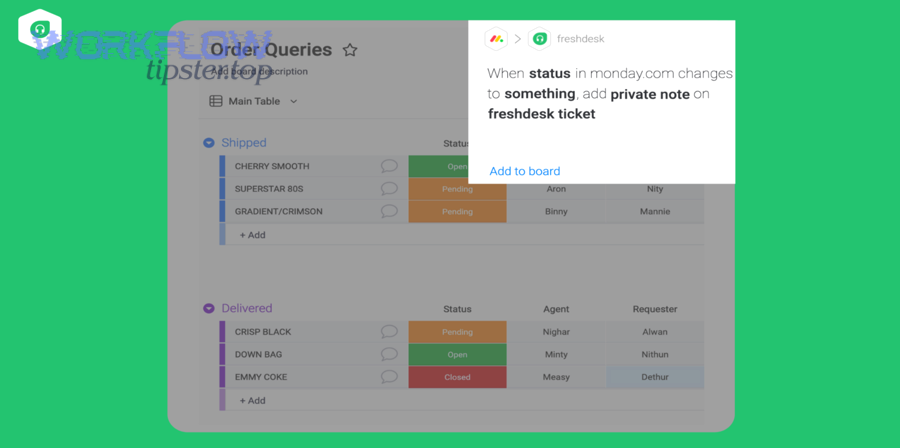
To begin, pick the approach that matches your constraints before you touch field mapping.
Native marketplace apps (Freshworks / monday marketplace)
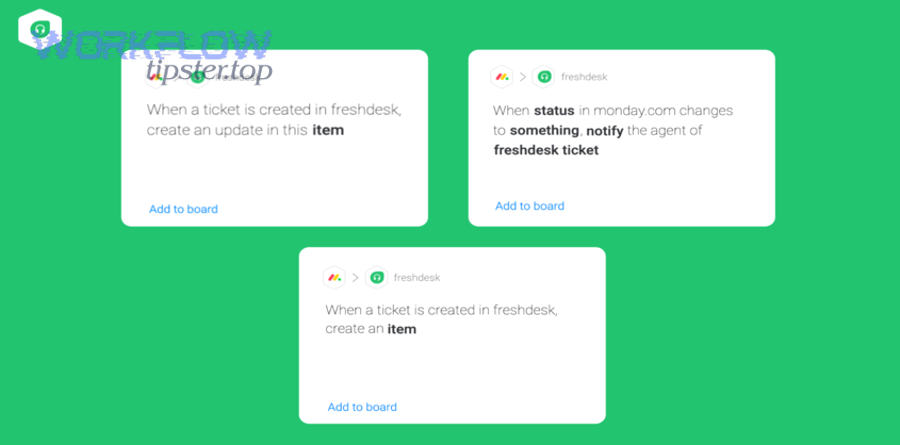
Native marketplace apps are the fastest path when you want a supported connector designed specifically for Freshdesk ↔ monday flows, such as creating a board item when a Freshdesk ticket is created.
Then, validate a few basics before committing:
- Does it support linking (not just creating) items to avoid duplicates?
- Can it map the columns you actually use (status, owner, priority)?
- Can it handle your ticket volumes without silent failures?
This approach is ideal when you want “install + configure” with minimal engineering time.
No-code platforms (Zapier/Make)
No-code platforms work best when you want quick workflows like “New Ticket in Freshdesk → Create Item in monday.com,” with flexible filters and easy iteration.
Next, use no-code when:
- You need to pilot fast, prove value, and refine rules weekly.
- Your workflow is mostly one-directional (Freshdesk → monday).
- You’re comfortable with “automation task” limits and platform-level governance rather than deep custom logic.
According to a study by Stanford University from the Symbolic Systems Program, in 2009, heavy media multitaskers were more susceptible to interference and performed worse on task-switching measures—supporting the idea that clearer, automated routing reduces cognitive drag.
Custom API + webhooks (build your own)
Custom API + webhooks is the best choice when you need strict control over security, reliability, complex mappings, or true two-way sync—because you can directly call Freshdesk ticket APIs and monday item APIs.
Then, build for real-world conditions:
- Retries (network failures happen)
- Idempotency (don’t create duplicates on retry)
- Rate limits and backoff
- Audit logs (who changed what, when, and why)
This is the most effort up front, but the most scalable when the integration becomes business-critical.
Freshworks marketplace app vs Zapier/Make vs custom API: which is best?
Freshworks marketplace apps win in fast deployment, Zapier/Make is best for rapid iteration, and custom API/webhooks is optimal for deep control and two-way sync—so “best” depends on your constraints, not the tool’s popularity.
To make the tradeoffs concrete, this table compares what each option typically delivers for a Freshdesk → monday.com workflow.
| Option | Best for | Strengths | Tradeoffs |
|---|---|---|---|
| Marketplace app | Quick rollout | Low setup effort, purpose-built | Less flexible for custom logic |
| Zapier/Make | Fast experiments | Filters, easy edits, quick wins | Limits, governance varies by plan |
| Custom API/webhooks | Mission-critical sync | Full control, strong reliability patterns | Engineering + maintenance required |
Setup speed vs flexibility
Marketplace apps are usually the fastest because the connector is prebuilt, while custom builds are most flexible because you control every mapping and edge case.
Next, match the method to the time horizon:
- If you need value this week, start with a marketplace or no-code flow.
- If the workflow will become a core operating system, plan for a custom build or a more robust connector.
Reliability & error handling
Custom builds win on reliability when done well because you can implement retries, deduplication keys, and structured logging; no-code tools can be reliable too, but troubleshooting can be more opaque.
Then, define your “failure policy”:
- Where do failed events go (a dead-letter queue, an error board, email alerts)?
- Who owns fixing failures (support ops, IT, engineering)?
- What’s the maximum tolerated delay (minutes vs hours)?
Security & compliance
Custom API/webhooks gives the most control over credentials, scopes, and data minimization, while marketplace/no-code options require careful review of what information is shared with third parties.
Next, reduce risk with a simple principle: sync only what the destination truly needs. For example, a bug board usually needs the ticket link and summary, not full customer PII.
How do you set up Freshdesk → monday.com ticket-to-item sync step by step?
You can set up Freshdesk → monday.com sync by (1) preparing a monday board with the right columns, (2) authenticating your connector (app/no-code/custom), (3) mapping fields, and (4) testing with real tickets until you can reliably create and update items.
Then, implement it in a way that prevents duplicates and preserves traceability.
Prepare your monday board and columns
Prepare your board by creating columns that represent the decisions your team must make: owner, delivery status, priority, due date, and a link back to Freshdesk.
Next, keep your column design “integration-friendly”:
- Use stable column IDs (avoid deleting/recreating columns mid-project).
- Prefer Status/Dropdown columns for things you want to report on.
- Add a dedicated Freshdesk Ticket Link column so the source is always one click away.
If you plan two-way sync, create a clear rule: which status column is authoritative, and which one is informational.
Generate Freshdesk API key and permissions
If you’re using an API-based approach (directly or via a connector), you’ll need Freshdesk API access and credentials handled securely, because ticket creation and updates rely on the ticket APIs.
Next, treat credentials as production secrets:
- Store keys in a secret manager (or the automation platform’s secure vault).
- Rotate keys if team members leave.
- Restrict which tickets can trigger automations (filters reduce risk and noise).
Connect, map fields, and test
Map the core fields first (ticket ID/link, subject, requester, priority, status), then test by generating a real ticket and confirming that monday creates an item exactly once.
Next, test for the issues that break workflows in practice:
- Duplicate creation: does a retry create a second item?
- Special characters: does formatting break the item name or notes?
- Status mapping: do you get the right status values every time?
- Edge tickets: spam, merged tickets, or deleted tickets should not pollute the board.
If you’re using the monday API, remember that column updates require the correct formatting approach (JSON vs string) depending on the column type.
Add two-way updates (status, comments) if needed
Two-way updates are worth adding only after one-way creation is stable, and they work best when you restrict them to a few signals (like delivery status or resolution markers) to avoid endless update loops.
Next, design two-way sync with “guardrails”:
- Sync only on specific transitions (e.g., when delivery status hits “Done”).
- Add a hidden “last_synced_at” marker (or integration tag) to prevent loops.
- Decide where comments live: Freshdesk conversation vs monday updates.
According to a study by Stanford University from the Symbolic Systems Program, in 2009, heavy multitaskers were more susceptible to interference and performed worse on task-switching ability—so two-way sync should be selective to reduce “noise updates” that cause unnecessary switching.
How do you design a ticket-to-task workflow that actually works?
A ticket-to-task workflow works when it uses clear routing rules, explicit ownership, and a shared definition of “done,” so monday items represent actionable work rather than a second inbox that nobody trusts.
Then, design your workflow so each team sees exactly what it needs—no more, no less.
Define routing rules and ownership
Routing rules should answer one question: “When does a ticket become delivery work?”—because not every ticket should become a monday item.
Next, implement simple, enforceable rules:
- Only create items when a ticket is tagged Bug, Feature Request, or Escalation.
- Assign ownership automatically (e.g., by product area, category, or group).
- Use a default triage owner if you can’t reliably route by category.
The goal is to prevent the board from becoming a mirror of the inbox.
Create a bug triage lane and SLAs
A bug triage lane works when you separate intake from commitment: intake captures the request, triage validates and prioritizes, and commitment places the work into a sprint or delivery plan.
Next, define SLA signals without overcomplicating:
- Use one “SLA risk” flag in monday (green/yellow/red).
- Keep SLA enforcement in Freshdesk, but surface the risk on the board so delivery teams feel the urgency.
- Add “next update due” dates for high-impact incidents.
According to a study by the University of California, Irvine from the Department of Informatics, in 2008, interruptions increased reported stress and time pressure—so a triage lane that reduces rework and repeated clarification can lower operational strain.
Use automation recipes to keep boards clean
Board hygiene improves when automation enforces consistent naming, required fields, and closure behavior (for example, archiving items after resolution or moving them to a “Done” group).
Next, build “cleanup” automations:
- When delivery status becomes Done → move item to Done group and notify support owner.
- When ticket is resolved → add resolution timestamp and lock further updates (or mark read-only).
- When item sits in “Waiting on Customer” too long → alert support to follow up.
This prevents your board from turning into a historical dump where active work is hard to spot.
What problems happen in Freshdesk–monday integrations, and how do you fix them?
The most common integration problems are duplicate items, missing updates, and broken field mappings, and you fix them by adding stable identifiers, tightening triggers/filters, and validating column formats and API rules.
Then, treat failures as expected events—not surprises—so your workflow stays trustworthy.
Duplicate items and missing updates
Duplicates happen when retries create new items instead of updating existing ones, and missing updates happen when triggers fire but mapping or permissions fail silently.
Next, use proven safeguards:
- Store a ticket_id → item_id mapping (even if it’s a simple datastore).
- Use idempotency rules: “If ticket_id exists, update the item; else create it.”
- Add an “Integration Health” view (items created today, items missing ticket link, failed runs).
Field mapping errors and dynamic forms
Mapping breaks when a field changes in Freshdesk (dynamic forms) or when monday columns expect a different data format than what you send.
Next, reduce mapping fragility:
- Map to stable fields first (subject, ID, status, priority).
- Keep “nice-to-have” fields (custom fields) optional until stable.
- Validate formatting rules for monday column updates (JSON vs string).
Rate limits, retries, and audit trails
Rate limits and transient errors are normal for APIs, so reliable integrations use retries with backoff, queueing, and logs that let you replay failed events.
Next, define a minimum reliability standard:
- Retry transient failures automatically.
- Stop retrying permanent failures (bad auth, missing board) and alert an owner.
- Log every event with ticket ID, item ID, timestamp, and the action taken.
According to a study by Stanford University from the Symbolic Systems Program, in 2009, heavy multitaskers were more susceptible to interference—so noisy, failure-prone sync increases cognitive load, while reliable logging and predictable retries reduce mental overhead.
What alternatives exist if you do NOT integrate Freshdesk to monday.com?
If you do not integrate Freshdesk to monday.com, you can still keep teams aligned by choosing a single “system of truth” and using lightweight bridges (like disciplined tagging, scheduled exports, or email-based handoffs), but you’ll trade automation for manual coordination.
Next, choose the alternative that fits your operating reality, not the ideal.
When to keep work in Freshdesk only
Keep work in Freshdesk only when support owns the full lifecycle (including resolution) and delivery work is minimal, because a second system can become an unnecessary coordination layer.
Then, improve Freshdesk-only workflows with:
- Strict tags for escalations
- Clear internal notes conventions
- Saved views for “needs engineering” vs “waiting”
When to manage work in monday only
Manage work in monday only when tickets are mainly intake and the real work is project delivery; in that case, the ticket becomes a reference, not the operational hub.
Next, ensure support still has a crisp customer loop (status updates, closure messages), even if delivery runs the board.
Bridge with email/CSV exports
Exports can work for low volume because they create periodic snapshots you can review in triage meetings, but they are weak for fast-moving incidents because they don’t update in real time.
Then, use exports only when:
- You can tolerate delays
- You have a weekly triage cadence
- You don’t require two-way updates
How other Automation Integrations compare (clickup to bitbucket, airtable to trello)
If you’re evaluating broader Automation Integrations, compare them by the same criteria: trigger reliability, mapping depth, two-way sync needs, and governance—whether you’re doing clickup to bitbucket for engineering traceability or airtable to trello for lightweight project execution.
In addition, keep your semantic model consistent: the best integrations preserve identity (IDs/links), ownership, status meaning, and auditability, regardless of which apps you connect.