


Invalid JSON payload errors usually happen because a webhook step receives malformed JSON—most often from unescaped quotes/newlines, trailing commas, wrong brackets, or a payload that isn’t JSON at all (like form-encoded data). The fix is to validate the raw body, correct the structure, and ensure your Zap sends/receives JSON in the right format.
If you’re catching webhooks, your next goal is to find where the JSON breaks in the chain: the source app, a Zapier field mapping, a formatter/code step, or the destination API step. Once you isolate the break point, the repair is typically a small change (escaping, headers, serialization, or a different webhook mode).
You may also need to confirm you’re using the right Webhook trigger/action mode (for example, raw vs parsed) and the right payload type for the receiving system. Some webhook modes capture the body “as-is,” while others expect it to be parseable JSON and will fail earlier if it’s not. (zapier.com)
Introduce a new idea: below is a structured, step-by-step path to validate, repair, and harden your webhook automation so you stop seeing invalid JSON payload errors.
What does “Invalid JSON Payload” mean in Webhooks by Zapier?
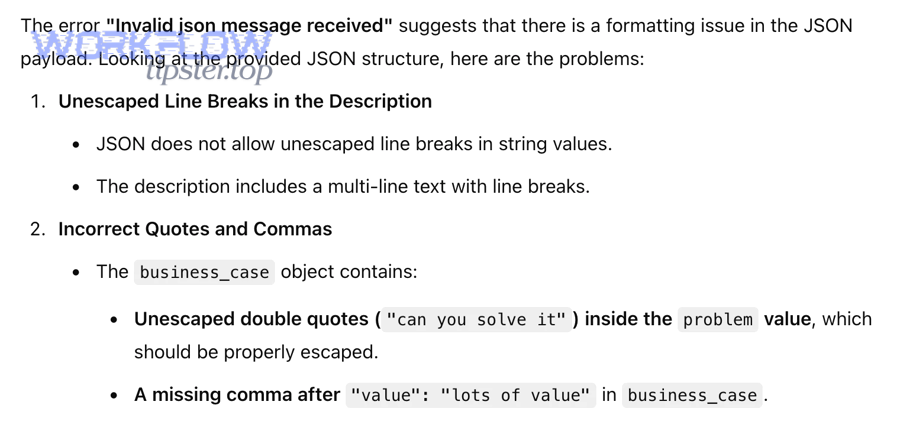
“Invalid JSON payload” means the webhook step received a request body that cannot be parsed as JSON because its syntax is broken (or it isn’t JSON at all), so Zapier can’t safely interpret it as structured data.
Next, the fastest way to fix it is to identify which part of JSON syntax is being violated and where that invalid body is coming from.

At a practical level, JSON becomes “invalid” when any of these rules are broken:
- Quotes: strings must use double quotes (
"like this")—not smart quotes, not unescaped quotes inside a string. - Commas: items must be separated by commas, but JSON cannot end with a trailing comma.
- Brackets/braces: arrays use
[]and objects use{}—and they must close correctly. - Escapes: line breaks must be
\ninside strings, and backslashes must be escaped as\\. - Encoding: the body should be UTF-8; invisible control characters can also break parsing.
When Zapier flags “invalid JSON payload,” treat it like a syntax error, not a business logic error. You’re not “sending the wrong value” yet—you’re sending something the parser can’t even read.
What is valid JSON, in plain terms?
Valid JSON is a text format with strict grammar that represents objects (key/value pairs) and arrays (ordered lists) using a limited set of allowed types.
To better understand the error, focus on what JSON allows and what it forbids:
- Allowed types: object, array, string, number, boolean, null
- Forbidden patterns: single quotes for strings, comments, trailing commas, unescaped newlines inside strings
A quick mental check: if you can paste the payload into a JSON validator and it highlights a line/column error, it’s likely a formatting issue—not a Zap configuration issue.
What are the most common “invalid JSON” error messages you’ll see?
There are 4 common error patterns, based on what broke first:
Then, matching the pattern to the cause helps you fix faster.
- Unexpected token / Unexpected character → usually a stray quote, comma, or a body that starts as non-JSON (like
field=a&field2=b) - Unexpected end of JSON input → truncated payload, missing closing brace/bracket, or network/timeouts cutting body short
- Bad control character / Invalid escape sequence → unescaped newline/tab/backslash inside strings
- Cannot parse / JSON parse error → generic wrapper around one of the above
This is why “valid vs invalid JSON” matters: Zapier can only map fields and continue automation once the JSON is valid.
Where can the JSON break in a Zapier webhook flow?
There are 3 main places JSON breaks in a Zapier webhook flow: the sender, the Zap mapping/transforms, and the receiver, based on where the payload is created or modified.
In addition, isolating the break point prevents you from “fixing” the wrong step and reintroducing the error later.

Think of a webhook flow as: Source → Zapier → Destination.
Can the source app send malformed JSON?
Yes—invalid JSON payload errors often start at the source because the app (or script) builds JSON via string concatenation, mixes encodings, or sends the wrong content type.
Next, confirm the source is truly sending JSON (not form data) and that it escapes characters correctly.
Common source-side causes:
- A template inserts raw user text containing
"or newlines into a JSON string. - The system sends
Content-Type: application/x-www-form-urlencodedbut the body looks “JSON-ish.” - The payload is double-encoded (a JSON string inside JSON) and later treated as an object.
Can Zapier steps accidentally corrupt JSON?
Yes—JSON can become invalid when you combine fields, insert text, or pass “JSON-looking strings” between steps without proper encoding.
More importantly, this is the most common place builders accidentally introduce errors because it looks correct in a field box.
Examples inside Zapier:
- A Formatter step merges strings and injects an unescaped quote.
- A field mapping inserts a line break into a string that wasn’t escaped.
- A Code step returns text that isn’t properly serialized as JSON.
Can the destination API reject JSON even if it’s valid?
Yes—the destination can reject payloads that are valid JSON but not valid for that API schema (wrong types, missing required fields, wrong nesting).
Then, you need to separate “JSON validity” from “API acceptance,” which you’ll do later in this guide.
Are you using the right webhook mode and payload type for your use case?
Yes—you’re using the right webhook mode and payload type if (1) you can capture the raw body when needed, (2) your payload’s content type matches what you send, and (3) your data shape matches the downstream step.
However, if any of those three checks fail, switching modes often fixes invalid JSON payload errors immediately.
One key detail: Catch Raw Hook captures the request body unparsed (and includes headers), which is useful when the body is not clean JSON yet. (zapier.com)
Next, choose the mode based on whether you need Zapier to parse JSON automatically or you need to inspect/repair raw input first.
Catch Hook vs Catch Raw Hook: which should you use?
Catch Hook is best when the sender produces clean JSON and you want Zapier to parse fields for mapping quickly.
On the other hand, Catch Raw Hook is best when you suspect malformed JSON, mixed encodings, signature validation needs, or you want to see the original body before parsing. (zapier.com)
Use Catch Raw Hook when:
- You see invalid JSON payload errors on the trigger.
- The sender sometimes posts non-JSON content.
- You need to validate headers (content-type, signature, etc.) before trusting the body.
Should you send JSON as “data” or as a raw body?
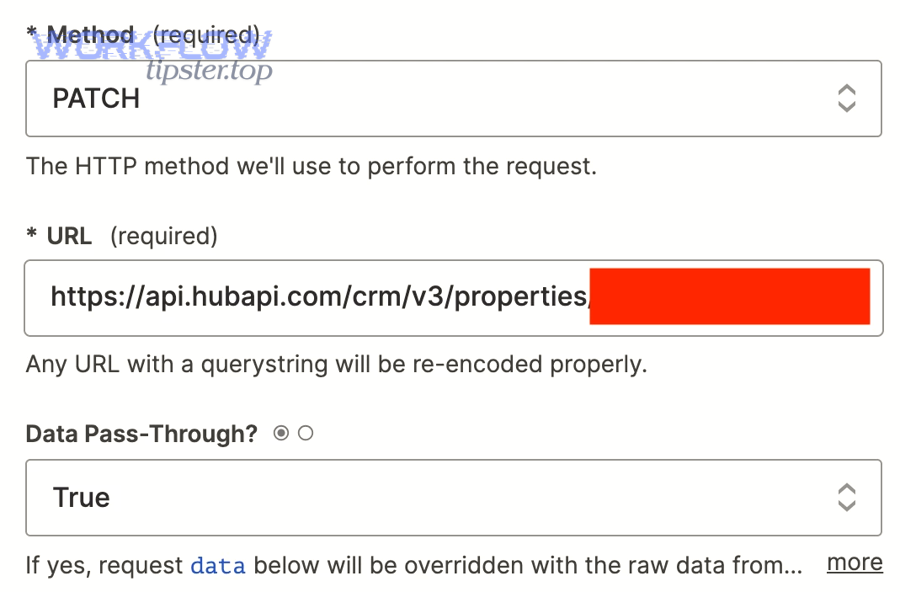
You should send JSON as a raw body when the receiver expects a JSON document (object/array) and you must preserve exact structure.
Meanwhile, you should send JSON as “fields” only when the action expects form-style key/value inputs and will assemble/encode correctly for you.
A practical rule:
- If you’re building a “Custom Request” or sending to an API expecting JSON, treat it as a single JSON document.
- If you’re pushing to a form endpoint, treat it as fields, not JSON.
Do headers matter for invalid JSON payload errors?
Yes—headers matter because Content-Type tells parsers how to interpret the body, and mismatches can make a valid JSON string look invalid to the receiving step.
In addition, if you send JSON, you generally want Content-Type: application/json and proper UTF-8 encoding.
What are the most common causes of invalid JSON payloads in Zapier webhooks?
There are 7 common causes of invalid JSON payloads in Zapier webhooks: unescaped characters, trailing commas, broken brackets, wrong content type, double-encoding, truncated bodies, and schema-shape mistakes, based on how JSON is constructed and transported.
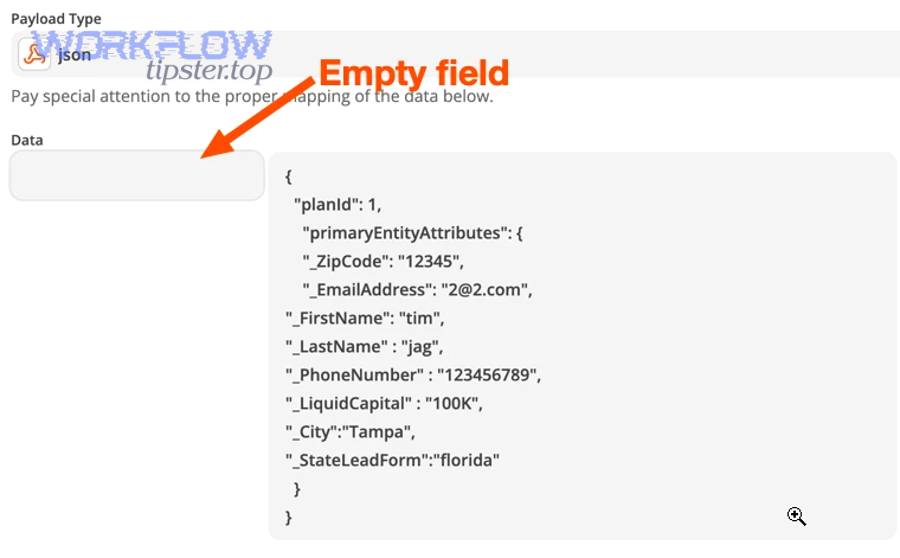
To illustrate the troubleshooting path, the table below maps each cause to the symptom you’ll see and the most reliable fix.
Table: common invalid JSON causes → symptoms → fixes (quick triage map)
| Cause | What you’ll usually see | Fastest reliable fix |
|---|---|---|
| Unescaped quote/newline in string | “Unexpected token” near a text field | Escape strings (\", \n) or JSON-encode the field |
| Trailing comma | Error near } or ] |
Remove trailing commas (JSON doesn’t allow them) |
| Missing brace/bracket | “Unexpected end of JSON input” | Rebuild payload using a serializer, not manual concatenation |
| Wrong content type | Body starts with a=b&c=d or looks parsed |
Send real JSON body + set Content-Type: application/json |
| Double-encoded JSON | Entire JSON appears inside quotes | Parse once (JSON.parse) or remove extra encoding layer |
| Truncated payload | Random cut-off mid-string/object | Check payload size/timeouts; reduce body or paginate |
| Valid JSON, invalid schema | “Bad Request” after passing JSON validation | Match API schema types, required keys, and nesting |
Next, walk through the most frequent root causes in more depth so you can spot them in seconds.
How do unescaped characters break JSON most often?
Unescaped characters break JSON when raw user text is inserted into JSON without encoding—especially quotes (") and line breaks.
Specifically, the most common payload breaker is a multiline text field (address, notes, chat transcript) that contains literal newlines or quotes.
Fix pattern:
- Always treat user text as data, not JSON syntax.
- Encode it before inserting into JSON.
- If you can’t guarantee that upstream, capture raw and sanitize before parsing.
How do trailing commas and “almost-JSON” formats show up?
Trailing commas appear when a list builder adds a comma after the last element, or when a template repeats blocks and leaves a dangling comma.
For example, {"a":1,} is invalid JSON even though many people visually accept it.
Fix pattern:
- Use a JSON serializer in code.
- If you must template, build arrays/objects by joining already encoded items with commas.
How can payload size and truncation cause “invalid JSON”?
Truncation causes invalid JSON when the body is cut mid-object or mid-string—so the JSON ends prematurely and the parser throws “unexpected end.”
More importantly, large payloads are more likely to be truncated by limits, proxies, or step-size constraints.
In Zapier, pay attention to any size constraints on specific webhook modes; for example, Catch Raw Hook captures an unparsed body up to a documented maximum. (zapier.com)
How do you validate and repair JSON before it hits Webhooks by Zapier?
Validate and repair JSON by following 5 steps—capture the raw body, run it through a JSON validator, identify the exact character/line that breaks parsing, sanitize/escape fields, and re-test with the same payload.
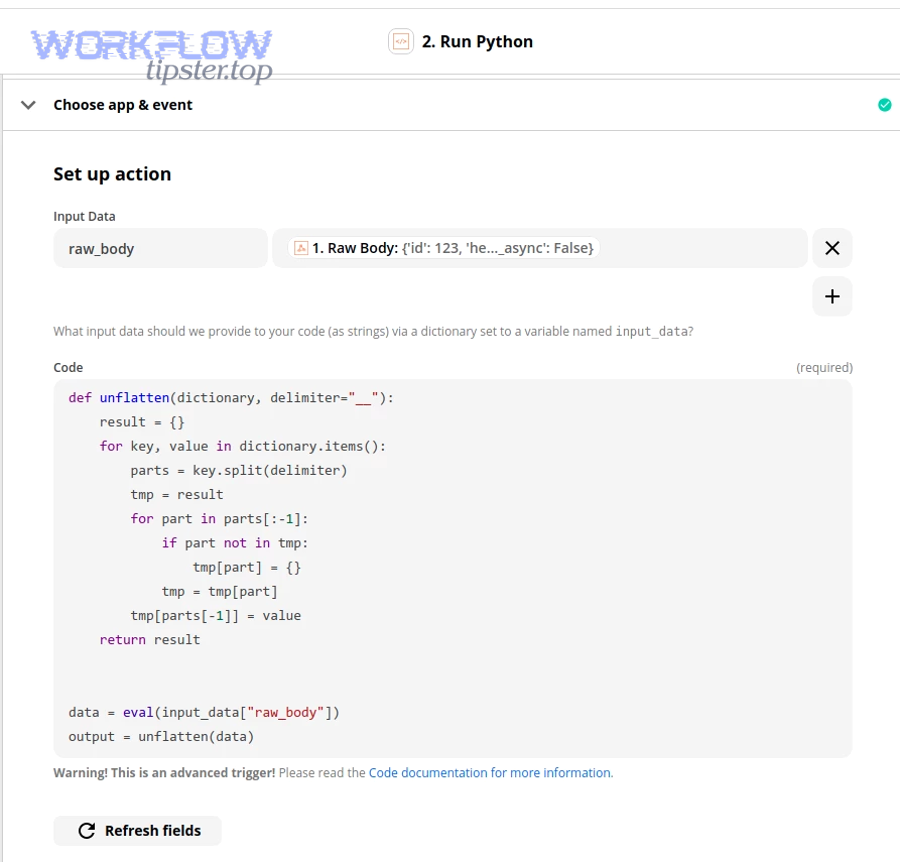
Then, once you can validate the body consistently, you can re-enable parsing/mapping confidently.
What’s the fastest way to validate JSON during troubleshooting?
The fastest way is to copy the raw payload and validate it with a JSON validator that reports line and column.
Next, fix exactly what the validator points to—don’t “rewrite the whole thing” unless it’s being built incorrectly.
Validation checklist:
- Does it start with
{or[? - Are all keys and string values in double quotes?
- Are backslashes and newlines escaped inside strings?
- Does every
{have a matching}and every[have a matching]?
How do you repair broken JSON without losing important content?
Repair broken JSON by encoding problematic fields (notes, descriptions, user messages) rather than deleting characters.
More specifically, the goal is to preserve meaning while making syntax valid.
Common safe repairs:
- Replace literal newlines with
\n - Escape quotes inside strings (
\") - Escape backslashes (
\\) - Ensure tabs are either removed or escaped (
\t)
Should you sanitize upstream or inside Zapier?
You should sanitize upstream when you control the sender (best long-term), but sanitize inside Zapier when you don’t control the sender or you need immediate recovery.
In addition, if you’re building a reusable zapier troubleshooting pattern, sanitizing inside Zapier can reduce support load because it’s consistent across sources.
How do you troubleshoot invalid JSON payloads step-by-step inside Zapier?
Troubleshoot invalid JSON payloads inside Zapier with 7 steps: reproduce, capture raw input, confirm content type, validate JSON, isolate the breaking step, repair via formatter/code, and re-test with the same sample.
To better understand the break point, do the steps in order—skipping steps usually causes you to “fix” a symptom, not the cause.
How do you reproduce the error with a controlled test payload?
Reproduce the error by sending a known test payload that contains only safe characters first, then gradually add risky content (quotes/newlines/Unicode) until it breaks.
Next, keep the failing payload as your “golden test” so you can confirm the fix.
Start with:
{ "status": "ok", "message": "test" }Then introduce likely breakers:
- A quote inside a string:
"He said \"hello\"" - A multiline string:
"line1\nline2" - Non-ASCII characters:
"café"/ emojis
How do you isolate which step corrupts the JSON?
Isolate the corrupting step by comparing the payload before and after each transform: trigger sample → formatter/code → webhook action.
Then, the first step where the payload becomes invalid is your repair target.
A practical method:
- Capture raw request (or the earliest available body).
- Validate it (it’s either valid or not).
- If valid early but invalid later, inspect each step that manipulates text.
What should you do if the webhook request fails with 403 or 404?
If you’re seeing 403 or 404 issues while also debugging invalid JSON, treat them as routing/auth problems first—because you can’t validate payload handling if the endpoint isn’t reachable/authorized.
More importantly, keep your debugging notes separate: payload validity vs endpoint access.
- Include “zapier webhook 403 forbidden troubleshooting” in your internal checklist when authentication, IP allowlists, or signing requirements are involved.
- Include “zapier webhook 404 not found troubleshooting” when the URL is wrong, deprecated, or environment-specific.
These issues can co-exist with invalid JSON, but they’re fixed by different actions.
What’s the difference between “valid JSON” and “API-accepted JSON”?
Valid JSON wins in syntax correctness, API-accepted JSON is best for schema correctness, and “Zap-ready JSON” is optimal for field mapping and consistent typing across steps.
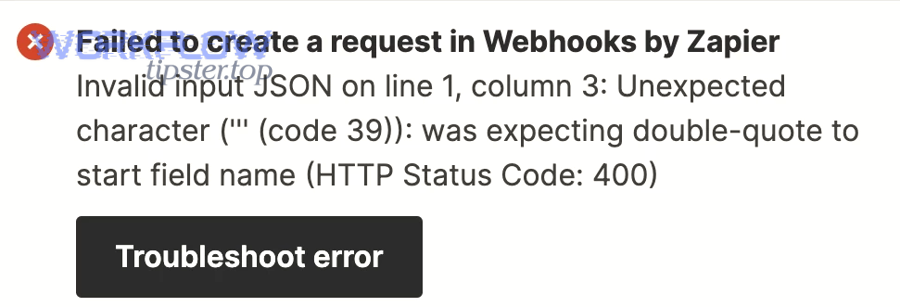
However, confusing these levels is why many builds “fix invalid JSON” and still get 400 errors later.
Here’s the comparison that matters:
- Valid JSON: the parser can read it (grammar is correct).
- API-accepted JSON: the API accepts it (schema, required fields, and types match).
- Zap-ready JSON: it remains stable through mapping (numbers stay numbers, arrays stay arrays, nested keys stay consistent).
Evidence matters because malformed inputs regularly crash or hang software—even when the test input is “random but valid.” According to a study by University of Wisconsin–Madison from the Computer Sciences Department, in 2000, random input testing crashed 21% of tested applications and hung 24%, showing how sensitive systems are to input correctness. (pages.cs.wisc.edu)
Why do APIs reject “valid JSON” so often?
APIs reject valid JSON when:
- A field must be an integer but you send a string (
"5"vs5) - A key is required but missing
- Nesting is wrong (
{"user":{"id":...}}vs{"user_id":...}) - An array is expected but you send a single object (or vice versa)
So after you eliminate invalid JSON, your next checkpoint is: Does the payload match the API contract?
How do you confirm schema expectations quickly?
Confirm schema expectations by checking:
- The endpoint docs for required keys and types
- Example requests in docs
- Any “schema” or “OpenAPI” definitions if available
Then align your Zap’s output exactly to that shape before you do “polish” work.
Can you prevent invalid JSON payload errors long-term in Zapier webhook automations?
Yes—you can prevent invalid JSON payload errors long-term by (1) generating JSON with serializers instead of manual strings, (2) validating/sanitizing risky fields before sending, and (3) adding guardrails (tests, versioned schemas, and fallbacks) in your Zaps.
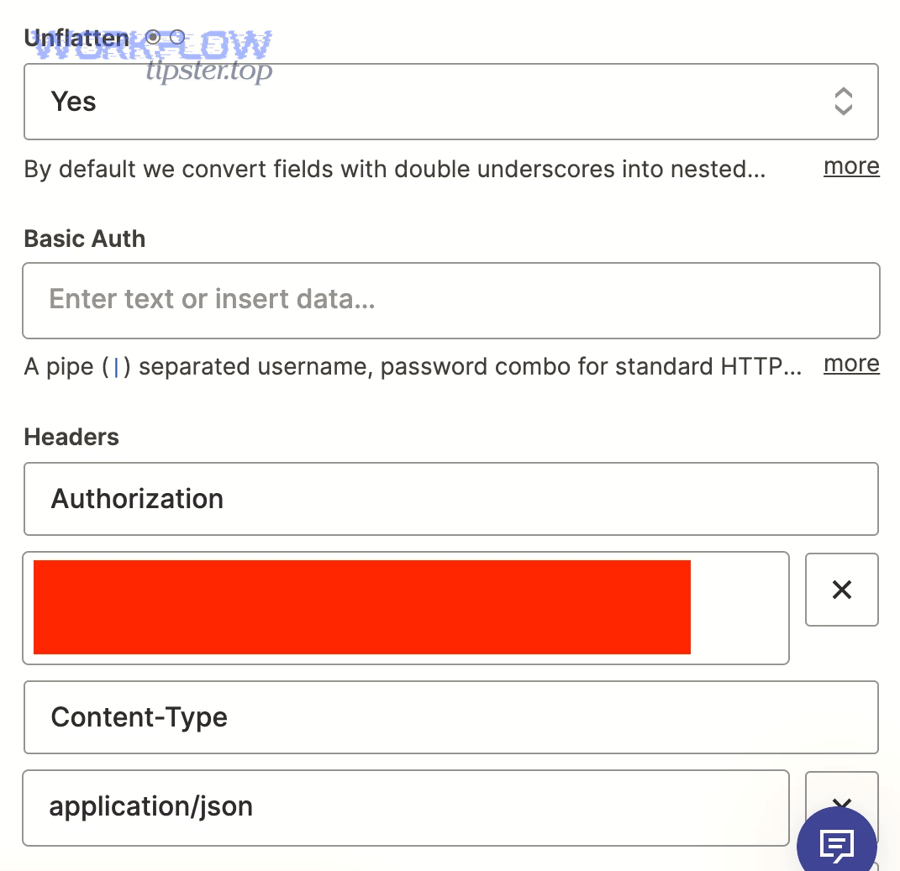
In addition, long-term prevention reduces “mystery failures” when content changes (like a user pasting a quote-heavy message).
Should you standardize a “safe JSON” pattern across Zaps?
Yes—standardizing a safe pattern prevents the same error from appearing across multiple automations when a new data source is added.
Next, build a small reusable checklist you apply every time:
- Always set the correct
Content-Type - Always escape/sanitize user-generated text
- Always validate JSON before sending to critical endpoints
- Always keep a known-good sample payload for regression testing
Can monitoring and retries make invalid JSON worse?
Yes—monitoring and retries can make invalid JSON worse when you retry the same broken payload repeatedly, increasing noise and hiding the real cause.
More importantly, retries are for transient transport errors, not for deterministic parse failures.
Use retries for:
- 429 rate limits
- 5xx temporary server issues
Do not retry for:
- invalid JSON payload
- schema validation errors
When should you add a fallback path?
Add a fallback path when you can’t fully control the source payload and you still need the Zap to succeed.
For example:
- If parsing fails, store the raw body for review
- Notify a channel with the payload snippet
- Route to a manual queue
If you publish troubleshooting write-ups externally, you might also document your standard fallback approach on a hub page like WorkflowTipster.top to keep patterns consistent across your team.
What edge cases and alternatives should you consider when Zapier keeps flagging “invalid JSON”?
There are 4 edge-case categories to consider when Zapier keeps flagging invalid JSON: non-JSON payloads disguised as JSON, signature/encryption wrappers, nested/double-encoded JSON, and payloads that are valid but too large or too inconsistent, based on transport and data-shape behavior.
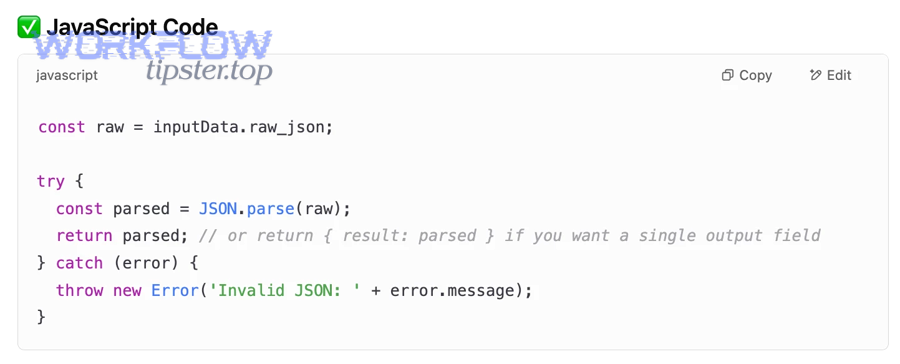
To sum up, if basic validation doesn’t fix it, the “alternative path” is usually to capture raw, normalize, and only then parse.
What if the sender is not sending JSON at all?
If the sender is not sending JSON, you must either switch the sender to JSON or treat the payload as form/text and convert it before your JSON-dependent steps.
Next, confirm by inspecting the first character of the body and the content type header.
What if the JSON is wrapped for security (signatures/encryption)?
If the body is signed or encrypted, it may not be parseable JSON until you verify/decode it, so parsing will fail even if the underlying data is “structured.”
Then, capture raw, validate signature, decode/decrypt, and only then parse.
What if the payload is double-encoded JSON?
If the payload is double-encoded, the “JSON” you see is actually a JSON string, so parsing once returns a string that still needs parsing.
In that case, parse exactly once per encoding layer—no more, no less—or you’ll either fail or lose structure.
What if the issue is inconsistent data shape over time?
If the issue is inconsistent shape (sometimes array, sometimes object), Zapier steps that expect stable structure may behave unpredictably.
More importantly, your fix is to normalize the shape into a stable schema before mapping: always output an object with consistent keys, and store variable parts inside predictable sub-objects/arrays. (zapier.com)