


OAuth token problems in Notion integrations usually look like “token expired,” but the real issue is often refresh-token rotation, redirect URI mismatch, or a token that was revoked/overwritten rather than a simple time-based expiration. Notion’s OAuth flow issues a new access token and a new refresh token when you refresh—so if you keep using the old refresh token, you can trigger invalid_grant. (developers.notion.com)
Next, you’ll learn how to confirm whether your Notion OAuth token is truly “expired,” using the exact Notion error semantics (like invalid_grant, unauthorized, and restricted_resource) so you can debug with confidence. (developers.notion.com)
Then, you’ll walk through a production-safe refresh workflow using Notion’s token endpoint and required headers, including the practical details that prevent refresh races and “works locally, fails in prod” surprises. (developers.notion.com)
Introduce a new idea: once you can reliably refresh, the biggest wins come from token storage discipline, concurrency control, and monitoring, so you prevent the same incident from returning next week.
Is your Notion OAuth token really expired?
No—most “Notion OAuth token expired” reports are actually invalid, revoked, or mismatched grants, and you can confirm that by checking the exact error response (especially invalid_grant, unauthorized, or restricted_resource) and when it occurs in your flow. (developers.notion.com)
Next, let’s pin down what “expired” means in practice so you don’t fix the wrong layer.

When people say “token expired,” they usually mean one of three situations:
- Token exchange fails (you just got redirected back with a
code, but exchanging it for tokens fails). This often points to redirect URI rules or a code that is already used/revoked. - Refresh fails (access worked earlier, then your refresh call fails with
invalid_grant). This often points to refresh token rotation or using the wrong refresh token. Notion’s docs explicitly describeinvalid_grantas including cases where the refresh token is invalid, expired, revoked, or doesn’t match the redirect URI used. (developers.notion.com) - API calls fail (you send a bearer token and the API replies
unauthorizedorrestricted_resource). That’s not “expiry” in the OAuth sense—it’s either bad credentials or permissions. (developers.notion.com)
A fast way to verify what you’re dealing with is to answer two debugging questions:
- Where did it fail? (token exchange / refresh / normal API call)
- What’s the exact Notion error code? (
invalid_grant,unauthorized,restricted_resource, etc.) (developers.notion.com)
If you can label the failure precisely, the fix becomes predictable rather than trial-and-error.
What causes a Notion OAuth token to “expire” or stop working?
A Notion OAuth token usually “stops working” because the authorization grant becomes invalid (revoked/rotated/mismatched) or your client implementation doesn’t persist new tokens correctly—not because time ran out. (developers.notion.com)
To better understand this, break the causes into the parts of the OAuth lifecycle that can break.
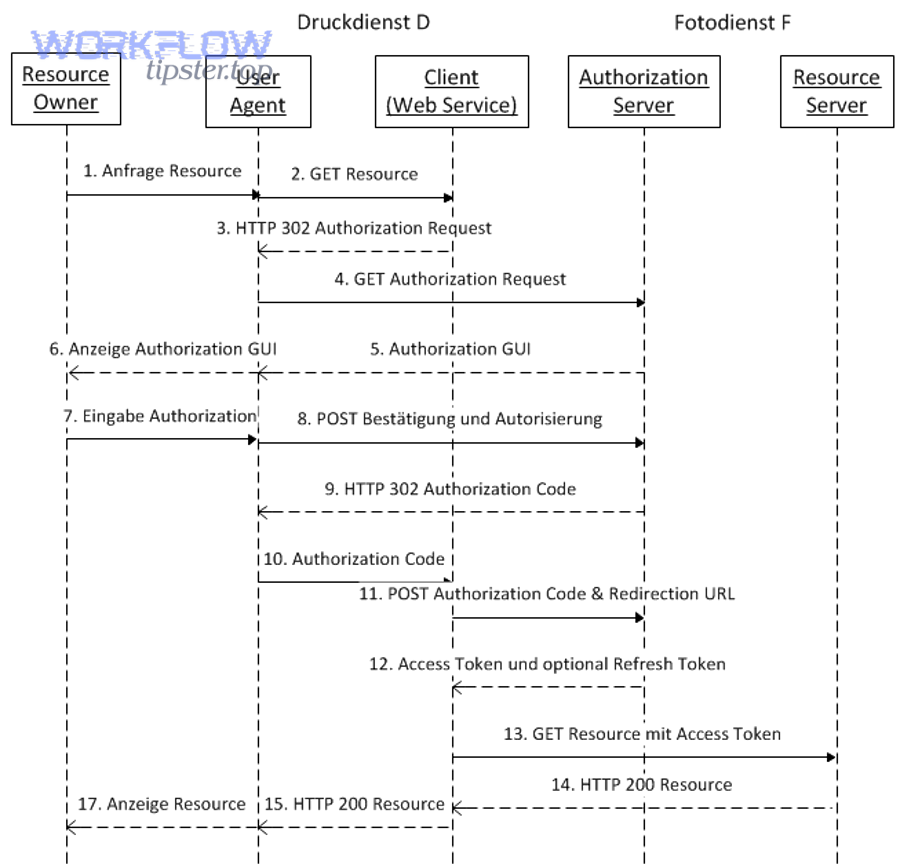
The most common root causes (practical, developer-facing)
1) Refresh token rotation not handled (most common in production).
Notion’s authorization guide indicates that refreshing generates a new access token and a new refresh token. If your system keeps the old refresh token—or two servers race and overwrite each other—you can create a self-inflicted invalid_grant loop. (developers.notion.com)
2) Redirect URI mismatch (looks random until you compare strings).
Notion’s invalid_grant description includes redirect URI mismatch as a cause. Even subtle differences (trailing slash, http vs https, different subdomain) can invalidate the grant. (developers.notion.com)
3) Revoked or replaced authorization.
Users can remove integration access, reinstall, or switch workspaces, producing “it worked yesterday” failures that surface as invalid/unauthorized states depending on the step that fails. (developers.notion.com)
4) Wrong client credentials / Basic auth mistakes at the token endpoint.
Notion’s OAuth token endpoint uses HTTP Basic authentication for token exchange/refresh; errors here can masquerade as token problems when they’re actually credential/encoding problems. (developers.notion.com)
5) Environment drift (staging vs prod settings).
If your integration’s registered redirect URIs differ from the environment calling them, your exchange/refresh calls can break under load even though local tests pass. (developers.notion.com)
Why this matters beyond “make it work once”
According to a study by University of Stuttgart researchers (2016), formal analysis of OAuth 2.0 found multiple real-world attacks and emphasized that correct adherence to best practices is essential for security and correctness. (sec.uni-stuttgart.de)
In other words: if you treat token handling as a one-off implementation detail, the failure mode often returns as either a production incident or a security risk.
What are the most common Notion OAuth error codes related to “expired” tokens?
There are 3 Notion error codes you’ll see most often in token-expiry scenarios: invalid_grant (grant/refresh problems), unauthorized (bad bearer token), and restricted_resource (token lacks permission). (developers.notion.com)
Specifically, use the code to decide whether you should refresh, re-authorize, or fix permissions.
Here’s a quick mapping table so you can diagnose faster. The table lists what the code usually means in practice and the most likely fix path.
| Notion error code | Where you see it | What it usually means | Fastest fix path |
|---|---|---|---|
invalid_grant |
Token exchange or refresh | Code/refresh token invalid, expired, revoked, redirect URI mismatch, or issued to another client | Confirm redirect URI + store/rotate refresh token correctly; re-authorize if revoked (developers.notion.com) |
unauthorized |
Normal API calls | Bearer token is not valid | Confirm you’re sending the latest access token; refresh if needed; verify token storage (developers.notion.com) |
restricted_resource |
Normal API calls (including webhooks calling your app logic) | Token is valid but lacks permission to that page/database/resource | Share the target page/database with the integration; verify workspace + resource access (developers.notion.com) |
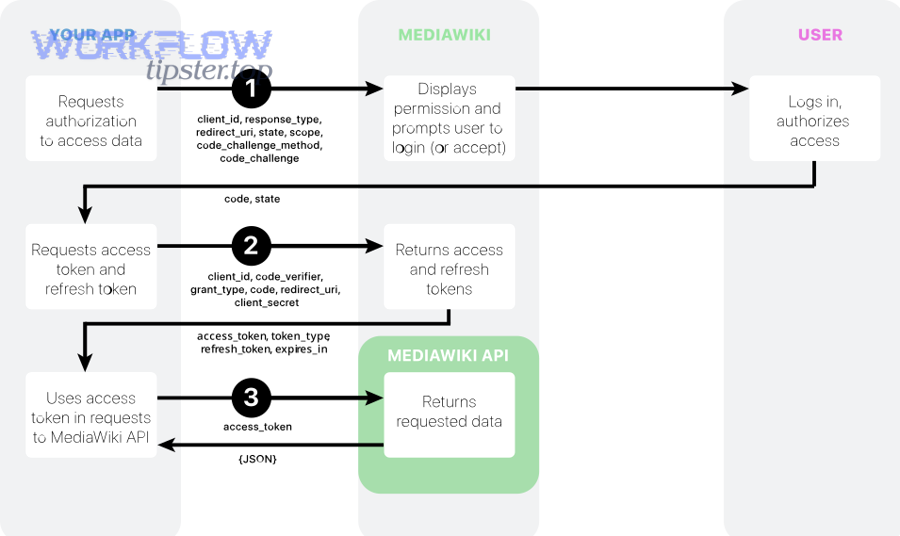
A practical debugging pattern is:
- If you see
invalid_grant, stop retrying blindly. Treat it as “grant is not acceptable,” then check rotation + redirect URI and consider re-auth. (developers.notion.com) - If you see
unauthorized, treat it as “you’re using the wrong access token (or formatting it wrong).” (developers.notion.com) - If you see
restricted_resource, treat it as “permissions/sharing,” not an OAuth lifecycle problem. (developers.notion.com)
This single triage step prevents most wasted time in Notion Troubleshooting.
How do you refresh a Notion OAuth access token correctly?
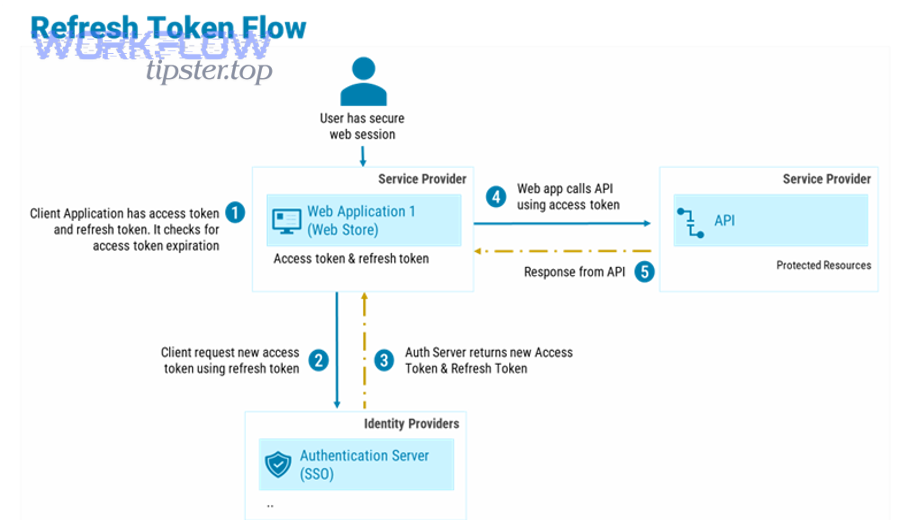
Refresh a Notion OAuth token by calling the Notion OAuth token endpoint with the refresh-token grant, using HTTP Basic authentication, and then saving both the new access token and the new refresh token returned by Notion. (developers.notion.com)
Then, make the refresh workflow production-safe so it survives concurrency and restarts.
Step-by-step refresh workflow (safe defaults)
- Read the latest stored refresh token (single source of truth).
Your refresh flow should start from the value you last persisted after the previous refresh. Notion’s guide explicitly recommends storing both tokens and relating them to the resources they access. (developers.notion.com) - Call the token endpoint with Basic auth and required headers.
Notion documents the “refresh a token” endpoint and indicates the Authorization header must be a Basic header containing base64-encodedusername:password(your client id and secret). It also requires specifying the Notion API version viaNotion-Version. (developers.notion.com) - Persist the full response atomically.
On success, store:- new
access_token - new
refresh_token - workspace identifiers (useful for debugging multi-workspace installs)
- updated timestamp
This is critical because Notion refresh returns a new refresh token as well. (developers.notion.com)
- new
- Retry API call once, then fail loudly.
If an API call fails due to auth, refresh and retry once. If it still fails, bubble up an error with correlation data (workspace_id, authorization_id/bot_id if you track it). Avoid infinite loops.
One embedded video walkthrough (optional learning aid)
A small but important gotcha: the version header
Notion’s refresh endpoint documentation indicates the request must include a Notion-Version header, and it lists the latest version value on the page. If you are inconsistent across services, you can get confusing behavior differences in multi-service systems. (developers.notion.com)
How do you prevent invalid_grant after refresh token rotation?
Prevent invalid_grant by treating Notion refresh tokens as rotating credentials: update the stored refresh token immediately after refresh, enforce single-flight refresh (one refresh at a time per authorization), and re-authorize when the grant is revoked. (developers.notion.com)
Moreover, build your implementation so refresh races cannot happen even under load spikes.
1) Eliminate refresh races (“single-flight” refresh)
When multiple requests notice an expired/invalid access token at the same time, they can all attempt refresh, and only the first refresh “wins.” The others may use a refresh token that has just been rotated away, causing invalid_grant. This is the classic pattern behind notion timeouts and slow runs: retries create more concurrency, concurrency creates more refresh attempts, and refresh attempts create more errors.
Practical fixes:
- Use a distributed lock keyed by
{workspace_id or authorization_id}for refresh. - Or implement a token refresh queue so only one refresh executes while others wait on its result.
- Cache the “fresh token result” briefly to satisfy concurrent callers without re-refreshing.
2) Store refresh tokens atomically (avoid “lost update”)
Because Notion issues a new refresh token on refresh, a late write can revert your database back to an older refresh token. (developers.notion.com)
Use one of these patterns:
- Compare-and-swap: only update the token row if the refresh token you read is still the latest.
- Versioned tokens: store
token_versionand only accept increasing versions. - Transactional write: update access+refresh in one transaction.
3) Treat redirect URI as a strict contract
Notion includes redirect URI mismatch in the invalid_grant meaning. (developers.notion.com)
Operationally:
- Normalize redirect URIs (lowercase host, explicit https, consistent trailing slash policy).
- Store the redirect URI used during authorization and reuse it during token exchange when required.
- Avoid environment-variable drift by validating config at startup.
4) Know when to stop and re-authorize
If a user revoked access, you cannot “refresh your way out.” Notion’s invalid_grant definition includes revoked/invalid tokens. (developers.notion.com)
So your runbook should say:
- If refresh returns
invalid_grant, stop auto-retrying. - Mark the authorization as “needs reconnect.”
- Send user through OAuth again (clean, explicit UX).
Notion OAuth token expired vs API permission errors: what’s the difference?
Notion OAuth “token expired” issues are authentication/grant problems (invalid_grant or unauthorized), while permission errors are authorization problems (restricted_resource)—and the fix is completely different. (developers.notion.com)
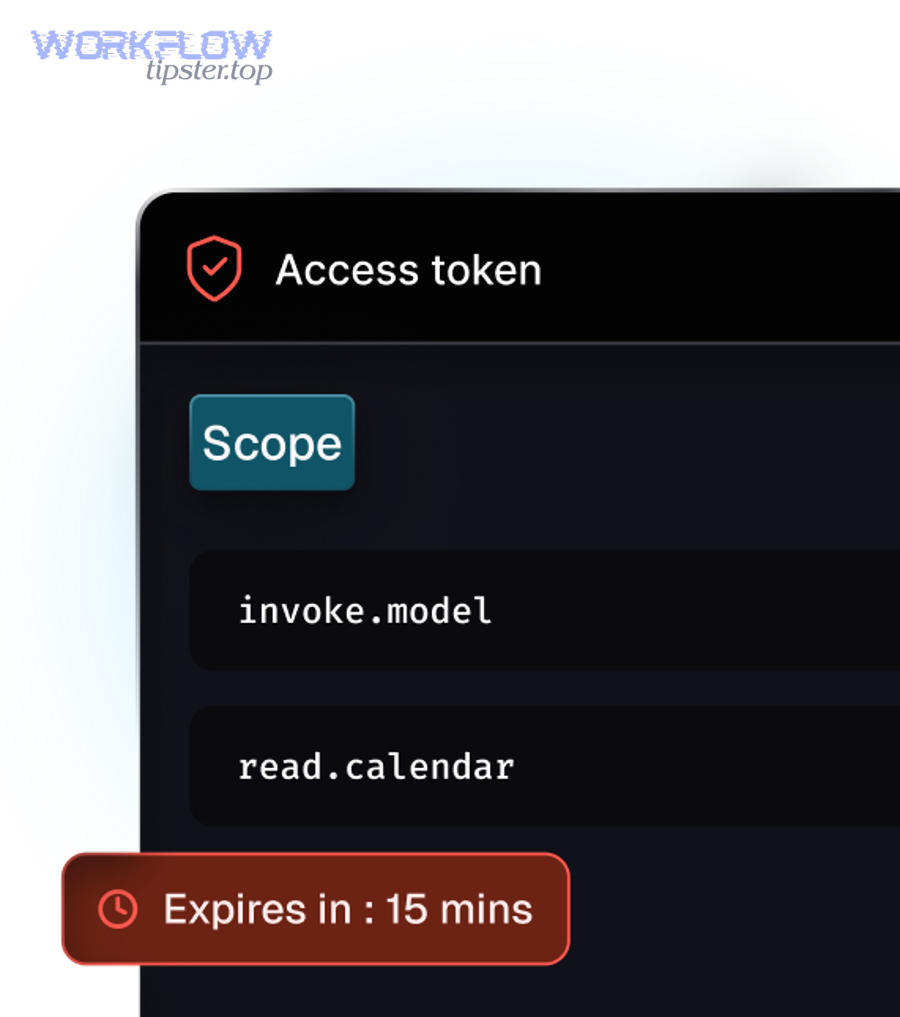
However, both can look like “it suddenly stopped working,” so your logs must preserve the error code.
Expired/invalid token signals (authentication & grant)
invalid_grantduring exchange/refresh: the grant is not acceptable (revoked/invalid/mismatched). (developers.notion.com)unauthorizedduring API call: the bearer token is not valid (wrong/old token or formatting). (developers.notion.com)
Fix path: refresh correctly + persist rotation, or re-authorize.
Permission signals (authorization to resources)
restricted_resource: bearer token is valid, but it doesn’t have permission to perform the operation. (developers.notion.com)
Fix path: ensure the integration is shared on the target page/database, and confirm you’re operating in the expected workspace context.
Where “notion webhook 403 forbidden” fits
A “webhook 403 forbidden” symptom can be misleading because it might originate from:
- Your own webhook endpoint rejecting Notion (your server auth rules), or
- Your integration logic failing when it calls Notion and receives
restricted_resource(permission), or - A bearer token problem that looks like “403” in your own logs if you map upstream errors poorly.
So in Notion Troubleshooting, always log both:
- the upstream Notion status + error code (
restricted_resource, etc.) (developers.notion.com) - your own endpoint status code (what your service returned)
This is how you avoid treating permissions as token expiry (and vice versa).
Contextual Border: Up to this point, you’ve addressed the macro problem—diagnosing and fixing “Notion OAuth token expired” through correct refresh, rotation, and error-code interpretation. Next, the micro layer expands into storage design, monitoring, and operational runbooks so the issue stays solved.
How should you store and monitor Notion OAuth tokens in production?
Store Notion OAuth tokens in a secure database with strict access controls, monitor refresh outcomes and error-code spikes, and maintain a runbook that distinguishes token failure from permission failure—so you prevent repeat incidents and speed up resolution. (developers.notion.com)
Especially, treat token lifecycle as an operational system, not a code snippet.
1) Where should you store access + refresh tokens?
Store tokens in a database table that supports:
- encryption at rest (or application-layer encryption)
- per-record ownership (workspace/user mapping)
- atomic updates (transaction or CAS/versioning)
- timestamps and “last refresh” tracking
Notion explicitly recommends storing both tokens for future requests and relating them to the Notion resources they access. (developers.notion.com)
Suggested schema fields (conceptual):
workspace_idauthorization_id(or bot id if you track it)access_token(encrypted)refresh_token(encrypted)token_updated_atscopes/permissions summarystatus(active,needs_reconnect,revoked)
2) What should you monitor to catch issues early?
At minimum, track:
- Refresh success rate (sudden drop often means rotation bug or config drift)
- Count of
invalid_grant(usually means “needs reconnect” or redirect mismatch) (developers.notion.com) - Count of
unauthorized(usually means old/incorrect access tokens in use) (developers.notion.com) - Count of
restricted_resource(usually a permissions/sharing wave, not OAuth) (developers.notion.com)
Then set alerts on:
- error spikes per workspace
- repeated refresh attempts for the same authorization (refresh storm)
- long tail latency for refresh calls (can cascade into notion timeouts and slow runs)
3) What security hygiene reduces both bugs and risk?
OAuth correctness and security are tightly coupled. A strong baseline:
- Keep client secrets out of source control and rotate them as needed. Notion’s guide warns that secrets should be protected and not included in source code or version control. (developers.notion.com)
- Validate redirect URIs strictly (exact match discipline reduces both failures and attack surface).
- Use “least privilege” in what your integration accesses and document the sharing model for users.
According to the same 2016 formal analysis work from University of Stuttgart, OAuth security depends heavily on correct implementation details and best-practice alignment, reinforcing why monitoring + strict handling are not optional in production. (sec.uni-stuttgart.de)
4) What should your runbook include?
A lightweight, high-signal runbook page should answer:
- If you see
invalid_grant: check rotation + redirect URI; mark authorization “needs reconnect”; stop retries. (developers.notion.com) - If you see
unauthorized: verify which access token your service is sending and whether refresh updated storage. (developers.notion.com) - If you see
restricted_resource: confirm the integration is shared to the target resources. (developers.notion.com) - For “notion webhook 403 forbidden”: separate upstream Notion status codes from your own webhook endpoint responses (don’t collapse them into one “403” bucket).
This is the difference between an integration that “usually works” and one that stays stable at scale.