


A Freshdesk to Asana integration is the fastest way to turn customer support tickets into trackable work, because it connects ticket context (owner, status, request date, updates) to the exact Asana task where the team executes the fix. (asana.com)
Most teams also need help choosing the right integration method—a native widget inside Asana, an app from the Freshdesk Marketplace, or an automation tool—because each option changes what you can sync, where agents work, and how much control you get over mappings and rules. (asana.com)
Once you pick a method, the real win comes from designing the tickets-to-tasks mapping so every escalation has a clear owner, a due date, and a consistent status flow, while updates stay visible to both support and delivery teams without double-entry. (asana.com)
If you want this integration to stay reliable, you also need a lightweight plan for testing, duplicates, permissions, and troubleshooting. Introduce a new idea: below is a practical, step-by-step connector guide that starts with “what it is,” then moves into method selection, setup, workflow design, fixes, and success metrics.
What is a Freshdesk to Asana integration (tickets-to-tasks), and what problem does it solve?
A Freshdesk to Asana integration is a workflow connector that attaches Freshdesk ticket details to Asana tasks (or creates tasks from tickets) so support and delivery teams can track progress in one place without losing the ticket’s context. (asana.com)
To better understand why this matters, focus on the problem it solves: support teams often escalate issues into “work items,” but those work items live outside the helpdesk—so updates split across tools, owners change, and follow-through becomes inconsistent.


In practice, “tickets-to-tasks” solves four recurring operational gaps:
- Context gap: engineers or ops teams get a vague handoff (“customer can’t pay”) without the ticket history, attachments, and timestamps.
- Ownership gap: the ticket has an agent owner, but the fix needs a task owner and due date.
- Visibility gap: stakeholders can’t tell if the ticket is blocked, in progress, or shipped—because task status and ticket status drift apart.
- Follow-up gap: when the fix is done, the agent still needs the right update to respond and close the loop—without hunting for details in another tool.
When the integration is set up correctly, the team gets a repeatable loop: ticket arrives → task is created or linked → work progresses in Asana with clear accountability → updates flow back to the ticket for faster customer communication. (asana.com)
According to a study by University of California, Irvine from Strategic Communications & Public Affairs, in 2020, it takes an average of 23 minutes and 15 seconds to get back to a task after an interruption—one reason why reducing tool-hopping matters in busy support environments. (news.uci.edu)
Do you need a Freshdesk to Asana integration for your support workflow?
Yes—most customer support teams benefit from a Freshdesk to Asana integration if they (1) escalate tickets into cross-functional work, (2) need clear ownership and due dates for fixes, and (3) lose time or accuracy when switching between tools. (asana.com)
Next, to decide quickly, use a reality-based checklist that maps directly to your day-to-day operations:
Decision checklist: when the integration is worth it
You likely need Freshdesk → Asana if three or more of these are true:
- Your agents escalate tickets to product/engineering/ops more than a few times per day.
- Customers ask for updates and agents must ping another team to answer.
- You already track support-related work in Asana projects (bugs, refunds, outages, onboarding fixes).
- Tickets get “stuck” because no single owner is accountable for the fix.
- You have recurring ticket types that should route to the same project/section automatically.
- You care about reporting on “time to assign,” “time to fix,” or “time to close loop.”
On the other hand, if your support team resolves almost everything within Freshdesk and escalations are rare, a full tickets-to-tasks connector may add complexity without enough payoff.
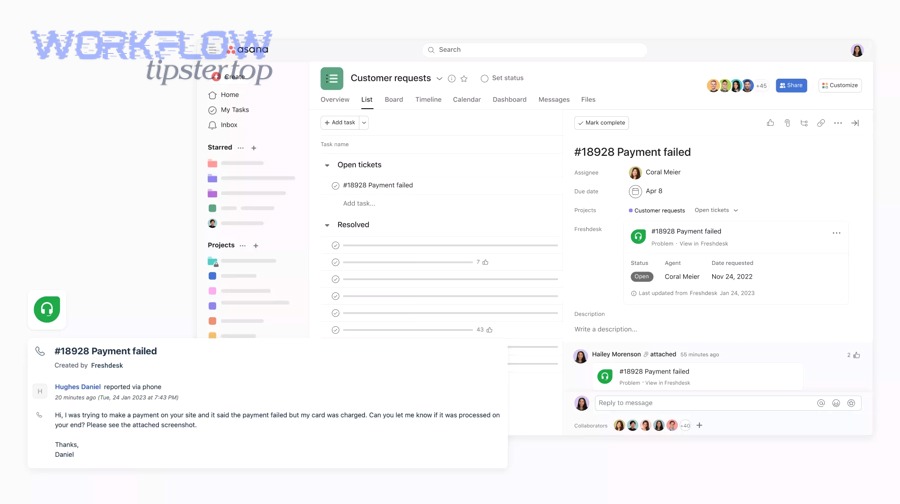
A simple way to frame it is: Freshdesk is where issues are received and communicated; Asana is where multi-step work gets executed and coordinated. When those two realities overlap often, integration becomes a workflow necessity rather than a “nice-to-have.” (asana.com)
Which Freshdesk → Asana integration method should you choose?
A native Asana widget wins for quick visibility, a Freshdesk Marketplace connector is best for ticket-side creation/linking, and an automation tool is optimal for custom routing and multi-step workflows—so the right choice depends on where your team works and how much control you need. (asana.com)
Then, to avoid guessing, compare the options on the criteria that actually change outcomes: setup time, two-way updates, field mapping depth, and duplicate prevention.
Before the table, here’s what it contains: this comparison table summarizes three common integration paths and what each path typically does best, so you can match your constraints to the most reliable method.
| Integration path | Best for | Typical strengths | Typical limitations |
|---|---|---|---|
| Native widget inside Asana | Seeing Freshdesk ticket details while working in Asana | Fast enablement; ticket details visible on tasks; simple linking by ticket URL | Usually centered on visibility/linking, not advanced routing |
| Freshdesk Marketplace connector | Agents creating/linking tasks from Freshdesk | Works where agents already live; create/link/notify workflows | Feature depth varies by app; mapping and sync depend on provider |
| Automation tool (no-code/iPaaS) | Custom rules, routing, multi-step logic | Flexible triggers/actions; conditional routing; multi-app flows | Two-way sync can be limited; requires careful testing and dedupe design |
Should you use a native Asana app/widget or a Freshdesk Marketplace connector?
The native widget is best when the team primarily works in Asana and needs ticket visibility on tasks, while a Freshdesk Marketplace connector is better when agents need to create or link tasks directly inside Freshdesk during ticket handling. (asana.com)
Next, anchor your decision in where work starts:
- If escalations start as tickets and the agent needs to push structured work to another team quickly, the Freshdesk-side connector tends to feel natural (create/link/notify from the ticket UI). (freshworks.com)
- If escalations start as Asana work and the team needs the ticket context embedded in the task for updates and tracking, the Asana-side widget is the cleanest starting point. (asana.com)
Is a no-code automation tool better than a direct connector for Freshdesk → Asana?
A no-code automation tool is better when you need conditional routing, multi-step workflows, or cross-app coordination, while a direct connector is better when you want a simpler, purpose-built tickets-to-tasks experience with fewer moving parts. (zapier.com)
Next, think in “workflow primitives.” Automation tools typically operate on triggers and actions (for example, a new ticket triggers creating a task), which is powerful but also demands careful logic and testing. (zapier.com)
This is also where it’s natural to connect broader workflow patterns: if you’ve built Automation Integrations like airtable to microsoft excel, docusign to dropbox, or clickup to google slides, you’re already familiar with the same “event → mapping → destination” design thinking—Freshdesk to Asana just applies it to tickets and tasks.
Do you need one-way ticket creation or two-way ticket↔task synchronization?
One-way creation is enough for simple escalations, while two-way synchronization is best when both teams must collaborate continuously and share updates (like comments or status) without duplicating communication. (asana.com)
Next, decide based on communication intensity:
- Choose one-way when the ticket only needs a task created, and the agent can manually summarize outcomes at the end.
- Choose two-way when the work team and the support agent need to exchange updates frequently—because comments and replies can be pushed between systems depending on the connector. (asana.com)
How do you set up Freshdesk to Asana integration step-by-step?
Use a single setup method with 7 core steps—prepare access, choose trigger events, define task destination, map fields, link ticket identity, test end-to-end, and roll out with monitoring—so tickets reliably become usable tasks without duplicates. (asana.com)
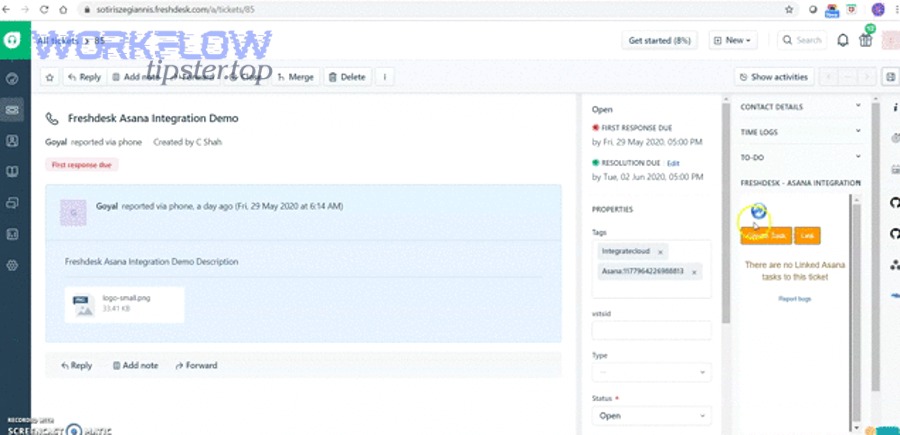
Below, the steps stay tool-agnostic so you can apply them to a widget, connector, or automation workflow.
What permissions and access do you need in Freshdesk and Asana before connecting?
You need (1) sufficient Freshdesk permissions to view tickets and their fields, (2) Asana access to the target workspace/team/project, and (3) connector authorization that matches the least-privilege principle so the integration can create or update tasks safely. (asana.com)
Next, avoid the most common setup failure: connecting with an account that can “see” the project but can’t actually create tasks or update custom fields.
- Confirm the exact Asana project(s) where tickets should land.
- Confirm who owns the connector credentials (shared admin vs dedicated service user).
- Confirm whether you need custom fields in Asana for priority, ticket type, product area, or SLA class.
- Confirm whether the integration must post comments, update status, or only create tasks.
Which trigger events should create or update an Asana task?
There are three main trigger categories: new ticket, ticket update, and escalation signal (priority/tag/status), and you should choose them based on whether you want every ticket to create a task or only specific escalations. (zapier.com)
Next, pick the smallest set of triggers that still covers your real needs, because too many triggers are the #1 cause of duplicate tasks.
- Create task when: ticket is tagged “escalation,” moved to a specific group, or reaches a priority threshold.
- Update task when: ticket status changes to “Waiting on customer,” “Resolved,” or “Reopened,” if your method supports updates.
- Notify team when: an internal note indicates urgency or a customer reply reopens the issue.
How should you map Freshdesk ticket fields to Asana task fields?
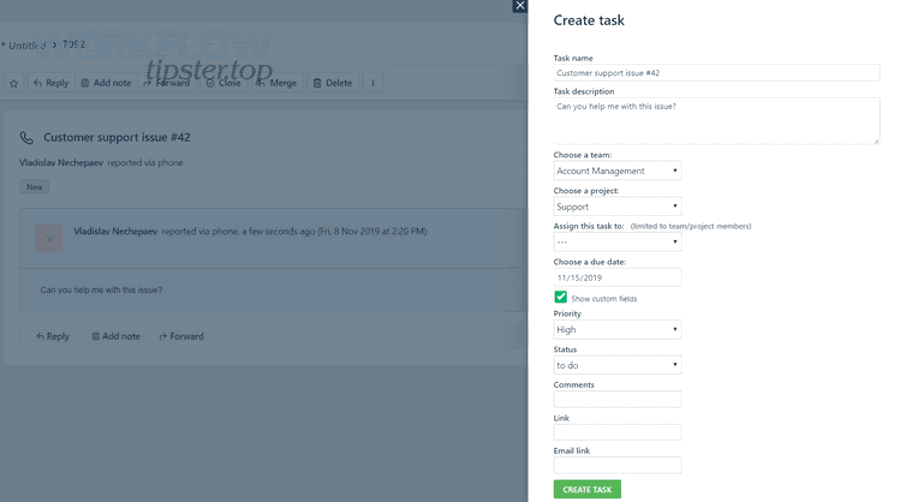
Map Freshdesk → Asana using a simple rule: the task title should identify the issue fast, the task description should preserve the ticket context, and custom fields should capture the structured data you’ll filter and report on. (zapier.com)
Next, treat mapping as the “contract” between support and delivery teams—if it’s inconsistent, every escalation becomes a manual cleanup task.
- Task name: [Ticket #ID] Short issue summary
- Task description: ticket link + customer impact + steps to reproduce + attachments list
- Assignee: default owner by category (billing → finance ops; login → engineering; onboarding → CS ops)
- Due date: based on priority/SLA class
- Custom fields: priority, product area, ticket type, severity, customer tier
- Followers/mentions: add the agent or escalation channel owner so updates are visible
How do you test the workflow and confirm it’s working end-to-end?
Test end-to-end by creating three sample tickets (normal, high priority, and reopened), verifying task creation/linking, confirming field mapping accuracy, checking updates/comments behavior, and validating dedupe rules before you roll out to the full team. (zapier.com)
Next, document the expected outcomes as “acceptance criteria,” because the best integrations fail later when nobody remembers what “correct” looked like.
- Create a sample ticket that should not create a task (control case).
- Create a ticket that should create a task and confirm destination project/section.
- Update the ticket (status/priority/tag) and confirm whether the task updates or receives a comment.
- Re-run the trigger condition and confirm no duplicate task appears.
- Close the loop: confirm the agent can see the outcome quickly enough to reply to the customer.
What is the best “tickets-to-tasks” workflow design in Asana for support teams?
There are 4 main Asana workflow designs for tickets-to-tasks—single escalation project, product-based projects, severity swimlanes, and service-owner routing—based on how your org assigns work and measures throughput. (asana.com)
Next, the key is consistency: every escalation should look the same to the receiving team, so they can triage in seconds instead of re-reading the ticket history.
- Single escalation project: best for smaller orgs; one place to triage and assign.
- Product-based projects: best when teams own different product areas.
- Severity swimlanes (sections): best when priority drives response (P0/P1/P2).
- Service-owner routing: best for ops-heavy orgs (billing, access, infrastructure, compliance).
How should you route tickets into the right Asana project/section?
Route tickets using 3 main criteria—category/product, severity/priority, and responsible team—so the task lands where the right people already triage work. (zapier.com)
Next, make routing rules readable and stable, because “mystery routing” causes teams to ignore tasks that appear in the wrong lane.
- If ticket contains tag billing → Billing Ops project → Section “New”
- If priority is “Urgent” → Escalations project → Section “P1” + assign on-call
- If category is “Bug” → Product Bugs project → assign engineering triage
How do you prevent duplicate tasks when a ticket updates multiple times?
Prevent duplicates by enforcing one stable dedupe key—usually the Freshdesk Ticket ID or URL—then checking for an existing linked task before creating a new one. (asana.com)
Next, treat duplicates as a design problem, not a user error: duplicates usually come from “create task on update” triggers without an idempotent check.
- Always write the ticket URL into the task description or a custom field.
- Use the ticket ID as part of the task title.
- If your method supports it, “search tasks where custom field = ticket ID” before create.
- If not, restrict creation to a single event (e.g., “when ticket first tagged escalation”).
How should agents and stakeholders communicate (comments, @mentions) across ticket and task?
Agents should communicate customer-facing updates in Freshdesk and operational updates in Asana, while the integration should push the minimum necessary signals (status/comments) to keep both sides aligned without leaking internal notes. (asana.com)
Next, define communication boundaries early, because the biggest integration mistakes are social: teams start posting the wrong kind of information in the wrong system.
- Freshdesk: customer-visible replies, summarized status, next update time.
- Asana: internal discussion, ownership handoffs, technical progress, blockers.
- Sync behavior: if your connector supports comment exchange, restrict it to internal notes or controlled messages to avoid confusion. (asana.com)
What are the most common Freshdesk → Asana integration problems, and how do you fix them?
The most common Freshdesk → Asana integration problems are (1) tasks not being created, (2) duplicates or wrong destinations, and (3) missing updates/comments—and you fix them by checking triggers, permissions, mapping, and dedupe logic in that order. (zapier.com)
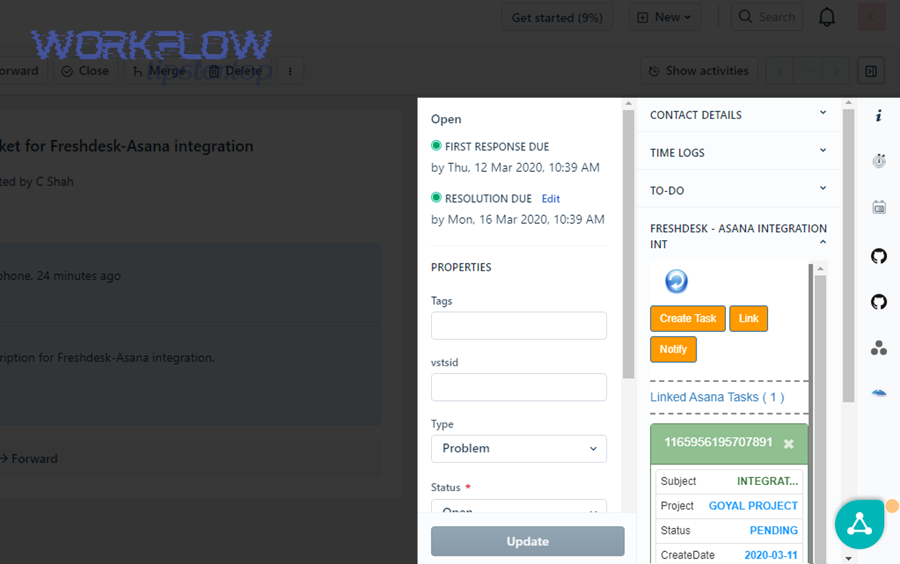
Next, troubleshoot like a funnel: start at the trigger (did it fire?), then authorization (could it act?), then mapping (did it write correctly?), then workflow rules (did it route correctly?).
Why isn’t my integration creating tasks in Asana?
It usually fails because the trigger condition never fires, the connector credentials lack access to the destination project, or the workflow action is misconfigured to create tasks in a different workspace or project. (zapier.com)
Next, isolate the failure with a quick sequence:
- Confirm the ticket matches the trigger rule (tag/priority/status).
- Confirm the connector account can create tasks in the target project.
- Confirm the action step points to the correct team/project.
Why are tasks duplicated or created in the wrong project?
Duplicates and wrong-project tasks usually happen when multiple rules overlap (e.g., “new ticket” and “tag added”), the workflow lacks a dedupe key, or the default project is set incorrectly in the integration’s action settings. (zapier.com)
Next, apply a “one ticket → one anchor task” approach:
- Use one creation trigger (preferably “escalation tag added”).
- Store ticket ID/URL on the task.
- Route by clear, mutually exclusive conditions.
Why aren’t status updates or comments syncing correctly?
Status/comments often don’t sync because many setups are one-way by design, field mappings don’t match the connector’s supported fields, or permissions prevent the connector from posting comments or updating custom fields. (asana.com)
Next, verify what your chosen method supports:
- Native widget setups typically emphasize ticket visibility on tasks. (asana.com)
- Some partner connectors support comment and reply exchange in both directions. (asana.com)
If you want a quick “reality check,” this short demo-style video shows an example connector experience and what linking looks like inside the ticket/task flow:
How do you know the integration is successful (and worth keeping)?
You know the integration is successful if it (1) reduces missed escalations, (2) speeds up assignment and resolution, and (3) improves update quality for customers—measured through task throughput, time-to-assign, and error/duplicate rates. (zapier.com)

Next, treat success as both an operations outcome and a workflow health signal, because an integration that “works” technically can still fail if people don’t trust it.
The metrics that prove value
Use a small, stable dashboard of indicators:
- Escalation capture rate: % of escalated tickets that produce a task (or get linked) correctly.
- Time to assign: time from escalation signal to an assigned owner in Asana.
- Time to first meaningful update: time until the task has progress (comment, status change, subtask creation).
- Duplicate rate: % of escalations that produce more than one task for the same ticket.
- Loop closure time: time from “fix done” to customer being updated and ticket being resolved.
The operational checks that keep it healthy
Set lightweight guardrails:
- Weekly review of duplicates and misrouted tasks.
- Quarterly review of permissions and connector ownership.
- A single owner (or small ops group) responsible for workflow rules and mapping changes.
How can you secure, scale, and govern Freshdesk → Asana integrations in real teams?
You can secure, scale, and govern Freshdesk → Asana integrations by enforcing least-privilege access, standardizing routing/mapping conventions across teams, monitoring failures and retries, and controlling what customer data is allowed to flow into tasks. (asana.com)
Next, this is where many teams mature from “it runs” to “it’s dependable,” because reliability and security become just as important as convenience.
How do you apply least-privilege permissions and auditability for the connector?
Apply least privilege by using a dedicated connector owner, granting only the minimum project/workspace permissions needed to create and update tasks, and keeping a small audit trail of what rules exist and when they change. (asana.com)
Next, write down three governance facts in one place: who owns the integration, what triggers create tasks, and what fields are mapped—because undocumented workflows become unfixable workflows.
What should you do if you have multiple Freshdesk instances or multiple Asana workspaces?
If you have multiple instances/workspaces, segment routing by environment (brand/region/product), standardize naming conventions for projects and sections, and avoid cross-workspace task creation unless you have a clear ownership model. (zapier.com)
Next, design for clarity:
- One workspace/team per business unit, if that mirrors how work is staffed.
- One escalation “front door” per unit, so triage is visible and accountable.
- One mapping standard, so reports stay meaningful.
How do you handle rate limits, retries, and webhook failures without losing tickets?
Handle reliability by monitoring workflow runs, retrying transient failures, and using periodic reconciliation checks (e.g., “tickets tagged escalation but missing an Asana link”) so no high-priority ticket disappears silently. (zapier.com)
Next, remember that most missed escalations are not dramatic outages—they’re quiet edge cases, like a temporary permission error or a rule edit that introduced overlap.
How do you prevent sensitive customer data from being copied into Asana?
Yes—you can prevent sensitive data spread by mapping only necessary fields, excluding private notes or regulated data, linking to the ticket rather than copying full transcripts, and setting clear internal rules about what belongs in tasks versus tickets. (asana.com)