


DevOps alerts from GitHub become actionable fastest when they land as work in Asana and as signals in Google Chat—because your team can triage, assign, and resolve without losing context. This guide shows how to set up a GitHub → Asana → Google Chat alerting workflow that turns commits, pull requests, and incidents into tasks and Chat messages with clear ownership and traceability.
Next, you’ll learn when you actually need this workflow (and when it’s overkill), so your team avoids noise and only escalates the events that deserve attention. You’ll also see how to keep the “alert → task → message” chain consistent so people trust the system instead of muting it.
Then, we’ll map the most common GitHub triggers to practical Asana task patterns—what fields to populate, how to structure titles, how to store links, and how to represent priority and severity. This keeps your DevOps alerts readable for engineers and understandable for stakeholders who live in Asana.
Introduce a new idea: once your alerting flow works once, reliability and governance determine whether it works forever—so we’ll close with implementation options (native integrations vs. webhooks vs. automation tools) and the guardrails that prevent duplicates, missed alerts, and Chat spam.
What is a “GitHub to Asana to Google Chat DevOps alerts” workflow?
A GitHub → Asana → Google Chat DevOps alerts workflow is an automation pipeline that converts selected GitHub events (like pull requests, failed checks, or security alerts) into Asana tasks and then posts summarized notifications to a Google Chat space so the right people can triage and respond quickly. (docs.github.com)
Specifically, this workflow answers a common DevOps problem: GitHub is where signals originate, Asana is where work gets tracked, and Google Chat is where teams coordinate in real time. When those three tools are connected with consistent rules, you get a durable “signal-to-action” loop instead of scattered pings.
To illustrate the “hook chain” from this heading into implementation, you can think of the workflow as three linked stages:
- Detect (GitHub): choose which events count as actionable alerts (not everything). (docs.github.com)
- Track (Asana): create or update tasks so alerts become assigned work with due dates, priority, and status. (help.asana.com)
- Coordinate (Google Chat): post concise context and links to the Asana task and GitHub artifact in a Chat space. (developers.google.com)
In addition, you should decide whether “alerts” and “notifications” are synonyms in your environment. Many teams treat them as synonyms at first, but mature teams draw a line: alerts = require action; notifications = informational. That synonym/contrast matters because it drives which GitHub events you escalate and which you quietly log.
Do you need GitHub → Asana → Google Chat alerts for DevOps?
Yes—if your team needs consistent ownership, cross-tool traceability, and fast coordination, GitHub → Asana → Google Chat DevOps alerts are worth implementing for at least three reasons: reduced time-to-triage, clearer accountability, and fewer “lost” incidents across tools.
However, the key issue is not “can you automate?” but “should you escalate?” so the workflow must be selective. To begin, evaluate these three reasons in practical terms:
- Reduced time-to-triage: The alert lands where the team already talks (Chat) with a direct link to where the work is tracked (Asana), so response starts immediately instead of after someone notices a dashboard.
- Clear accountability: When alerts auto-create tasks with an assignee, due date, and severity, the team avoids the “everyone saw it, nobody owned it” failure mode.
- Fewer lost signals: GitHub events are abundant; by turning only the important ones into tasks, you build a reliable queue instead of a noisy feed. (docs.github.com)

More specifically, you don’t need this workflow if either of these conditions is true:
- Your team already uses GitHub Issues as the single source of truth and doesn’t track operational work in Asana.
- Your organization treats Google Chat as optional and incident coordination happens elsewhere, so Chat messages won’t be seen.
If you do implement it, build it as automation workflows that escalate only actionable events, and demote everything else to dashboards or daily digests.
Evidence: According to a study hosted by a university repository (University of Tennessee / TRACE), alert fatigue and over-notification can reduce responsiveness and contribute to missed important signals, especially when systems produce high volumes of low-action messages. (scholarsarchive.library.albany.edu)
Which GitHub events should trigger DevOps alerts in this workflow?
There are 4 main types of GitHub event triggers you should consider for DevOps alerts—CI failures, pull request state changes, security findings, and release/deployment events—based on the criterion “does this event require human action within a defined time window?” (docs.github.com)
Then, the practical job is to map GitHub’s rich event surface into a small alert taxonomy your team agrees to. Below is a recommended grouping you can start with:
- CI and checks (high urgency): failed workflow runs, failed required checks, repeated flaky failures, or blocked merges.
- Pull requests (medium urgency): PR opened for a protected branch, PR review requested, PR marked ready for review, PR merged with a risky label.
- Security (high urgency): dependency vulnerability alerts, secret scanning alerts, code scanning alerts—escalate based on severity and exploitability.
- Delivery (medium/high urgency): release created, deployment failed, production hotfix merged, rollback triggered. (docs.github.com)
To better understand the “signal-to-action” principle, use filters at the GitHub side so you don’t create tasks for everything. GitHub Actions supports event triggers and filters (for example, targeting push or pull_request conditions and scoping paths), which is crucial for reducing alert volume. (docs.github.com)
A good starting rule set looks like this:
- Alert on failed checks on default branch (or release branches).
- Alert on PRs with security labels or touching sensitive paths.
- Alert on deploy failures and rollback events.
- Do not alert on routine PR opened events unless your team needs a triage queue.
This is also where you can intentionally include related workflow patterns in your broader automation ecosystem—for example, “github to trello to slack devops alerts” or “github to basecamp to discord devops alerts”—to compare approaches and borrow the best parts (like threaded incident discussion vs. task-first triage).
How do you map GitHub alerts to Asana tasks so they are actionable?
The best mapping is: one Asana task per actionable alert, with a consistent title schema, a standard set of fields, and links back to the originating GitHub artifact—because that makes alerts triageable in seconds and auditable later. (help.asana.com)
Next, you should standardize what “good” looks like for every created task. A practical task template includes:
- Title:
[System] [Severity] [Repo] short event summary- Example:
[GitHub] [P1] payments-api — CI failing on main
- Example:
- Description/body: direct links to the PR/commit/run, plus a one-paragraph context snippet (who, what, when).
- Assignee: on-call engineer or team rotation.
- Due date / SLA: based on severity (P1: hours; P2: day; P3: week).
- Custom fields: severity, environment, component/service, incident type, status.
- Project/section: “DevOps Alerts” project with sections like New, Triaging, In Progress, Waiting, Done.
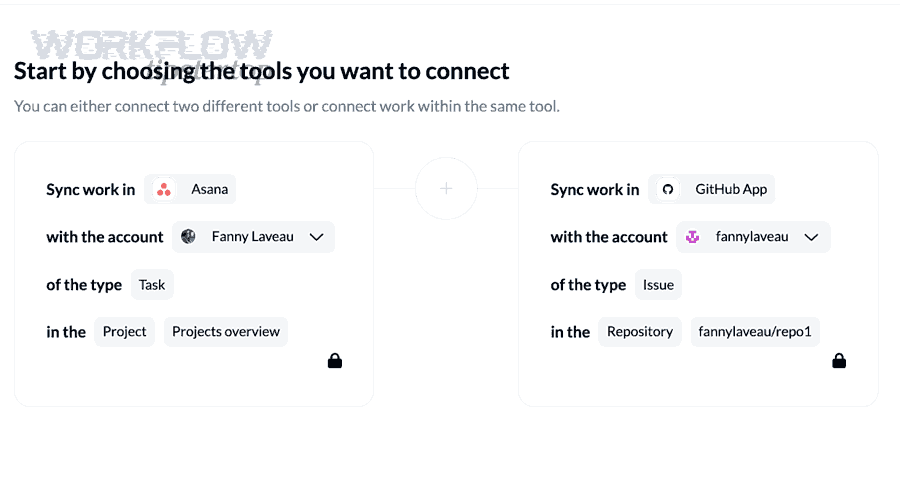
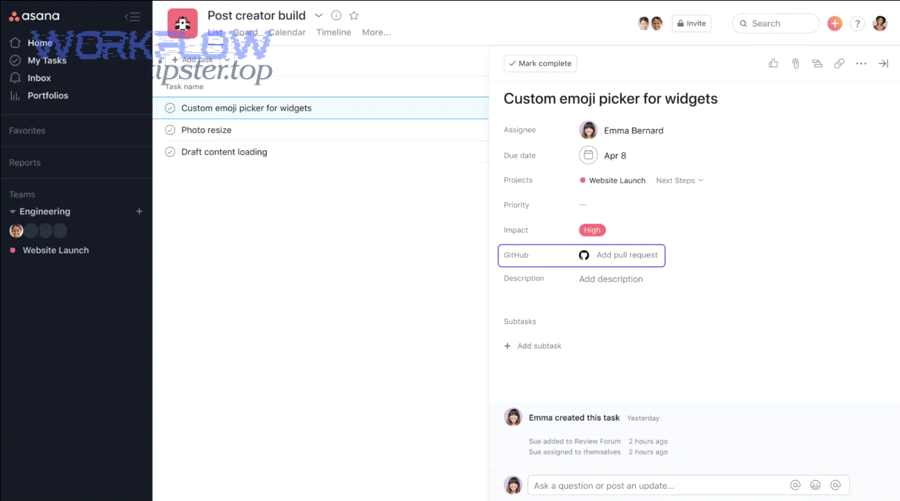
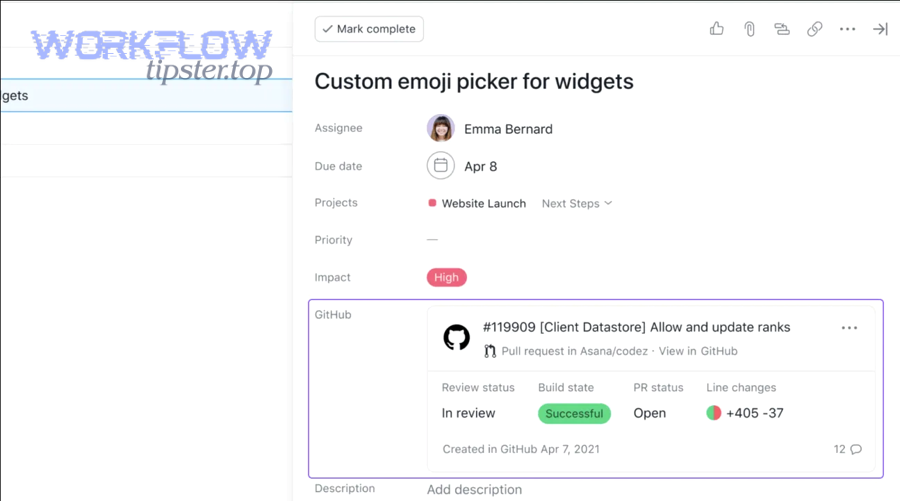
If you’re using the official Asana GitHub integration, Asana can sync GitHub PR status updates to tasks, which is valuable for keeping tasks in sync once the link exists. (help.asana.com)
How should you deduplicate alerts so you don’t create multiple Asana tasks?
You should deduplicate by stable identifiers—typically repo + event type + primary object ID (PR number, workflow run ID, alert ID)—and update an existing task instead of creating a new one when the same incident changes state.
In practice, your dedupe options are:
- Use a search step (automation platform or custom service) to find an existing Asana task containing the PR URL or run URL.
- Store an external ID in a custom field (best if you control task creation).
- Use “one task per PR” for PR-based alerts, and add comments/updates for new failures. (help.asana.com)
A lightweight rule that works well: If the GitHub URL already exists in Asana, update; if not, create.
Which Asana fields matter most for DevOps alert triage?
The three most important Asana attributes for triage are severity, ownership, and next action—because they determine whether the alert gets handled now, by whom, and with what success criteria.
A recommended minimal field set:
- Severity (P1–P4): drives SLA and escalation.
- Component/service: helps route to the right team.
- Environment (prod/stage/dev): prevents overreacting to non-prod failures.
- Alert type (CI / Security / Deploy / PR): enables dashboards and reporting.
- Status (triaging/in progress/blocked/resolved): keeps the queue honest.
This is where the “hook chain” continues: once the task is structured, your Google Chat message can be compact and consistent because it can reference those fields instead of rewriting context every time.
How do you send DevOps alert notifications from Asana to Google Chat?
You send DevOps alert notifications by posting a message into a Google Chat space (via webhook or Chat app) that includes a short summary and links to the Asana task and GitHub artifact—so the team can coordinate without hunting for context. (developers.google.com)
Then, make the Chat message format predictable. A strong default message includes:
- What happened: “CI failing on main” / “High severity dependency alert”
- Where: repo + branch + environment
- So what: expected impact (blocked deploy, security risk)
- What now: link to Asana task + who is assigned
- Source links: PR/run/alert link(s)
Google’s webhook quickstart explains how to set up a webhook to send asynchronous messages into a Chat space, which is the simplest way to push alerts from external systems. (developers.google.com)
A practical message template (human-friendly and scannable) looks like this:
- [P1] payments-api — CI failing on main
Owner: @oncall
Asana: (task link)
GitHub: (workflow run link)
Notes: failing since 09:12 UTC, blocks release branch
Google Chat supports formatting for text messages, so you can use lightweight formatting to make alerts readable without being noisy. (developers.google.com)
One suitable video (optional reference)
This is also where you can naturally extend your organization’s broader patterns. For example, your support organization might run “freshdesk ticket to clickup task to discord support triage” while engineering runs GitHub → Asana → Chat; both are the same shape of automation, just different systems and audiences.
What are the best ways to implement GitHub → Asana → Google Chat automation?
GitHub → Asana → Google Chat automation works best in 3 implementation patterns—native integration + webhook, GitHub Actions + webhooks, or an integration platform—based on the criterion “how much control do you need over logic, dedupe, and formatting?” (asana.com)
Next, choose the pattern that matches your team’s constraints:
- Native GitHub ↔ Asana integration + Chat webhook (low code):
- Use Asana’s GitHub integration to sync PR status to tasks where possible. (asana.com)
- Use a webhook-based poster to send Chat messages when tasks are created/updated (often via an automation platform or lightweight service). (developers.google.com)
- GitHub Actions → Asana API → Chat webhook (high control):
- Trigger on selected GitHub events using Actions workflow syntax. (docs.github.com)
- Create/update Asana tasks via API (best for strict dedupe and consistent fields).
- Post to Chat via webhook using Google’s webhook method. (developers.google.com)
- Integration platform (balanced):
- Use a connector-based tool to listen for GitHub events, create/update Asana tasks, and send Chat messages.
- Best when you need fast iteration, approvals, and logs without maintaining code.
A simple selection guide:
- If you need speed and minimal engineering time → start with native integration + webhook.
- If you need precision, dedupe, and structured payloads → GitHub Actions + APIs.
- If you need enterprise operations (audit logs, retries, approvals) → integration platform.
How do you make DevOps alerts reliable, secure, and low-noise?
You make DevOps alerts reliable and secure by using filtering, retries, idempotency, secrets management, and rate-limit awareness, and you keep them low-noise by enforcing an “alert = action” rule with severity thresholds. (developers.google.com)
To begin, reliability is mostly about handling the failure modes you will definitely see:
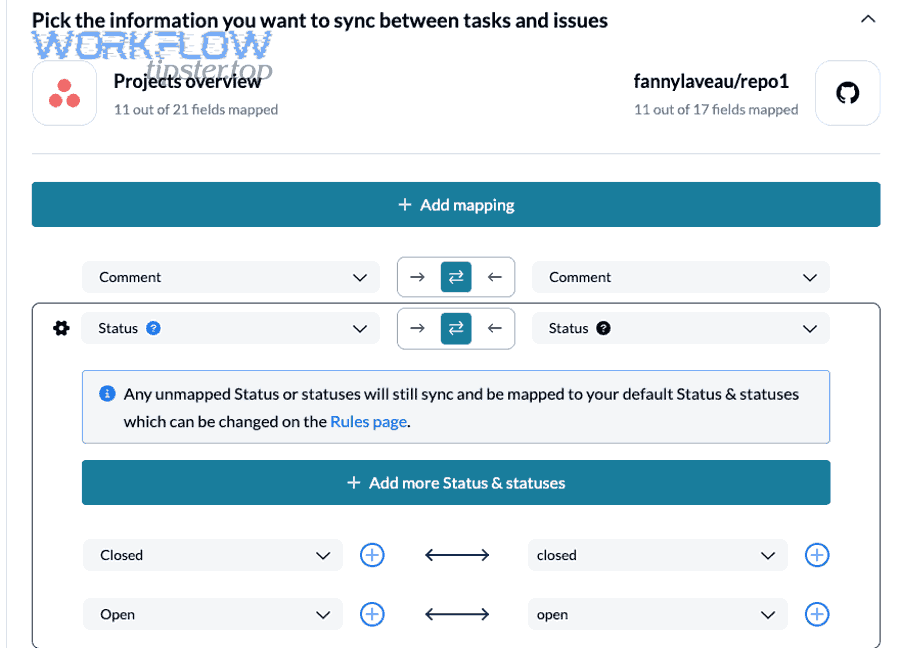
- Duplicates: same event delivered multiple times (webhook retries, reruns).
- Missed messages: transient failures, auth issues, rate limits.
- Out-of-order updates: PR status changes quickly; messages arrive late.
- Spam storms: one broken dependency triggers many repos at once.
Here are the practical guardrails that solve those problems:
Reliability guardrails
- Idempotency key: compute
event type + object IDand ensure “create task” becomes “upsert task.” - Retry with backoff: only for transient errors; stop retrying for invalid payloads.
- Concurrency controls: prevent parallel workflow runs from creating duplicates during incident bursts. GitHub Actions supports controlling concurrency for workflows/jobs, which helps during rapid event storms. (docs.github.com)
- Dead-letter logging: store failed events somewhere searchable (even a simple log table) so you can replay.
Security guardrails
- Secrets: store Asana tokens and Chat webhook URLs as secrets; never hardcode them in repos.
- Least privilege: restrict Asana API scopes and limit which projects the bot can access.
- Audit trail: include the GitHub run URL and Asana task URL in every message so changes are traceable.
Noise reduction rules
- Severity gating: Only P1/P2 go to Chat immediately; P3/P4 go to a daily digest or stay as Asana-only.
- Path filters and event filters: Don’t trigger for docs-only changes or non-critical paths when using GitHub Actions triggers. (docs.github.com)
- Aggregation: Bundle multiple related failures into one Asana task (for example, “CI failing across 5 repos due to shared dependency”).
- Channel routing: Use different Chat spaces for build failures vs. security vs. deployments.
Finally, keep your terminology consistent across the whole hook chain: GitHub event → DevOps alert → Asana task → Google Chat message. When people see the same severity labels, the same title schema, and the same links every time, the workflow becomes trustworthy—and teams stop treating alerts as background noise.
What advanced features can you add after the basic workflow works?
You can add advanced features by expanding from simple alerts to interactive triage, bidirectional updates, and observability—so the workflow doesn’t just notify but actively reduces resolution time.
Next, here are the highest-impact upgrades (choose based on your team’s maturity):
What is the difference between “alerts” and “notifications” in DevOps messaging?
Alerts are action-required signals with ownership and urgency, while notifications are informational updates that may be useful but don’t demand immediate response—so an alert should usually create or update an Asana task, while a notification might only appear in a digest or a lower-priority channel.
This antonym-like contrast (action vs. information) is the simplest rule that prevents Chat overload while preserving real incident response.
How can you add interactive triage in Google Chat?
You can add interactive triage by moving from basic webhooks to a Chat app that supports richer messages and interaction events, enabling buttons like “Acknowledge,” “Assign to me,” or “Open Asana task,” depending on your org’s governance model. (developers.google.com)
How do you monitor and troubleshoot the workflow end-to-end?
You monitor end-to-end by logging each stage (GitHub trigger → Asana write → Chat post), tracking success/failure rates, and keeping a replay mechanism for failed events—so you can prove whether an alert was generated, created a task, and posted to Chat.
If you already run other patterns like “github to trello to slack devops alerts,” you can reuse the same monitoring approach: count events, count created tasks, count posted messages, and investigate gaps.
Evidence (reliability concept): Google’s Chat webhook guidance emphasizes asynchronous messaging and practical limitations like rate limits, which is why batching and severity gating matter for a stable alerting setup. (developers.google.com)