


Freshdesk ticket to Linear task to Google Chat support triage is a practical way to turn incoming support requests into trackable engineering work while keeping responders informed in the right Chat space. The core intent is to route the right tickets into Linear (with consistent fields) and notify the right people in Google Chat so nothing urgent gets missed.
Next, you’ll want a clear decision model for which tickets become Linear issues (and which stay in Freshdesk), because Linear’s Triage inbox is designed to hold issues created by integrations until your team accepts, prioritizes, or declines them. (linear.app)
Then, you need an alert format that’s readable in Chat and safe at scale: Google Chat incoming webhooks are one-way notifications into a space, and they work best when you control message structure, thread behavior, and error handling. (developers.google.com)
Introduce a new idea: if you treat this like an “ops-quality” pipeline—rate limits, dedupe keys, routing rules, and governance—you’ll build automation workflows that stay reliable even as ticket volume grows. (support.freshdesk.com)
What is Freshdesk ticket → Linear task → Google Chat support triage routing?
Freshdesk ticket → Linear task → Google Chat support triage routing is a how-to automation pattern that converts selected Freshdesk tickets into Linear issues and then posts structured notifications to a Google Chat space, so support and engineering can triage quickly and consistently.
Then, think of it as a 3-stage conveyor belt: (1) ticket signal, (2) task creation, (3) responder notification.
Which tickets should be routed to Linear vs kept inside Freshdesk?
A good rule is: route tickets to Linear when they represent product/engineering work, and keep them in Freshdesk when they’re primarily support execution.
Route to Linear when the ticket is:
- A bug report with reproducible steps
- A feature request tied to roadmap or product discovery
- A reliability or incident that needs engineering ownership
- A customer escalation that requires code/config changes
Keep in Freshdesk when the ticket is:
- Password/login help, billing clarifications, “how do I…”
- One-off account fixes that don’t require product change
- Known-issue responses where support can resolve with macros/runbooks
This separation matters because Linear’s Triage inbox exists specifically to review, update, and prioritize incoming issues before they enter the team workflow—so you don’t want to flood it with tickets that never become engineering work. (linear.app)
Which events should trigger Chat alerts (new ticket, status change, escalation)?
Use Chat alerts for moments that require human attention, not for every state transition.
Most teams get the best signal-to-noise from:
- New high-priority ticket created (or newly marked “urgent”)
- Escalation tag applied (e.g., “SEV1”, “VIP”, “Security”)
- Linear issue created successfully (so triage can begin)
- Assignment needed (no owner after X minutes)
- Automation failure (couldn’t create Linear issue / webhook 4xx/5xx)
If you later extend this pattern to engineering monitoring, the same Chat-space alerting logic works for “github to linear to google chat devops alerts” too—just keep severity thresholds consistent so your responders trust the alerts.
Can you automate Freshdesk-to-Linear task creation and Google Chat alerts reliably?
Yes—Freshdesk-to-Linear task creation and Google Chat alerts can be reliable because you can standardize payloads, enforce rate limits, and add idempotency, which prevents duplicates and reduces alert storms.
Next, reliability comes from engineering-style guardrails: stable triggers, bounded retries, and clear fallbacks.
What minimum data do you need from Freshdesk to create a useful Linear task?
At minimum, you want enough context that a triager can decide in under a minute:
- Ticket ID + permalink (the “source of truth”)
- Requester/company (or account name)
- Subject + short description
- Category/type (bug/feature/question) and priority
- Environment (prod/staging), if applicable
- Attachments/logs (or links to them)
- Tags (VIP, escalation, billing, security)
This keeps the Linear issue actionable even if the Chat notification is the only thing someone reads initially.
What is the simplest workflow that still supports triage?
The simplest workflow that still supports triage is:
- Trigger: Freshdesk ticket created or updated (when it matches criteria)
- Filter: only route tickets meeting a triage threshold (priority/tag/company)
- Create Linear issue: set title, description, team, and default triage status
- Post to Google Chat webhook: send a concise summary with links
- Log outcome: store Linear issue ID + idempotency key back on the ticket
This design also scales later into “freshdesk ticket to trello task to discord support triage” as a sibling automation pattern—same concept, different destination tools.
How do you map ticket fields so Linear tasks are searchable and actionable?
You map ticket fields by treating Linear as the system for engineering execution, so every mapped field must improve triage decisions, search, and reporting—not just “copy everything.”
Then, make the mapping predictable so your team can learn the pattern and trust it.
Which Freshdesk fields map to Linear title, description, labels, project, and priority?
A clean, high-utility mapping looks like this:
- Linear title: [Customer/Account] Ticket subject (Ticket #ID)
- Goal: searchable by customer + recognizable source
- Linear description:
- Ticket link
- Summary (first 3–6 lines)
- Repro steps / expected vs actual
- Environment + logs/attachments links
- Freshdesk metadata (requester, tags, timestamps)
- Labels: product area, platform, “support”, “vip”, “regression”
- Project: only if it’s clearly part of an active initiative (avoid guessing)
- Priority: align your Freshdesk priority scale to Linear priority levels
This pairs well with Linear’s Triage model, where issues created by integrations typically land in Triage for review before joining the main workflow. (linear.app)
How do you translate Freshdesk priority and category into Linear conventions?
Do two translations: priority normalization and category normalization.
Priority normalization example (simple and stable):
- Freshdesk Urgent → Linear High
- Freshdesk High → Linear Medium
- Freshdesk Medium/Low → Linear Low
Category normalization example:
- “Bug” → label
bug, optionally route to bug triage team - “Feature request” → label
feature, route to PM triage or backlog project - “Incident/outage” → label
incident, force Chat alert + escalation path
You can refine this later with rules (account tier, affected seats, revenue risk) without changing the basic meaning of priority.
How should Google Chat notifications be structured for fast response?
Google Chat notifications should be structured for fast response by being short, link-rich, and consistent, so responders can triage from the message without hunting.
Next, use threads to keep noise down: Google Chat incoming webhooks can post into a space as one-way notifications, and they support thread behavior (for example via threadKey) when configured correctly. (developers.google.com)
Should you notify in a shared Chat space, a DM, or threaded updates?
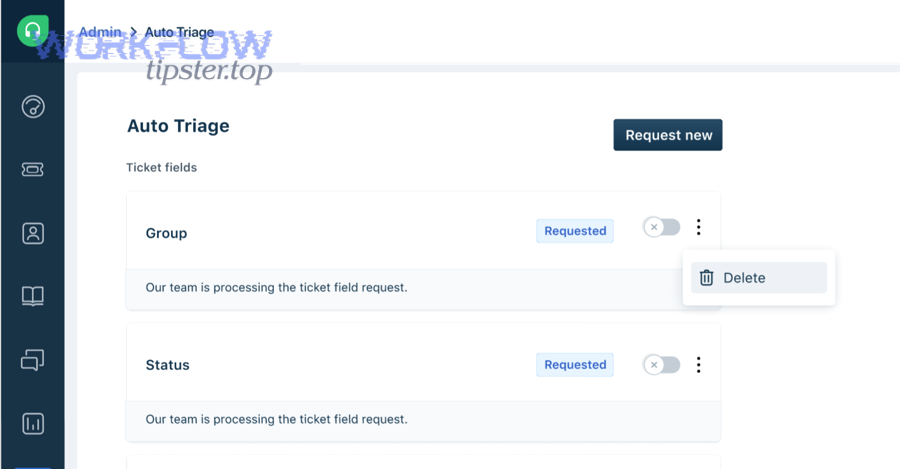
Pick based on speed, ownership clarity, and noise:
- Shared space (recommended default): best for team visibility and shared triage.
- DM: good for VIP or on-call only, but risky if that person is offline.
- Threaded updates in a shared space: best when you expect multiple updates (status changes, retries, comments).
A strong default is: post the initial alert to the shared space, then reply in the same thread for updates (e.g., “Linear issue created,” “assigned,” “status changed”).
What should each alert contain to reduce back-and-forth?
Use a fixed “triage card” structure:
- What happened: “New Freshdesk escalation routed to Linear”
- Severity + reason: “Urgent: outage impacting checkout”
- Owner/queue: “Needs triage owner” (or “Assigned to X”)
- Two links: Freshdesk ticket + Linear issue
- One-line next action: “Accept in Linear Triage or decline with note”
This is where “Workflow Tipster” style guidance helps: you’re not just notifying—you’re telling the responder exactly what to do next.
How do you design the routing logic for support triage?
Routing logic is best when it’s rule-based first, with a small number of high-confidence criteria, because triage breaks when rules are ambiguous.
Next, treat the routing layer as a policy engine: it decides where the work goes before the work even becomes a Linear issue.
What are the best segmentation rules (tags, groups, customers, categories)?
Start with 4 segmentation dimensions:
- Severity: urgent/high tickets route to a dedicated “expedite” triage queue
- Customer tier: VIP accounts route to a priority team or PM-visible project
- Category: bug vs feature vs incident goes to different Linear teams/labels
- Product area: use tags like
billing,mobile,api,integrations
If your support org uses groups, keep the mapping aligned: support group → default Linear team or label.
Should you create Linear tasks immediately or after support validation?
Use a split approach:
- Create immediately when:
- severity is urgent (time matters)
- known incident signals appear
- VIP escalation triggers
- Wait for validation when:
- ticket quality is inconsistent
- duplicates are likely
- the request is vague (“it doesn’t work” without details)
Linear’s Triage concept supports this: you can create issues into Triage so a human can accept/decline—meaning “immediate creation” doesn’t have to mean “immediate commitment.” (linear.app)
What are the most common failure modes and how do you prevent them?
The most common failure modes are duplicate issues, rate limits, missing fields, and notification overload, and you prevent them with idempotency, validation, throttling, and clear fallbacks.
More importantly, these systems fail in predictable ways, so prevention is mostly disciplined design.
How do you prevent duplicates and idempotency issues?
Use an idempotency key that is stable and unique, for example:
freshdesk:{ticket_id}:{event_type}for single-event creationfreshdesk:{ticket_id}:linear_issuefor “only one Linear issue per ticket”
Store the Linear issue ID back into Freshdesk (custom field or note). If the automation runs again, it checks that field first and updates instead of creating.
Also decide your duplicate policy:
- duplicates should become comments on the same Linear issue
- or separate issues only when the ticket truly represents a separate problem
Why do Chat alerts fail, and what are your “must-have” checks?
Common Chat alert failure causes:
- webhook URL revoked or leaked (security rotation)
- payload formatting errors (invalid JSON)
- quota/rate limit hits (429)
- network timeouts/retries without backoff
Two “must-have” checks:
- Validate payload before sending (required fields present, size reasonable).
- Throttle + backoff when quotas are hit: Google Chat webhooks can be constrained by per-space limits such as 1 request per second for message creation in a space, and exceeding quotas can produce 429 errors. (developers.google.com)
Also watch upstream rate limits: Freshdesk API limits vary by plan, and trial accounts commonly start at 50 calls per minute, which can become a bottleneck if you poll instead of using event-driven triggers. (support.freshdesk.com)
Evidence: According to a study by the University of California, Irvine from the Department of Informatics, in 2008, workplace interruptions were associated with an average of about 25 minutes before people returned to their original task—one reason alert noise and unnecessary pings can quietly destroy triage effectiveness. (ics.uci.edu)
— Contextual Border: Up to this point, the goal has been to implement the core “Freshdesk → Linear → Google Chat” triage pipeline correctly. Next, we expand into optimization, governance, and micro-level practices that improve long-term semantic and operational coverage.
How do you optimize and govern support triage automation at scale?
You optimize and govern support triage automation by reducing noise, enforcing privacy controls, and standardizing cross-tool routing, so the system stays trustworthy as volume and stakeholders grow.
Next, treat governance like product work: define rules, measure outcomes, and iterate.

How do you reduce alert noise without missing critical tickets?
Use three levers:
- Severity gates (only alert on high-impact conditions)
- Digest patterns (hourly rollups for non-urgent updates)
- Threaded updates (one thread per ticket/issue)
A simple policy: “Only urgent/escalation posts create a new top-level message; everything else replies to an existing thread.”
What is the best practice for deduping messages and linking threads?
Pick one thread key strategy:
- Per ticket:
threadKey=freshdesk-{ticket_id} - Per Linear issue:
threadKey=linear-{issue_id}
Then always post updates to that thread. This turns a noisy stream into a clean timeline.
How do you handle sensitive data and compliance in ticket-to-chat workflows?
Assume Chat is less private than your ticketing system. Govern by:
- redacting PII from the Chat message (emails, phone numbers, access tokens)
- keeping sensitive details behind Freshdesk/Linear links
- rotating webhook secrets (don’t commit them to code)
- limiting who can add/use webhooks in your workspace
Google explicitly warns that webhook URLs contain secret parameters and shouldn’t be shared publicly. (developers.google.com)
How can you extend this pattern across multiple workflow products without rewriting everything?
Build a shared “event contract”:
- Normalize inputs (ticket_id, severity, customer, summary, links)
- Normalize outputs (issue_id, status, owner, notification thread)
- Swap adapters (Linear adapter, Trello adapter, Discord adapter, etc.)
That’s how you scale the same mental model across:
- support triage variants (Freshdesk → Trello → Discord)
- scheduling variants (Calendly → Google Calendar → Google Meet → ClickUp)
- engineering variants (GitHub → Linear → Google Chat)
Finally, keep a lightweight “playbook” for your team (who owns triage, response SLAs, escalation rules). When the humans trust the system, the automation does real work instead of creating more work.