


Connecting Freshdesk to HubSpot is the fastest way to stop copy-pasting customer context between a helpdesk and a CRM—so agents resolve tickets with full contact history, and sales teams see support signals that affect deals.
Next, you’ll see what “Freshdesk–HubSpot integration” really means in practice (contacts, companies/accounts, tickets, and timelines), and how to define “success” so the integration supports both service outcomes and revenue outcomes.
Then, you’ll compare the real-world options—native connector vs. automation platform—so you can pick a method that matches your required sync direction, field mapping complexity, and governance needs.
Introduce a new idea: once you choose the right approach, the rest becomes a repeatable process—prepare, connect, map, test, and only then scale the sync to production with clear conflict rules.
What does it mean to “integrate Freshdesk with HubSpot” for ticket and contact sync?
Integrating Freshdesk with HubSpot means linking your helpdesk tickets and customer records to HubSpot CRM objects so key data flows between systems (contacts/companies and ticket context) without manual updates, while preserving a single source of truth for each field.
To better understand what you’re building, start by separating objects (contacts, companies/accounts, tickets) from events (status changes, updates, replies) and ownership (which system is authoritative for each field).
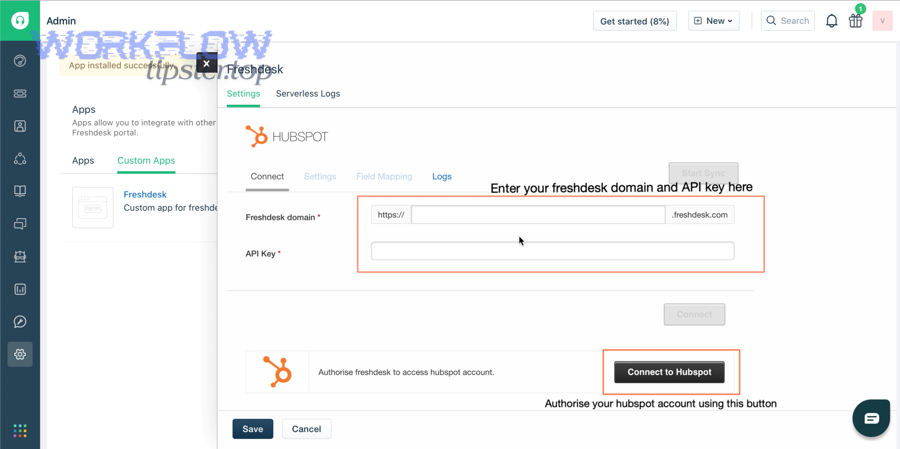
What objects should you sync between Freshdesk and HubSpot?
You should sync contacts (the person), companies/accounts (the organization), and tickets (the support case) because they are the minimum set needed to deliver full context to both support and sales.
- Contacts: name, email, phone, lifecycle stage, owner, consent fields.
- Companies/Accounts: domain, industry, segments, SLA tier, ARR/MRR, account owner.
- Tickets: subject, status, priority, category, timestamps, tags, and a CRM link back to the ticket.
In practice, “sync” is less about copying everything and more about deciding which fields matter to decisions—routing, prioritization, escalation, renewal risk, and upsell timing.
What does “one-way” vs “two-way” sync change in daily operations?
One-way sync means one system pushes updates into the other; two-way sync means changes in either system can update the counterpart record—so your conflict rules and field ownership become mission-critical.
- With one-way, your process is simpler: you nominate one source of truth and avoid most conflicts.
- With two-way, your process is faster for teams (they update wherever they work), but you must manage collisions (e.g., email uniqueness, owner changes, lifecycle stage overrides).
Notably, some “connectors” force one-way choices rather than true bidirectional sync—for example, Freshdesk’s HubSpot CRM connector documentation explicitly notes that two-way data flow may be unavailable depending on the connector’s design. (support.freshdesk.com)
Evidence: According to a study by Pennsylvania State University from the School of Hospitality Management, in 2006, both timeliness and problem resolution were important determinants of satisfaction with complaint handling in call-center contexts—meaning you should sync the data that speeds up correct resolution, not just “more data.” (pure.psu.edu)
Which integration method should support and sales teams choose: native connector or automation tool?
Yes—support and sales teams should choose a Freshdesk–HubSpot integration method based on (1) required sync direction, (2) mapping depth, and (3) governance, because those three factors determine data reliability, team adoption, and long-term maintenance cost.
More specifically, the “best” method is the one that produces predictable data behavior under real workloads—new tickets, updates, merges, pipeline changes, and permission constraints.
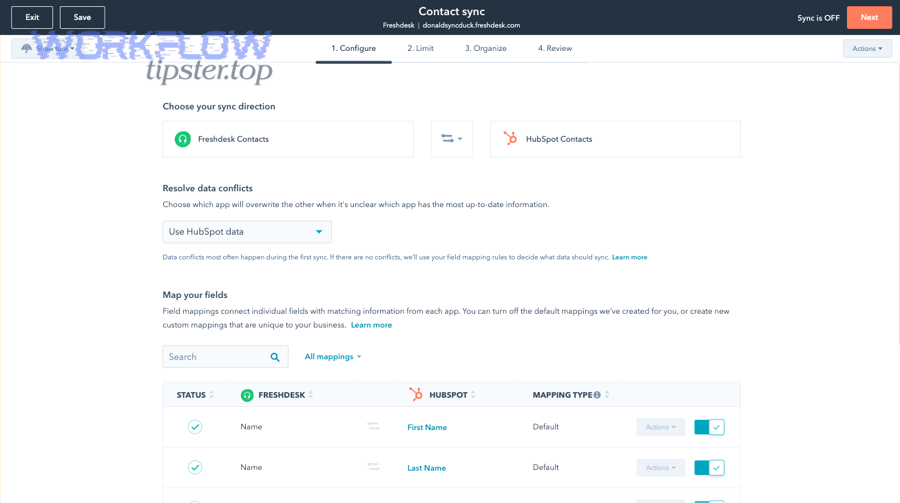
When is a native Freshdesk–HubSpot connector the better choice?
A native connector is best when you want faster setup, standard mappings, and lower operational overhead, and your sync requirements match what the connector supports.
Choose a native connector if:
- You’re syncing standard objects (contacts/companies/tickets) with common fields.
- You want admin-controlled setup inside the product UI.
- You prefer predictable behavior and fewer moving parts.
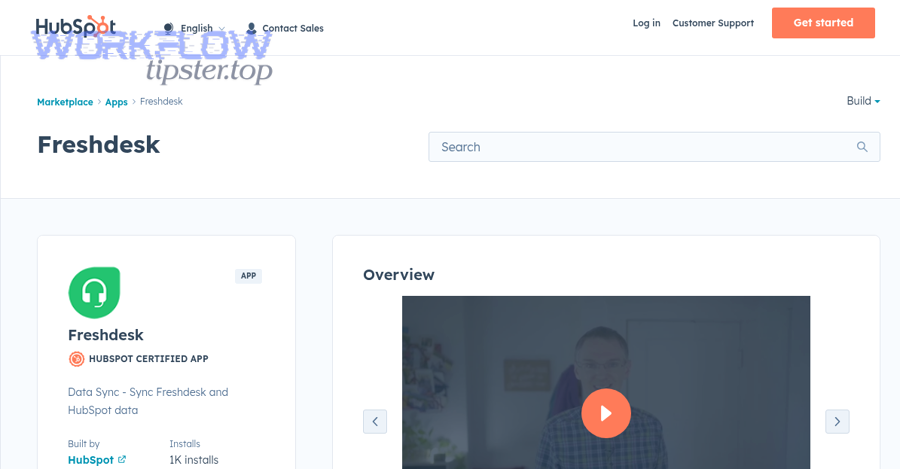
Be careful, though: “native” does not always mean “two-way.” Freshdesk’s own connector guidance can require choosing a one-way direction and may not support two-way sync in the connector layer. (support.freshdesk.com) Meanwhile, HubSpot’s marketplace listing for Freshdesk data sync may describe two-way sync and default mappings—so you must validate what your plan and connector version actually deliver. (ecosystem.hubspot.com)
When does an automation tool (Zapier/iPaaS) make more sense?
An automation tool is best when you need custom workflows, conditional logic, and event-driven actions that go beyond standard object syncing.
Choose an automation tool if:
- You need “if/then” routing (e.g., “If ticket priority is Urgent and company tier is Enterprise, create a task + Slack alert + update HubSpot deal.”)
- You must enrich records (normalize company domains, dedupe, format phone numbers).
- You want multiple downstream actions from one trigger.
For example, Zapier explicitly frames Freshdesk ↔ HubSpot setups as trigger/action workflows (e.g., new ticket → create/update contact), which is powerful when your goal is orchestration rather than pure syncing. (zapier.com)
Before deciding, a practical way to compare options is to use a simple “capability matrix.” This table contains the decision criteria that most often determine whether your integration stays stable after launch:
| Criterion | Native Connector Tends to Win When… | Automation Tool Tends to Win When… |
|---|---|---|
| Sync direction | One-way is acceptable | You need multi-step workflows and conditional direction |
| Field mapping | Standard fields are enough | You need custom mapping + transforms |
| Conflict handling | Minimal collisions expected | You can define logic for collisions |
| Maintenance | You want fewer moving parts | You can monitor runs and handle exceptions |
| Scale & auditability | Basic audit is enough | You need run logs and advanced routing |
To keep your ecosystem cohesive, teams that already standardize on Automation Integrations across tools (even workflows as different as clickup to gitlab or google docs to convertkit) usually adopt iPaaS-style governance faster—but only if they also commit to data ownership rules.
Evidence: According to a study by Pennsylvania State University from the School of Hospitality Management, in 2006, satisfaction with complaint handling was lower when customers perceived delays as unnecessary—so pick the method that reduces delay without creating data errors that cause rework. (pure.psu.edu)
What do you need before you connect Freshdesk to HubSpot?
You need admin access, a clear sync direction decision, and a documented field ownership map before you connect Freshdesk to HubSpot, because most integration failures come from permissions gaps and undefined “source of truth.”
Then, treat prerequisites as a short checklist you can complete in under an hour—so you don’t discover blockers mid-setup.
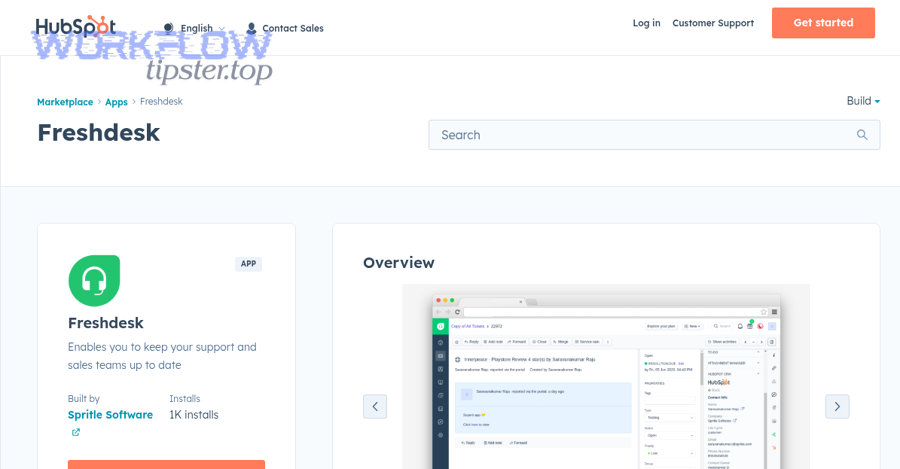
What permissions and access do you need in Freshdesk and HubSpot?
At minimum:
- Freshdesk: admin permissions to install/configure apps and access API/auth credentials if required by the connector.
- HubSpot: permissions to authorize integrations and create/update CRM objects (contacts, companies, tickets).
Freshdesk’s connector installation flow explicitly starts with installing the app in Freshdesk and authenticating/authorizing access to HubSpot. (support.freshdesk.com)
What data hygiene should you fix before syncing?
Fix these before you sync:
- Email uniqueness: decide whether HubSpot email is the primary key for contacts (it usually is) and resolve duplicates.
- Company domain rules: standardize domains so companies don’t fragment.
- Owner mapping: confirm how agents and CRM owners map (or whether they should).
Also decide what you will not sync. Excluding noisy fields (internal notes, certain tags) can reduce conflicts and protect data quality.
Evidence: According to a study by Pennsylvania State University from the School of Hospitality Management, in 2006, timeliness expectations varied by complaint type—so your setup should prioritize syncing the fields that affect urgent complaint resolution first (priority, SLA tier, owner, status), not cosmetic fields. (pure.psu.edu)
How do you integrate Freshdesk with HubSpot step by step?
The most reliable method is connect → choose sync direction → map fields → test with sample records → enable sync, because that sequence prevents silent data drift and makes failures observable before you scale.
Below is a practical step-by-step that matches how real connector setups work in Freshdesk.
How do you install and authorize the connector?
1) In Freshdesk, go to the apps/marketplace area and locate the HubSpot connector app. (support.freshdesk.com)
2) Install it and proceed to connect your HubSpot account (OAuth authorization). (support.freshdesk.com)
3) Confirm which agents/admins can access the configuration (governance step).
The key outcome of this phase is not “installed”—it’s authorized access with the correct permissions.
How do you configure data sync direction and recipes?
After authorization, you’ll typically:
1) Open the connector’s Data sync configuration.
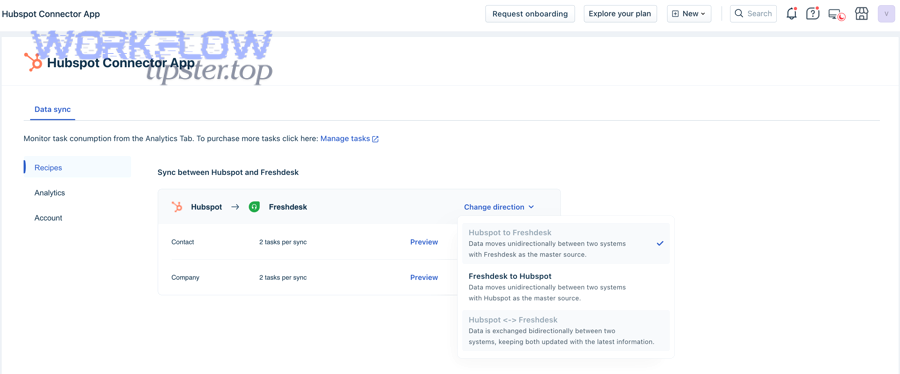
2) Click Configure and choose the direction of data flow (e.g., HubSpot→Freshdesk or Freshdesk→HubSpot). (support.freshdesk.com)
3) Select the available “recipes”/sync templates and proceed to field selection.
Important: connector documentation may require choosing one direction and note that two-way data flow can be unavailable in that connector context. (support.freshdesk.com)
How do you test safely before enabling full sync?
Use a controlled test:
- Create 2–3 test contacts and 1–2 test tickets with distinctive values.
- Verify the mapping results in HubSpot (properties populated correctly, correct associations).
- Confirm that updates behave as expected (does an update overwrite or append?).
If you’re using an automation tool instead, follow the same discipline—Zapier-style triggers/actions should be tested with sample data and verified end-to-end. (zapier.com)
Evidence: According to a study by Pennsylvania State University from the School of Hospitality Management, in 2006, both timeliness and resolution quality mattered—so your “test pass” criteria should include time saved plus accuracy of the resolved outcome, not only whether records appeared. (pure.psu.edu)
How should you configure sync rules for tickets and contacts to prevent conflicts?
You should configure sync rules by defining (1) a single source of truth per field, (2) conflict resolution behavior, and (3) update scope, because most integration conflicts are predictable once ownership is clear.
More importantly, rule design is what separates a “connected” system from a system that teams actually trust.
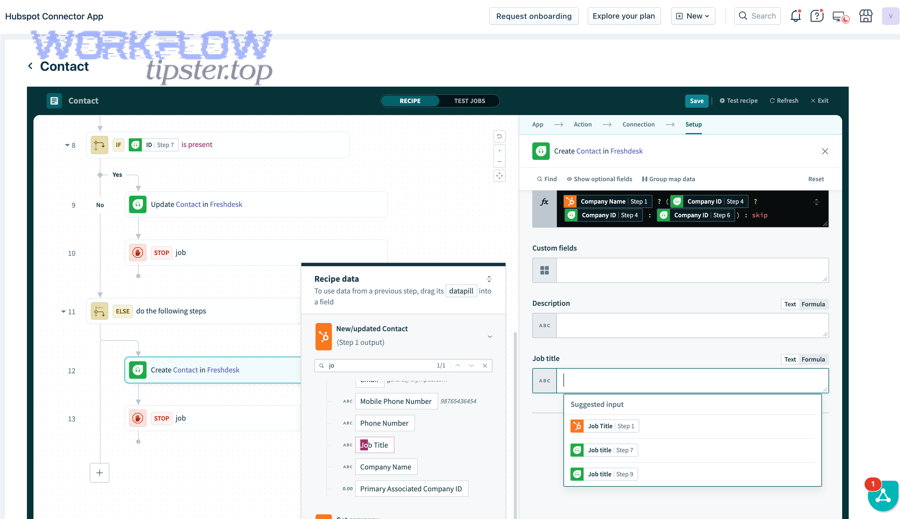
What field mapping rules prevent duplicate contacts and broken associations?
Start with these mapping rules:
- Map Freshdesk requester email ↔ HubSpot contact email (and treat email as immutable unless you manage merges carefully).
- Map company domain ↔ HubSpot company domain using normalization (lowercase, strip “www.”).
- Map ticket identifiers so you can always trace the record back to the source system.
A helpful way to keep mappings consistent is to document them as “source → target → ownership.” This table contains an example field mapping blueprint you can adapt:
| Data element | Freshdesk field | HubSpot field | Ownership rule |
|---|---|---|---|
| Contact email | Requester email | Contact email | HubSpot enforces uniqueness; update with caution |
| Account domain | Company domain (if stored) | Company domain | HubSpot as canonical for company identity |
| Ticket status | Ticket status | Ticket status/pipeline stage | Freshdesk canonical for support workflow |
What conflict resolution rules should you set for two systems?
If your setup supports bidirectional behavior, pick a rule style:
- Last write wins (fast, risky)
- System priority (safer: e.g., “HubSpot owns lifecycle stage; Freshdesk owns ticket status”)
- Conditional priority (best: ownership depends on pipeline stage, ticket type, or account tier)
Be aware that not all connectors offer true two-way sync in the same way. Freshdesk’s connector documentation may require choosing a one-way direction. (support.freshdesk.com) At the same time, HubSpot’s Freshdesk data sync listing describes two-way sync and custom mappings depending on plan—so you should verify plan prerequisites and actual behavior in your account. (ecosystem.hubspot.com)
Evidence: According to a study by Pennsylvania State University from the School of Hospitality Management, in 2006, unnecessary delays reduced satisfaction—so conflict rules should minimize “back-and-forth rework,” which is a hidden delay driver even when first response looks fast. (pure.psu.edu)
What are the most common Freshdesk ↔ HubSpot integration problems and fixes?
There are 4 main types of Freshdesk ↔ HubSpot integration problems—auth failures, duplicate records, mapping mismatches, and sync direction limitations—based on where the breakdown happens (access, identity, schema, or flow).
Next, use this troubleshooting approach: confirm connector limitations first, then validate identity rules, then validate mappings, and only then debug individual runs.
Why does authentication fail, and how do you fix it?
Common causes:
- Wrong admin permissions
- Expired OAuth grant
- API key/credential mismatch (if applicable)
- Account selection mismatch (authorized the wrong HubSpot portal)
Fix pattern:
1) Re-authorize the HubSpot connection from the connector UI.
2) Confirm required permissions in both systems.
3) Test with a known admin account before delegating.
Freshdesk’s connector instructions emphasize installing, authenticating, and granting permissions during connection—most auth failures occur when those steps were done with insufficient permissions. (support.freshdesk.com)
Why do you get duplicate contacts or mismatched companies?
Common causes:
- Multiple systems creating contacts with different emails
- Inconsistent domains (e.g., “acme.com” vs “acme.co” vs “acmeinc.com”)
- Missing dedupe rules before enabling sync
Fix pattern:
- Deduplicate in HubSpot first (or whichever system owns identity).
- Enforce a single “company domain” rule.
- Limit which side can create net-new records until data is clean.
Why do tickets sync partially or not reflect ongoing replies?
This usually happens when the integration is effectively a data copy rather than a living ticket conversation sync.
A practical way to validate is to:
- Create a ticket, reply twice, change status, and reassociate the contact.
- Verify what fields update in HubSpot and whether conversation content is included.
Also check marketplace descriptions carefully—some listings may advertise “sync,” but user feedback can indicate limitations in what is actually shared. (ecosystem.hubspot.com)
What do you do if you need a one-time transfer instead of ongoing sync?
If your real intent is migration or a structured one-time move (not continuous sync), HubSpot provides a “Smart Transfer” approach for supported apps—including Freshdesk—designed around auditing and mapping before moving data, and it explicitly describes transfers as one-way into HubSpot. (knowledge.hubspot.com)
Evidence: According to a study by Pennsylvania State University from the School of Hospitality Management, in 2006, satisfaction depended on timeliness and resolution—so “partial sync” is dangerous because it creates false confidence and slows true resolution when agents act on incomplete context. (pure.psu.edu)
How do you measure success after connecting Freshdesk to HubSpot?
You measure success by tracking resolution speed, resolution quality, and revenue protection signals in both systems, because an integration is only “successful” when it changes outcomes—not when it merely moves data.
In addition, measurement should be tied to the workflows you intended to improve: faster routing, fewer escalations, cleaner handoffs, and better renewal/expansion decisions.
What support metrics show the integration is working?
Track:
- First response time and time to resolution
- Reopen rate
- Escalation rate
- SLA compliance by account tier
- Agent time saved (reduced manual lookup and logging)
The real marker is whether context is available at the moment of action—assignment, escalation, or customer update.
What sales and customer success signals improve with a good sync?
Track:
- Deals influenced by support activity (tickets created during active deals)
- Renewal risk indicators (ticket volume, severity, time to resolution)
- Product feedback themes (tags/categories flowing into CRM reporting)
If your sync is stable, your CRM becomes a more reliable “customer health narrative,” not a separate system of guesses.
Evidence: According to a study by Pennsylvania State University from the School of Hospitality Management, in 2006, timeliness expectations varied by complaint type—so success measurement should segment by ticket type (billing vs service vs technical), not only overall averages. (pure.psu.edu)
Contextual Border: The main setup is complete. From here, the goal shifts from “make the integration work” to “make the integration resilient, scalable, and semantically complete across edge cases.”
What advanced considerations matter after you integrate Freshdesk with HubSpot?
After you integrate Freshdesk with HubSpot, the advanced considerations that matter most are data governance, lifecycle design, and scalability safeguards, because these determine whether the integration stays accurate as your team, pipelines, and fields evolve.
Especially for growing teams, the “after” phase is where integrations either become infrastructure—or quietly degrade.
How do you handle identity, merges, and contact ownership long term?
Set policies for:
- Contact merges
- Owner changes (sales owner vs support owner vs account owner)
- Email changes (process required, and whether the sync should ignore email updates)
The simplest long-term rule is: HubSpot owns identity, while Freshdesk owns operational ticket workflow—unless you explicitly design otherwise.
How do you design for reporting consistency across both systems?
To keep reporting consistent:
- Standardize taxonomy (ticket types, issue categories, priorities).
- Create a shared “definition of done” for resolution.
- Use consistent timestamps (created vs first response vs resolved).
If your connector supports custom mappings (or if you use automation), lock your mapping documentation as part of change management: every new field should have an owner, a sync rule, and a reporting purpose.
What security and compliance checks should you apply?
Check:
- Least-privilege permissions for integrations
- PII handling rules (who can see phone numbers, addresses, sensitive notes)
- Data retention alignment (ticket history vs CRM retention)
When should you consider switching approaches (connector → iPaaS or vice versa)?
Switch when:
- You outgrow one-way constraints and need controlled bidirectional logic.
- You need deeper enrichment and multi-system orchestration.
- You need better observability (run logs, retries, exception queues).
If your current connector’s design restricts directionality (e.g., one-way choice and no two-way flow), it can be a valid reason to adopt an approach that gives you explicit control—provided you can govern it well. (support.freshdesk.com)
Evidence: According to a study by Pennsylvania State University from the School of Hospitality Management, in 2006, customers responded negatively when delays felt unnecessary—so governance work (ownership, conflicts, permissions) is not “extra”; it’s what prevents preventable delays created by bad data. (pure.psu.edu)