


To connect Asana to Bitbucket effectively, you need a clear integration goal (what should sync and why), the right connection method (two-way sync, one-way automation, or custom webhooks), and a tested mapping from Bitbucket activity (issues, commits, pull requests) into the correct Asana tasks and fields.
Beyond basic setup, teams also need to decide whether integration is truly necessary or whether lightweight manual linking is enough—because the wrong kind of sync can add noise, conflicts, or extra maintenance.
Once you choose the approach, the highest-impact work is defining exactly what to sync (and what not to sync), then verifying reliability with rules, filters, monitoring, and a staged rollout that matches your team’s workflow.
Introduce a new idea: below is a complete, practical guide that starts with the meaning of Asana–Bitbucket integration, then moves through decision-making, setup, syncing strategy, troubleshooting, and best-practice workflows—before finishing with advanced edge cases.


What does it mean to integrate Asana with Bitbucket for a dev team workflow?
Integrating Asana with Bitbucket means connecting project work in Asana to code work in Bitbucket so that Bitbucket events (issues, commits, pull requests) automatically update the right Asana tasks, reducing manual status updates and improving shared visibility.
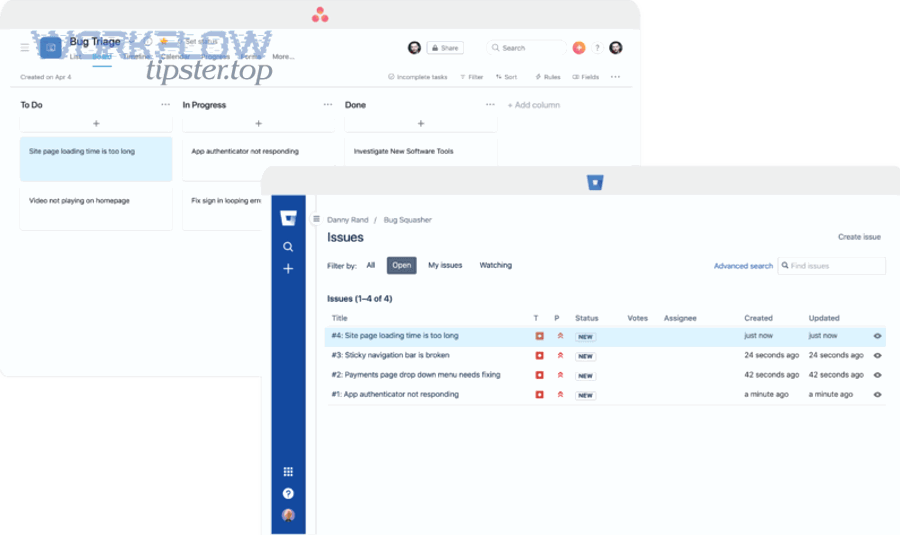
To better understand this integration, it helps to separate the “signal” (what matters for delivery) from the “noise” (what creates clutter) and then decide where each Bitbucket event should land inside Asana.
What problems does an Asana–Bitbucket integration solve in practice?
An Asana–Bitbucket integration solves three practical problems: it prevents progress from going “invisible” between planning and code, it reduces repetitive manual updates, and it shortens coordination loops between developers, PMs, and QA.
Specifically, without integration, a task can look “in progress” in Asana while the actual PR is already merged—or the opposite: the PR is blocked, but the Asana task still appears on track. Integration closes that reality gap by bringing the most relevant Bitbucket signals into the task where stakeholders already collaborate.
This matters because dev work often requires deep focus, and frequent “Where are we?” check-ins can cause unnecessary context switching. According to a study by the University of California, Irvine from the Department of Informatics, in 2008, interruptions increased the time cost of returning to an interrupted task because workers had to reorient and rebuild context after switching.
Which Bitbucket activities typically need to appear inside Asana tasks?
The Bitbucket activities that most commonly belong in Asana tasks are the ones that change delivery truth: a relevant issue creation/update, a pull request opened, review feedback, build/check results, and the final merge outcome.
For example, a “PR opened” update can move an Asana task into “In Review,” while “PR merged” can move it to “Ready for QA” or “Done,” depending on your workflow. Bitbucket supports webhooks and event payloads that can notify your integration endpoint when those events occur, which is the backbone of reliable automation.
Do you actually need to connect Asana to Bitbucket, or is manual linking enough?
Yes, most dev teams benefit from connecting Asana to Bitbucket because it improves status accuracy, reduces manual coordination overhead, and enforces consistent traceability from task to code—though very small teams with low change volume can often succeed with manual linking.
However, the key is to decide based on team size, change frequency, and reporting needs rather than treating “integration” as automatically better.
When is the answer “Yes” (integration is worth it)?
The answer is “Yes” when your team needs reliable cross-functional visibility, handles many concurrent pull requests, or depends on accurate reporting for planning and delivery accountability.
- High PR/issue volume: manual updates fall behind quickly, and stale status causes planning errors.
- Multiple stakeholders: PM/QA need current signals without interrupting developers for updates.
- Process consistency: definitions of “done,” review gates, or QA handoffs depend on standard events like “PR merged.”
- Traceability requirements: you want every deliverable to map cleanly from an Asana task to a Bitbucket PR and back.
In these cases, a partner-style integration can sync tasks, issues, and related fields more consistently than ad hoc habits. For example, Asana’s app listing for Bitbucket describes syncing issues, tasks, projects, repos, comments, assignees, and custom fields through a partner integration.
When is the answer “No” (keep it lightweight)?
The answer is “No” when you have a very small team, a simple workflow, and enough discipline to maintain consistent manual links without creating repeated interruptions or coordination loops.
- Low change volume: a few PRs per week and a stable backlog can be tracked with minimal overhead.
- Short feedback loops: the same people plan and ship, so misalignment is rare.
- Minimal reporting: you don’t need formal dashboards tied to code activity.
Even then, “manual linking” should be structured: use a consistent rule like placing the Asana task URL or task ID in the branch name or PR description so that traceability is searchable and predictable.
What are the main ways to connect Asana to Bitbucket?
There are three main ways to connect Asana to Bitbucket: a partner two-way sync platform, a no-code automation builder, or a custom webhook-and-API implementation—each option optimizes a different tradeoff between setup speed, control, and long-term maintenance.
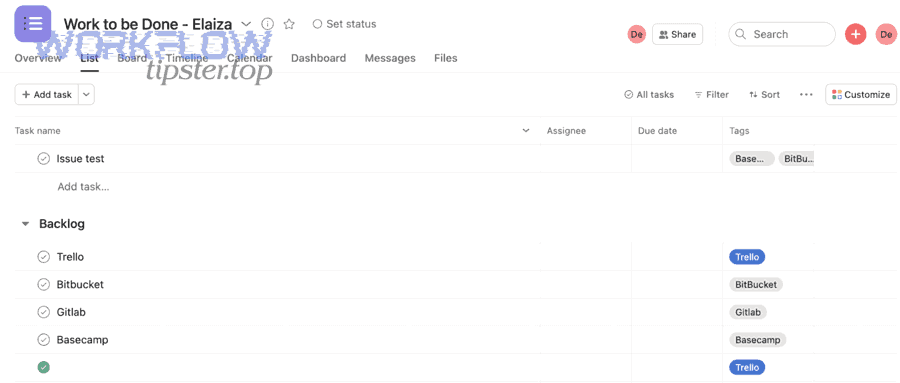
Next, you’ll want to pick an approach based on whether you need true two-way updates, whether you can tolerate partial sync, and how much governance and reliability you require.
This table contains the most common integration approaches and helps you choose based on workflow needs, setup effort, and control.
| Approach | Best for | Strength | Risk |
|---|---|---|---|
| Partner / two-way sync platform | Teams needing structured mapping and ongoing sync | Field mapping, rules, two-way capability | Conflicts if ownership rules are unclear |
| No-code automation builder | Quick one-way workflows (events → tasks) | Fast setup, many templates | Can create noise; limited true sync |
| Custom webhooks + APIs | Strict requirements and engineering ownership | Max control, auditing, idempotency | Build/maintain burden |
Which approach is best for dev teams who want a two-way sync?
A two-way sync platform wins for teams who need structured, ongoing updates in both directions—because it supports mapping and rules that keep Asana tasks and Bitbucket work items aligned rather than merely sending notifications.
Specifically, two-way sync is valuable when Asana is not just a reporting surface but also a work intake and prioritization system, meaning changes in Asana (like status, owner, or priority) should influence the Bitbucket side as well. Platforms like Unito frame this as choosing a “flow direction” (one-way or two-way) and defining rules to control what syncs.
The most important caution is ownership: define which system is the source of truth for each field. For example, let Bitbucket own PR state while Asana owns business priority. Without that boundary, two-way sync can create flip-flopping updates.
Which approach is best if you only need Bitbucket → Asana updates?
No-code automation wins if your only requirement is to push key Bitbucket events into Asana tasks, because event-driven rules are fast to set up and easy to constrain with filters.
For example, you can create an Asana comment or move a task when a PR is opened, updated, or merged. Bitbucket Cloud webhooks are built for this pattern: when a webhook event occurs, Bitbucket sends a request to your webhook URL containing the event payload.
This is where broad “Automation Integrations” can be helpful: you treat Bitbucket events as triggers and Asana actions as outcomes, focusing only on the few workflow moments that change delivery truth.
Which approach is best for teams with engineering resources and strict requirements?
Custom webhooks + APIs are optimal for teams with strict compliance, complex mapping, or high scale, because you can build idempotent processing, deduplication, auditing, and strong access controls that generic tools may not match.
More specifically, Bitbucket webhooks deliver payloads you can validate and process, while Asana’s API lets you update tasks, fields, and comments in a controlled way—provided you manage rate limits and retries.
According to a study by the University of California, Irvine from the Department of Informatics, in 2008, the cost of interruptions includes reorientation time after a switch, which reinforces why a reliable automated pipeline (instead of frequent manual checking) can protect focus in dev workflows.
How do you set up an Asana ↔ Bitbucket integration step by step?
The best way to set up an Asana ↔ Bitbucket integration is to follow a 7-step method—define the goal, scope the workflow, connect accounts, choose sync direction, map fields, apply rules/filters, and test before rollout—so you achieve clean, reliable updates instead of noisy automation.
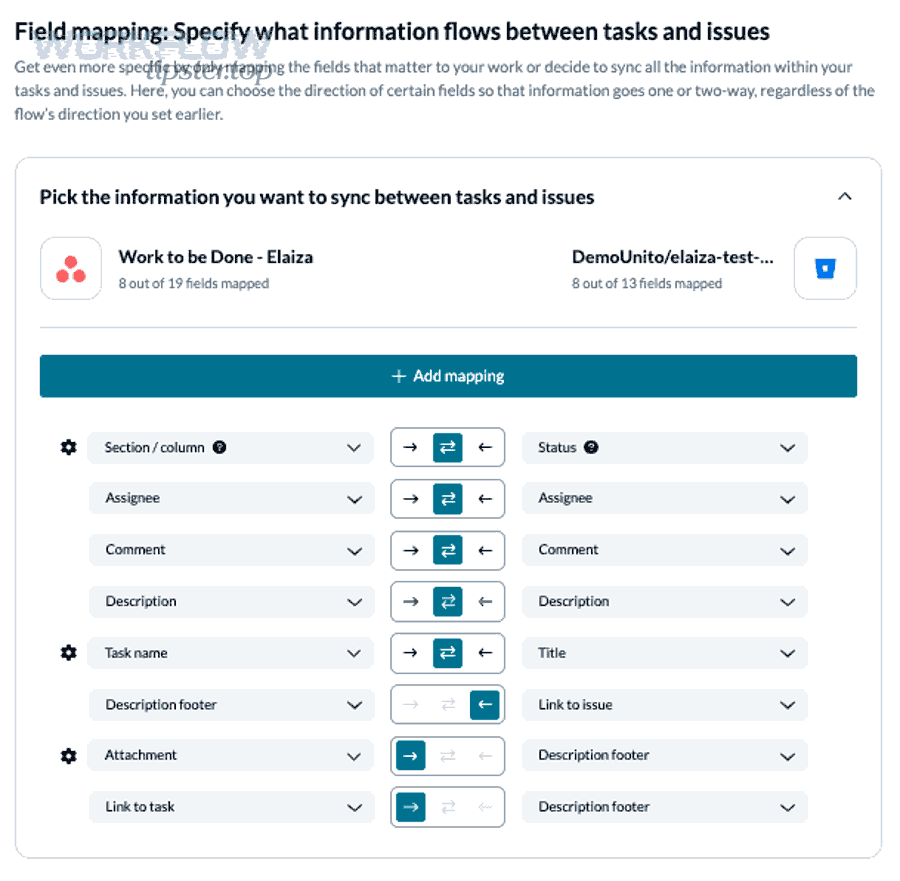
Then, once the foundation is correct, you can scale the integration across more repos and projects without changing the underlying logic.
How do you define the integration goal and scope before connecting anything?
You define the goal and scope by selecting one workflow you want to make “automatic and trustworthy,” choosing exactly which repos/projects it applies to, and deciding what success looks like in measurable terms.
For example, pick a single high-value outcome such as: “When a PR is merged to main, move the related Asana task to ‘Ready for QA’ and add the PR link.” That goal is testable, visible, and limited enough to prevent scope creep.
- Goal: what must become automatic (status change, comment, link, assignment).
- Scope: which repo(s), which Asana project(s), which task types.
- Success metrics: fewer manual updates, fewer status mismatches, faster handoffs.
How do you authenticate securely and set the right permissions?
You authenticate securely by using least-privilege access, clearly assigning ownership for the integration credential, and documenting a revocation plan so access can be rotated or removed without breaking accountability.
Specifically, decide whether the integration is owned by a shared service account (common for teams) or individual accounts (riskier for continuity). If your integration uses APIs, you must also plan for token rotation and permission reviews over time.
For teams building custom integrations, be mindful of platform constraints such as API rate limits; Asana documents rate limits with quotas that can vary by plan tier and are enforced per time window.
How do you choose sync direction and map fields without causing conflicts?
You choose sync direction and map fields safely by assigning a “source of truth” per field and using one-way updates for fields that can conflict, while enabling two-way sync only where both systems genuinely need to edit the same information.
For example, Bitbucket should own PR state (opened, merged), while Asana can own business priority or target dates. Tools that support directional “flows” and field mapping help structure this decision by making direction explicit.
- Recommended ownership split: PR status (Bitbucket), task status (shared with mapping rules), priority (Asana), links/comments (Bitbucket → Asana).
- Conflict prevention: avoid syncing the same status field both ways unless you have strict rules and naming parity.
How do you build rules and filters so only the right work items sync?
You build rules and filters by defining inclusion criteria (what must match to sync) and exclusion criteria (what must never sync), then testing against real cases to ensure you get signal without clutter.
More specifically, rules typically combine a repo filter plus a task/issue filter, such as: “Only sync PR events from repo X to tasks in project Y that include a custom field ‘Engineering = Yes’.”
- Repo-level filters: only main repos, or only product repos (exclude experiments).
- Branch filters: only main/release branches, or only PR merges to staging.
- Task filters: only tasks with a specific tag/field/section (e.g., “Dev Backlog”).
- Noise suppression: ignore minor events like “PR updated” unless it changes review state.
What exactly should you sync between Asana and Bitbucket for Issues, Commits, and Pull Requests?
There are two main sync tiers you should use—Minimum Viable Sync (status + links + key comments) and Expanded Sync (custom fields, assignees, and workflow metadata)—based on whether stakeholders need visibility only or also need structured reporting.
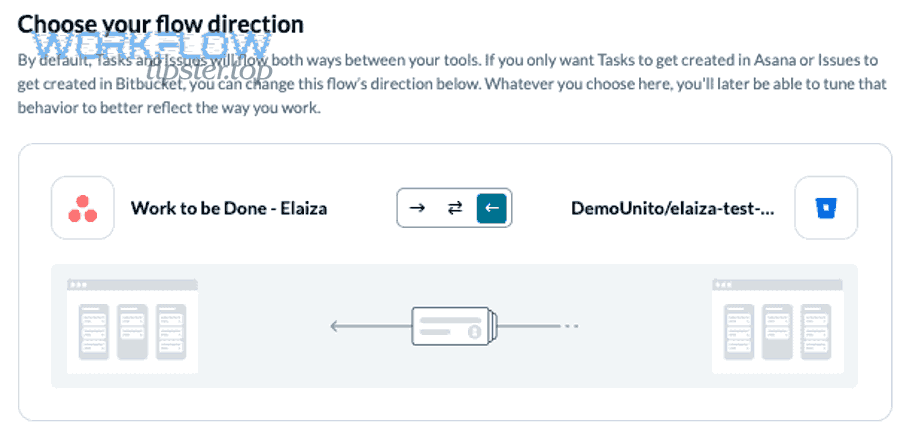
Specifically, most teams succeed when they sync fewer, higher-signal events first and only add more fields once the workflow is stable.
What Bitbucket triggers should update an Asana task status or comment?
The Bitbucket triggers that should update an Asana task are the ones that represent workflow state changes: PR opened, review requested/updated, checks/build status change, and PR merged or declined.
For example, “PR opened” can add a comment with the PR link, “checks failed” can add a warning comment, and “PR merged” can move the task to the next stage. Bitbucket’s webhook model supports sending event payloads to your endpoint whenever selected events occur.
- PR opened: Add PR link + move task to “In Review.”
- Review feedback: Add comment summary (or link to discussion) to reduce back-and-forth.
- Build/checks: Add “pass/fail” signal to help QA and PM understand readiness.
- PR merged: Move task to “Ready for QA” or “Done,” depending on your definition of done.
What Asana fields and artifacts should receive Bitbucket data?
The best Asana fields to receive Bitbucket data are the task comments (for timeline and collaboration), a dedicated link field (for PR URL), and a small set of custom fields (for state and reporting), because these keep code context visible without bloating the task.
More specifically, aim for a consistent pattern across projects so anyone can open a task and instantly find the PR link, merge status, and the latest blockers.
- Task description: include canonical links (repo, PR, issue) if your team prefers a “single source” section.
- Comments: chronological event trail (opened, requested changes, merged).
- Custom fields: “PR Status,” “Build Status,” “QA Needed” (only if you truly report on them).
How do you verify, troubleshoot, and maintain the integration over time?
You verify and maintain the integration by testing a full PR lifecycle in a controlled sandbox, monitoring failures with logs and alerts, and continuously managing permissions and rate limits so updates remain reliable as repos, projects, and team members change.
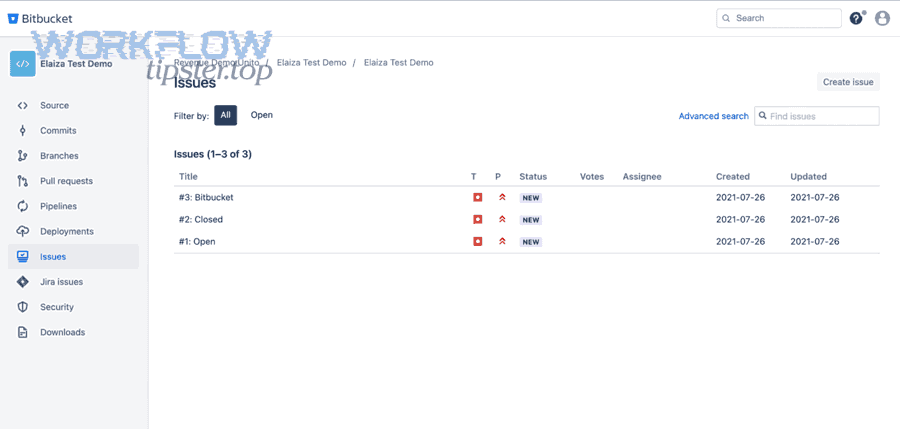
In addition, long-term stability comes from treating the integration like a production system with ownership, change control, and periodic health checks.
What are the most common sync failures and how do you fix them?
The most common sync failures are expired credentials, missing permissions, incorrect field mapping, webhook delivery issues, duplicate events, and API rate limiting—and each one is fixable with a clear checklist and logging.
- Expired token: rotate credentials; use a stable owner account; document renewal steps.
- Permission mismatch: confirm repo/project access and scopes for the integration identity.
- Mapping mismatch: verify field IDs and allowed values (especially statuses and custom fields).
- Webhook delivery failure: confirm endpoint availability and validate payload structure.
- Rate limiting: add backoff, batching, and avoid bursty updates.
As a concrete example of platform constraints, Asana documents minute-based rate limits that differ by plan tier, which means a burst of updates can trigger 429 responses unless you implement retries and pacing.
How do you test the integration before rolling it out to the whole team?
You test an Asana–Bitbucket integration by running a staged PR scenario—create a task, link it to a PR, simulate review changes, run checks, merge, and confirm the correct Asana updates—then repeat across edge cases like declined PRs and multiple commits.
Then, once the “happy path” works, you validate noise control by ensuring only intended tasks receive updates and that non-scoped repos or tasks remain untouched.
- Sandbox Asana project: isolated tasks and fields that mirror production.
- Test repo: safe PR lifecycle without impacting real releases.
- Acceptance criteria: correct task updated, correct field set, correct link attached, no duplicates.
According to a study by the University of California, Irvine from the Department of Informatics, in 2008, interruptions introduce reorientation costs that add time and stress; a well-tested integration reduces “check-in” interruptions by making status visible where stakeholders already collaborate.
What is the best-practice workflow for linking commits and pull requests to Asana tasks?
A best-practice workflow links every meaningful change (branch, commit, PR) to an Asana task using a consistent identifier and uses PR milestones (opened, approved, merged) to drive Asana status updates, creating traceability without requiring constant manual coordination.
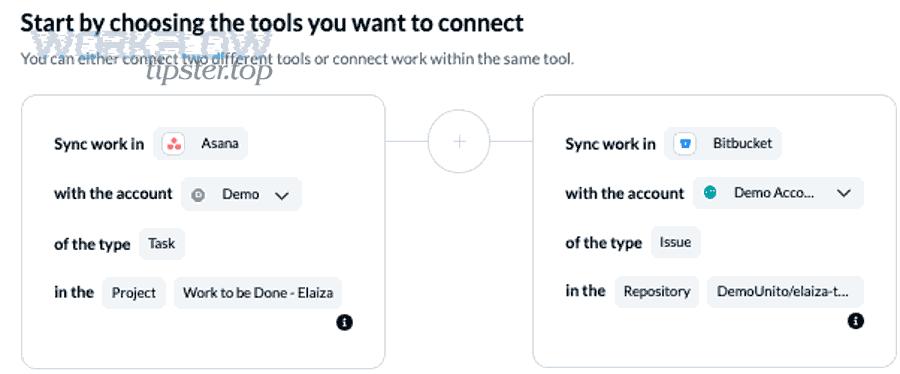
Moreover, the workflow should be easy for developers to follow and easy for non-developers to understand, so that visibility improves without adding friction.
Should you link by task ID in branch names/commit messages or rely on automation rules?
Task IDs in branch names or PR templates win for consistency and searchability, automation rules win for reduced manual effort, and the best workflow is usually a hybrid: human-friendly linking conventions plus automation that uses those links to update the right task.
For example, you can require a PR description field like “Asana task:” and paste the task URL, while automation uses that URL to post updates and move the task when merge happens. This approach reduces ambiguity and makes audits and debugging simpler.
What is a practical “definition of done” that uses PR merges to close tasks?
A practical definition of done is “PR merged to the target branch + required checks passed + required reviews completed + QA/verification rules satisfied,” and you should map those milestones to clear Asana statuses so stakeholders can trust the board.
To illustrate, you might use: “In Progress” (branch exists), “In Review” (PR opened), “Blocked” (checks failed or changes requested), “Ready for QA” (merged and green), and “Done” (QA verified). Bitbucket’s webhook-driven event model makes it possible to trigger those transitions reliably when key PR events occur.
If you publish or document these patterns for your team, consider centralizing the playbook in a single internal guide so it’s easy to follow—some teams even share integration “recipes” through community write-ups like WorkflowTipster, as long as the final rules reflect your own governance and schema.
What advanced or uncommon scenarios should you plan for when integrating Asana and Bitbucket?
There are four advanced scenarios you should plan for—enterprise identity/auditing, rate limits and duplicate events, large-scale mapping across many repos/projects, and monorepo multi-task PRs—because these edge cases can quietly break reliability and trust in the integration.
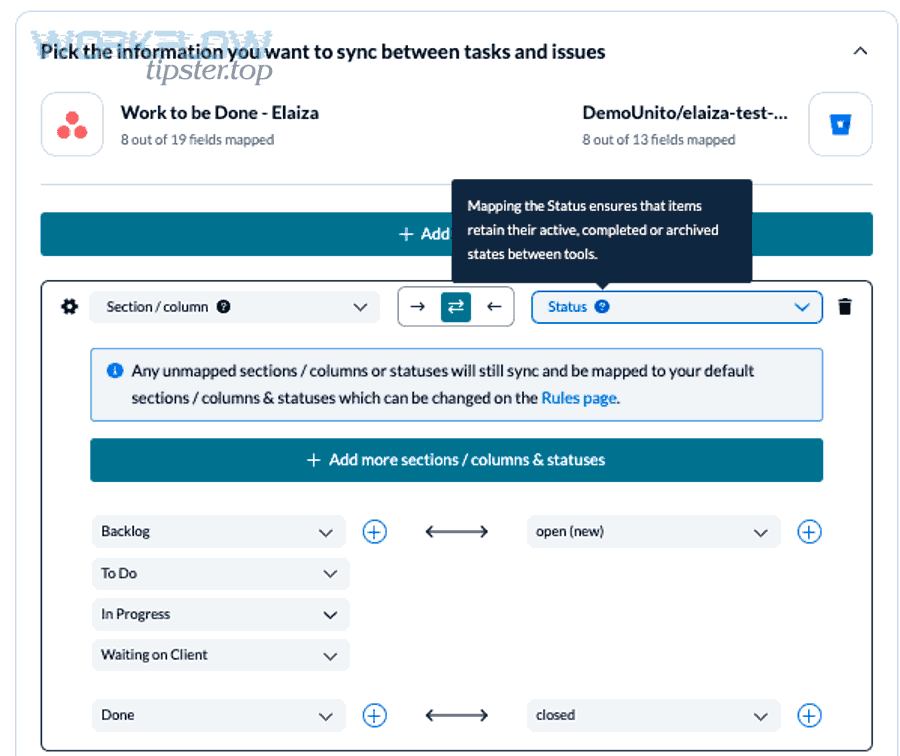
Especially as usage scales, the integration stops being a “nice automation” and becomes infrastructure that needs governance, observability, and predictable rules.
How do SSO, provisioning, and audit logs affect who can connect and maintain the integration?
SSO and provisioning affect integration ownership by constraining who can authorize apps, how accounts are created/removed, and how access changes are audited—so you should assign a stable integration owner identity and align permissions with least-privilege policies.
More specifically, if an employee leaves and their account is deactivated, integrations that rely on their personal tokens can fail unexpectedly. A shared, governed owner account (with proper approvals) prevents “silent breakage” and supports audit requirements.
For partner integrations, verify what the vendor can sync and which objects and fields are supported; Asana’s Bitbucket listing emphasizes syncing a broad range of objects and fields (including custom fields), which is useful for enterprise reporting but also increases governance needs.
What should you do about rate limits, retries, duplicate events, and event ordering?
You should handle these reliability issues by using idempotent updates (dedupe keys), exponential backoff retries, safe batching, and event ordering safeguards so the final state is correct even when events arrive late or repeat.
Specifically, webhooks can deliver multiple events for one PR lifecycle, and network retries can cause duplicates. Store a unique event identifier (or a computed signature from PR ID + timestamp + event type) and ignore events you’ve already processed.
- Idempotency: same event processed twice results in the same final Asana task state.
- Backoff: retry when APIs respond with rate limits or transient errors.
- State validation: before moving a task, verify the PR state (merged/declined) to avoid stale ordering.
Asana’s developer documentation explains that API rate limits are enforced per time window and can differ by plan tier, which is why pacing and backoff are non-negotiable for stability.
How do you scale the mapping across many repos and many Asana projects without chaos?
You scale safely by standardizing fields and statuses, using consistent naming conventions, defining routing rules (which repo maps to which project/section), and documenting a single “integration policy” that every team follows.
Then, you operationalize the policy with templates so new repos and projects start with correct defaults instead of reinventing mapping each time.
- Standard Asana schema: shared custom fields like “Engineering Stage” and consistent status names.
- Routing rules: repo A → project A; repo B → project B; shared services → triage project.
- Template-driven rollout: clone integration settings per team with minimal edits.
If your organization also maintains other structured workflows—like google calendar to notion for meeting-to-notes automation—use the same governance pattern: standard fields, clear ownership, and predictable routing.
How should you handle monorepos or shared repos where one PR impacts multiple Asana tasks?
Automation wins in correctness, manual linking wins in clarity, and the optimal approach for monorepos is a controlled hybrid: require explicit task references in PR templates (for multiple tasks) while automation posts the PR link and status updates to each referenced task.
More specifically, one PR can touch multiple features and therefore multiple tasks, but “auto-closing everything” on merge is risky. Instead, update all related tasks with the PR link and merge status, then close tasks only when their acceptance criteria are met (which may include QA verification or staged release).
- PR template: “Related Asana tasks:” followed by multiple URLs.
- Automation rule: for each URL, post the same PR status update to the task.
- Close policy: merge moves tasks to “Ready for QA,” QA completion moves to “Done.”
According to a study by the University of California, Irvine from the Department of Informatics, in 2008, reorientation after interruptions adds measurable time cost; reducing ambiguity in monorepo PR-to-task mapping lowers the need for frequent clarification pings that break focus.
If your organization also manages other predictable cross-tool workflows, you can keep the same integration discipline across systems—whether it’s basecamp to calendly for scheduling handoffs or clickup to google docs for documentation pipelines—by standardizing templates, identifiers, and routing rules under one shared playbook.