


A Smartsheet webhook 404 Not Found almost always means Smartsheet reached a server, but the specific callback resource you configured (host + path + routing) did not resolve to a real handler—so the endpoint is effectively “Not Found” when it needs to be “Found” and routable.
Most teams fix it faster when they separate two questions early: (1) Did Smartsheet reach my edge (DNS/TLS/proxy)? and (2) Did the request match an actual route (method/path) that returns 200? That simple split prevents endless guessing.
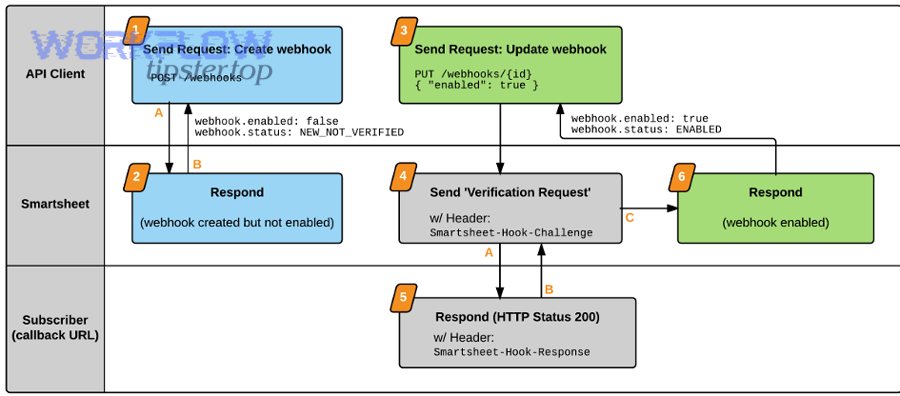
Next, verification matters: when you enable a webhook, Smartsheet sends a verification challenge and expects HTTP 200 plus an echoed challenge value in the required place. If your server returns a 404 during that handshake, Smartsheet will keep the webhook disabled or mark verification failed.
Introduce a new idea: below is a structured, end-to-end checklist that starts with the fastest routing wins and then drills down into framework, proxy, and production hardening.
Is a Smartsheet webhook 404 Not Found always caused by your callback endpoint?
No—Smartsheet webhook 404 Not Found is not always caused by your application code, but it is almost always caused by your callback endpoint “shape” (DNS/host/path/method/routing) not mapping to a real handler at the moment Smartsheet calls it.
Next, to pinpoint where “Not Found” happens, split the path into edge vs app routing and test each layer deliberately.
Can a 404 come from your app framework routing (missing path or wrong method)?
If your server is up but your framework never matches the request, it will return a clean 404—often without logging anything useful.
Common framework-level 404 triggers:
- You registered
/webhook/smartsheetbut configured Smartsheet with/webhooks/smartsheet(pluralization mismatch). - Your handler is
POSTonly, but a proxy or test tool hits it viaGET(and your framework returns 404 or 405). - You mounted routes under a base path like
/api, but your production reverse proxy strips or adds that prefix.
Practical fix pattern:
- Print or expose a route table at startup (most frameworks can list registered routes).
- Add a temporary catch-all route that logs unmatched requests (method + path + Host header), then remove it after diagnosing.
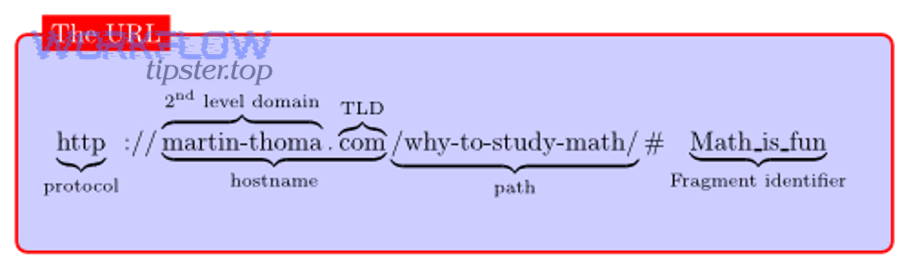
Can a reverse proxy or load balancer generate a 404 before your app sees the request?
Yes. Many 404s are produced upstream—by Nginx, Apache, an API gateway, a CDN, or a load balancer—when it cannot map the request to a backend or route.
Proxy-level 404 patterns:
- Nginx
locationblocks don’t include your webhook path. - A load balancer listener forwards only certain paths; everything else is a fixed 404.
- A CDN ruleset blocks POST requests to certain paths and returns a branded 404 page.
How to confirm quickly:
- Compare response headers/body between a “local curl” call and a “public curl” call.
- Look for proxy-identifying headers (e.g.,
server: nginx,via,x-cache) and branded HTML 404 pages.
Can environment mismatch (staging vs prod) make a real endpoint look “Not Found”?
Absolutely—this is a top cause in real deployments.
Typical mismatch scenarios:
- You updated the route in code but Smartsheet still points to the old path.
- Your production app is deployed under
/v2, but Smartsheet still calls/v1. - You rotated domains (or moved from
api.company.comtohooks.company.com) but didn’t update the webhook callback URL.
A good rule: treat the Smartsheet callback URL as a production contract—version it and roll changes with a compatibility window (more on that in prevention).
What is the Smartsheet webhook callback URL and how does it trigger a 404?
The Smartsheet webhook callback URL is the HTTPS endpoint Smartsheet posts event payloads and verification challenges to; it triggers a 404 when the server cannot find a matching resource for that exact host + path at request time.
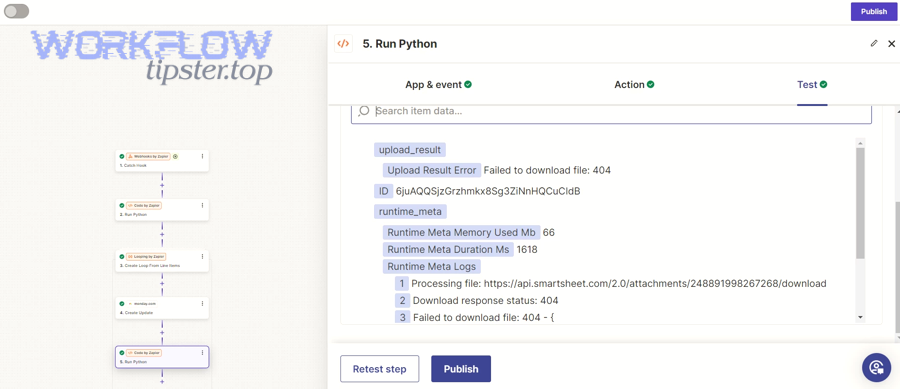
Then, once you understand what Smartsheet sends and when it sends it, you can reproduce the same request shape and eliminate guesswork.
What exactly does Smartsheet send to the callback URL?
Smartsheet sends:
- Verification requests during enablement (and ongoing verification) that include a
Smartsheet-Hook-Challengeheader and a small JSON body containingchallengeandwebhookId. - Event callbacks as JSON-formatted HTTP POST requests with an
eventsarray describing changes (depending on scope).
Important operational implication: you must support both verification requests and event callbacks on the same callback URL, and both must return a valid response (especially during enablement).
Which parts of the callback URL commonly break?
404-causing breakpoints usually fall into these buckets:
- Host resolution: wrong domain or DNS not pointing where you think.
- TLS/HTTPS termination: you’re serving HTTP but configured HTTPS (or vice versa).
- Path routing: the app doesn’t have a handler at that path.
- Method routing: Smartsheet posts, but your handler is not accepting POST.
- Port restrictions: you host on a port Smartsheet doesn’t accept.
Smartsheet explicitly documents valid ports for event-handling endpoints (commonly 443 for HTTPS, plus a few specific alternates). If you pick a random port, the integration can fail before you even reach app routing.
Why “Not Found vs Found” is the right mental model for callback URLs
A webhook callback URL is not “just a link”—it’s a routable resource. That’s why the HTTP definition of 404 is a perfect fit: 404 indicates the server cannot find the requested resource.
So the goal is not simply “make the server respond,” but “make the exact resource Found and return 200 for the right requests.”
Which checks confirm your webhook endpoint is publicly reachable and correctly routed?
You can confirm your endpoint is publicly reachable and correctly routed by validating DNS + HTTPS access from the public internet, then verifying that the exact POST path returns HTTP 200 and is handled by your application (not a fallback 404).
To begin, do these checks in the same order Smartsheet experiences them: internet → edge → proxy → app.
Check 1: Public HTTPS reachability (DNS + TLS)
Do this from a machine that is not on your private network (or use an external uptime checker):
- Resolve DNS (
nslookup/dig) to ensure the domain points to the correct IP. - Confirm TLS certificate validity and SNI behavior (many multi-tenant setups fail here).
- Verify the final URL is HTTPS, because Smartsheet expects an HTTPS endpoint for webhook handling.
What “good” looks like:
- A successful TLS handshake
- No redirect loops
- A stable 200/204 response for a health check path you control (separate from the webhook path)
Check 2: Exact path + method routing (POST to the callback path)
Smartsheet posts to your callback URL. Your routing test must match that:
- Use
POST(notGET) - Use the exact callback path
- Send
Content-Type: application/json - Observe whether your app logs the request
If a POST to the callback path returns 404, you’ve proven the issue is routing—not Smartsheet.
Check 3: Proxy mapping and path rewriting
If you have Nginx/Apache/API gateway in front:
- Confirm the proxy forwards the webhook path to the correct upstream service.
- Check rewrite rules that add/remove prefixes.
- Ensure your proxy allows POST and doesn’t block unknown user agents.
A clean way to prove where 404 originates:
- Add a distinctive response header in your app (e.g.,
X-App: webhook-handler). - If you never see that header in responses, the 404 is upstream.
Check 4: Firewall and allowlisting policies
Corporate WAF policies sometimes block webhook traffic and “mask” it as 404 rather than 403. If you suspect a WAF:
- Inspect WAF logs for the callback path.
- Temporarily bypass WAF for the webhook path (if policy allows).
- Rate-limit safely at the edge to avoid accidental floods, but don’t block legitimate Smartsheet traffic during verification.

What is webhook verification and what response prevents 404 during enablement?
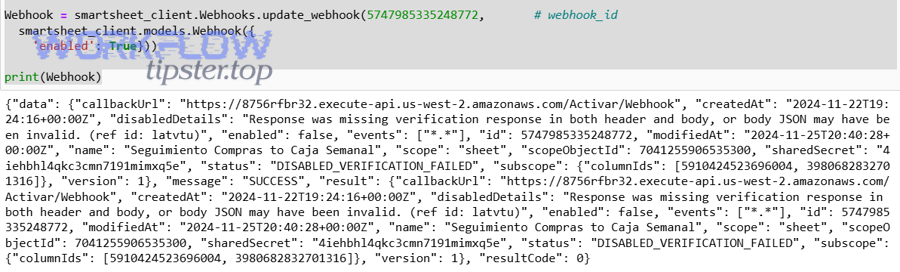
Webhook verification is Smartsheet’s challenge–response handshake that confirms your callback URL is valid; to prevent 404 during enablement, your endpoint must return HTTP 200 and echo the challenge value in the required response header or JSON field.
Then, once verification is correct, you can treat all remaining 404s as pure routing and deployment problems—not protocol confusion.
What headers and body fields are involved in Smartsheet verification?
Smartsheet’s verification request includes the challenge value in two places:
Smartsheet-Hook-Challengeheader- JSON body
challengefield
To pass verification, your response must include:
- HTTP
200 - The challenge echoed back via either:
Smartsheet-Hook-Responseresponse header, or- JSON response field
smartsheetHookResponse
If your route returns 404 instead of handling this handshake, Smartsheet keeps the webhook disabled or marks verification failed.
Why ongoing verification can “suddenly” surface 404 later
Even after enablement, Smartsheet performs ongoing verification periodically (documented as once every 100 callbacks). If your endpoint starts returning 404 later—because of a deployment, path change, or proxy rule—Smartsheet can disable the webhook again.
That’s why 404 troubleshooting must consider:
- Release rollouts
- Blue/green routing
- Versioned paths and backward compatibility
Common verification mistakes that look like a “mysterious 404”
- Your verification handler exists in dev but not in prod (different route tables).
- Your app expects a different path for verification vs events (Smartsheet uses the same callback URL).
- Your proxy forwards
/webhookbut blocks/webhook/verify—yet your code only handles the latter. - You respond 200 but forget to echo the challenge value correctly, causing Smartsheet to treat verification as failed.
How do you systematically troubleshoot Smartsheet webhook 404 from fastest to deepest?
Systematically troubleshooting Smartsheet webhook 404 Not Found works best as a 7-step funnel: validate the configured URL, reproduce the POST publicly, confirm routing at the edge, handle verification correctly, inspect proxy rewrites, confirm your app route table, and harden deployments so the endpoint stays “Found.”
Below is a practical sequence that avoids random changes and keeps a tight hook-chain from symptom → cause → fix.
Step 1: Confirm the exact callback URL Smartsheet is calling
Start by verifying the callback URL string in the webhook configuration:
- Scheme:
https:// - Host: correct domain
- Path: exactly matches your deployed route
- No trailing-slash mismatch (some routers treat
/hookand/hook/differently)
This is the “one-character bug” stage: most 404s are here.
Step 2: Reproduce from the public internet with a POST to the same path
Use a public runner (or a machine outside your VPC) to POST the callback URL.
If you get 404 publicly but 200 internally, the issue is edge/proxy routing.
If you get 404 both publicly and internally, the issue is app routing.
This is also where you can differentiate smartsheet troubleshooting from generic web debugging: the goal is not “a webpage loads,” but “the POST webhook handler is Found.”
Step 3: Add minimal request logging to prove whether the request hits your app
Add a short-lived log that prints:
- Timestamp
- Method + path
Host- Presence of
Smartsheet-Hook-Challengeheader (for verification requests)
If you see nothing in logs, 404 is upstream. If you see logs but still 404, your app is generating it.
Step 4: Validate verification handling (the most common enablement blocker)
When enabling a webhook, Smartsheet sends a verification challenge and expects:
- HTTP 200
- Echoed challenge value in
Smartsheet-Hook-Responseheader orsmartsheetHookResponseJSON field
If you’re missing this, Smartsheet can keep the webhook disabled as DISABLED_VERIFICATION_FAILED.
Pro tip: treat verification as a separate code path that must never 404—even if your event-processing pipeline is down. It should be lightweight and always available.
Step 5: Check for “nearby” failures that masquerade as 404
In real integrations, you might be debugging 404, but your system is also suffering:
- smartsheet timeouts and slow runs troubleshooting: the endpoint responds too slowly, which can trigger retries and eventually disablement if failures persist.
- smartsheet attachments missing upload failed troubleshooting: if your callback triggers downstream attachment fetch/upload work synchronously, your webhook handler can bog down and produce unstable behavior under load.
- smartsheet webhook 400 bad request troubleshooting: malformed JSON parsing or signature verification failures can return 400s; if your proxy maps certain failures to a generic 404, you’ll misdiagnose the root cause.
A key operational detail: Smartsheet expects 200 to acknowledge receipt; if it does not get 200, it retries delivery up to 14 times with exponential backoff and can disable the webhook after retries are exhausted.
Evidence: According to a study by Worcester Polytechnic Institute from the Computer Science Department, in 2018, research referenced in their latency report notes abandonment can reach 87% with a 2-second delay—one reason webhook handlers should respond quickly and push heavy work async.
Step 6: Inspect proxy rewrites, base paths, and service routing rules
If you use Nginx or an API gateway:
- Ensure
location /my-sheet-webhookforwards to the correct upstream - Confirm you’re not stripping
/apiunexpectedly - Confirm the upstream service is healthy and listening on the expected port
Smartsheet documents a limited set of valid ports for webhook endpoints; align your infra to those ports to avoid avoidable failures.
Step 7: Retest enablement and monitor ongoing verification
Once fixed:
- Re-enable the webhook
- Confirm verification passes
- Trigger a known event
- Watch logs for both event callbacks and periodic verification traffic
Remember that Smartsheet performs ongoing verification; a deployment that “fixes it now” but breaks it later will lead to the webhook being disabled again.
What’s the difference between a webhook 404 and other webhook failures like 401/403/429?
A webhook 404 means the requested callback resource wasn’t found; 401 means missing/invalid authentication credentials; 403 means the server refuses the request even if understood; and 429 means rate limiting because too many requests were sent in a time window.
However, mapping these correctly helps you avoid fixing the wrong layer—routing vs auth vs throttling.
404 vs 400: Not Found vs Bad Request
404 Not Found: the server can’t find the requested resource.
400 Bad Request: the server refuses to process the request due to client-side issues like malformed syntax or framing.
In webhook systems, 400 often shows up when:
- Your handler expects JSON but receives something else
- Signature validation rejects a request body format
- A proxy forwards partial bodies or changes headers
If you see 404, prioritize: host/path/method/routing. If you see 400, prioritize: request parsing/validation and payload format expectations.
404 vs 401/403: Routing vs authorization
401 Unauthorized: request lacks valid authentication credentials.
403 Forbidden: server understood the request but refuses to process it (permissions/policy).
If your webhook endpoint requires auth:
- Ensure Smartsheet can supply whatever you require (often it cannot do custom auth schemes).
- Prefer validating Smartsheet callbacks using the webhook shared secret signature (HMAC) rather than forcing traditional login-based auth on the callback URL.
404 vs 429/timeouts: Missing route vs overloaded endpoint
429 Too Many Requests: rate limiting; client sent too many requests.
Timeouts: the server didn’t respond fast enough; Smartsheet treats timeouts as retryable failures.
Smartsheet’s callback retry behavior matters here:
- If the subscriber response is not 200, Smartsheet retries up to 14 times with exponential backoff (then may disable the webhook).
So:
- If you’re seeing 429/timeouts, you need throttling, queueing, or async processing.
- If you’re seeing 404, you need route stability and deployment correctness.
How can you prevent webhook 404 Not Found issues in production deployments?
You can prevent Smartsheet webhook 404 Not Found issues by making the callback URL a stable, versioned contract; deploying with backward-compatible routing; handling verification with an always-200 lightweight path; and monitoring for route regressions so the endpoint stays “Found” across releases.
More importantly, prevention is cheaper than incident response because ongoing verification and retries can turn small route changes into real webhook downtime.
How should you version and stabilize webhook routes?
Use one of these stable patterns:
- Versioned path:
/webhooks/smartsheet/v1/events - Alias path that forwards internally: keep
/webhooks/smartsheetforever, forward to current handler
Rules that reduce 404s drastically:
- Never delete the old path on the same day you deploy the new one.
- Keep a 30–90 day compatibility window if multiple environments or clients exist.
- Avoid trailing slash sensitivity: normalize
/hookand/hook/consistently.
What deployment practices keep endpoints “Found” during rollouts?
Adopt rollout patterns that keep routing stable:
- Blue/green or canary deploys that preserve the route mapping
- Health checks that validate the webhook path explicitly (POST route exists, not just GET
/health) - Infrastructure-as-code checks that verify gateway rules include the webhook location
Also: don’t do heavy work in the webhook request thread. Acknowledge quickly (return 200) and queue the work. Smartsheet retries when it doesn’t see 200 and can disable the webhook after repeated failures.
How do you secure callbacks without breaking Smartsheet compatibility?
Instead of requiring interactive auth (which can lead to 401/403), use Smartsheet’s callback authentication design:
- Smartsheet assigns a
sharedSecretto the webhook and signs callback payloads with HMAC SHA-256; you validate the signature header server-side.
This keeps the endpoint open enough for Smartsheet to reach it while still verifying authenticity.
What monitoring catches 404 regressions before Smartsheet disables the webhook?
Set up monitoring that watches:
- 404 rate on the webhook path (edge + app)
- Verification failures (responding incorrectly to challenge requests)
- Timeouts and non-200 responses (which trigger retries)
Smartsheet notes that verification is ongoing; failing verification can disable the webhook. Smartsheet also documents that callbacks require 200 acknowledgement and that repeated non-200 results lead to retries and eventual disablement.