


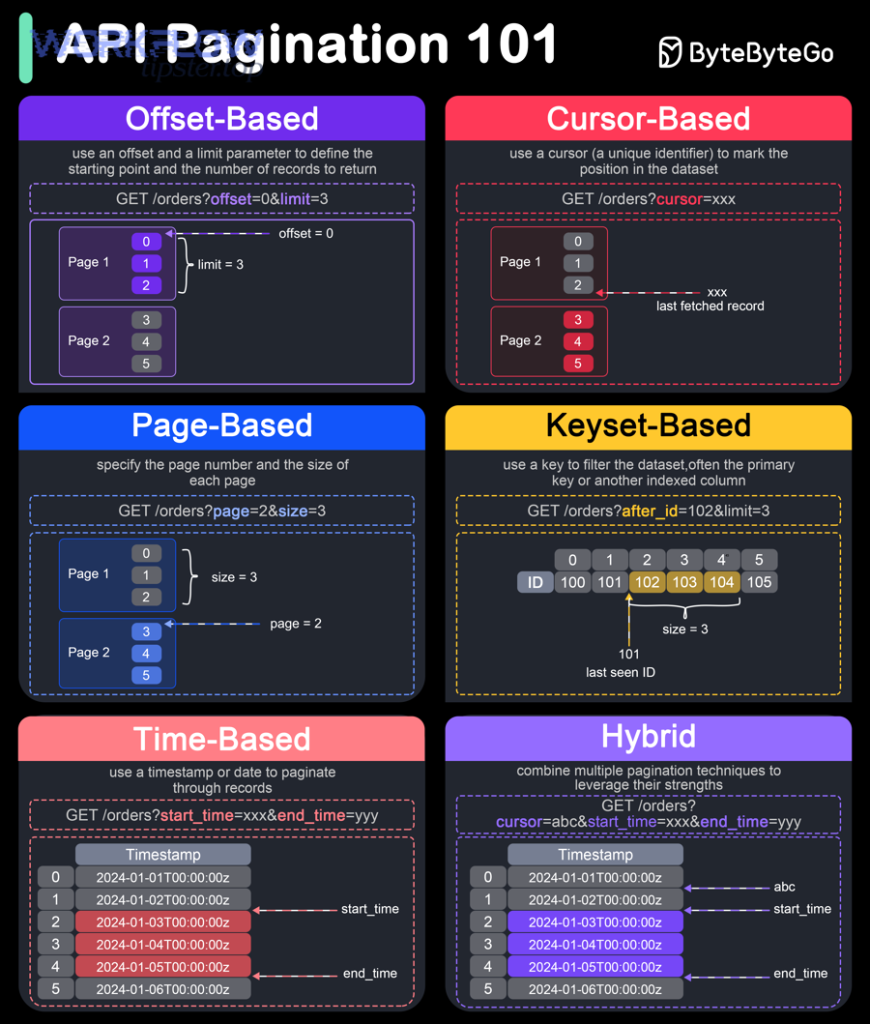
When Smartsheet data looks “missing” during an API pull, you can usually fix it by (1) confirming pagination is truly the cause, (2) implementing the correct paging loop (page-based or token-based), and (3) validating completeness with ID-level reconciliation—so “Missing vs Complete” becomes measurable, not a guess. (developers.smartsheet.com)
Next, you’ll learn how pagination is supposed to work in Smartsheet (especially token-based paging with lastKey), what “done” looks like, and which implementation patterns prevent silent drop-offs when you scale up sheets, workspaces, or reports. (developers.smartsheet.com)
In addition, we’ll cover the visibility traps that make results appear incomplete—filters, hidden columns, collapsed rows, or access scope—so you don’t waste time “fixing” a paging loop that was already correct. (help.smartsheet.com)
Introduce a new idea: once your baseline loop is correct, the real differentiator is reliability engineering—handling throttling, transient server issues, and consistency drift—so your integration stays complete under load, not just in a clean test run. (developers.smartsheet.com)
Is Smartsheet pagination the reason you’re seeing missing records?
Yes—Smartsheet pagination can be the reason you’re seeing missing records because you may be stopping early, relying on misleading page metadata, or fetching data that your API identity can’t actually see. (developers.smartsheet.com)
To better understand why “missing” happens, start by separating retrieval failures from visibility gaps, because each points to a different fix.
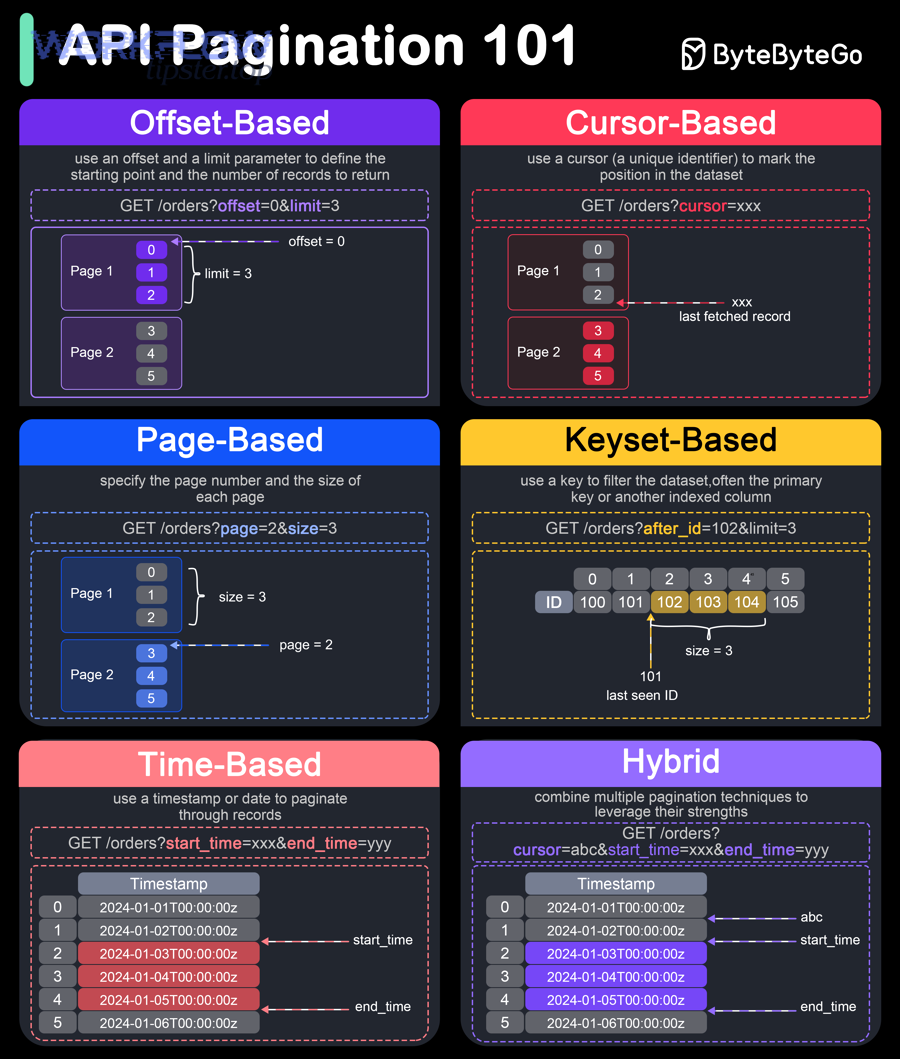
Are you actually iterating through all pages/tokens until completion?
No—many integrations are not iterating through all pages/tokens until completion, because they stop after the first response, treat an empty page as the end, or fail to pass the new continuation value into the next request (and each mistake can drop records silently). (developers.smartsheet.com)
Next, reconnect this to your symptom: if your dataset is “mostly there” but consistently short by an unpredictable amount, you’re often seeing a loop termination problem rather than a true data loss.
Here’s the simplest mental model that prevents premature stopping:
- If you use token-based pagination: you are not “done” until the response returns no
lastKey(or a null/empty continuation key), because that is the explicit end signal. (developers.smartsheet.com) - If you use page-based pagination: you are not “done” until you’ve requested pages until the API indicates there are no more items (or your own stopping rule is consistent with returned counts and stable ordering).
Common “I thought I paged” implementation bugs (the ones that cause missing records without obvious errors):
- Failing to update the continuation value
You keep re-sending the original page number/token, so you repeatedly fetch the first page and overwrite prior results. - Stopping when you get fewer items than your page size
With some endpoints and conditions, a page can return fewer items than requested even when more items exist, especially when using cursor/token patterns or when the backend partitions results. Treat the API’s continuation marker as the authority. (developers.smartsheet.com) - Stopping on a transient error
A throttling response or intermittent server issue ends your job early, and you mistakenly store partial output as “complete.” (developers.smartsheet.com)
If you want a fast confirmation, add one log line per request:
- current
lastKey(or page number) - returned item count
- first/last ID returned on that page
When the last page returns, you should see a clear terminal condition (e.g., lastKey absent/null). (developers.smartsheet.com)
Are the “missing” records simply not visible to the API identity (permissions/filters/hidden data)?
Yes—records can appear “missing” even when pagination is correct because (1) the API token’s user lacks access, (2) data is hidden by filters/hidden columns/collapsed rows in the UI, or (3) you’re comparing API results to a filtered view rather than the underlying sheet. (help.smartsheet.com)
Then, use a visibility-first check to avoid chasing the wrong root cause.
Start with the UI vs. API mismatch that bites teams the most:
- In the Smartsheet UI, filters can hide rows; hidden columns can hide fields; and collapsed parent rows can hide child rows—making data “disappear” even though it still exists. (help.smartsheet.com)
That’s why a solid smartsheet troubleshooting routine begins with a baseline visibility reset:
- turn off filters
- unhide all columns
- expand all rows (help.smartsheet.com)
On the API side, treat your token like a user:
- confirm the token’s user is shared to the sheet/workspace you’re pulling
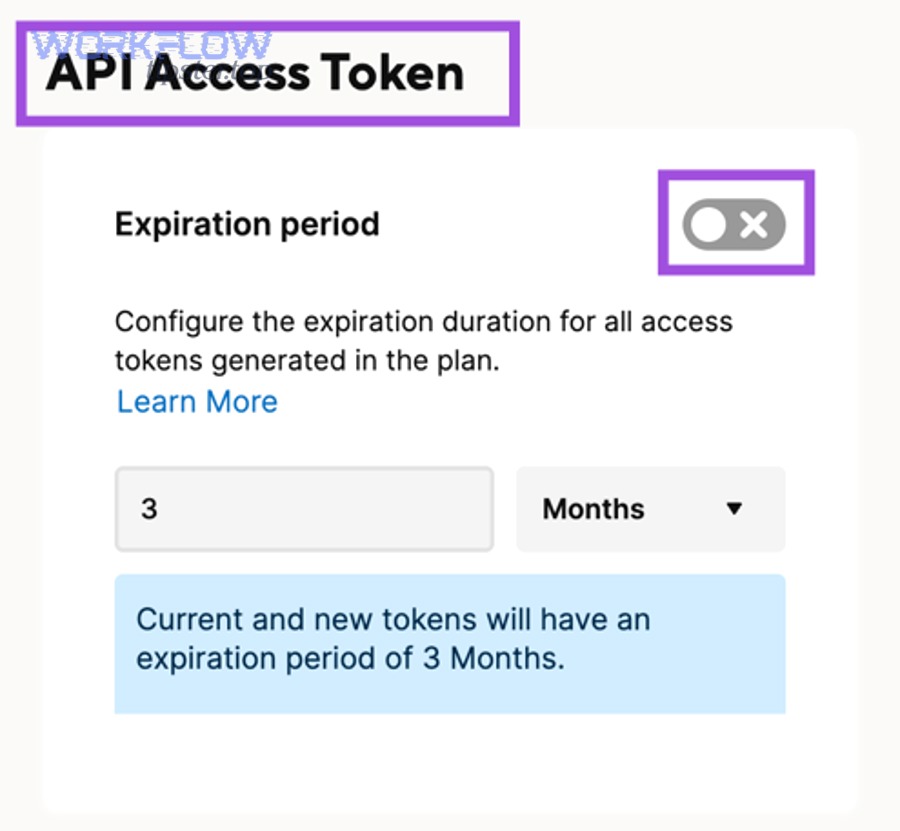
- verify you’re using the intended identity (tokens can expire or be revoked under governance settings, which can silently change what your integration can access). (help.smartsheet.com)
If “missing” is always the same subset (same projects, same department sheets), assume access scope first. If “missing” changes run to run, assume pagination loop or reliability first.
What does “Missing vs Complete” mean in Smartsheet API pagination?
“Missing vs Complete” in Smartsheet API pagination is a data-retrieval quality state that originates in paging mechanics and access scope, and it stands out because it can be defined objectively by whether your integration collects all expected unique record IDs without gaps or duplicates.
Next, you’ll turn that idea into concrete checks so completeness becomes provable.
What is a “complete dataset” when paginating Smartsheet data?
A “complete dataset” is a fully reconciled set of unique Smartsheet record identifiers (rows/items) collected across all pages/tokens, originating from the authoritative resource, and distinguished by repeatable totals, stable ID coverage, and traceable paging checkpoints.
Specifically, completeness should be something you can measure in your logs, not “feel” from eyeballing a sheet.
A practical completeness definition for integrations:
- Coverage: every expected record ID appears at least once
- Uniqueness: no record ID appears more than once in your final output
- Repeatability: reruns under the same conditions produce the same ID set (or a predictable delta if the underlying data changed)
- Traceability: you can map each record back to the page/token that produced it
Why IDs matter more than counts: counts can lie when visibility changes, when filtering differs between UI comparisons, or when items shift during your run. IDs let you de-duplicate and reconcile even under change.
A simple “complete vs missing” reconciliation table helps teams operationalize this. It should list what you expected, what you received, and how you prove the difference:
| Reconciliation check | What it proves | How to run it |
|---|---|---|
| Unique ID count | No duplicates inflated your results | Count distinct IDs after merge |
| Terminal condition reached | You truly paged to the end | Confirm lastKey becomes null/absent (token) (developers.smartsheet.com) |
| Page/token audit trail | You can reproduce the run | Log token/page + first/last ID per page |
| Rerun delta | “Missing” isn’t random | Compare ID sets between runs |
What’s the difference between “missing because not retrieved” vs “missing because not accessible/visible”?
“Not retrieved” wins in paging mechanics, “not accessible/visible” is best explained by permission/view conditions, and “data drift” is optimal for cases where records change mid-run—so the right fix depends on which of these three explains your gap. (developers.smartsheet.com)
However, you can usually classify your issue in minutes by using two quick comparisons.
1) Compare API logs, not the UI screen.
If your job stops before reaching the terminal paging signal, you have a retrieval issue (loop, continuation, error-handling). With token pagination, the continuation marker (lastKey) is the canonical “more data exists” signal. (developers.smartsheet.com)
2) Compare against a visibility reset.
If the UI “missing data” returns after turning off filters/unhiding/expanding rows, the records were never missing—your comparison target was. (help.smartsheet.com)
3) Compare two API runs back-to-back.
If the “missing” subset changes across runs with the same inputs, suspect transient failures, throttling, or backend inconsistencies—not permissions.
Which pagination method are you using, and how should it be implemented correctly?
Use a two-part method—(1) identify whether your endpoint uses page or token pagination and (2) implement the correct loop with termination, retries, and de-duplication—so you reliably retrieve complete results without skipping records. (developers.smartsheet.com)
Next, we’ll break down the patterns and show the safest loop structure.
What are the common pagination patterns you’ll encounter (page-based vs token-based)?
There are 2 main pagination patterns you’ll encounter—page-based and token-based—based on the continuation criterion (page number vs opaque continuation token), and each pattern implies a different “stop” rule and state you must store. (developers.smartsheet.com)
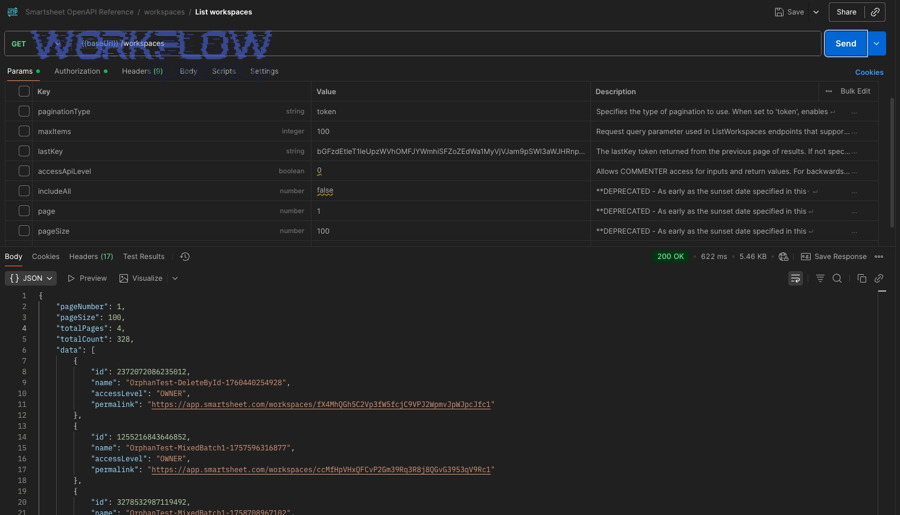
More specifically, Smartsheet supports token-based pagination on some endpoints where responses include a lastKey token you pass into the next request. (developers.smartsheet.com)
Page-based (offset/page):
- Continue with:
page,pageSize(or similar) - Stop when: you’ve reached the last page per the API’s signals and your results don’t change with additional pages
- Store for retry: page number + request parameters
Token-based (cursor/continuation):
- Continue with:
lastKey(opaque token) - Stop when:
lastKeyis missing/null in the response (developers.smartsheet.com) - Store for retry: last successful
lastKey+ request parameters + a checkpoint
The “opaque and arbitrary” nature of tokens matters because you must not parse meaning from them—just pass them back exactly. (developers.smartsheet.com)
What is the safest “pagination loop” structure to avoid missing records?
The safest pagination loop is “iterate → append → checkpoint → continue until explicit terminal condition” in 5 steps, producing a merged, de-duplicated ID set and an audit trail that proves completeness. (developers.smartsheet.com)
Then, connect this to your missing-records problem: the loop is only “safe” if it survives throttling and intermittent failures without silently returning partial output.
A production-grade loop (conceptual steps, tool-agnostic):
- Initialize state
token = null (or page=1), results = empty set, seenIDs = empty set - Request a page
send the request with the current token/page - Append + de-duplicate by ID
add new items; ignore items whose IDs are already inseenIDs - Checkpoint
persist (token/page, timestamp, count, firstID, lastID) - Advance or stop
update token from response (or increment page)
stop only when the API indicates completion (e.g., nolastKey) (developers.smartsheet.com)
Where teams go wrong is step 5: they stop based on “items returned < requested” rather than the API’s terminal signal.
If you’re working with workflows that also ingest files or enrich rows, remember that resource-intensive operations can change your throughput and failure patterns. For example, teams debugging row pulls often discover they also need smartsheet attachments missing upload failed troubleshooting procedures because attachment endpoints and uploads have different constraints and can trigger separate failure modes. (developers.smartsheet.com)
What are the most common root causes of missing records during pagination?
There are 5 main root-cause groups of missing records during pagination—loop termination bugs, continuation mishandling, unstable ordering, transient failures, and visibility/access issues—based on whether the gap originates in retrieval logic or data visibility. (developers.smartsheet.com)
Next, you’ll map your symptom to the most likely cause and the fastest corrective action.
Which implementation bugs most often cause skipped records?
There are 6 common implementation bug types that cause skipped records: premature stop, token/page not updated, overwritten merges, parallel pagination collisions, inconsistent parameters between pages, and “success” recorded after partial failure. (developers.smartsheet.com)
To illustrate how each one creates “missing” results, focus on the mechanism—where the records disappear in your pipeline.
- Premature stop (false completion)
Your code interprets one empty/short response as the end. - Continuation not updated
You keep fetching the same page/token. - Overwritten merge
You replace the results array each iteration instead of appending. - Parallel workers without partitioning
Two workers paginate the same resource and step on each other’s checkpoints. - Parameter drift
You change filters/fields between calls, so page 2 is not “continuation” of page 1. - Error swallowed
A 429 or 5xx occurs, but the job still emits “success” with partial output. (developers.smartsheet.com)
One simple, high-leverage guardrail is a “must reach terminal condition” assertion. If the loop never sees the terminal paging signal, the job cannot mark itself complete.
Which data/visibility conditions make records appear missing even when pagination is correct?
There are 4 visibility condition groups that make records appear missing: filters/views, hidden structure (columns/row hierarchy), permission scope, and platform-side inconsistencies—based on whether the data is hidden, restricted, or returned differently by endpoint behavior. (help.smartsheet.com)
Moreover, these conditions often overlap, so you need a short, repeatable checklist.
Visibility checklist (fastest to slowest):
- Filters: turn off filters and compare again (help.smartsheet.com)
- Hidden columns: unhide and confirm the fields exist (help.smartsheet.com)
- Collapsed rows: expand all rows to reveal child rows (help.smartsheet.com)
- Sharing/access: confirm the API identity is shared correctly
- Endpoint anomalies: check whether a known token-pagination inconsistency is affecting your endpoint
Smartsheet community reports have documented cases where token-based pagination behaves inconsistently on specific endpoints, which is exactly why your integration should be able to detect “impossible” states (e.g., next page returns empty unexpectedly) and fall back to safer retrieval or alerting. (community.smartsheet.com)
How do you prove you’re getting complete results and prevent regressions?
Use a three-layer method—(1) ID-based reconciliation, (2) paging audit logs, and (3) automated anomaly checks—so you can prove completeness and catch regressions the moment an endpoint, token, or volume profile changes. (developers.smartsheet.com)
Next, you’ll choose the verification approach that best matches your risk and scale.
Which verification approach is better—count-based checks or ID-based reconciliation?
Count-based checks win in speed, ID-based reconciliation is best for correctness, and audit-grade checkpoints are optimal for high-stakes integrations—so choose based on how costly a “silent missing records” incident would be for your workflow.
However, if your problem is pagination missing records troubleshooting, ID-based reconciliation is the default because it directly detects gaps and duplicates.
Count-based checks (fast, weak):
- Good for: early smoke tests
- Fails when: visibility differs, totals are not authoritative, items shift during the run
ID-based reconciliation (slower, strong):
- Good for: proving completeness
- Detects: duplicates, skipped pages, partial failures
- Requires: stable unique identifiers
Checkpoint + replay (strongest, operational):
- Good for: long-running, production jobs
- Enables: resume after failure, replay for audits, reproducible debugging
If you only do one thing, do this: store the set of IDs produced per page/token (or at least the range), and alert if a page/token produces an empty response before you reach a terminal condition.
What logging and guardrails should every integration add to pagination jobs?
Every integration should add 7 guardrails—token/page progression logs, per-page counts, boundary IDs, retry reason logs, rate-limit awareness, terminal-condition assertion, and reconciliation summaries—so missing records become observable, diagnosable, and preventable. (developers.smartsheet.com)
In addition, these guardrails connect directly to the reliability issues that most often create “partial success.”
A practical logging schema (minimum viable):
- run ID + start time
- endpoint + parameters hash
- page number or token
- items returned
- firstID / lastID
- cumulative unique IDs
- retry count + last error
- terminal condition reached? (true/false)
Now tie this to rate limiting: Smartsheet returns HTTP 429 when you exceed limits and provides rate-limit headers—so “missing records” can be nothing more than a job that hit 429 and stopped early. (developers.smartsheet.com)
This is where teams should explicitly implement smartsheet api limit exceeded troubleshooting behaviors: detect 429, wait for the reset, then retry—without losing your paging state. (developers.smartsheet.com)
You can also borrow resilience guidance from the webhook side: Smartsheet’s webhook error guidance recommends retrying certain transient conditions using exponential backoff, which is a good pattern for pagination jobs too when paired with checkpoints. (developers.smartsheet.com)
Evidence: According to a study by Northwestern University from the Department of Electrical Engineering and Computer Science, in 2008, researchers cited a congestion-collapse incident where throughput dropped from 32 kbps to 40 bps, highlighting why exponential backoff-style damping is used to stabilize overloaded systems. (networks.cs.northwestern.edu)
How do you handle rare pagination edge cases that still cause “missing” records in production?
Handle rare edge cases by combining idempotent paging, change-aware reconciliation, and endpoint-specific fallbacks in 4 steps, so your pipeline stays complete even when data changes mid-run or the platform behaves inconsistently under token pagination. (community.smartsheet.com)
Next, we’ll move from general pagination correctness into micro-level reliability patterns that protect you in real production traffic.
How do you prevent skips/duplicates when records change while you’re paginating?
“Snapshot-style” runs win in consistency, real-time runs are best for low-latency updates, and hybrid checkpointed runs are optimal for large, changing sheets—so you prevent skips/duplicates by choosing the model that matches your update rate and correctness needs.
Meanwhile, the core technique is the same: de-duplicate by ID and reconcile after the run.
Practical tactics that work without special platform support:
- Time-box the run: define a start timestamp; treat changes after that as “next run”
- Checkpoint every page/token: persist state so retries don’t reprocess unpredictably
- De-duplicate by ID: always merge into a set keyed by the record ID
- Reconcile with a second pass: if the cost is acceptable, rerun quickly and diff IDs
When your users see shifting gaps run to run, don’t assume “records are missing.” Assume the dataset is moving while you’re walking it.
What endpoint-specific quirks should you test for when results don’t match expectations?
There are 4 endpoint-quirk categories you should test—token pagination inconsistencies, mismatched maxItems behavior, empty-next-page anomalies, and differing behaviors between token vs page pagination—based on the resource type and the pagination mode used. (community.smartsheet.com)
Especially when a community-reported bug exists, the right move is to validate and build a defensive fallback.
A quick test matrix you can run in staging:
- same endpoint, page-based vs token-based pagination
- small dataset vs large dataset
- same token identity vs a different identity with limited access
- repeated runs to detect inconsistent paging sequences
If token mode produces an empty page early, your system should (a) alert, (b) preserve all logs, and (c) attempt a fallback mode if available—rather than returning partial results as “complete.” (community.smartsheet.com)
What is an idempotent pagination job, and why does it reduce “missing records” incidents?
An idempotent pagination job is a repeatable retrieval process that produces the same final ID set when rerun with the same inputs, originating from checkpointed state and de-duplication, and it stands out because retries do not create gaps, duplicates, or partial-success corruption.
More importantly, idempotency turns retries from a risk into a feature.
To make pagination idempotent, implement these rules:
- Store state externally: last successful token/page + parameters hash
- Write outputs in an upsert style: keyed by record ID, not by “page”
- Mark completion only after terminal condition + reconciliation
- Treat transient errors as resumable: never restart from scratch unless you must
This pattern also reduces the pain of adjacent operational issues that can happen alongside data pulls—like intermittent callbacks and webhook delivery failures—because you’re building a system that expects retries and still reaches correctness. If you’re troubleshooting webhook instability, fold the same “retry + checkpoint” mindset into smartsheet webhook 500 server error troubleshooting so your system distinguishes temporary platform errors from permanent configuration issues. (community.smartsheet.com)
What’s the minimum production checklist for “complete” Smartsheet pagination?
There are 10 minimum production checklist items for complete Smartsheet pagination: correct continuation, terminal-condition assertion, stable parameters, ID de-duplication, checkpointing, retry/backoff, rate-limit handling, anomaly alerts, reconciliation diffs, and reproducible logs—based on preventing silent partial success. (developers.smartsheet.com)
In short, completeness is not a single “loop”—it’s a small reliability system.
Minimum checklist (copy/paste into your runbook):
- Identify pagination mode (token vs page) per endpoint (developers.smartsheet.com)
- Loop until terminal condition (
lastKeynull/absent for token) (developers.smartsheet.com) - Keep parameters identical between pages/tokens
- Append results; don’t overwrite
- De-duplicate by record ID
- Persist checkpoint after each successful page/token
- Handle 429 with wait-until-reset behavior (developers.smartsheet.com)
- Retry transient failures with controlled backoff, not tight loops (developers.smartsheet.com)
- Reconcile IDs at end of run; alert on gaps
- Rerun and diff when anomalies appear; store artifacts
If you apply this checklist and still see missing records, your job has already done the most important thing: it has made the problem observable. From there, you can prove whether you’re facing a visibility gap, a platform inconsistency, or a reliability failure—then choose the appropriate fix with confidence.