


Yes—you can connect ActiveCampaign to Salesforce and run a reliable two-way sync for Leads and Contacts when you set clear sync rules, map fields intentionally, and test the lifecycle handoff end-to-end.
Next, the fastest way to avoid rework is to choose the right integration method (native connector vs Zapier/third-party) based on how much control, flexibility, and governance your RevOps team needs.
Then, you’ll get the most value when you define exactly what data should sync (and what should not), so marketing automation stays personalized while Salesforce remains the source of truth for sales process and reporting.
Introduce a new idea: once the foundation is stable, you can expand into monitoring, scale considerations, and advanced RevOps optimizations without turning your CRM into a duplicate-filled mess.
Can you connect ActiveCampaign to Salesforce for a two-way Lead and Contact sync?
Yes—ActiveCampaign to Salesforce integration can support a two-way Lead and Contact sync because it improves speed-to-lead, eliminates manual re-entry, and keeps lifecycle stages consistent across marketing and sales.
To better understand what “two-way” really delivers, it helps to separate what should flow automatically from what should remain governed by your RevOps process rules.
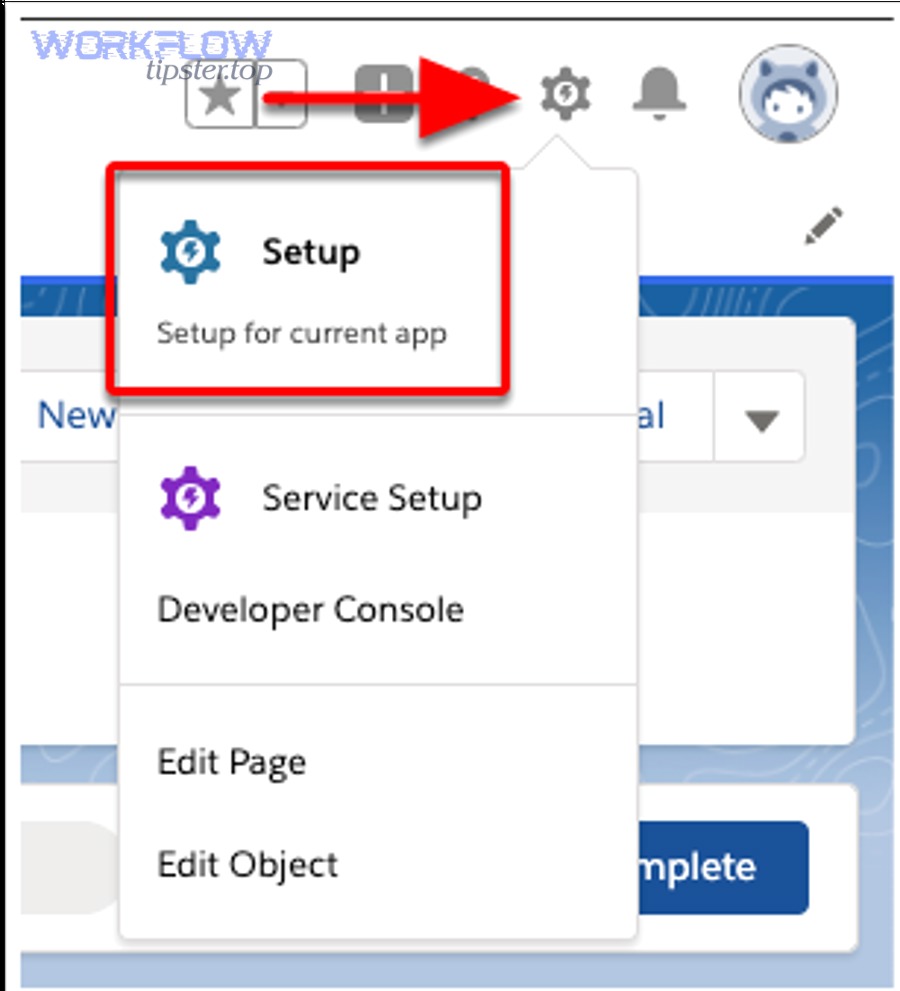
Does two-way sync mean both systems can create and update records automatically?
Yes—two-way sync typically means both platforms can create and update records, but only within the boundaries you configure for identity matching, field ownership, and conflict resolution.
Specifically, two-way sync is not “everything changes everywhere.” Two-way sync is a controlled exchange of record updates that follows rules like:
- Identity matching: how a Salesforce Lead/Contact matches an ActiveCampaign contact (often email; sometimes phone).
- Create rules: whether Salesforce can create new ActiveCampaign contacts, whether ActiveCampaign can create Salesforce Leads/Contacts, or both.
- Update rules: which fields can be updated from each direction (for example, Sales updates phone and title in Salesforce, while marketing updates tags and engagement attributes in ActiveCampaign).
- Conflict resolution: what happens if both systems change the same field (a “last write wins” pattern can be dangerous without governance).
In practice, strong RevOps teams treat Salesforce as the operational system of record for pipeline, owner assignment, and sales stages, while ActiveCampaign acts as the behavioral engagement system that personalizes journeys and triggers actions based on intent signals.
That split keeps automations powerful without letting marketing tools overwrite critical CRM fields like Lead Status, Owner, or required compliance fields.
Is ActiveCampaign → Salesforce syncing best for RevOps teams managing lead handoff and lifecycle stages?
ActiveCampaign → Salesforce syncing is best for RevOps teams because it standardizes lead handoff, reduces the gap between marketing activity and sales action, and enforces lifecycle alignment with shared definitions.
However, the “best” fit depends on the operating model. A solo marketer may only need one-way pushes for new leads, while a RevOps-led organization usually needs two-way feedback loops for stage progression and reporting hygiene.
Here’s the practical difference in outcomes:
- RevOps team outcome: a measurable process where a lead becomes an MQL/SQL based on synced data, routed to the correct owner, and tracked for conversion.
- Marketing-only outcome: campaigns run, leads are collected, and a manual export/import cycle creates delays and data drift.
According to a study by MIT from the Sloan School of Management, in 2007, the odds of contacting a lead if called in 5 minutes versus 30 minutes dropped 100 times, and the odds of qualifying a lead dropped 21 times.
What is the ActiveCampaign–Salesforce integration and what data should you expect to sync?
The ActiveCampaign–Salesforce integration is a connector that links CRM records and marketing automation profiles so both platforms can exchange Lead/Contact updates, enabling consistent personalization, routing, and reporting across the customer lifecycle.
More specifically, you should expect a “core dataset” to sync first—then expand carefully—because syncing too much too soon is how duplicates and broken automations appear.
Which Salesforce objects and ActiveCampaign records should you sync first (Leads vs Contacts)?
There are 2 main starting approaches—sync Leads first or sync Contacts first—based on your CRM design and how your business defines pre-customer versus customer stages.
To illustrate, the cleanest “Day 1” path for most RevOps teams is:
- Leads first if your Salesforce org uses Leads for top-of-funnel and converts to Contacts/Accounts after qualification.
- Contacts first if your org treats nearly everyone as a Contact early (common in product-led growth or account-based motions where Contacts are created from the start).
In both cases, your integration should start with the object that:
- Represents new inbound people most accurately.
- Has stable required fields and validation rules you can satisfy consistently.
- Is already used by sales to take action (not just stored for reporting).
Once that is stable, you can consider adding related context like Opportunities, campaign membership, or activity summaries—only if your team can support the governance.
What fields should be mapped to avoid broken automations and bad reporting?
There are 3 main field groups you should map first—identity fields, lifecycle fields, and governance fields—because they prevent sync failures, misrouting, and inconsistent reporting.
For example, a minimum viable mapping often includes:
This table contains a practical “must-map vs nice-to-have” field set so your team can launch quickly without sacrificing data quality.
| Field Group | Must-map examples | Why it matters |
|---|---|---|
| Identity | Email (or Phone), First Name, Last Name | Prevents duplicates and ensures records match correctly across systems. |
| Lifecycle | Lead Status, Lifecycle Stage, MQL/SQL flags, Lead Source | Keeps marketing and sales aligned on “where the person is” in the journey. |
| Governance | Opt-in/Consent, Unsubscribe status, Owner, Region/Territory | Avoids compliance issues and ensures correct routing and segmentation. |
| Attribution (optional early) | UTM Source/Medium/Campaign | Improves reporting on what created pipeline without rewriting sales-owned fields. |
Most sync headaches come from field type mismatches and “required field” rules in Salesforce. You avoid them by standardizing picklist values, creating safe defaults for required fields, and defining which system owns each field before you turn on two-way updates.
Which method should you use to integrate ActiveCampaign with Salesforce: native connector or Zapier/third-party?
The native connector wins in reliability and governance, Zapier/third-party is best for flexibility and multi-app workflows, and a hybrid is optimal when RevOps needs controlled core sync plus custom edge-case automations.
Meanwhile, the method you choose should match your team’s tolerance for maintenance, say-no governance, and the number of workflows you need beyond basic Lead/Contact syncing.
When is the native ActiveCampaign–Salesforce connector the best choice?
There are 4 common situations where the native connector is the best choice: standardized RevOps governance, stable lifecycle definitions, strict data hygiene requirements, and a need for fewer moving parts.
Specifically, choose the native connector when:
- Your CRM is the source of truth: Sales stages, ownership, and pipeline fields must be protected from accidental overwrites.
- You need predictable sync behavior: A single integration path is easier to monitor, audit, and troubleshoot.
- Your team needs admin-level controls: Permission sets, controlled mappings, and clear ownership rules matter more than fast experimentation.
- You want less operational overhead: Fewer connectors means fewer failure points and fewer hidden errors.
Native connectors tend to feel “boring”—and that’s a good thing for core CRM data. Boring sync is stable sync.
When is Zapier (or middleware) better than the native connector?
Zapier (or middleware) is better than the native connector when your primary need is workflow flexibility across multiple tools, especially for non-standard routing, enrichment, or multi-step automations that go beyond Lead/Contact sync.
However, flexibility comes with tradeoffs. You typically accept more operational monitoring, potential rate-limit constraints, and a higher chance of silent failures if you do not build alerts.
Use middleware when you need patterns like:
- Conditional routing: “If the lead is from Region A and product interest is X, assign owner Y and create a task.”
- Multi-app sequences: A RevOps workflow that touches many Automation Integrations beyond CRM and email marketing.
- Fast prototyping: You want to validate a workflow quickly before hardening it in a governed system.
As a practical example, many teams start with a lightweight Zapier flow to test a routing rule, then move the “core sync” into the native connector and keep Zapier for edge workflows.
To keep the article’s semantic ecosystem connected, it helps to see integration decisions as repeatable patterns—similar to planning “asana to microsoft excel” reporting exports, “calendly to clickup” task creation for sales meetings, or “google docs to freshdesk” workflows for support handoffs.
How do you set up the ActiveCampaign → Salesforce connection step-by-step?
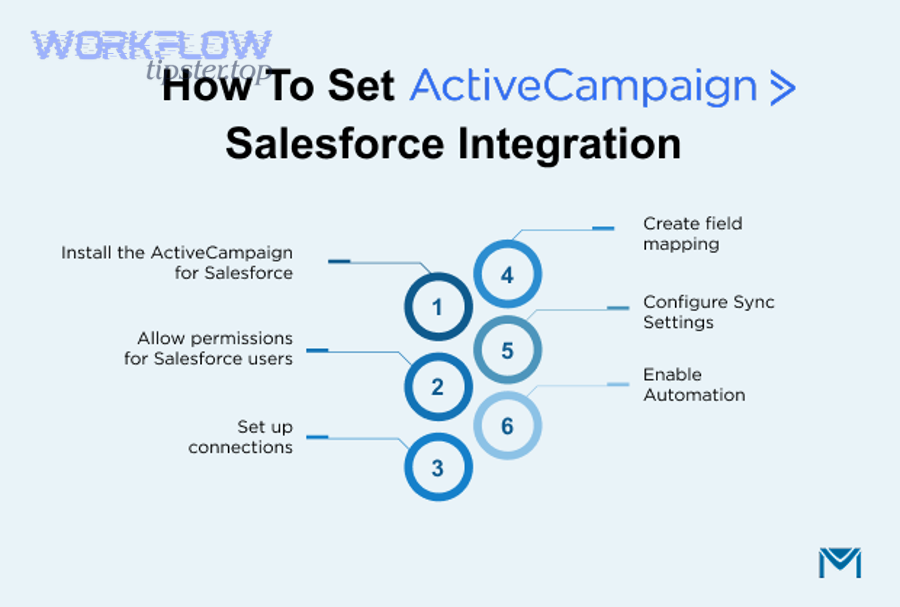
Set up the ActiveCampaign → Salesforce connection by completing 6 steps—prepare prerequisites, install/connect, configure sync selections, map fields, define ownership rules, and run controlled testing—so Leads and Contacts sync cleanly without breaking your CRM process.
Below, the key is to move from permissions to mappings to governance in that order, because a perfect mapping still fails if Salesforce access and validation rules are not ready.
What prerequisites in Salesforce must be ready before you connect?
There are 5 prerequisites in Salesforce you should confirm first: API access, object permissions, field-level security, validation rules review, and a safe testing environment.
To illustrate, a RevOps-friendly Salesforce checklist looks like this:
- API-enabled integration user: Create or designate a user with the right permissions and stable licensing.
- Object permissions: The integration must be able to read/write the specific objects you sync (Leads and Contacts at minimum).
- Field-level security: If the integration cannot access a field, updates fail or partial records appear.
- Validation rules and required fields: Identify which rules will block record creation and decide how to satisfy them.
- Sandbox or test plan: A controlled environment prevents accidental data floods.
Many teams skip the validation-rule review and then wonder why “some leads sync and some don’t.” In reality, Salesforce is doing its job: it is protecting data integrity. Your job is to make the integration compatible with that integrity.
What prerequisites in ActiveCampaign must be ready before you connect?
There are 4 prerequisites in ActiveCampaign that matter most: clean lists, required custom fields, consistent tagging strategy, and automation safeguards.
More specifically, prepare ActiveCampaign by:
- Defining a minimal contact schema: Create the custom fields you will map (industry, product interest, lifecycle stage, consent).
- Standardizing tags: Decide which tags represent intent, which represent source, and which represent lifecycle—then document it.
- Segmenting responsibly: Build segments that do not depend on fields that might be blank during early sync.
- Pausing risky automations temporarily: If an automation triggers on “tag added” and you are about to sync thousands of tags, you can trigger chaos.
When both systems share a stable schema, two-way sync becomes predictable, and predictable sync is what lets RevOps scale automation without fear.
How do you configure mapping and sync direction to prevent overwrites?
Configure mapping and sync direction by assigning field ownership (Salesforce-owned vs ActiveCampaign-owned), setting identity matching rules, and limiting two-way updates to fields that do not control pipeline governance.
Then, enforce the ownership rules with a simple framework:
- Salesforce-owned fields: Owner, Lead Status, Opportunity-related fields, sales notes, qualification fields.
- ActiveCampaign-owned fields: Engagement tags, email interaction indicators, nurture segment membership, automation entry markers.
- Shared fields (with rules): Phone, title, company size—shared only if you define the winning system for conflicts.
This table contains a “field ownership map” example that prevents accidental overwrites while preserving two-way value.
| Field | Recommended owner | Sync direction | Reason |
|---|---|---|---|
| Lead Status | Salesforce | Salesforce → ActiveCampaign (one-way) | Protects pipeline governance and reporting accuracy. |
| Lifecycle Stage (marketing) | ActiveCampaign | ActiveCampaign → Salesforce (one-way) | Supports segmentation and lead scoring signals without rewriting sales stages. |
| Consent / Opt-in | Shared (governed) | Two-way with strict rules | Compliance must be consistent; define the authoritative update logic. |
| UTM Campaign | ActiveCampaign | ActiveCampaign → Salesforce | Marketing attribution should write once, then remain stable. |
When you document this map before launch, your team replaces “guessing” with a repeatable RevOps standard operating procedure.
How do you prevent duplicates and lifecycle chaos when syncing Leads/Contacts?
You prevent duplicates and lifecycle chaos by using a single identity key, enforcing matching rules, and aligning lifecycle definitions—because duplicates come from ambiguous identity and chaos comes from inconsistent stage ownership across systems.
Especially with two-way sync, a small identity mistake becomes a large operational mess, so it pays to build a simple but strict governance layer.
What matching logic should you use (email-only vs email+phone vs custom ID)?
Email-only matching wins for simplicity, email+phone is best for higher certainty in noisy datasets, and custom ID is optimal for enterprise governance—because each option trades off ease, accuracy, and implementation complexity.
However, most RevOps teams should start with the simplest matching that is correct for their business reality:
- Email-only: Best when each person reliably has a unique email. Risk: shared inboxes (info@) cause collisions.
- Email + phone: Best when emails are missing or reused. Risk: phone formatting differences and international numbers require normalization.
- Custom ID: Best when you have upstream identity management. Risk: higher build effort and more places to break.
In short, use email as the default key, but enforce rules to stop shared emails from becoming identity keys for individual people.
How should you align lifecycle stages between ActiveCampaign and Salesforce?
Align lifecycle stages by defining one shared lifecycle model, mapping each stage to a single authoritative system, and syncing only the stage fields that represent the same meaning across tools.
Then, make the alignment real with operational rules, not just documentation:
- Define shared stage names: Inquiry, MQL, SQL, Opportunity, Customer (or your equivalent).
- Choose stage authority: For example, Salesforce controls SQL and beyond, ActiveCampaign controls pre-MQL engagement stages.
- Set stage transition triggers: “MQL happens when score ≥ X AND consent valid AND key intent event occurs.”
- Prevent stage regression accidents: Avoid rules that move someone backward due to a single email click or tag change.
Lifecycle alignment is where RevOps moves from “tools connected” to “revenue process connected.” That is the difference between a working integration and a revenue engine.
How do you test, validate, and monitor the integration after launch?
You test, validate, and monitor the integration by running controlled test cases, verifying field-level accuracy, and setting up ongoing alerts—because integrations fail silently when you only check “it connected” instead of checking “it works end-to-end.”
Then, treat the first two weeks after launch as a stabilization window where you measure sync health like a product release.

What test cases prove your sync is working end-to-end (form → nurture → handoff → update)?
There are 6 main test cases that prove end-to-end success: create, update, dedupe, stage change, consent change, and routing validation—based on whether the same “person” stays consistent from marketing capture to sales action.
To begin, run tests with a small set of clearly labeled test leads:
- Create test: New form lead enters ActiveCampaign, then appears in Salesforce as the right object (Lead or Contact).
- Update test: Update phone or title in Salesforce and confirm the correct field updates in ActiveCampaign without creating a duplicate.
- Dedupe test: Submit the same email twice and confirm it updates one record rather than creating two.
- Stage change test: Change Lead Status in Salesforce and verify ActiveCampaign receives the lifecycle signal without overwriting marketing attributes.
- Consent test: Unsubscribe or opt-out in one system and confirm the other system reflects it correctly.
- Routing test: Confirm owner assignment or territory logic behaves as expected for different segments.
After you pass these, you are not “done.” You are ready to launch with confidence—and confidence is what lets you scale automation safely.
What are the most common sync problems and how do you fix them fast?
There are 5 common sync problems—permissions, required fields, picklist mismatches, identity conflicts, and volume/rate constraints—and each is fixed fastest by checking logs, isolating a sample record, and correcting the underlying rule rather than retrying blindly.
More importantly, build a “first-response playbook” so the team doesn’t panic when a sync queue backs up:
- Permissions error: Fix integration user permissions and field-level security; re-run sync on a small sample.
- Required field error: Provide defaults, adjust validation rules, or ensure mapped fields always populate.
- Picklist mismatch: Standardize picklist values or add translation logic; avoid free-text-to-picklist mappings without normalization.
- Duplicate creation: Tighten identity rules and clean existing duplicates; stop sync temporarily if duplicates are rapidly multiplying.
- Volume limits: Reduce sync frequency, batch updates, and prioritize only the records that need near-real-time updates.
When the team can diagnose issues quickly, the integration stops being “fragile tech” and becomes a stable operational system.
How do you optimize ActiveCampaign–Salesforce syncing for advanced RevOps needs?
You optimize ActiveCampaign–Salesforce syncing by hardening rollout in a test environment, standardizing complex field rules, managing volume with monitoring, and deliberately choosing where manual process beats automation—so two-way sync stays reliable as your org scales.
In addition, advanced optimization is where RevOps shifts from “integration setup” to “integration operations,” which is how you maintain long-term data quality and trust.
Should you roll out in Salesforce Sandbox first or connect directly to Production?
Sandbox rollout wins for risk control, Production-first is best for speed, and a phased hybrid is optimal for most RevOps teams because it validates mappings safely while keeping business momentum.
However, the right choice depends on how sensitive your Salesforce org is:
- Choose Sandbox first if you have strict validation rules, complex automation, or heavy reporting dependencies.
- Choose Production first only if you have low risk, small datasets, and a clear rollback plan.
- Choose phased rollout if you want to test mappings and sync rules on a sample set, then expand gradually.
A phased rollout usually looks like this: test with internal users → test with a small segment of inbound leads → expand to all new leads → backfill historical records only after the system proves stable.
How do you handle custom fields, picklists, and validation rules without breaking sync?
You handle custom fields, picklists, and validation rules by standardizing values, mapping to the correct field types, and building “safe defaults” that satisfy Salesforce considerations while preserving marketing segmentation fidelity.
Specifically, advanced schema hygiene includes:
- Picklist governance: Maintain a single controlled vocabulary for lifecycle and lead source fields.
- Normalization rules: Convert free-text inputs into standardized values before writing to Salesforce picklists.
- Validation-aware mapping: Map required fields first and ensure no workflow can create a record missing mandatory data.
- Version control for schema changes: Document changes like a product release so the team can trace what broke and when.
When you treat CRM schema as a governed product, your ActiveCampaign to Salesforce integration stays stable even as teams add new fields and campaigns.
What should you do if you hit API limits or high-volume sync delays?
You should reduce unnecessary writes, batch updates, and prioritize near-real-time syncing only for high-intent records if you hit API limits or high-volume sync delays, because too many low-value updates can consume capacity and slow critical handoffs.
Then, shift from “sync everything instantly” to “sync what matters at the right cadence”:
- Throttle low-value fields: Do you really need every tag update written back to Salesforce immediately?
- Batch non-urgent updates: Push nightly updates for enrichment fields instead of real-time writes.
- Prioritize high-intent triggers: Form submits, demo requests, pricing-page visits, and SQL handoffs deserve higher priority.
- Monitor usage: Track API consumption and spikes to identify which workflows generate most writes.
When you tune volume intentionally, you protect the “speed-to-lead” advantage that makes syncing valuable in the first place.
When should you keep a process manual instead of automating it end-to-end?
You should keep a process manual when the decision requires human judgment, compliance review, or exception handling—because automating ambiguous decisions creates bad data faster than any person could.
On the other hand, automation is perfect for repetitive, deterministic tasks. So a clean RevOps split is:
- Automate: lead capture, enrichment, routing triggers, nurture sequences, basic status updates, task creation.
- Keep manual: disqualification reasoning, account ownership disputes, compliance edge cases, high-value exception routing.
That balance prevents the antonym problem of “automated chaos,” where everything is technically connected but operationally untrusted.